
You probably started with one useful agent.
It answered support tickets in Slack, drafted follow-up emails from HubSpot data, or pushed structured notes into Notion. Then another agent appeared. Then one for sales ops. One for billing questions. One for internal knowledge lookup. Suddenly your AI stack stopped looking like automation and started looking like a small workforce with no manager, no badge system, and no shared rulebook.
That's the point where teams learn the hard lesson. Building an agent is easy compared with operating many of them safely. Scripts drift across repos. API keys live where they shouldn't. Logs are split between platforms. A new deployment needs engineering help every time. The problem isn't intelligence. The problem is coordination, governance, and scale.
Table of Contents
- The Rise of the Unmanaged AI Workforce
- What Is an Agent Orchestration Platform
- Core Architecture and Components
- Key Features for Governance and Scale
- Common Use Cases and Personas
- Platform Selection and Implementation Roadmap
- How Donely Unifies and Scales AI Workforces
The Rise of the Unmanaged AI Workforce
The usual failure mode isn't a bad model. It's unmanaged growth.
A team launches a few successful agents, proves value quickly, and then keeps adding more. Nobody stops to decide who owns runtime standards, how handoffs work, where memory lives, or how permissions should be scoped. What looked efficient at five agents becomes brittle at fifteen.
That's why the category is growing so fast. The global market for AI agent orchestration platforms is projected to grow from $5.8 billion in 2025 to $38.6 billion by 2034 according to Market Intelo's AI agent orchestration platforms market report. That projection matters because it reflects a broader shift. Companies aren't buying isolated AI helpers anymore. They're preparing to run coordinated multi-agent systems as part of normal operations.
The real inflection point
The first agent usually lives inside one tool and one workflow.
The second and third agents introduce handoffs, shared context, retries, and permissions. After that, the problems stack up fast:
- Operational sprawl means every agent has its own setup logic, secrets handling, logs, and deployment quirks.
- Governance blind spots show up when multiple agents touch customer records, financial data, or internal systems without clear boundaries.
- Scaling friction appears when adding one new agent feels like launching a small infrastructure project.
The moment an agent hands work to another agent, you're no longer just automating tasks. You're running a system.
In practice, that system needs policies, routing, observability, and containment. Without those pieces, teams create what amounts to shadow operations. Useful on the surface. Dangerous underneath.
A lot of single-agent demos hide this reality because they stop before production complexity begins. But real business workflows don't end with one prompt and one answer. They cross tools, roles, approvals, and data boundaries. That's where an agent orchestration platform becomes less of a convenience and more of an operating layer.
What Is an Agent Orchestration Platform
The simplest way to think about an agent orchestration platform is as air traffic control for AI agents.
One plane on a clear route doesn't need much coordination. A busy airport does. Arrivals, departures, handoffs, safety checks, runway allocation, delays, and emergency procedures all need a control system. Multi-agent AI works the same way. A single agent can do useful work alone. A workforce of agents needs centralized coordination or it turns messy fast.
An agent orchestration platform doesn't just run agents. It decides which agent should act, what context it receives, when it should hand off, what guardrails apply, and how the whole workflow is monitored from start to finish.
What the platform is actually managing
In production, the platform usually owns four jobs:
Task routing
A request comes in. The platform sends it to the right specialist instead of forcing one generalist agent to do everything.Shared context and state
An agent shouldn't forget what happened two steps earlier just because a workflow moved from support to billing to CRM update.Handoffs between agents
Work needs to pass cleanly from one role to the next without dropping instructions, permissions, or data boundaries.Operational control
Teams need logs, failure traces, approval paths, and a way to understand what happened when an output goes wrong.
That's where the performance difference shows up. Multi-agent orchestration platforms achieve approximately 30% higher workflow efficiency than isolated-agent deployments by maintaining persistent state and shared context across handoffs. The key point isn't just the number. It's why that improvement happens. Isolated agents tend to restart from partial context. Orchestrated systems carry the workflow forward.
What it is not
It's not just a scheduler.
It's not a prompt library with extra branding.
And it's not a workflow builder alone, because workflow logic without memory, guardrails, and observability still leaves the hard operational problems unsolved.
Practical rule: If your platform can trigger an agent but can't explain the handoff, permission scope, and state history behind the outcome, it isn't really orchestrating much.
A good agent orchestration platform makes specialization possible without creating chaos. That's the leap from “we have some AI automation” to “we can operate an AI workforce.”
Core Architecture and Components
Architecture matters because orchestration failures usually aren't model failures. They're system design failures.
Teams often choose an appealing demo pattern, then discover too late that the pattern doesn't match their control requirements. The Dataiku explanation of agent orchestration lays this out clearly. It notes that teams commonly move from simple sequential designs into more governed systems, and that selecting the wrong orchestration pattern is one of the most common architectural mistakes. It also describes the practical setup timeline: agent selection often takes one to two weeks, framework setup takes two to four weeks, and testing and optimization add another two to four weeks.
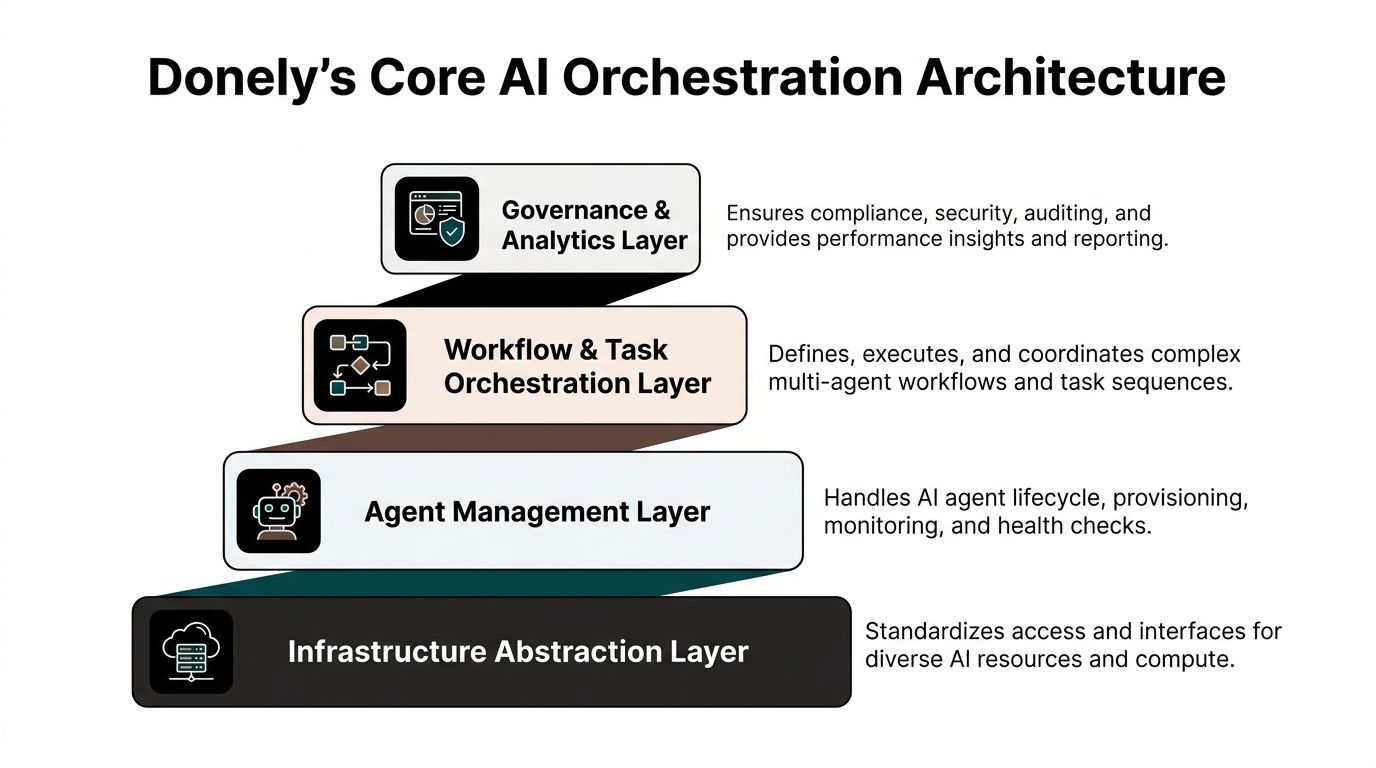
Coordination models change the operating model
Expert technical guidance defines four coordination layers for orchestration systems: centralized, decentralized, hierarchical, and federated. Each one changes the trade-off between control, resilience, and scale.
| Coordination layer | Best fit | Main upside | Main risk |
|---|---|---|---|
| Centralized | Tightly governed workflows | Strong control and consistent policy enforcement | Can become a bottleneck |
| Decentralized | Fast-moving agent collaboration | More flexibility and resilience | Harder to audit and predict |
| Hierarchical | Complex operations with clear supervision | Clean delegation and easier escalation | Supervisor design becomes critical |
| Federated | Multi-team or multi-business environments | Local autonomy with shared standards | Governance gets harder to unify |
Hierarchical designs are common in business settings for a reason. A supervisor agent can interpret intent, route tasks, and push execution to narrower agents for actions like data retrieval, CRM updates, or billing checks. That mirrors how operations teams already work.
For teams that also run connected automations outside the agent layer, it helps to study adjacent workflow patterns. A practical example is how marketing teams build automated campaigns with triggers, branching, and channel coordination. The same orchestration mindset applies to agents, except the state, reasoning, and permissions are more complex.
The four components that matter in production
An orchestration platform needs more than a clever routing graph. In practice, four components decide whether it survives contact with real operations.
Task routing engine
This is the decision layer. It assigns work, sequences steps, and decides when to retry, pause, or escalate.Memory and state layer
This stores what the workflow already knows. Without it, every agent behaves like it just joined the conversation.Conflict resolution and guardrails
Agents need boundaries for contradictory outputs, unsafe actions, missing data, and policy violations.Monitoring and observability
If you can't replay the workflow, inspect handoffs, and trace failures, you can't run this reliably.
Most teams overinvest in prompt quality and underinvest in state management. Production issues usually come from the second problem, not the first.
The integration surface also matters. A platform that can't connect cleanly into your stack will force awkward side systems and manual glue code. That's why buyers should inspect the actual connector model, event handling, and runtime integration options, not just the logo wall. Reviewing a platform's integration architecture usually tells you more than its homepage does.
Key Features for Governance and Scale
A platform can feel powerful in a demo and still fail under basic business constraints.
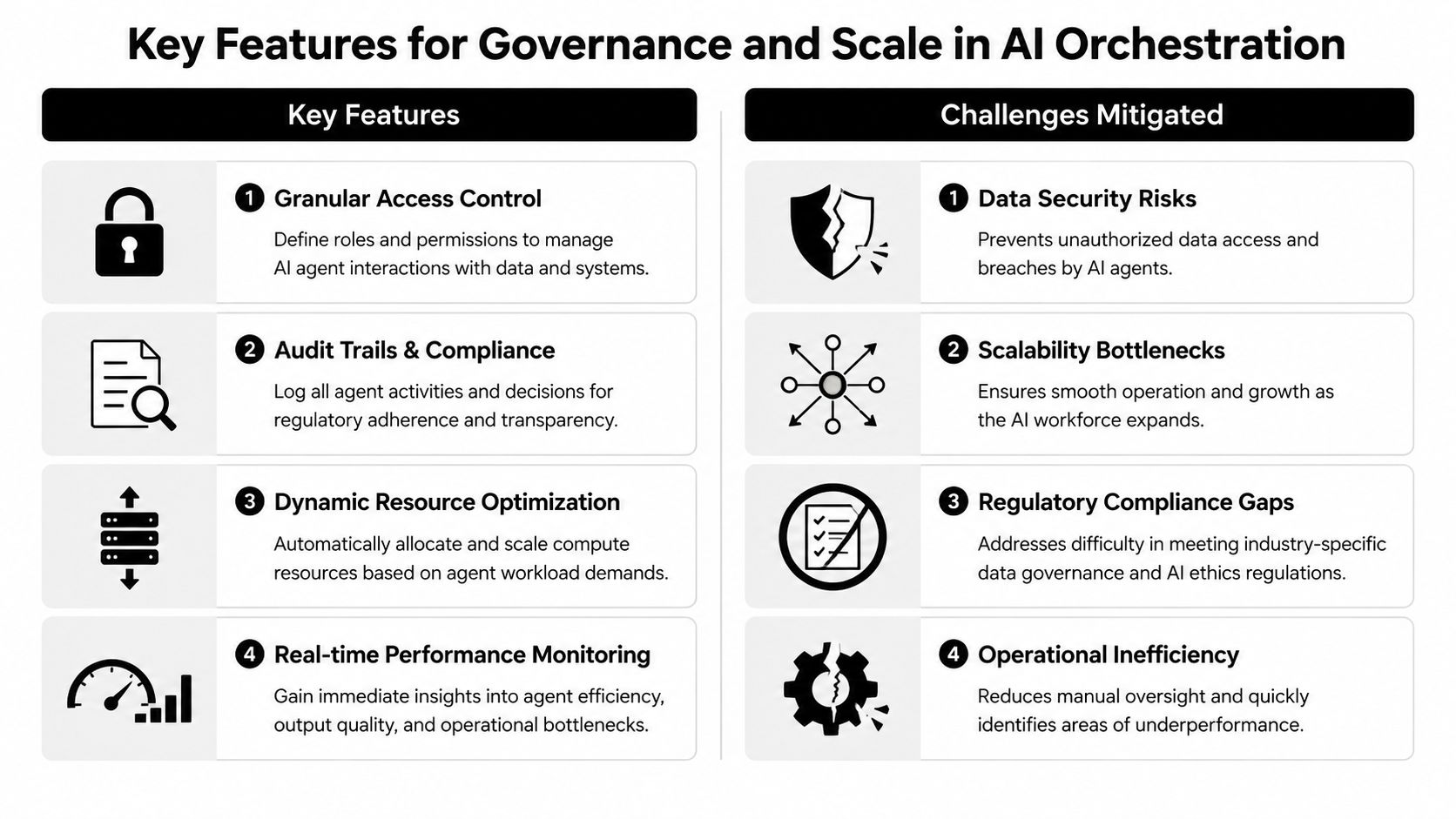
The overlooked issue is multi-instance governance. Many teams don't need one giant agent environment. They need separate AI workspaces for personal operations, internal business functions, and client-specific workloads. Those boundaries need to exist without spinning up separate accounts, rebuilding everything from scratch, or trusting people to “just avoid the wrong data.”
That's not a niche concern. According to Rasa's enterprise guide to AI agent orchestration, 68% of enterprise AI deployments face compliance failures due to unmanaged data leakage across shared agent instances in this enterprise orchestration guide.
Why shared instances fail under real business constraints
Shared deployments often look efficient early on because they reduce setup work.
Then real operating conditions arrive. An agency needs client A and client B fully separated. A founder wants one agent for personal workflow and another for company sales ops. A compliance team wants different permissions for HR, finance, and IT. A single shared agent pool starts to break down because too much trust is placed on convention rather than enforcement.
The common failure points are predictable:
- Permission sprawl when broad access gets granted so workflows keep moving
- Cross-instance leakage when memory, connectors, or logs overlap across teams
- Audit gaps when nobody can reconstruct who triggered what and under which role
- Billing confusion when usage is spread across mixed workloads
If you're comparing governance approaches, this agent management system guide is a useful companion read because it frames management as an operating discipline, not just a deployment checklist.
The controls that actually make scale safe
The features that matter most here aren't glamorous. They're the controls that keep the system usable after growth.
Granular RBAC
Role-Based Access Control should apply per instance, not just at the account level. Sales ops shouldn't inherit finance access because they share a workspace.Container isolation
Hard separation matters. Logical labels alone aren't enough when agents access customer data, internal docs, and external tools.Scoped data access
Each agent should only see the systems and records required for its job. Least privilege matters just as much in AI operations as it does in infrastructure.Unified audit logs
One searchable trail across agent actions, tool calls, and handoffs is how teams investigate errors and prove control.
Shared convenience becomes shared risk very quickly. If you can't isolate workloads cleanly, you don't have an AI workforce strategy. You have a future incident report.
Strong privacy posture also has to be visible and intentional. A company's privacy manifesto can reveal whether governance is treated as core product design or as marketing copy added later.
Common Use Cases and Personas
The best way to evaluate an agent orchestration platform is to stop thinking in features and start thinking in operating situations.
Agency teams
An agency usually hits orchestration pain first.
It starts by offering one AI employee for lead qualification or support triage. Then each client wants custom behavior, separate data access, and independent reporting. Very quickly the agency isn't managing “agents” in the abstract. It's running many small, isolated AI businesses under one roof.
What works for agencies is strict separation. Each client needs its own connectors, its own logs, its own permissions, and its own billing view. What doesn't work is a shared environment with naming conventions pretending to be security boundaries.
Startup founders
A founder often begins with one agent that saves time personally.
That agent drafts outbound replies, summarizes meetings, and updates a CRM. Then the business grows, sales hires arrive, support volume increases, and people want the same convenience across the company. Founders then face one of two choices. They either formalize the system into a managed platform, or they keep stacking lightweight automations until nobody understands the whole flow.
The hidden requirement here is operational simplicity. The founder usually doesn't want another platform that demands ongoing DevOps attention. They want scale without turning orchestration into a side job.
Startups shouldn't optimize for the most powerful graph editor. They should optimize for the fewest operational surprises.
Enterprise operations teams
Enterprise teams have different priorities.
They usually care less about how clever the demo looks and more about whether the system can survive audit, satisfy internal access rules, and support workflows across HR, IT, finance, and service operations. Their agent orchestration platform has to fit how the business already governs systems.
For these teams, the winning pattern is usually a supervised structure with clear role ownership, searchable logs, scoped integrations, and integration into identity controls like SSO. They're not buying novelty. They're buying a safer way to operationalize AI across departments that already live under policy.
Platform Selection and Implementation Roadmap
Buyers often compare platforms the wrong way.
They count integrations, browse templates, and get impressed by visual builders. Those things matter, but they aren't the first screen. The first screen should be governance model, scaling model, and operational burden. If a platform can connect to every system you own but becomes fragile after a few dozen agents, it isn't the right foundation.
That concern is widespread. Recent data shows that 72% of organizations delay AI scaling beyond 10 agents due to perceived DevOps complexity and fragmented billing, according to Coworker's analysis of AI agent orchestration platform adoption. That tells you where to focus your evaluation: not on the prettiest builder, but on the platform that removes operational drag.
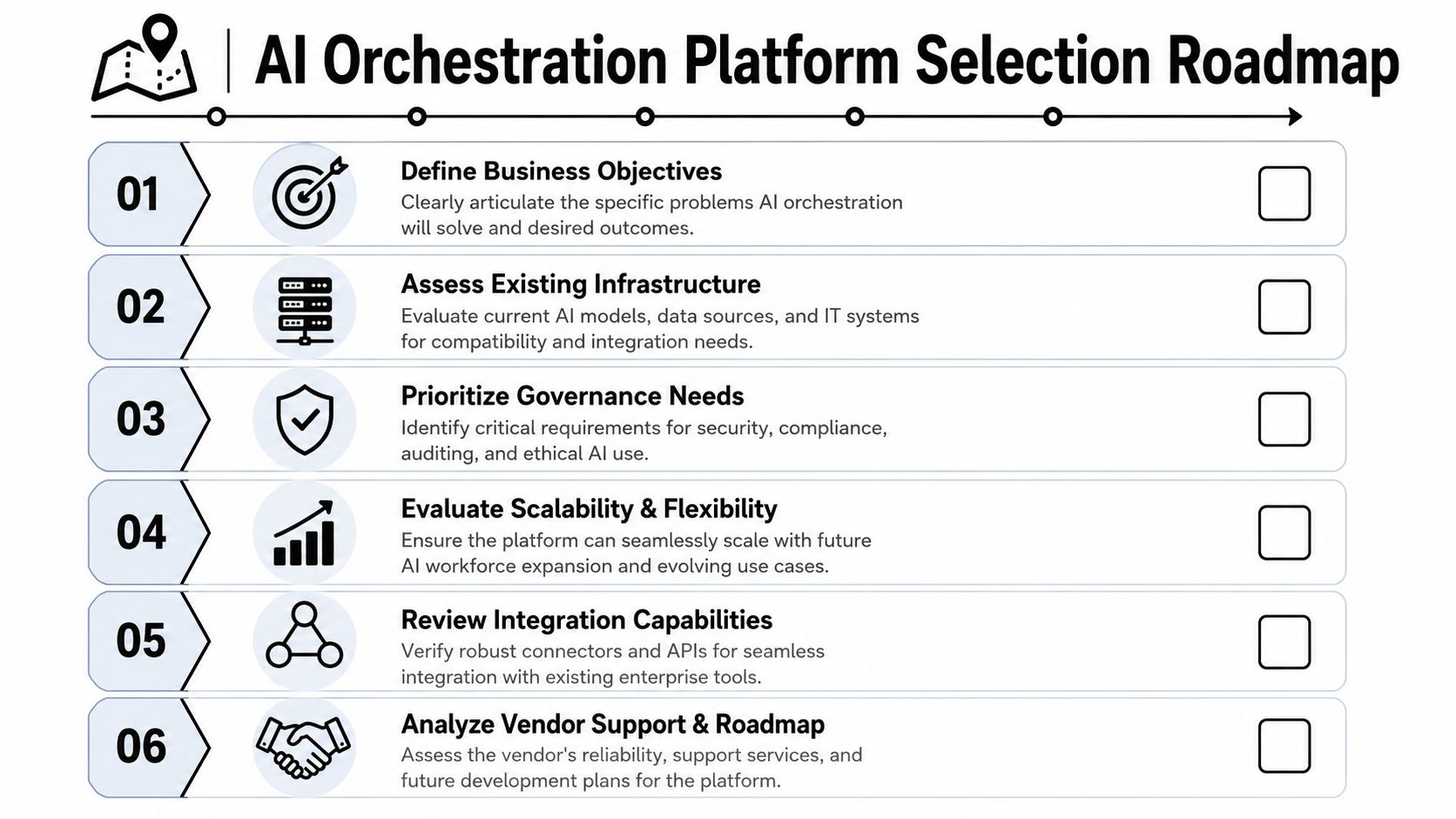
How to evaluate platforms without getting distracted
Use this shortlist when comparing vendors.
Governance first
Ask how RBAC works, whether isolation is hard or soft, and how audit logs are structured.Scaling path second
Ask what changes operationally when you move from one agent to many instances across teams or clients.DevOps overhead third
Find out what still requires engineering. Setup is one thing. Ongoing care is what burns teams later.Integration depth fourth
Don't just ask whether Gmail, Slack, Salesforce, or Jira connect. Ask how credentials, scopes, retries, and failures are handled.
A platform with fewer integrations but cleaner runtime governance often beats a platform with a larger connector catalog and weak controls.
A practical rollout sequence
Implementation goes better when teams treat orchestration like platform adoption, not like a quick experiment.
| Phase | What to do | What to avoid |
|---|---|---|
| Pilot | Pick one workflow with clear boundaries and measurable business value | Starting with a broad cross-department rollout |
| Integration | Connect only the systems needed for that workflow | Wiring every available tool on day one |
| Governance | Set up roles, instance boundaries, logs, and approvals early | Deferring access design until after launch |
| Scale | Expand by repeating the pattern to new teams and use cases | Rebuilding architecture for every new agent |
A few vendor questions separate mature platforms from flashy ones:
- How are isolated instances created and managed
- What does billing look like across many deployments
- Can non-engineers operate the system safely after launch
- How are failures traced across multi-agent handoffs
- What governance controls exist at the instance level
The right buying posture is simple. Choose the platform that makes your future operating model easier, not the one that makes your demo look better this week.
How Donely Unifies and Scales AI Workforces
The hard part of agent operations is bringing together deployment, governance, and scale without turning everything into a custom infrastructure project.
That's where Donely's design is notable. Instead of treating orchestration as one shared workspace with loose permissions, it centers on a multi-instance model. Individuals, startups, agencies, and larger organizations can run separate environments for personal, business, and client workloads without switching accounts or migrating between plans. That directly addresses the governance gap many teams run into after their first few successful automations.
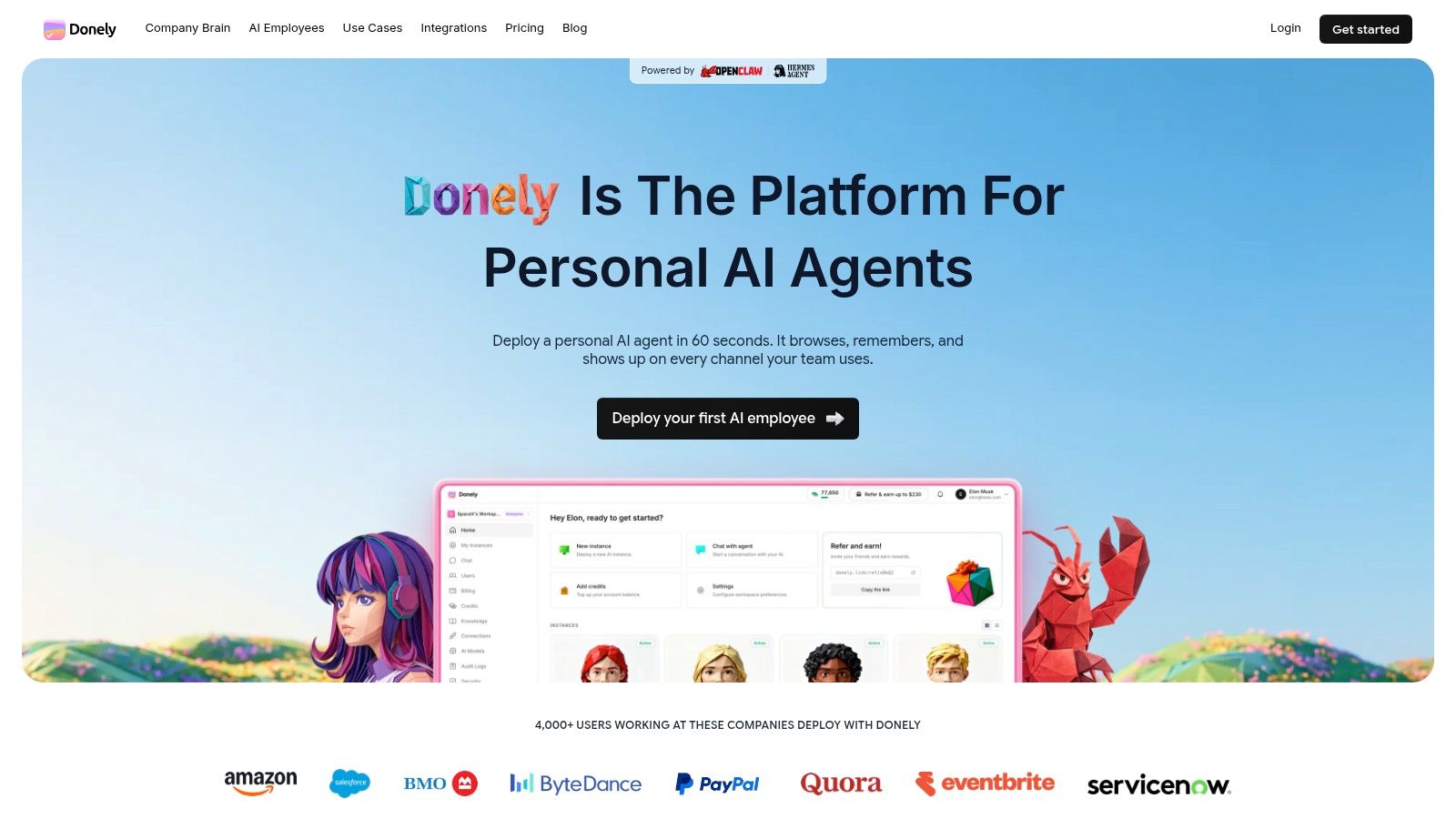
The operational logic is strong. Per-instance RBAC lets teams control who can access what in each deployment. Isolated containers and scoped data access create clearer security boundaries. Unified audit logs and centralized monitoring give operators one place to inspect health, usage, and agent activity instead of hunting across disconnected services.
Why it fits the workforce model
Donely also targets the bottleneck that stops many deployments from expanding: ongoing platform work.
The product is built around click-simple deployment for OpenClaw agents, with centralized billing and automatic volume discounts as deployments grow. That matters for founders who don't want to hire platform engineers just to support internal AI operations, and for agencies that need a repeatable way to launch and govern many client-specific environments. The platform's AI employees offering makes that positioning explicit by framing agents as operational workers that need deployment, oversight, and scale controls.
From a practitioner's perspective, that's the right framing. A serious AI workforce needs the same things any workforce needs: role separation, controlled access, oversight, accountability, and a practical path from one worker to many. Donely maps closely to that reality.
If you're moving from a few scattered automations to a managed AI workforce, Donely is worth evaluating. It gives you one platform to deploy, isolate, govern, and scale AI employees without piling DevOps overhead onto your team.