
The WhatsApp Business API platform market is projected to grow from USD 2.34 billion in 2024 to USD 19.13 billion by 2033, with a 24.7% CAGR from 2025 to 2033 according to Growth Market Reports. That number matters because it changes the question business leaders should ask. The question isn't whether WhatsApp belongs in your stack. It's whether your platform choice will hold up when message volume, compliance pressure, and integration complexity increase.
I've seen teams buy a “WhatsApp tool” when what they needed was infrastructure. That mismatch creates problems fast. Sales wants routing and qualification. Support wants ticket sync and handoff. Operations wants alerts and confirmations. Legal wants controls. Developers want webhooks that don't break under load. A real WhatsApp automation platform sits in the middle of all of that.
The overlooked issue in 2026 is AI scope. A lot of buyers still evaluate platforms by chatbot polish, template builders, or CRM logos on a pricing page. That's incomplete. After WhatsApp's January 15, 2026 ban on open-ended AI chatbots, the safer and smarter path is task-specific automation for support, shopping, booking, and other clearly bounded workflows. Platform selection now affects both performance and compliance.
Table of Contents
- Understanding the WhatsApp Automation Platform
- Exploring Core Features That Power Automation
- Real-World Use Cases for Sales and Support
- Integrating Your Tech Stack for Seamless Workflows
- Mastering Security Governance and Compliance
- How to Choose the Right Platform in 2026
Understanding the WhatsApp Automation Platform
A WhatsApp automation platform is best understood as a digital communications hub. Messages come in from WhatsApp, the platform interprets context, applies rules, triggers actions in other systems, and sends the right response back. That's very different from the standard WhatsApp Business app, which is fine for small volumes and manual replies but not for coordinated, event-driven operations.
The important distinction is the API. The consumer app and the small business app are interfaces for people. The API is an interface for software. Once you move to the API layer, you can connect WhatsApp to Salesforce, HubSpot, Zendesk, Stripe, internal databases, scheduling systems, and custom business logic.
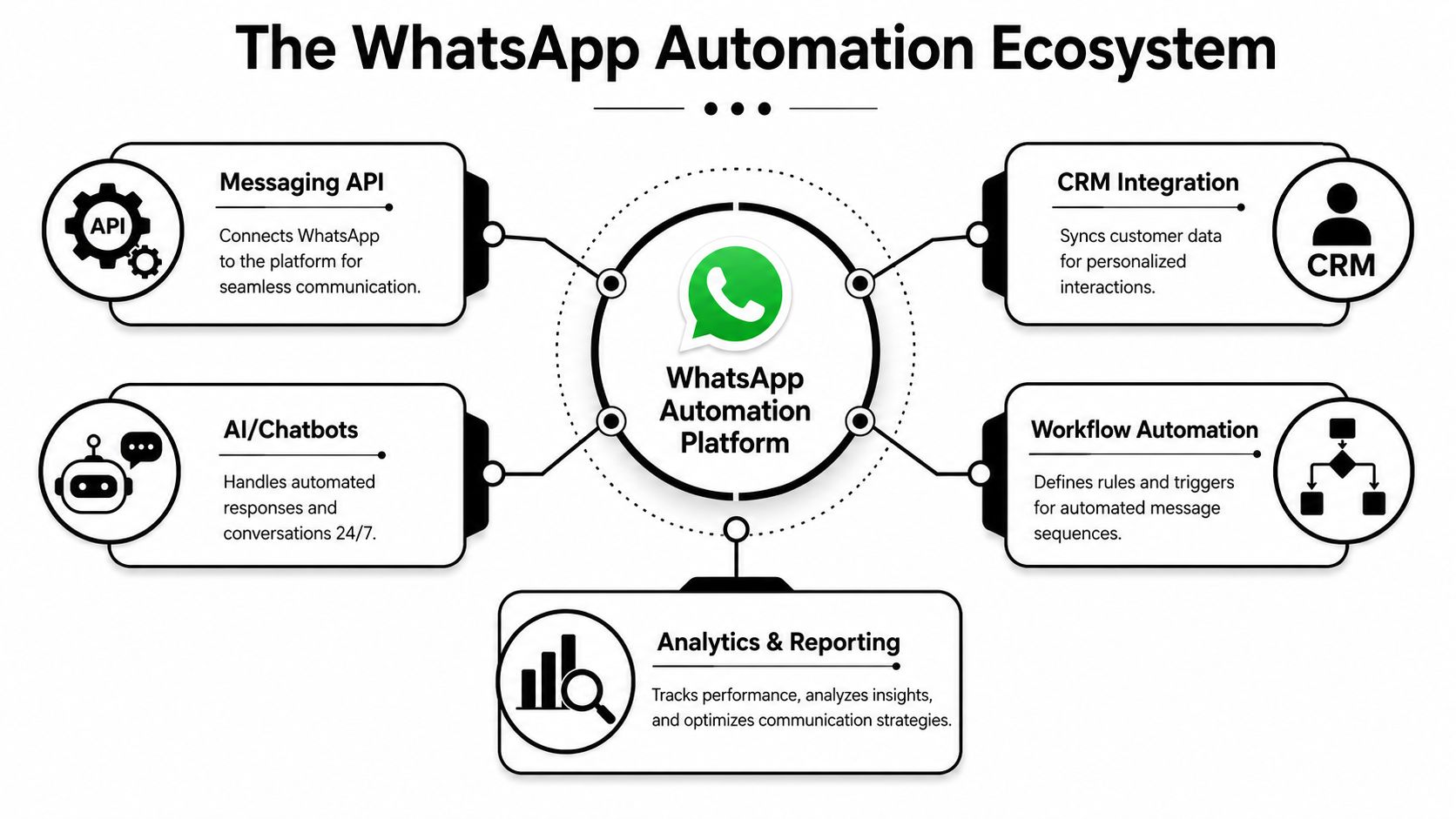
A platform is a routing layer, not just a sender
Most bad implementations treat WhatsApp as a broadcast channel. Good implementations treat it as an operational layer.
That means the platform has to do more than send and receive text. It should:
- Route inbound messages to the right workflow, queue, or human team.
- Store context so a returning customer doesn't start from zero.
- Trigger downstream actions such as creating a deal, opening a ticket, or updating an order.
- Sync data back so the CRM, help desk, and reporting stack reflect what happened in the conversation.
Practical rule: If a platform can send messages but can't reliably coordinate business actions around those messages, it's a messaging tool, not a serious automation platform.
What the API changes in practice
At the architecture level, a platform acts as the infrastructure layer between Meta's API and your business logic. According to Resayil's breakdown of WhatsApp automation platform architecture, reliable systems use multi-session designs, embed unique idempotency keys in message payloads to prevent duplicates, and decouple webhook ingestion from business logic so payloads can be accepted quickly without creating latency bottlenecks.
Those details sound technical, but they show up in business outcomes. If a webhook handler is tightly coupled to CRM processing, a temporary slowdown can delay customer responses. If you don't handle retries correctly, duplicate messages appear. If one session failure affects unrelated traffic, teams lose trust in the channel.
Here's the simplest way to evaluate the difference:
| Setup | What it's good for | Where it breaks |
|---|---|---|
| WhatsApp Business app | Manual replies, very small teams | Shared ownership, automation depth, auditability |
| Direct API with custom code | Maximum flexibility | Ongoing engineering overhead, maintenance burden |
| WhatsApp automation platform | Workflow automation, integrations, governance | Vendor fit depends on architecture depth |
The buyers who get this right don't ask, “Can it send WhatsApp messages?” They ask, “Can it run a dependable business process through WhatsApp without manual cleanup?”
Exploring Core Features That Power Automation
The core feature set should make operations simpler, not more decorative. Many vendors overload demos with shiny flow canvases and AI branding, then underdeliver on execution. The better way to evaluate a WhatsApp automation platform is to inspect the features that directly affect control, maintainability, and learning.
The features that actually matter
A visual flow builder is usually the first thing people notice. It matters, but not for the reason vendors say. The best builders don't just let non-technical teams drag boxes around. They make logic visible. That helps teams spot dead ends, weak handoffs, missing fallback states, and template misuse before those problems hit production.
Message templates are another essential feature. For company-initiated conversations, templates are part of the compliance and delivery model. A solid platform gives teams approval visibility, template version control, and clear mapping between trigger conditions and outbound messages.
Webhooks matter even more than either of those. They're the bridge between a conversation and the rest of your systems. If a customer asks for an invoice, updates an address, confirms a booking, or requests support, the platform should push that event into the right system immediately. In such instances, platforms tied to broader orchestration ecosystems tend to stand out, especially when they connect cleanly with tools like AI employees that can execute bounded tasks across multiple systems.
Why conversational analytics deserves scrutiny
Basic dashboards usually show delivery, read status, and maybe agent response times. That's useful, but it's shallow. The next serious layer is conversational analytics.
According to a discussion highlighted in this Reddit thread on conversational analytics in WhatsApp, most platforms still don't give businesses enough visibility into why users drop off, how intent shifts mid-conversation, or where flows stop matching user expectations. That gap is bigger than it sounds. If you only know that a message was delivered, you still don't know why the conversation failed.
What I'd look for in analytics is less glamorous and more useful:
- Drop-off visibility so teams can see where users abandon a path.
- Intent movement to detect when a sales inquiry turns into a support issue.
- Fallback analysis to identify where the bot stops understanding requests.
- Completion tracking for task-specific flows like booking, support resolution, or lead qualification.
Most teams don't need more dashboards. They need evidence for why a flow underperforms.
A mature platform helps teams answer practical questions. Which branch creates confusion? Which message causes hesitation? Where should a human step in earlier? Those answers improve automation more than another template pack ever will.
Real-World Use Cases for Sales and Support
The best way to judge a WhatsApp automation platform is to follow the work. Where does it remove waiting, eliminate copy-paste steps, or improve customer response quality? That's where value shows up.
Businesses using WhatsApp automation report 98% message open rates, 45% to 60% conversion rates, 25% to 40% revenue increases, and 30% to 60% customer acquisition cost reductions, while chatbot usage has surged 92% since 2019, according to Jesty's WhatsApp marketing statistics roundup. I wouldn't use those figures as a blanket promise for every company, but they do explain why more teams are moving serious sales and support workflows into messaging.
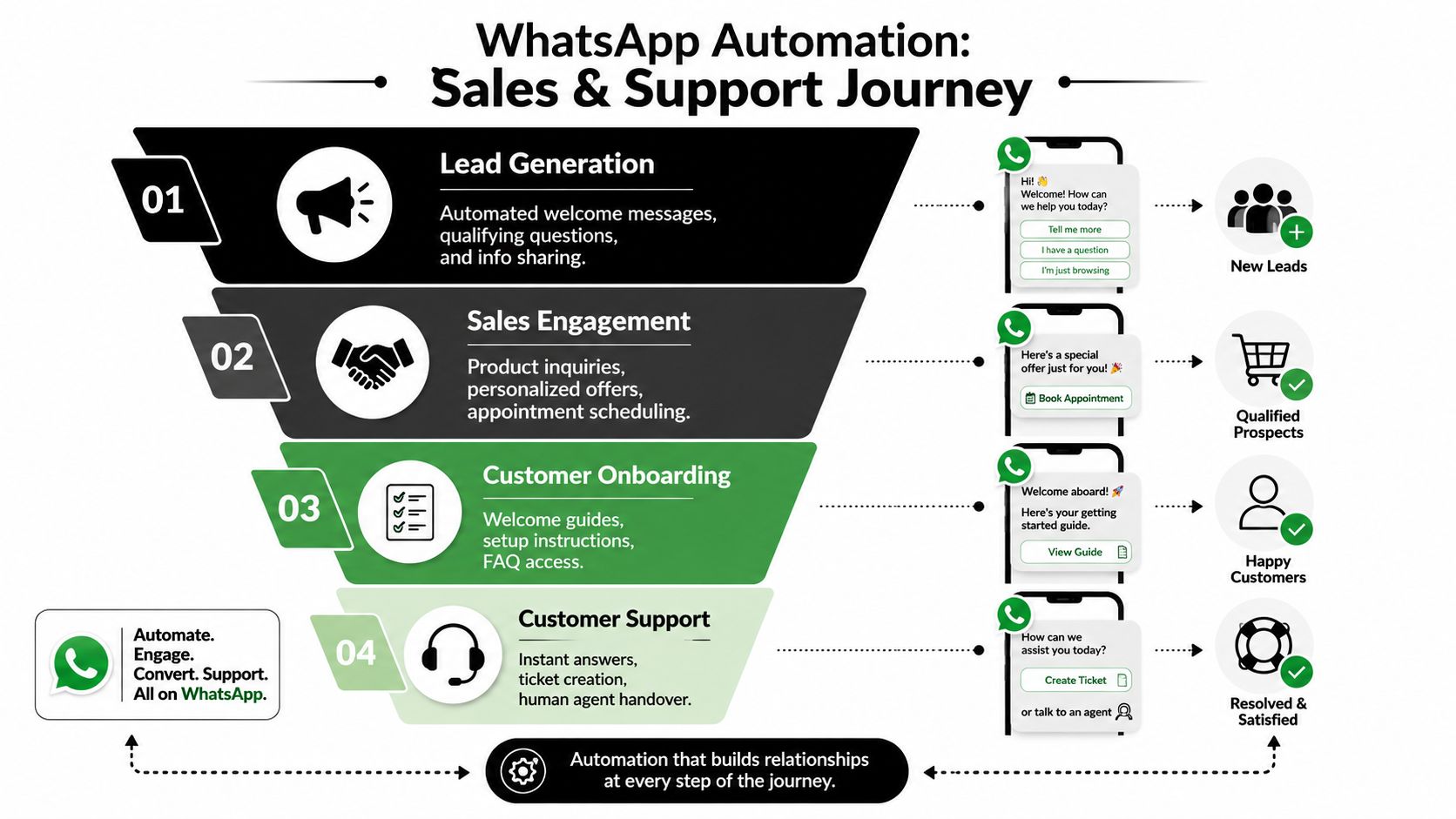
A simple visual helps frame the journey:
Sales workflows that move faster
In sales, WhatsApp works best when the workflow is narrow and timely. A lead comes in from a form, ad, or website visit. The platform sends a welcome message, asks a short qualifying question set, routes high-intent leads to a rep, and books a meeting or demo.
I've seen three patterns work consistently:
- Lead qualification with short structured questions that map directly into CRM fields.
- Demo scheduling where the system offers times, confirms the booking, and sends reminders.
- Cart or inquiry recovery where the message resolves hesitation quickly with the next best action.
Video examples can be useful here when teams are trying to picture the full customer flow:
The mistake is trying to make the bot sound endlessly clever. The better approach is direct and transactional. Ask what's needed, get the answer, move the lead forward.
Support and operations that scale cleanly
Support teams benefit when the platform handles repetitive requests instantly, but hands off at the right moment. FAQ answers, order status, reset instructions, appointment reminders, and ticket creation all fit well. So do internal workflows like notifying an operations team when a customer confirms a delivery window or flags a billing issue.
Teams exploring more advanced service design can also review examples of AI agent workflows for customer support, especially for structured cases where triage, classification, and escalation need to happen consistently.
A strong support setup usually follows this sequence:
- Recognize intent early so common requests stay self-serve.
- Collect the missing detail such as order number, booking reference, or issue category.
- Resolve or escalate based on confidence and business rules.
- Write the outcome back to the help desk or CRM for continuity.
If a customer has to repeat the same issue to the bot and then again to a human, the workflow isn't automated. It's just delaying support.
Operations teams often overlook WhatsApp until they see how well it handles confirmations, reminders, and status notifications. Those aren't flashy use cases. They are, however, the ones that usually stick because they reduce friction for both staff and customers.
Integrating Your Tech Stack for Seamless Workflows
In deployed WhatsApp programs, integration quality usually decides whether automation saves labor or creates another inbox for staff to monitor. The winning pattern is simple: an event happens in a core system, WhatsApp uses the right business context, the customer replies, and the result is written back to the system that owns the record.
That write-back step matters more than teams expect.
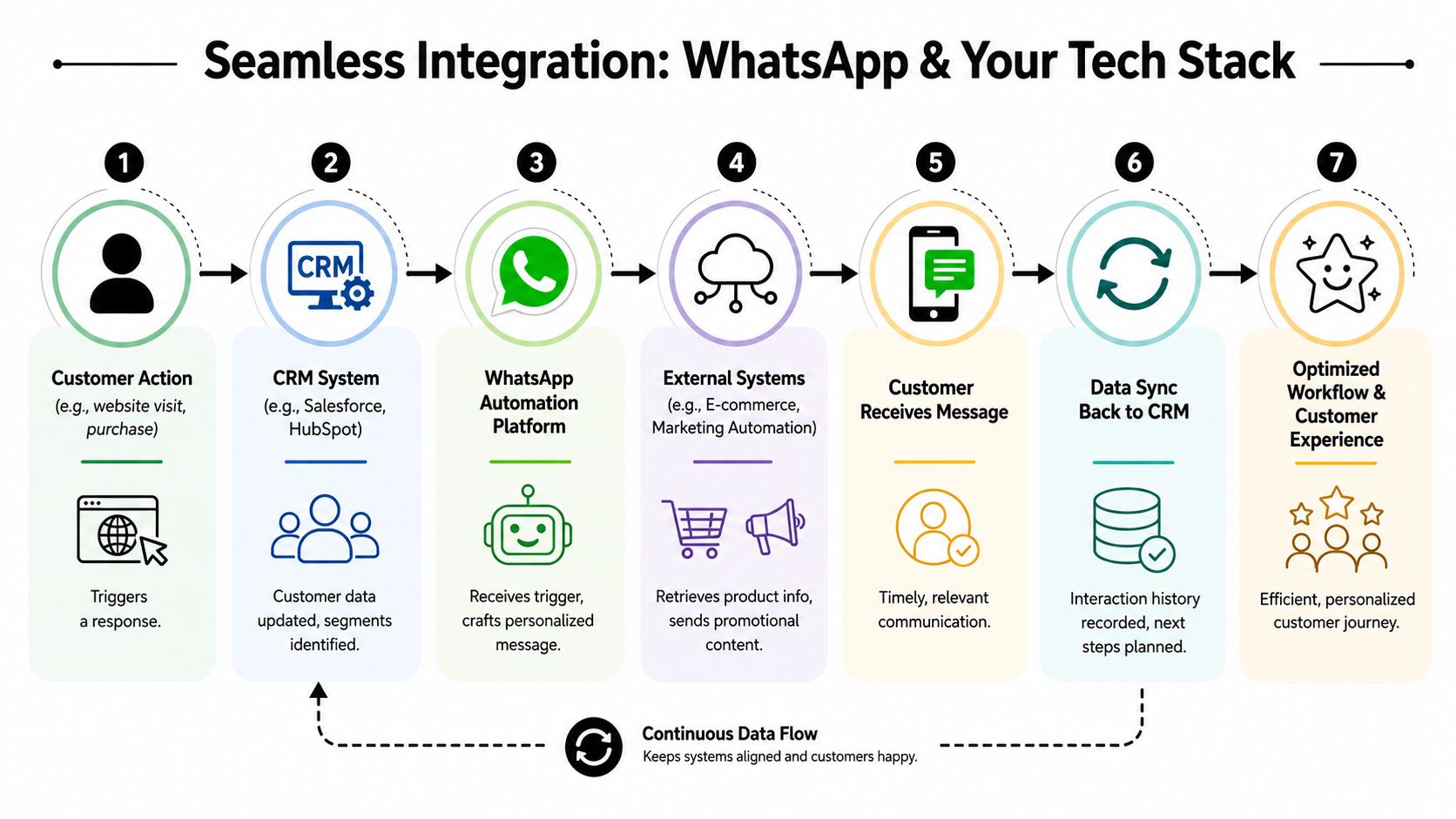
The connected workflow pattern
A good integration does more than pass messages between tools. It preserves system ownership. The CRM remains the source of truth for lead and account state. The help desk remains the source of truth for case history. Commerce systems remain the source of truth for orders, payments, and fulfillment. WhatsApp sits in the middle as the interaction layer.
That design matters even more after WhatsApp's January 2026 ban on open-ended AI bots. Safe deployments keep the bot tied to a defined business task and to the system that can verify the answer. If a user asks for order status, pull it from the order system. If they want to reschedule an appointment, write the confirmed time back to the booking platform. Do not let a general-purpose model improvise across disconnected data.
A few common patterns work well:
- Lead qualification: a form submission creates or updates a lead in HubSpot or Salesforce, starts a WhatsApp qualification flow, then updates lifecycle stage, owner, or next step based on the response
- Support intake: a Zendesk or Jira ticket is opened, WhatsApp collects the missing order number, device type, or issue category, and appends that data to the case
- Order and billing updates: an e-commerce or payment event triggers a WhatsApp message, then logs delivery confirmation, failed payment follow-up, or customer acknowledgment back into the customer record
For teams that need prebuilt app connections plus custom event handling, WhatsApp integration options across CRM, support, and workflow tools are usually the fastest way to assess fit.
Where integrations usually fail
The API is rarely the blocker. Data ownership, field quality, and workflow boundaries are.
I have seen polished demos break in production because the CRM had three phone number fields, two lifecycle definitions, and no rule for which system could overwrite the other. The WhatsApp layer was fine. The operating model was not.
Failures usually show up in four places:
| Failure point | What it looks like | What fixes it |
|---|---|---|
| Dirty CRM data | Wrong personalization, bad routing, duplicate conversations | Clean source fields, deduplication rules, and field ownership |
| Weak event design | Missed triggers, duplicate sends, race conditions | Clear event mapping and idempotent processing |
| No sync-back logic | Sales or support teams work from partial records | Bi-directional updates tied to the system of record |
| Unbounded AI behavior | The bot answers outside policy or invents unsupported actions | Task-specific prompts, fixed intents, and human escalation rules |
According to GuruSup's explanation of WhatsApp API operations, poor data quality can materially reduce chatbot accuracy, while steady refinement improves handle time and resolution rates. That matches field experience. A well-designed WhatsApp flow will still fail if the underlying account data, product catalog, or ticket taxonomy is unreliable.
The strongest implementations treat integration as operating infrastructure. Define which system owns each field. Define which events trigger outreach. Define when the bot must stop and hand off. That is how WhatsApp becomes part of a working process instead of a thin conversational layer sitting on top of messy systems.
Mastering Security Governance and Compliance
Teams often think about compliance too late. They focus on launch speed, message design, and automation coverage. Then the first governance issue appears. A contractor sees data they shouldn't. A bot handles a request outside its allowed scope. A support team can't reconstruct who changed a flow. None of those are edge cases in scaled deployments.
The major shift in 2026 is the AI boundary itself.
The compliance line that changed in 2026
WhatsApp officially banned open-ended AI chatbots on January 15, 2026, restricting automation to task-specific functions like shopping, support, and booking, according to Chat Data's coverage of the policy shift. This is the point many buying guides still miss. A platform can look modern and still push you toward non-compliant behavior if it encourages broad, general-purpose conversational agents inside WhatsApp.
That changes implementation strategy. The safe pattern is not “build one assistant that can talk about anything.” The safe pattern is “build bounded workflows with clear purpose, clear entry points, and clear escalation rules.”
Task-specific automation usually holds up when it does things like:
- Support resolution for known categories such as order status, password reset guidance, or ticket intake
- Booking flows that collect date, time, service type, and confirmation details
- Shopping assistance that helps a customer find, compare, or confirm products within a defined scope
Broad conversational freedom feels impressive in demos. Bounded task design is what survives policy review and production use.
Governance features that stop avoidable mistakes
Security governance is where platform selection gets practical fast. You want role-based access control so support agents, marketers, developers, and external partners don't all have the same permissions. You want isolated environments so one team's workflows and data don't bleed into another's. You want audit trails so changes to templates, automations, and access are traceable.
For privacy-minded teams, it also helps to review how vendors think about scoped access and operational boundaries. A resource like the Donely privacy manifesto is useful as a reference point for evaluating what good governance language should include.
When I'm reviewing a platform for enterprise or multi-client use, I look for these controls first:
- Granular permissions so teams can work without overexposure.
- Audit visibility for workflow edits, access changes, and operational activity.
- Data isolation across clients, brands, or departments.
- Escalation design so sentiment issues, repeated failures, or out-of-scope requests move to a human.
Compliance isn't just about avoiding penalties or account issues. It creates better systems. Teams build cleaner flows when the allowed scope is explicit. Developers make better escalation logic when they know exactly where AI should stop.
How to Choose the Right Platform in 2026
Vendor choice got harder after WhatsApp tightened enforcement around AI behavior. The biggest mistake I see is buying for demo quality instead of policy fit, operating model, and long-term maintenance.
A platform that answers anything can look impressive in a sales call. In production, that same design can create template issues, bad handoffs, inconsistent answers, and account risk. After the January 2026 ban on unsupported open-ended AI experiences in WhatsApp flows, the safer path is clear. Choose software built for bounded tasks, explicit escalation, and traceable automation.
A practical selection checklist
Run the evaluation in your own business scenarios. Ask each vendor to show a support deflection flow, a lead qualification sequence, a CRM writeback, a failed payment reminder, and a human handoff triggered by ambiguity or sentiment. If they can only show a general chatbot conversation, they are hiding the hard part.
Here's the checklist I use:
- Delivery architecture. Check retries, queue handling, duplicate protection, webhook reliability, and what happens when a downstream system fails.
- Policy-safe AI design. Confirm the platform is built for task-specific automation inside WhatsApp, with clear limits on what AI can and cannot do.
- Escalation control. Review how the system routes edge cases to a person, preserves context, and records the reason for transfer.
- Integration behavior. Verify two-way sync with your CRM, help desk, commerce stack, or scheduling system. One-way updates create reconciliation work later.
- Change management. Make sure teams can update flows, templates, and routing logic without creating hidden logic breaks.
- Reporting. Look past delivery and open rates. You need visibility into drop-off points, failed intents, transfer reasons, and conversion by workflow.
- Permission model. Check whether operations, support, agencies, and developers can work in the same platform without sharing more access than they need.
If you're comparing WhatsApp-specific software with broader orchestration options, this roundup of top marketing automation tools is a useful secondary reference. It helps frame where messaging automation belongs in the wider customer journey, even though WhatsApp compliance still needs its own review.
What strong platforms have in common
The strongest platforms make scope visible. You can see what the bot is allowed to handle, where data comes from, when a template is required, and when a human should step in. That matters more in 2026 than an oversized feature list.
They also reduce custom work without boxing your team in. Good platforms let developers control integrations and logic, while operations teams manage day-to-day changes safely. That balance keeps rollout speed high without turning every update into an engineering ticket.
This screenshot shows the kind of centralized operating layer teams should expect from a modern platform environment:
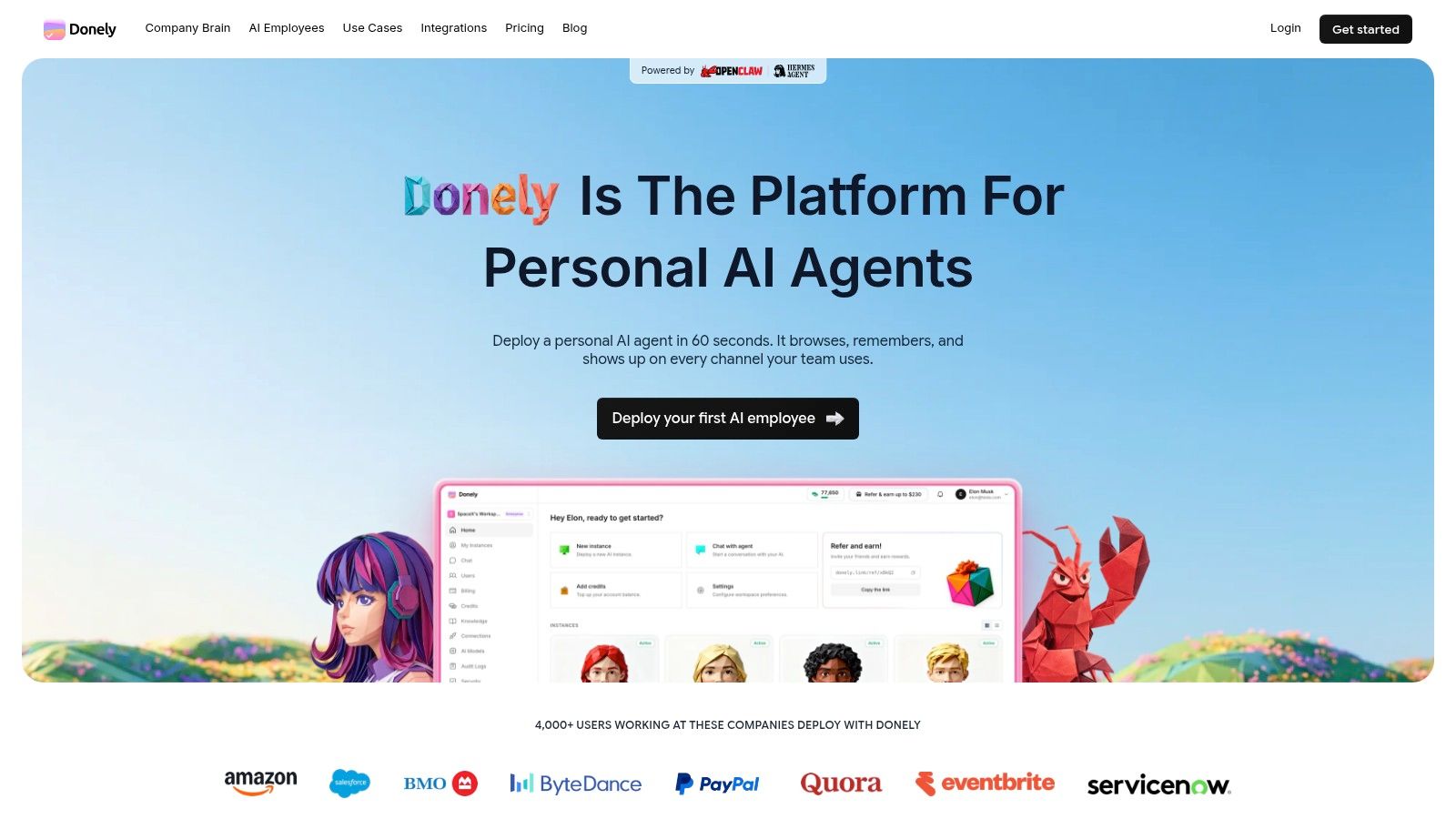
Weak platforms usually fail in predictable ways. Some are too thin for real support or sales volume. Others depend on custom code that becomes expensive to maintain. The riskiest group blurs the line between workflow automation and open-ended AI, which is exactly the boundary businesses need to enforce now.
The right WhatsApp automation platform should let teams automate repeatable conversations at scale, keep AI inside a defined job, and hand off cleanly when the conversation no longer fits that job.
If you're deploying AI-powered WhatsApp workflows and want a platform built for scale, governance, and fast setup, take a look at Donely. It gives teams a unified way to launch and manage AI employees across channels like WhatsApp, connect to hundreds of business tools, and keep workloads isolated with strong access control and audit visibility.