
You probably know the pattern already. The first AI agent went live fast and solved a real problem. A second agent followed, then a third. Support has one. Sales has one. Someone in operations built another to move data between Slack, HubSpot, and Jira. Early wins were easy to see.
The mess showed up later.
Each agent ended up with its own credentials, prompts, tools, logs, owners, and deployment habits. Security started asking who approved access. Finance wanted to know where usage was going. Operations couldn't answer basic questions like which agent called which system, why it failed, or whether two teams had built overlapping automations. That's the point where AI stops being a prototype exercise and becomes an operations discipline.
Table of Contents
- The Hidden Chaos of Scaling AI Agents
- What Is AI Agent Management Software
- Six Core Capabilities You Cannot Ignore
- Real World Use Cases and Applications
- Best Practices for Deployment and Governance
- Your Implementation Checklist for Choosing a Platform
The Hidden Chaos of Scaling AI Agents
The hidden problem with AI agents isn't getting one to work. It's getting ten to behave.
The initial phase typically delivers isolated success. A support triage agent cuts queue noise. A lead qualification agent saves reps time. Then every department wants its own version. Very quickly, the company has multiple agents running across separate environments, with separate credentials and inconsistent review processes. No one planned for a shared operating model because the first few launches felt small.
That's where unmanaged growth turns into operational risk.
The broader market signals why this problem is arriving so fast. One major market forecast projects the AI agents market will grow from USD 7.84 billion in 2025 to USD 52.62 billion by 2030, a 46.3% CAGR, according to MarketsandMarkets' AI agents market report. That projection matters because it shows agents are moving into mainstream software budgets, not staying in lab environments.
The pain points show up in operations first
The first symptoms are usually mundane:
- Credentials sprawl. Agents inherit broad access because teams optimize for speed.
- No unified logs. When an agent misfires, operators have to piece together what happened from several tools.
- Duplicate automations. Different teams build overlapping agents that hit the same systems with different rules.
- Unclear cost ownership. Finance sees spend, but not which agent, team, or workflow created it.
- Weak accountability. Everyone can launch something. Fewer people can explain or govern it.
Practical rule: If you can't answer who owns an agent, what tools it can call, and where its actions are logged, you don't have an AI workforce. You have automation sprawl.
Why ad hoc management breaks down
A few bots can survive on tribal knowledge. A real deployment can't.
As agents move from isolated tasks into cross-functional workflows, the management layer becomes more important than the prompt layer. Teams that are serious about scale usually end up looking for a single operational surface where they can deploy, monitor, permission, and review agents consistently. That's the shift from experiments to governed execution.
For companies trying to centralize that model, platforms built for enterprise AI operations reflect where the category is going. The need isn't more demos. It's less chaos.
What Is AI Agent Management Software
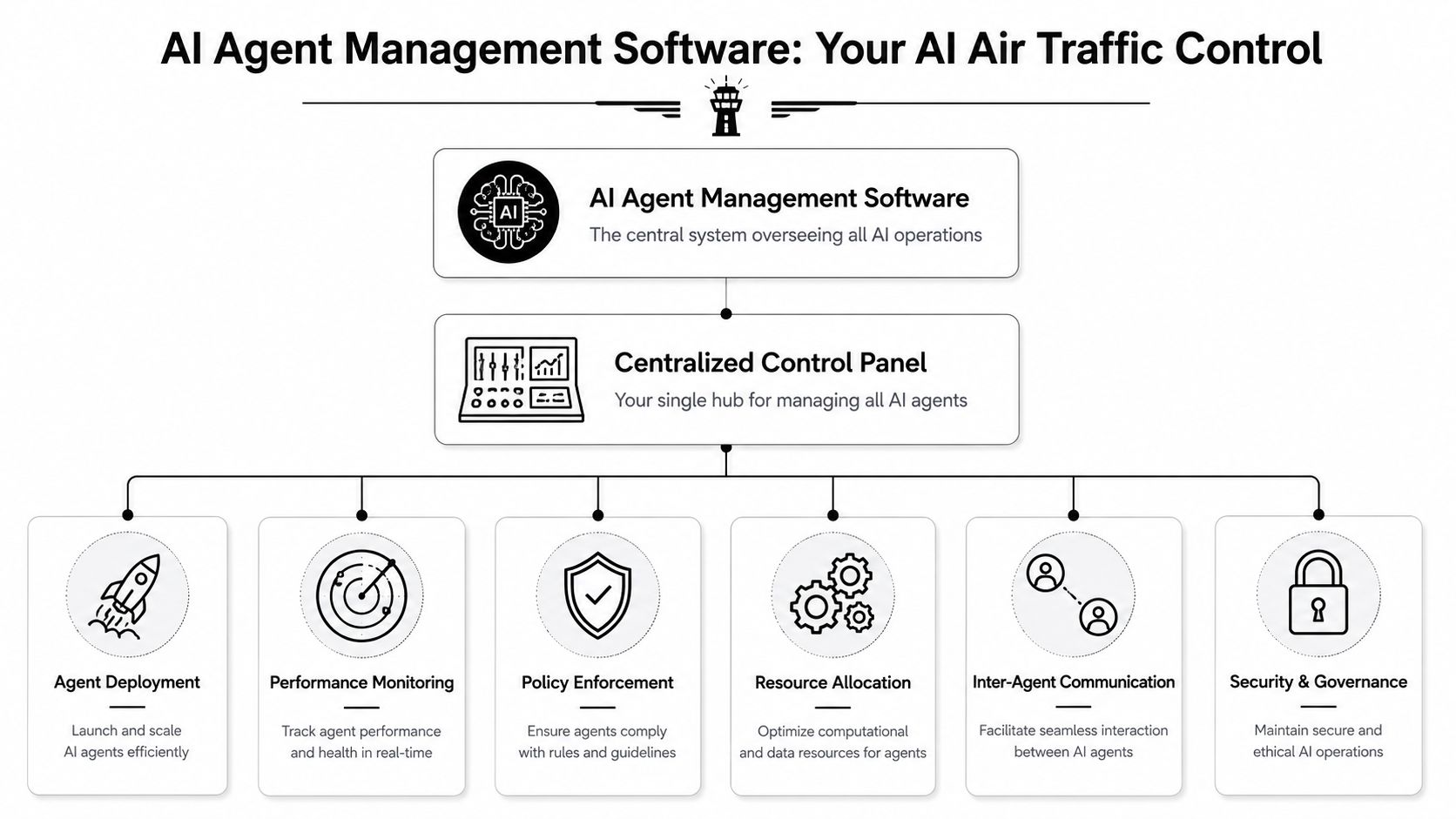
AI agent management software is the system that keeps a growing fleet of agents usable, observable, and governable after launch.
The simplest analogy is air traffic control. Planes aren't useful because they can take off. They're useful because an operating system exists around them: routing, spacing, permissions, communication, monitoring, escalation, and incident response. AI agents need the same thing once they touch real business systems.
It is not the same as an agent builder
This distinction trips up a lot of buyers.
An agent builder helps you define instructions, tools, triggers, and outputs. That's useful. But once the agent is live, you still need to answer harder questions. Who can edit it? Which systems can it access? How do you trace a failed tool call? What happens when an agent starts making repeated bad calls? How do you review actions across many agents without checking each one manually?
That operational gap is why post-deployment governance matters so much. Studio Alpha's analysis of live agent operations points to the underserved challenge clearly: the difficult work starts after deployment, when teams need to enforce permissions, validate actions, and prevent tool misuse at scale.
Think control plane, not chatbot studio
A mature platform behaves like a control plane for agent identity, traffic, tool access, and observability. In practical terms, that means one place to manage:
| Function | What it handles |
|---|---|
| Deployment | Where agents run and how new instances are launched |
| Permissions | Which users and agents can access tools or data |
| Monitoring | Health, failures, usage, session traces, and execution timing |
| Governance | Policies, reviews, audit trails, and escalation rules |
| Coordination | How multiple agents interact across workflows |
| Cost oversight | Usage visibility across teams, clients, or environments |
That matters even more when agents interact with external systems. In commerce workflows, for example, agents may need to inspect products, pricing, availability, and order steps through structured APIs rather than scraping brittle interfaces. Zinc's overview of an Ecommerce API is useful here because it shows the kind of dependable tool surface agents need when they operate in production.
Build quality matters less than operating quality once agents start touching revenue, customer records, or internal systems.
The useful way to think about AI agent management software is simple. It isn't the thing that makes an agent possible. It's the thing that makes many agents safe to run.
Six Core Capabilities You Cannot Ignore
Most platform evaluations fail because teams ask whether a tool can create agents. The better question is whether it can contain operational failure.
Security boundaries first
Start with access control and isolation. Autonomous systems don't just answer questions. They call tools, fetch data, and trigger workflows. That increases the blast radius of a bad prompt, bad config, or bad credential.
Rasa's guidance on agent management is direct on the minimum controls: RBAC, detailed logging of actions and data access, and circuit breakers or human-review thresholds to stop anomalous behavior. Those aren't enterprise extras. They are baseline requirements.
In practice, look for these capabilities:
- Granular RBAC so support managers, operators, developers, and compliance reviewers don't all get the same level of control.
- Scoped credentials that limit what an agent can retrieve or modify.
- Isolated runtime boundaries so one client or business unit doesn't bleed into another.
- Circuit breakers that pause execution when agents behave outside expected patterns.
A platform that skips these controls may still look polished in a demo. It won't survive a real incident review.
Operational visibility and cost control
Observability is where many teams realize they never had a management layer at all.
If an agent fails halfway through a workflow, you need to reconstruct the session. That means seeing prompts, tool calls, timings, retries, outputs, and handoffs in one place. Without that, troubleshooting becomes guesswork and governance becomes theater.
Three capabilities separate workable platforms from fragile ones:
Unified audit logs
Every meaningful action should be traceable. Who launched the agent, what it accessed, which tool it called, and what happened next should be reviewable without exporting data from five products.Cross-instance monitoring
Teams need health and status visibility across all active agents, not one dashboard per bot.Centralized billing or usage oversight
Cost management gets messy when every team launches agents independently. Mature platforms make it possible to attribute usage to a business unit, client, workflow, or environment.
One factual product example provides a helpful illustration. Donely's integrations layer fits this model by tying deployment to a broad tool ecosystem while keeping monitoring, access boundaries, and usage oversight in one operating surface. That's the kind of shape to look for, regardless of vendor.
If finance can't map spend to a workflow owner, the problem isn't just billing. It's missing operational design.
Integrations and multi-agent coordination
The final capability set tends to be underestimated until the environment gets crowded.
Single-agent demos are clean because they avoid coordination. Real businesses don't. Support hands off to CRM. Sales qualification touches messaging, enrichment, and routing. HR workflows may need document systems, chat, and approvals. As agents multiply, management software has to handle not just one worker, but interactions among many workers and systems.
Use this quick test:
| Scenario | Weak platform behavior | Strong platform behavior |
|---|---|---|
| New client onboarding | Manual cloning and loose credentials | Isolated instance with predefined access rules |
| Department expansion | Separate tools per team | Shared control plane with role-based visibility |
| Agent failure review | Partial logs in scattered systems | Traceable sessions and unified audit history |
| Tool growth | Fragile custom connectors | Managed integrations with clear permissions |
What works is boring in the best sense. Clear boundaries. Predictable logging. Structured integrations. Repeatable provisioning.
What doesn't work is relying on memory, spreadsheets, and goodwill once more than a handful of agents are live.
Real World Use Cases and Applications
The practical value of AI agent management software shows up when a company stops asking, "Can we build this?" and starts asking, "Can we run this repeatedly without creating new risk?"

A broad adoption wave is already underway. PwC's May 2025 survey of 300 senior executives found 79% say AI agents are already being adopted in their companies, while less than 10% of organizations have scaled them in any individual function, according to PwC's AI agent survey. That gap is where management software earns its place.
The agency model
An agency may run separate AI agents for lead intake, customer support, appointment handling, and internal reporting across multiple clients. The technical challenge isn't launching ten agents. It's keeping ten client environments isolated while still giving the agency one place to operate.
The right setup usually includes separate instances per client, read-only dashboards for client stakeholders, client-specific credentials, and isolated logs. That reduces the chance of cross-client leakage and makes invoicing cleaner. It also gives the agency an easier way to explain what happened when a client asks why an agent made a particular decision.
For teams debugging these environments, supplemental tools such as Fluxtail's AI log analysis solutions can help operators inspect noisy log streams and failure patterns faster, especially when agent workflows span several tools.
The scaling startup
Startups feel this problem early because they have ambition without extra operations headcount.
A growth-stage team might launch one agent for inbound support, another for lead qualification, and another for employee onboarding tasks. Each one saves time. But without a shared operating layer, the startup inadvertently creates a mini DevOps burden around every new deployment. Someone has to manage secrets, approvals, integrations, logs, outages, and access reviews.
What works for startups is a platform that removes custom infrastructure work and standardizes deployment. The small ops team should be able to see all active agents, check failures, review permissions, and pause risky workflows without waiting on engineering every time.
A short product walkthrough can help teams visualize this shift from isolated bots to managed operations:
The compliant enterprise
Regulated or compliance-heavy organizations have a different pressure. Their problem isn't enthusiasm. It's proof.
A healthcare-adjacent company, for example, may want agents to handle patient communication workflows, internal routing, and documentation support. The blockers usually aren't around model quality alone. Legal, compliance, and security teams want clear access boundaries, auditability, identity controls, and a deployment pattern that fits existing review processes.
That pushes buyer attention toward SSO, immutable logs, role-specific visibility, approval thresholds, and strong separation between environments. These teams also care whether operations staff can answer concrete questions quickly:
- Who approved this agent's access
- What records did it retrieve
- Which tool call triggered the downstream action
- Can we pause or roll back behavior if the workflow drifts
The common thread across all three cases is simple. The software becomes valuable when it reduces operational ambiguity.
Best Practices for Deployment and Governance
Buying a platform doesn't solve governance. It gives you a place to practice it.
The strongest AI operations teams don't treat governance as a document or a one-time security review. They treat it as a live operating process tied to deployment, monitoring, exception handling, and periodic review. That matters because agents change behavior through tool access, workflow updates, prompt adjustments, and surrounding system changes, even when nobody thinks they shipped a major change.
Start with an agent charter
Before an agent goes live, define its operating charter in plain language.
That charter should cover purpose, allowed tools, disallowed actions, escalation paths, owner, reviewer, and acceptable failure handling. If an agent can reach Slack, Salesforce, Zendesk, or an internal database, those permissions shouldn't exist because "it might need them later." They should exist because the agent's assigned role requires them.
A practical charter usually answers these questions:
- Business role. What job is the agent allowed to do?
- Tool boundaries. Which systems can it read, write, or trigger?
- Risk points. Which actions require review, pause rules, or handoff?
- Ownership. Which person or team signs off on changes?
- Success criteria. What does useful behavior look like operationally?
Make the platform the source of truth
The management platform should become the central record for agent identity, traffic, tool access, and execution history.
That control-plane model matters because operators need end-to-end tracing of sessions, tool calls, execution timing, and immutable audit history. Gravitee's architect guide for AI agent management platforms describes this clearly: without those controls, teams can't safely govern agents acting across multiple business systems.
Governance fails when logs live in one system, permissions in another, and ownership in someone's memory.
This is also where data-ingestion workflows need extra care. If your agents depend on external collection pipelines, including vendor-run social media scraping solutions, review those inputs as part of your governance model. Bad or unstable upstream data doesn't stay upstream for long once agents start taking action on it.
Treat governance as an operating loop
Good governance is repetitive. That's a feature, not a burden.
Use a recurring loop with three motions:
Deploy carefully
Start with one contained workflow, narrow permissions, and explicit human fallback.Monitor continuously
Review traces, failed calls, odd tool patterns, and policy exceptions. Watch for long-running workflows that drift from their original role.Refine deliberately
Expand permissions or autonomy only after the current scope is stable and understandable.
Teams often make this mistake: they add more agents before they harden the operating model. A better pattern is to scale the rules first, then the fleet.
Your Implementation Checklist for Choosing a Platform
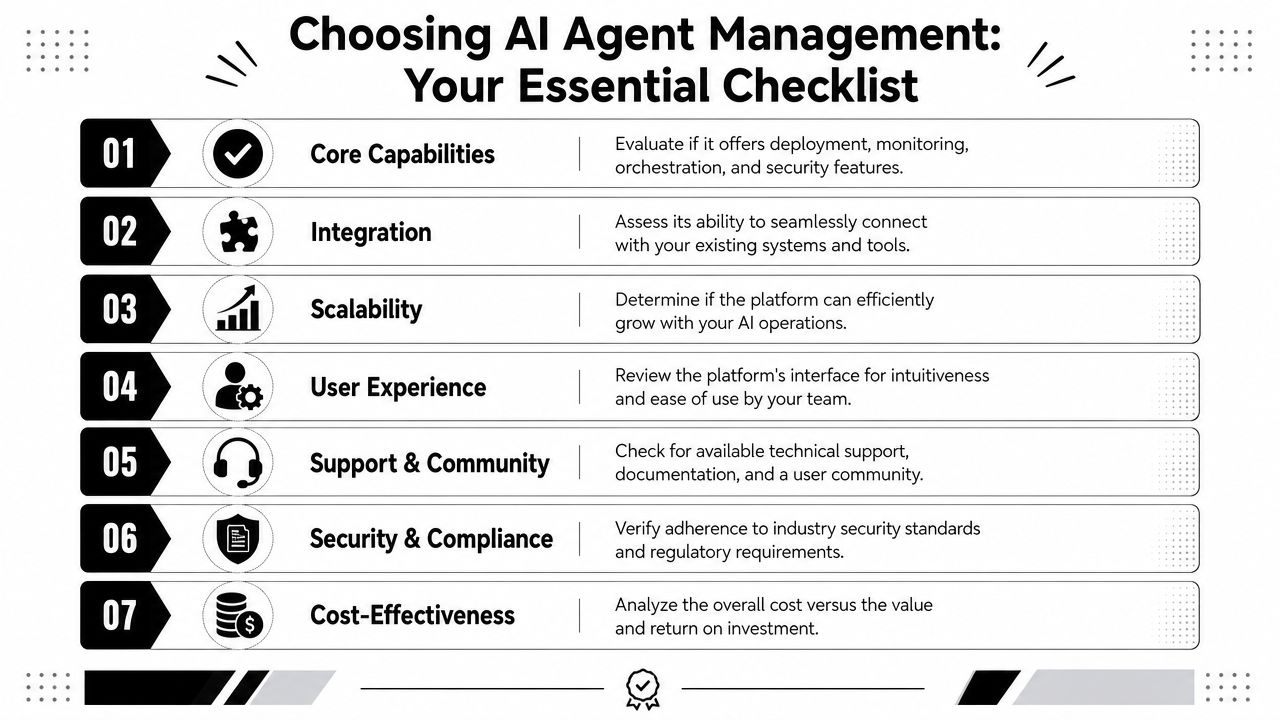
Most buying mistakes happen because teams evaluate AI agent management software like a feature catalog. They compare demos, connectors, and launch speed, but skip the questions that matter once dozens of agents are live.
Questions to ask before you buy
Use this as a practical evaluation sheet.
Can it isolate workloads cleanly
If you serve multiple teams, clients, or business units, ask whether the platform supports separate instances or equivalent boundaries without awkward workarounds.Does access control match real roles
A platform should support granular RBAC so operators, business users, developers, and auditors don't inherit the same permissions.Can you reconstruct agent behavior
Ask to see session traces, tool calls, execution timing, and audit history. If the vendor only shows high-level dashboards, keep digging.How are risky actions contained
Look for scoped credentials, review thresholds, and ways to stop anomalous behavior before it spreads.Will it fit your stack
Integrations matter less as a logo wall and more as an operational model. Check whether connections to systems like Slack, Salesforce, HubSpot, Zendesk, Jira, and internal tools are manageable from one place.Who carries the infrastructure burden
Some platforms push deployment complexity back onto your team. Ask what your operators will still need to host, secure, patch, or debug.Can usage and cost be attributed clearly
You want enough visibility to understand which teams, clients, or workflows are consuming resources.
If you're comparing pricing models directly, it helps to inspect a live example such as Donely pricing and use it as a benchmark for how vendors present instance structure, team tiers, and enterprise options.
What to reject quickly
A few red flags usually save time:
| Red flag | Why it matters |
|---|---|
| One shared environment for everything | Increases exposure and muddies accountability |
| Weak or missing audit trails | Makes incident review and compliance difficult |
| Broad default permissions | Encourages unsafe access patterns |
| Fragmented monitoring | Slows debugging and masks drift |
| Hard dependence on engineers for routine changes | Prevents operational scale |
A buying process should test how the platform behaves under stress, not how polished it looks in a happy-path demo.
Choose the platform that makes control easier as your agent count rises. That's the core job.
Donely is one option for teams that need a unified place to host, deploy, and manage AI employees across separate workloads, with multi-instance architecture, scoped access controls, unified logs, integrations, and a path from small deployments to larger operational fleets. If you're evaluating platforms for governed AI operations, you can review Donely alongside your other shortlist candidates.