
AI agent security isn't lagging because teams don't care. It's lagging because deployment got easy before governance got real. In 2025, research summarized by MintMCP on AI agent security statistics reported that 73% of CISOs were critically concerned about AI agent risks, only 30% had mature safeguards in place, and 97% of organizations that experienced AI-related security incidents lacked proper AI access controls.
That gap changes how this topic should be discussed. AI agent security isn't just about stopping clever prompt attacks in a demo. It's about deciding what an autonomous system can access, what it can execute, what it can remember, and how you'll prove what happened after the fact.
The hard part isn't securing one helpful assistant in a sandbox. The hard part is running many agents across Slack, Gmail, HubSpot, Salesforce, Zendesk, Stripe, internal knowledge bases, and customer environments without creating invisible privilege paths or fragmented logs. That's where most guidance gets thin, and that's where real operational risk starts.
Table of Contents
- The Urgent Need for AI Agent Security
- Understanding the AI Agent Threat Landscape
- Core Principles of Secure AI Agent Architecture
- Secure Deployment Patterns in Practice
- Managing Multi-Instance and Client Workloads Securely
- Navigating Compliance and Governance in 2026
- Your Actionable AI Agent Security Checklist
The Urgent Need for AI Agent Security
Most companies still talk about AI risk as if the biggest problem is whether a model says something wrong. That framing is outdated. Once an agent can read a ticket queue, send email, update a CRM record, approve a refund path, or trigger a workflow, the issue stops being content quality and becomes operational control.
The market signal is already clear. Security leaders are worried because agents compress several risky functions into one runtime. They interpret untrusted input, fetch more context, call tools, retain memory, and act across systems. A weakness at any point can turn into unauthorized execution.
That changes the security model in a few important ways:
- The prompt is part of the attack surface. Instructions can arrive through user input, retrieved docs, browser content, tickets, or tool responses.
- Connected tools increase consequence. An agent with access to Gmail, Slack, Jira, Salesforce, or Stripe can do more than answer questions.
- Memory creates persistence. A bad instruction doesn't have to succeed immediately to be dangerous if it can persist and influence later actions.
- Logs become essential evidence. If an agent took action, someone needs to know which input triggered it, what tools it called, and who approved it.
Practical rule: Treat every agent like a junior operator with broad system reach and inconsistent judgment. Give it narrow access, require approval for sensitive actions, and record everything it does.
A lot of teams still secure AI agents the way they secure chat features. That's not enough. Chatbots mostly generate text. Agents make decisions and touch systems. If you're building or deploying them in production, ai agent security has to be part of the platform design, not a patch added after launch.
Understanding the AI Agent Threat Landscape
The cleanest mental model is this: an AI agent is a capable intern with API keys, tool access, partial memory, and a tendency to follow the most recent persuasive instruction. If you wouldn't let that intern operate without guardrails, you shouldn't let an agent do it either.
Why agents fail differently from normal software
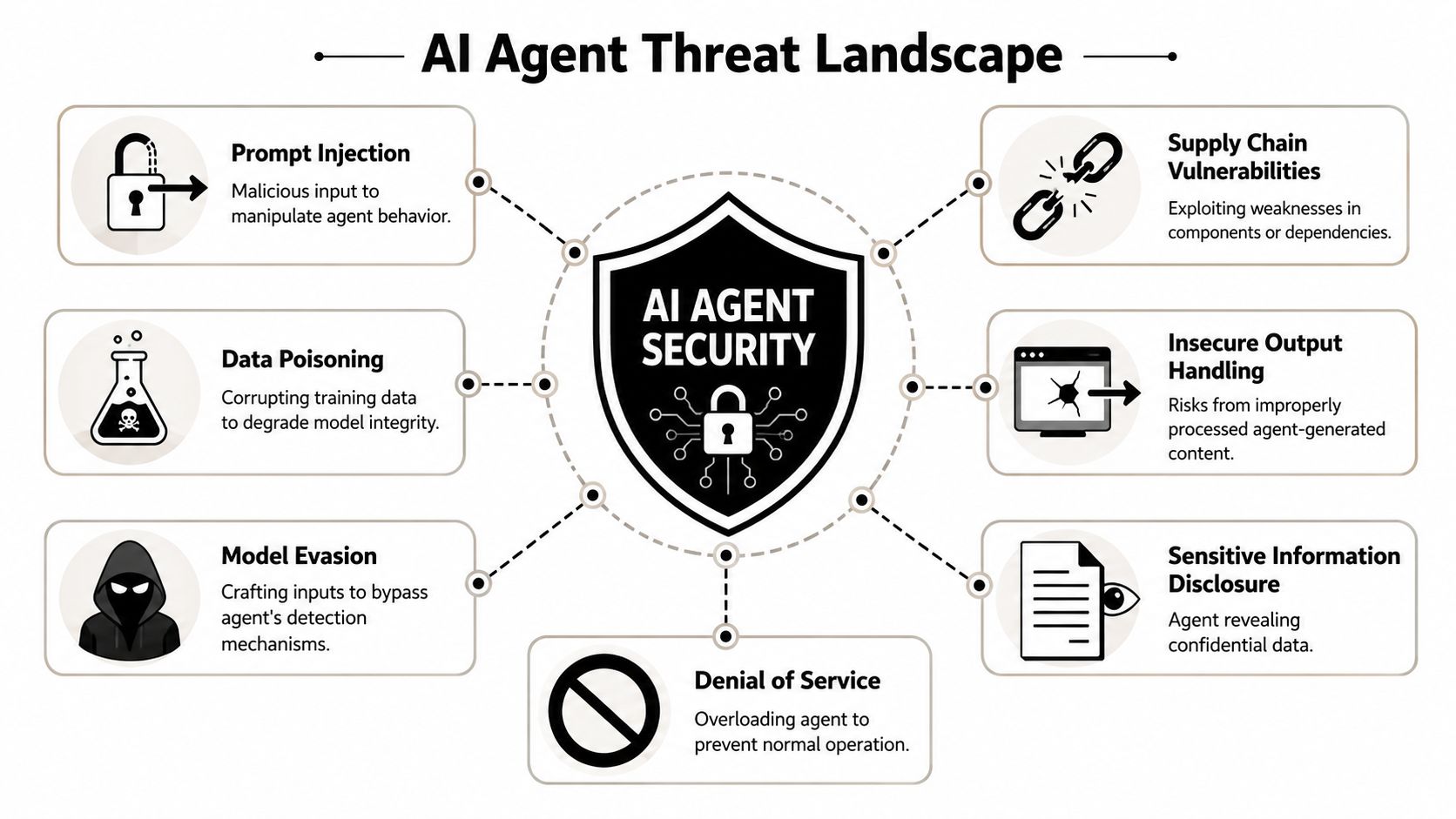
Traditional software usually breaks because of explicit bugs. Agents fail in messier ways because they combine probabilistic reasoning with real permissions. OWASP's AI Agent Security Cheat Sheet identifies common failure modes including prompt injection, tool abuse, privilege escalation, data exfiltration, memory poisoning, goal hijacking, and excessive autonomy.
That list matters because it maps directly to how production incidents happen.
A support agent might read a malicious ticket comment and get redirected into exposing internal notes. A browser agent might visit a page containing hidden instructions that override the original task. A sales operations agent might be granted a tool scope broad enough to modify records it should only read.
For teams working through broader engineering trade-offs, this is the same discipline discussed in managing engineering risk for AI startups. The point isn't to eliminate uncertainty. It's to identify where autonomy meets consequence and then design controls around that boundary.
Later, when people compare these systems with conversational tools, they often miss the execution layer. That distinction is why AI agents vs chatbots isn't just a product taxonomy question. It's a security boundary question.
The main attack paths teams actually need to model
The top risks are easy to describe and hard to control if you wait too long.
Prompt injection
The agent sees attacker-controlled text and treats it like instruction. This can arrive in email bodies, documents, CRM notes, webpages, knowledge base content, or tool output.Tool abuse
The model uses a legitimate integration in an unsafe way. Think sending messages, updating tickets, creating records, or triggering downstream automations without the right checks.Privilege escalation
A low-trust user or process gets a high-trust action executed through the agent. This often happens when the agent's credentials are stronger than the requesting user's permissions.Data exfiltration
Sensitive content leaves the approved boundary through messages, exports, summaries, or API calls. If the agent can read broadly and write externally, this risk is immediate.Memory poisoning
Malicious instructions or false facts persist in memory and influence future runs. This is especially risky in long-lived agents that accumulate context over time.Excessive autonomy
The agent loops, retries excessively, chains too many tools, or keeps acting when uncertainty is high. This creates both security and cost risk.
A short demo helps clarify the difference between harmless error and security failure. This walkthrough is useful context:
Untrusted input isn't just what the user types. It's every document, page, ticket, transcript, and tool response the agent can read.
What doesn't work is relying on one system prompt that says "ignore malicious instructions." What works better is layering controls around the model so it can't easily turn bad input into bad action.
Core Principles of Secure AI Agent Architecture
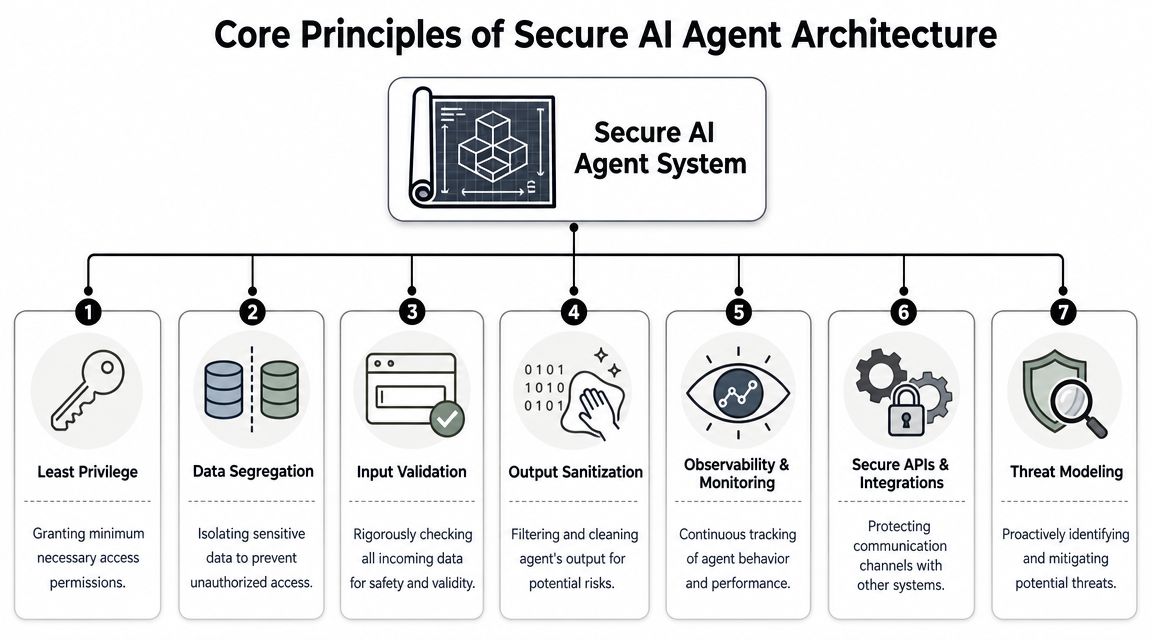
Security starts before the first prompt. If the architecture is sloppy, runtime controls will only soften the damage. If the architecture is disciplined, the same attack has far less room to spread.
Isolation first
The first design question isn't which model to use. It's what shares a boundary with what.
If multiple agents, clients, or business units share execution context too freely, one mistake can become a cross-tenant problem. Strong isolation means separate runtime boundaries, isolated data access paths, and controls that prevent one instance from seeing another instance's state, credentials, or logs.
A useful architecture baseline looks like this:
| Control area | What good looks like |
|---|---|
| Execution | Each agent instance runs in an isolated container or equivalent runtime boundary |
| Data access | Retrieval is scoped to the specific workspace, client, or task context |
| Secrets | Credentials are centrally managed and injected per instance, not hardcoded into prompts or configs |
| Identity | Agent actions map to a distinct role or service identity with narrow permissions |
| Logging | Tool calls, approvals, failures, and policy events land in one auditable stream |
Without this layer, teams often end up with accidental trust sharing. A support workflow can read sales data. A client-facing automation can inherit internal credentials. An agent meant for one department can access another department's tools because the connector was configured once at the account level.
Least privilege has to be granular
Least privilege is easy to say and easy to fake. Giving an agent a read-write token to a system because "it may need it later" isn't least privilege. It's deferred incident creation.
Snowflake's overview of security for AI agents makes the practical point that risk should be classified by consequence. Reading knowledge base content isn't the same as sending external email, modifying production data, approving financial actions, or provisioning access. Higher-consequence actions should require mandatory human review.
That means permission design should happen per action, not just per integration.
- Read access can be broad only when the data class allows it.
- Write access should be narrow and contextual.
- External communication should be explicitly gated.
- Financial or provisioning actions should require step-up approval.
This is also why teams working through Microsoft environments often study controls like those covered in this guide to Copilot data loss prevention. The principle carries over cleanly. If a system can read sensitive content and act on it, prevention has to extend beyond identity into inspection, policy, and review.
Security controls belong in the runtime
Static hardening isn't enough because the dangerous moment is often the live decision. You need controls around the agent's behavior while it's operating.
Field lesson: Separate reasoning from execution. Let the model propose an action, then let policy decide whether that action is allowed, blocked, or requires approval.
That runtime layer should include input validation, output validation, schema checks for tool calls, explicit limits on retries and tool-chain length, and policy checks before irreversible actions. It should also include strong observability. You need to see failed approvals, denied tool calls, unusual retry patterns, and abnormal outbound behavior.
One practical implementation of this model is Donely, which provides multi-instance deployment with isolated containers, per-instance RBAC, scoped data access, unified audit logs, and approval flows for higher-risk actions. Those are the kinds of controls that matter because they reduce blast radius at the architecture and runtime layers, not just in prompt wording.
Secure Deployment Patterns in Practice
A secure design can still fail in production if operations are loose. Most real problems show up in the day-to-day layer: connectors added quickly, logs that don't capture enough context, alerts nobody tuned, and approval paths that exist on paper but not in the workflow.
Control outbound behavior
Teams often spend too much time worrying about what an agent can read and too little time controlling where it can send data or what systems it can change. Outbound pathways deserve stricter treatment because that's where compromise turns into consequence.
In practice, that means restricting unnecessary network egress, limiting which APIs an agent can call, and separating harmless outputs from sensitive ones. A summary generated for an internal Slack channel is different from a customer-facing email, a CRM write, or a payment-related tool action.
A simple review framework helps:
Low consequence
Internal drafting, read-only retrieval, suggested next steps, or classification output.Moderate consequence
Updating internal records, changing ticket metadata, posting to monitored channels, or creating draft artifacts.High consequence
Sending external communication, modifying customer records, triggering billing-related workflows, provisioning access, or changing production systems.
High-consequence actions should never rely on prompt compliance alone. They need policy enforcement and approval.
Log actions not just prompts
Many teams log the conversation and call it observability. That isn't enough for ai agent security. You need a record of what the agent did, not just what it said.
Useful audit trails usually include:
- Identity context such as which user, role, or workflow triggered the run
- Data context showing what knowledge sources or retrieved documents were accessed
- Execution context covering tool calls, parameters, policy decisions, retries, and final outcomes
- Approval context showing who approved, rejected, or escalated a sensitive action
If you're evaluating hosted environments for this kind of deployment, it's worth reviewing platforms built for operational visibility rather than only model access, such as OpenClaw hosting and deployment options.
If you can't reconstruct an agent's tool path after an incident, you don't have agent observability. You have chat history.
Prepare for containment
Incident response for agents needs a slightly different mindset. The first question usually isn't "Was the model wrong?" It's "What could this runtime reach, and what did it already touch?"
Containment plans should be boring and fast. Revoke tool credentials. Pause the instance or workflow. Preserve logs. Identify whether the trigger came from user input, retrieved data, memory, or a connector response. Then decide whether the failure came from permissions, policy, prompt design, or monitoring.
A lot of teams skip this because the system feels like application logic rather than infrastructure. That's a mistake. Agents sit close to business operations. They need the same rollback, quarantine, and review discipline you'd expect for any privileged automation.
Managing Multi-Instance and Client Workloads Securely
Most published advice on ai agent security assumes one agent serving one environment. That's useful, but it doesn't solve the harder operational problem. Agencies, consultancies, and enterprise platform teams usually run many agents at once across different clients, departments, or brands.

AWS discusses this directly in its write-up on the agentic AI security scoping matrix, noting that most guidance concentrates on single-agent risks while the practical challenge is running many isolated AI workers for different clients without cross-instance data leakage or audit-log fragmentation. That's where governance at scale becomes a real design problem.
Single-agent advice breaks at portfolio scale
What fails in multi-instance environments isn't usually the obvious stuff first. It's the quiet operational shortcuts.
A shared connector gets reused because it saves setup time. A support admin role is copied across client instances. Logs live in different places depending on who deployed the workflow. A memory store gets treated as "team-wide" even though the team serves multiple customers. Nothing looks catastrophic until one agent surfaces the wrong document or executes with the wrong account.
The biggest multi-instance risks usually cluster into four categories:
- Privilege bleed where one tenant inherits permissions intended for another
- Cross-instance data exposure where retrieval or memory boundaries aren't strict enough
- Audit fragmentation where no one can trace activity across the full lifecycle
- Operational drift where each instance evolves its own policies, connectors, and exceptions
What good multi-instance governance looks like
The secure pattern is stricter than commonly expected. Every instance should have its own role model, data boundary, connector scope, and audit trail. Shared infrastructure is fine. Shared trust isn't.
A practical governance model includes:
Per-instance RBAC
Users and operators should only administer the instances they own or support. Client A's workspace shouldn't even be visible to Client B's admin path.Scoped credentials and connectors
Each instance should use credentials specific to that environment. Avoid broad account-level tokens that can act across unrelated workloads.Isolated state and memory
Retrieval indexes, conversation state, and long-term memory should be bounded to the instance unless there is an explicit and reviewed reason to share.Unified but filterable logging
Security teams need a consolidated view for oversight, but each tenant or department also needs clean local visibility for support, compliance, and billing.
Multi-tenant agent security isn't only about preventing a breach. It's about being able to prove that one workload couldn't influence another.
This is the part of the market that still feels under-documented. Single-agent hardening matters, but portfolio governance is what decides whether an agency or enterprise can scale agent deployments without creating a permanent security exception process.
Navigating Compliance and Governance in 2026
Compliance teams don't care that your architecture diagram looks elegant. They care whether you can show who had access, what the agent could do, what data it touched, and how sensitive actions were controlled.
Auditors need evidence not architecture diagrams
That evidence problem is getting harder because transparency in the agent ecosystem is still uneven. The Future of Life Institute's AI Safety Index Summer 2025 cites the 2025 AI Agent Index from MIT, which found that for 30 state-of-the-art agents, 135 out of 240 safety-related fields were undisclosed. If external transparency is incomplete, internal governance matters even more.
For compliance-oriented teams, that pushes a few controls into the non-optional category:
- Immutable or durable audit logs that capture actions, approvals, and access paths
- Granular RBAC so reviewers can verify role boundaries
- Documented approval workflows for higher-risk actions
- Scoped data boundaries that map clearly to customer, department, or regulatory needs
This is also why governance discussions increasingly overlap with legal exposure and customer expectations. A commercial example from the go-to-market side is Unpacking the AI SDR debate, which shows how fast "cool automation" can become a policy, disclosure, and accountability issue.
Governance is becoming a buying requirement
For many buyers, security review now starts with basic questions: Can we isolate workloads? Can we restrict actions by role? Can we review logs after the fact? Can we explain data handling clearly?
Those aren't abstract governance asks. They're product requirements. A public statement like the Donely privacy manifesto matters because customers increasingly expect a clear explanation of boundaries, access, and responsibility before they approve deployment.
The organizations that handle this well won't just pass reviews more smoothly. They'll move faster because procurement, security, and operations won't be fighting the platform on every new rollout.
Your Actionable AI Agent Security Checklist
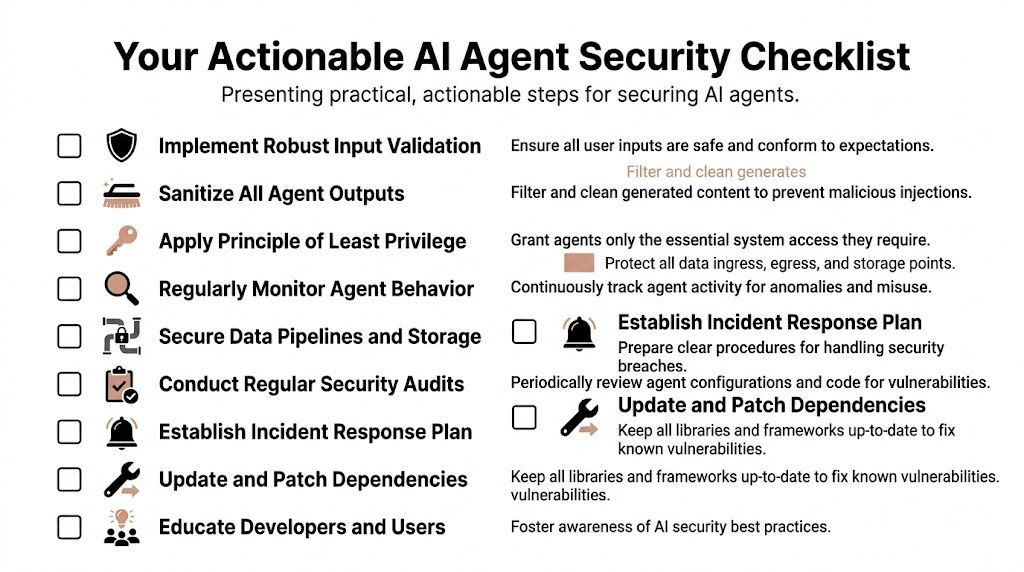
Security checklists usually fail because they're too generic. This one works better if you treat it as a deployment gate for any agent that can access tools, data, or external channels.
Before deployment
Define the action boundary
List exactly what the agent can read, write, send, approve, and trigger.Separate low-risk from high-risk tools
Read-only search and drafting shouldn't share the same approval path as outbound email, billing, or access changes.Scope credentials to the instance
Don't reuse broad tokens across clients, departments, or environments.Set validation rules for inputs and tool calls
Treat prompts, retrieved content, web pages, and tool responses as untrusted until checked.
During operation
Capture execution logs
Store tool calls, policy decisions, retries, approvals, and failures. Conversation history alone isn't enough.Monitor for abnormal patterns
Watch for unusual tool sequences, repeated retries, unexpected destinations, and memory changes that alter behavior.Review memory and retrieval boundaries
Long-lived context stores need periodic checks so stale or malicious instructions don't persist.Use human approval where consequence is high
If an action affects money, customer records, access, or external communication, make review part of the workflow.
When something goes wrong
Pause the agent or connector quickly
Containment beats diagnosis in the first minutes.Preserve logs and affected context
Keep the prompt chain, retrieval path, tool outputs, and approval records intact for analysis.Rotate secrets and review scopes
If misuse occurred, assume permissions were too broad until proven otherwise.Fix the system, not just the prompt
Incidents usually reveal architectural or policy gaps. Patch those first.
A secure agent isn't the one with the smartest prompt. It's the one that stays inside a narrow operating envelope, leaves evidence behind, and can't do much damage when it gets something wrong.
If you're deploying AI workers across personal, business, and client workloads, Donely is worth evaluating as a platform layer. It gives teams a single dashboard for OpenClaw-powered agents with isolated instances, per-instance RBAC, scoped data access, approval flows, and unified audit logs, which are the controls that matter when ai agent security has to scale beyond a single sandbox.