
If you're a consultant using WhatsApp to handle client communication, you've probably hit the same wall many teams hit early. One client wants instant replies to inbound leads. Another wants status updates pushed to a project thread. A third wants an AI assistant that can remember prior conversations, pull from internal notes, and escalate cleanly when the message gets sensitive. The first prototype feels easy. Running that setup across multiple clients without crossing data, breaking workflows, or creating a support burden is where things get real.
That gap is what AI employee hosting solves. Not chatbot prompts. Not demo automation. Hosting. The infrastructure, isolation, access control, logging, integrations, and operational guardrails that let an AI worker run inside a real consulting environment.
Table of Contents
- Why AI Employee Hosting is a Game-Changer for Consultants
- The DIY Roadmap for Hosting AI Employees and Its Pitfalls
- Securing Client Workloads with Isolated AI Instances
- The Hidden Costs of Scaling Your AI Workforce
- The Smart Alternative Managed AI Hosting with Donely
- Your AI Hosting Questions Answered
Why AI Employee Hosting is a Game-Changer for Consultants
A consultant can get pretty far with a single WhatsApp automation. One assistant qualifies leads. Another answers common support questions. A third drafts follow-ups after meetings. The problem starts when clients expect those assistants to behave like real team members. They need memory, tool access, escalation rules, and a clear boundary around each client account.
That shift is happening fast. In Q3 2025, Gallup found 45% of U.S. employees were using AI at work, with frequent use rising to 23%, and over 60% of AI adopters using chatbots and virtual assistants according to Gallup workplace AI adoption figures summarized here. For consultants, that matters because clients no longer see AI support as a novelty. They expect a working system.
Consultants are under pressure from both sides
Clients want faster response times and better coverage. Consultants want delivery that doesn't turn into a maintenance contract in disguise. That's why simple chatbot builders often fall short. They can answer messages, but they usually don't solve the hard parts: client isolation, persistent context, approvals, logging, and access control.
For WhatsApp work especially, the criticality is greater than on a generic web widget. Messages arrive with urgency. They often include account details, project context, or commercial conversations. A consultant can't afford loose operational boundaries when one team member is handling several client environments at once.
Practical rule: If an AI assistant touches multiple client workflows, treat it like infrastructure, not like a marketing experiment.
A lot of firms first encounter this during onboarding. They try to use one agent across lead intake, document collection, and kickoff scheduling, then discover that each client wants different logic and different data sources. That's where a dedicated client onboarding agent setup becomes more useful than a one-size-fits-all assistant.
WhatsApp changes the requirements
WhatsApp compresses the whole consulting motion into one channel. Sales, delivery, reminders, support, and escalation all show up in the same thread. That sounds efficient until the same AI worker is expected to speak in the right voice, remember prior interactions, and route tasks into tools like HubSpot, Salesforce, Jira, or Zendesk.
A proper AI virtual employee platform has to support that reality. It needs to host agents as durable systems, not temporary demos. For consultants, that means thinking in instances, permissions, auditability, and repeatable deployment.
The opportunity is real. So is the operational burden if you build it the hard way.
The DIY Roadmap for Hosting AI Employees and Its Pitfalls
Most consultants start DIY for a sensible reason. They want control. They assume self-hosting will be cheaper, more customizable, and good enough for a few client deployments. The problem isn't that this logic is irrational. The problem is that the roadmap is much bigger than it looks on day one.
MIT studies report a 95% failure rate for AI projects, with the main causes being poor data quality, skills gaps, and unclear metrics, as summarized in this review of the MIT failure-rate findings. DIY hosting puts consultants directly in the path of all three.
Foundation work comes first
Before the agent does anything useful, you need a stable environment. That includes compute, runtime setup, secrets handling, storage choices, environment separation, and a plan for backups and rollback. If the AI employee is meant to work on WhatsApp, you also need the messaging layer, session management, and a safe way to connect business logic to external tools.
That foundation work is where many consulting teams underestimate effort. The technical path is not impossible. It just drags consultants into jobs they don't bill well for.
A realistic foundation checklist usually includes:
- Environment separation: Keep dev, test, and client production workloads apart so one bad deployment doesn't affect everyone.
- Credential control: Store API keys and channel tokens in a way your team can rotate and revoke without chaos.
- Dependency discipline: Pin versions and document them, because silent package changes create hard-to-debug failures.
- Workflow mapping: Decide what the agent should do, what it must never do, and when it should escalate to a human.
The first deployment isn't the real test. The first urgent incident on a client account is.
Deployment is the easy part
Once the base environment exists, installing the agent stack often feels deceptively smooth. You connect tools, define prompts, configure memory, map actions, and run a few happy-path conversations. For a moment, it looks solved.
Then the edge cases arrive. WhatsApp users send half-complete requests. A client changes their sales process. A CRM field name changes. An assistant that worked in staging starts producing unreliable outputs because the production data is messier. That is why deployment isn't the same as delivery.
A useful framing for this stage is the AI Day 2 ops problem. The article is worth reading because it captures what consultants run into after launch: monitoring, drift, policy enforcement, and the operational work that begins once the demo is over.
This walkthrough is useful before you go further:
Operations never stay simple
The third phase is where self-hosting usually stops being attractive. You now need to maintain networking, TLS, integrations, logs, uptime, user access, and incident response while still doing consulting work. Every new client adds another set of tools, prompts, exceptions, and expectations.
What tends to break first:
| Risk area | What it looks like in practice |
|---|---|
| Secrets sprawl | Team members copy credentials into docs, chats, or local files to keep a client deployment moving |
| Weak change control | Prompt changes or integration edits go live without approval and alter behavior unexpectedly |
| No clean observability | You know an agent failed, but can't quickly see whether the issue came from the model, tool call, channel, or permission layer |
| Shared admin access | Too many people have broad access because narrowing permissions takes work |
| Support drag | Senior consultants end up diagnosing runtime issues instead of advising clients |
Self-hosting can still make sense for a narrow internal use case with a technical team behind it. For client-facing AI agent hosting for consultants, it usually creates a business problem disguised as a technical one. The more successful the deployment becomes, the more operational labor it creates.
Securing Client Workloads with Isolated AI Instances
A shared AI environment is convenient right up to the moment it isn't. The same setup that feels efficient during a pilot becomes dangerous when one consultant team serves multiple clients with different data, approval rules, and compliance expectations.
Nutanix research found 79% of IT leaders had encountered unauthorized Shadow AI deployments, as discussed in this Nutanix analysis of unsanctioned AI use. That matters because when official systems are slow or rigid, teams work around them. Consultants see this firsthand. Someone spins up an unsanctioned assistant, pastes client documents into it, and now nobody knows where the data went or who can access it.
Shared environments create avoidable risk
The biggest security mistake in AI employee hosting is treating all client workloads like they belong in one runtime with light logical separation. On paper, shared prompts and shared tooling seem manageable. In practice, they create cross-client exposure risks, confusing access patterns, and messy troubleshooting.
If one client wants a WhatsApp assistant tied to HubSpot and another wants a support workflow tied to Zendesk, they should not be operating inside the same broad environment with the same admin surface. Consultants need hard boundaries they can explain to clients without hand-waving.
A good security review should include the code and integration layer, not just the prompt layer. If you need a reference point for what that review can involve, this AI code security audit is a useful example of the categories teams should inspect before they trust agent behavior in production.
What proper isolation looks like
For multi-client consulting work, secure hosting for AI agents should include three baseline controls.
- Per-instance isolation: Each client gets its own runtime boundary, so memory, files, connectors, and failures stay contained.
- Granular RBAC: Internal operators, client users, and reviewers should each have the minimum access needed for their role.
- Unified audit logs: When a client asks what the agent did, who changed a workflow, or why a message was sent, you need an answer grounded in records.
Those controls are part of what separates a hobby deployment from a usable AI employee platform architecture. The point isn't enterprise theater. It's operational clarity.
Security test: If you can't explain where one client's data lives, who can touch it, and how you would investigate a bad action, the system isn't ready for production.
Shadow AI is often a symptom, not just a policy violation. Teams reach for unofficial tools because sanctioned ones are too slow, too technical, or too restrictive. The right answer isn't more policing. It's giving consultants and client teams a governed environment that's fast enough to use and strict enough to trust.

The Hidden Costs of Scaling Your AI Workforce
A self-hosted AI worker looks affordable when you count only software and infrastructure. The full cost shows up in the hours around it. Someone has to review logs, reconnect broken tools, tune prompts after workflow changes, manage access requests, investigate bad outputs, and explain failures to clients.
MIT Sloan's discussion of ghost workers is useful here because it names the labor many teams hide from themselves. The people who clean data, flag issues, monitor systems, and keep AI useful are often invisible to end users, as described in this MIT Sloan piece on hidden AI labor. In consulting environments, that invisible labor often lands on the same senior people who should be doing higher-value client work.
The work nobody scopes
Most proposals scope the visible deliverable. Build the WhatsApp assistant. Connect the CRM. Add memory. Set escalation rules. They rarely scope the weekly operational chores that follow.
That hidden workload usually includes:
- Message exception handling: Conversations that don't fit the expected pattern and need routing fixes.
- Tool maintenance: Broken auth, renamed fields, changed workflows, and brittle downstream automations.
- Behavior review: Checking whether the assistant is still responding in the right tone and taking the right actions.
- Client-specific tuning: Small adjustments that are easy to request and time-consuming to maintain.
Consultants don't just host AI agents when they self-manage. They become operators, support engineers, QA, and incident responders.
Scale multiplies exceptions
Running two client assistants is manageable with discipline. Running many client assistants changes the shape of the work. You stop dealing with one system and start dealing with a fleet. The burden isn't linear because every client has its own stack, stakeholders, prompt logic, and approval norms.
What usually happens next is familiar. A consultant creates one-off fixes to keep delivery moving. Those fixes live in documents, team chats, and personal memory. Then a colleague takes over an account and finds an environment nobody fully understands.
A managed AI assistant deployment matters because it takes recurring infrastructure work out of the consulting margin. It also reduces the number of places where knowledge can get trapped. If you're serious about consulting automation tools, that's a real business consideration, not an implementation detail.
The core mistake is assuming that AI scale is mostly about adding more agents. It isn't. Scale is about keeping dozens of small systems understandable, supportable, and safe.
The Smart Alternative Managed AI Hosting with Donely
For consultants, the best alternative to DIY is usually not another framework. It's a managed layer that handles deployment, isolation, monitoring, access control, and billing in one place. That changes the economics of AI employee hosting because the team can focus on workflow design and client outcomes instead of infrastructure upkeep.
PwC's 2025 Global AI Jobs Barometer found that industries more exposed to AI showed 3x higher revenue growth per employee, according to PwC's Global AI Jobs Barometer. For consultants, that doesn't mean "use more AI" in the abstract. It means remove the friction that keeps AI work from becoming reliable client delivery.
What managed hosting changes
A managed platform is useful when it solves concrete operational problems:
- Fast launch: You can stand up a production-ready agent without building the full infrastructure stack yourself.
- Client separation: Each client workload can run in its own isolated instance.
- Built-in governance: RBAC, logs, and centralized monitoring are already part of the system.
- Commercial clarity: Billing, usage, and support don't have to be stitched together from separate tools.
For example, Donely's AI employee agent hosting provides multi-instance hosting for OpenClaw-powered AI employees, supports connections to channels including WhatsApp, and includes built-in integrations to a large tool catalog, plus centralized monitoring and billing. For a consulting team, that's less about convenience than about removing a category of work that doesn't differentiate the firm.
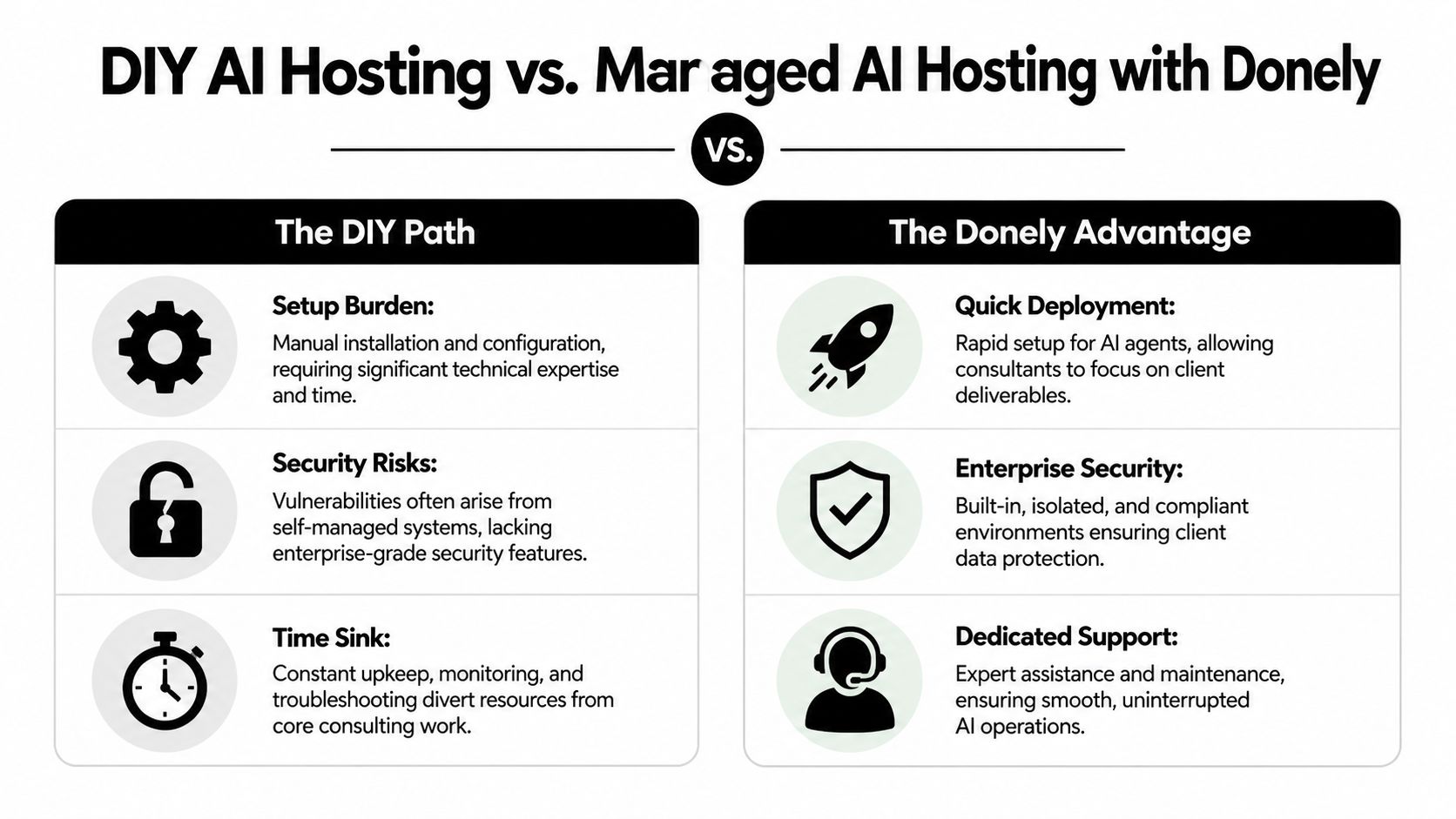
AI Employee Hosting DIY vs Donely
| Feature | Self-Hosted (DIY) | Donely (Managed Platform) |
|---|---|---|
| Setup | Manual environment prep, installation, config, and validation | Launch from a unified platform |
| Client isolation | Must be designed and maintained by your team | Multi-instance architecture built for separate workloads |
| WhatsApp deployment | Requires you to wire channel logic, secrets, and runtime handling | Supported as part of channel connectivity |
| Integrations | Added one by one and maintained manually | Built-in access to 850+ tool integrations |
| RBAC | You define and enforce permission structure yourself | Per-instance RBAC included |
| Audit logging | Requires separate implementation and retention planning | Unified audit logs available across instances |
| Monitoring | Usually spread across several tools | Centralized status, logs, and usage views |
| Billing | Tracked manually across clients and environments | Consolidated billing with growth-friendly administration |
| Operational ownership | Your team carries support and maintenance | Managed platform reduces DevOps overhead |
A platform won't eliminate the need for good consulting judgment. You still need workflow design, client boundaries, escalation logic, and change control. What managed hosting does is keep those tasks from getting buried under operational chores.
Choose the layer where your firm adds value. For most consultants, that isn't container maintenance or log plumbing.
Your AI Hosting Questions Answered
Can I start with one client and expand later
Yes, but only if your first deployment is structured like a repeatable service, not a custom tangle. Start with one isolated client environment, clear permissions, a defined escalation path, and a short list of supported actions. If you build the first client on shortcuts, those shortcuts become your operating model.
What should I evaluate before choosing a platform
Check five things first:
- Isolation model: Can you separate clients cleanly at the instance level?
- Access control: Can you limit internal and client permissions without workarounds?
- Logging: Can you review actions, changes, and failures without piecing data together manually?
- Channel support: Does the platform handle the messaging channels your clients use, including WhatsApp?
- Operational burden: Will your team spend its time advising clients or maintaining runtime systems?
If you want a broader market view before you decide, this guide to AI agent platforms is a useful comparison starting point.
How do I keep client collaboration practical
Keep the collaboration model simple. Give clients visibility into outcomes, not raw infrastructure. Share approved workflows, escalation rules, and auditability expectations. Internally, assign one owner for delivery logic and one owner for governance, even if the same person wears both hats early on.
For consultants, the right decision usually isn't whether AI can help. It can. The main decision is whether you'll run a growing fleet of client AI workers through ad hoc infrastructure or through a system designed for managed, secure deployment.
If you're deploying AI workers over WhatsApp and need client isolation, persistent memory, audit logging, and a cleaner operational model, Donely is worth evaluating as the managed path.