
A searchable event record isn't automatically an audit-ready trail. The useful record connects actor, action, target, time, scope, outcome, and supporting context, so a reviewer can reconstruct what happened without guessing. NIST describes audit trails as records of system and user activity that help detect security violations, performance problems, and application flaws, which is why strong audit log examples capture who did what, when, and from where. NIST's audit logging guidance also helps explain why logs support more than troubleshooting.
The eight examples below cover authentication, agent changes, data access, permissions, billing, integrations, execution, and compliance. Each one focuses on the event's evidentiary value, a practical field template, parsing decisions, and the control it can support. Donely is a useful operating context because isolated instances, scoped data access, per-instance RBAC, integrations, and unified monitoring only work reliably when events use consistent names and fields. Teams managing operator workflows can also manage operator licence compliance online while applying the same accountability principles.
Table of Contents
- 1. User Authentication and Login Events
- 2. Agent Deployment and Configuration Changes
- 3. Data Access and Export Events
- 4. Role-Based Access Control Changes
- 5. Billing and Usage Events
- 6. Integration and Tool Connection Events
- 7. System Performance and Agent Execution Logs
- 8. Compliance and Security Audit Events
- 8-Point Audit Log Events Comparison
- Turn Audit Log Examples Into Controls
1. User Authentication and Login Events
A login record proves that an identity attempted to establish access. By itself, it doesn't prove that the person was authorized to reach every resource afterward, so authentication logs should be correlated with session creation, instance selection, role evaluation, and session termination.
A useful event might look like this conceptually:
- Event name:
authentication.login - Actor: user ID, service account, or API client
- Context: IP address, device identifier, authentication method, SSO provider
- Target: account, tenant, or Donely instance
- Outcome: success, failure, challenge, or denial
- Correlation: request ID and session ID
For an agency administrator logging into Donely, the instance scope matters as much as the username. A record should show whether the administrator entered a client instance, a shared administrative area, or a personal workspace. An SSO event should preserve the relationship between the local session and the corporate identity provider, such as Okta or Azure AD, without storing passwords or raw tokens.
Practical rule: Log authentication attempts, not just successful logins. Failed events often provide the first usable signal of credential abuse.
Turning login records into controls
Parse the outcome as a controlled value rather than free text. This makes it possible to distinguish a wrong password from an expired session, an MFA failure, an IP policy denial, or an API key rejection. Alerting can then focus on patterns that matter, such as repeated failures for one account, unusual source locations, or an API client authenticating against an instance it never used before.
IP allowlists can support per-instance access control, but they can also create operational friction for remote teams and changing networks. Treat them as an additional control, not a substitute for identity verification and RBAC. Review authentication records regularly, and ensure events from agent-connected tools are correlated where the platform supports that relationship. Donely's multi-instance model makes the instance identifier essential, because an administrator's access to one isolated workload shouldn't imply access to another.
2. Agent Deployment and Configuration Changes
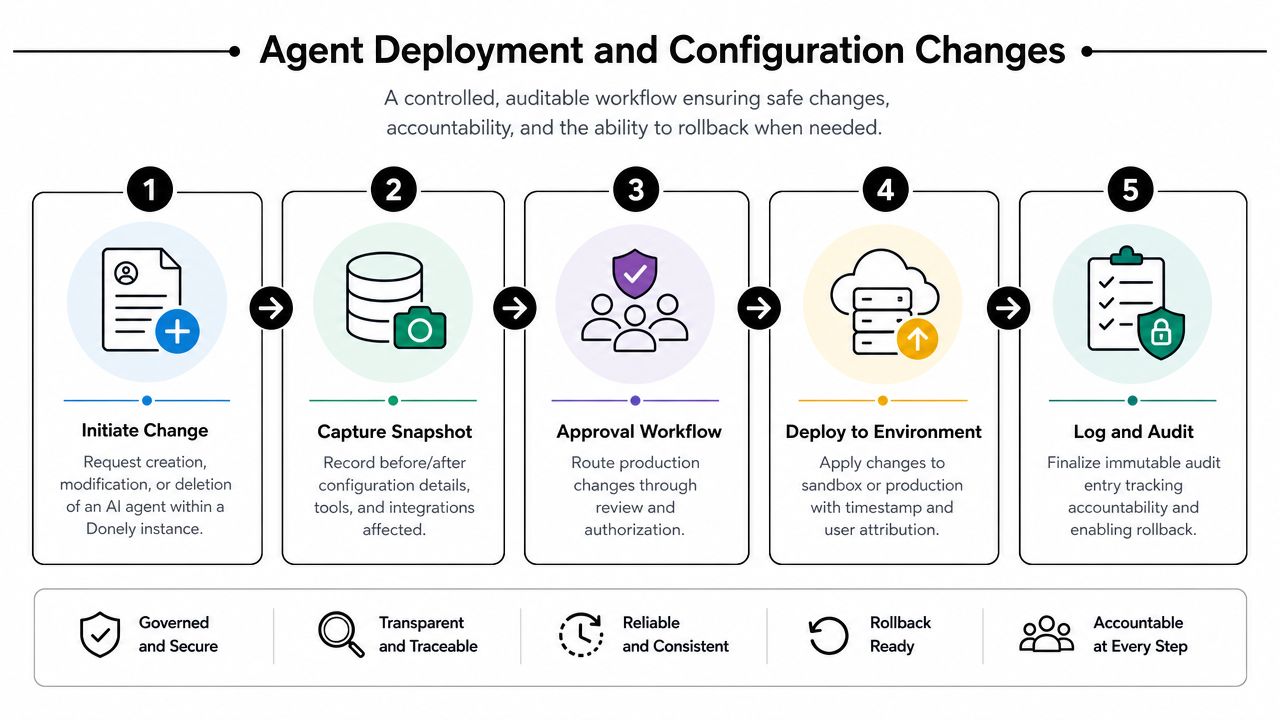
A production agent can change behavior without a traditional software release. A prompt edit, a new tool connection, a changed instruction, or a modified data scope can alter what the agent does, so the audit event must preserve the before and after state or a reliable reference to each version.
A practical deployment record should include:
- Change type: create, deploy, modify, disable, or delete
- Actor: human user, automation account, or deployment service
- Agent identity: agent ID, instance ID, and environment
- Changed components: prompt, model settings, integrations, policies, or data scope
- Version references: previous version, new version, and deployment identifier
- Outcome: approved, rejected, completed, or rolled back
A startup founder launching an agent can create a deployment event. An agency deploying customized agents for separate clients should create distinct records for each instance, even when the underlying template is shared. If a developer adds a Stripe connection to a billing workflow or removes Salesforce from one client's instance, the log should make the affected scope unambiguous.
For teams deploying a Hermes-based agent, the Donely Hermes agent is a relevant example of why deployment history needs to remain connected to the agent identity and operating instance.
Parsing changes safely
Don't parse a prompt or configuration as an unstructured blob if reviewers need to identify the changed field. Emit a normalized change_type, a component, and version references, then store sensitive content separately or represent it with a controlled diff. Secrets, customer records, and personal data shouldn't be copied into an audit message merely because they appeared in a configuration payload.
Approval workflows work best when the log records both the requested change and the final decision. A deployment event without an approver may prove that something changed, but it won't necessarily prove that the change followed governance. Establish change windows for critical agents, alert on production modifications outside those windows, and retain rollback references so an investigator can reconstruct which configuration was active during an incident.
The linked training or setup event also matters. If someone changes the data sources, instructions, or tool permissions used by an agent, record that relationship rather than logging only the final deployment.
3. Data Access and Export Events
Data-access logs answer a question authentication logs cannot: what information did the user or agent reach? The record should distinguish reading, searching, updating, deleting, synchronizing, and exporting because each action carries a different risk and supports a different review.
An agent accessing Gmail to prepare a lead response might generate an event with these fields:
- Actor: agent ID and initiating user or workflow
- Source: Gmail, Slack, Notion, HubSpot, Salesforce, Jira, Zendesk, or Stripe
- Operation: read, query, write, export, or delete
- Resource: mailbox, record type, ticket, file, or dataset
- Scope: instance, customer boundary, and record filter
- Volume indicator: bounded count or size category, without exposing the data
- Outcome: allowed, denied, partial, or failed
- Correlation: workflow, request, and tool-call identifiers
A sales employee exporting contacts from HubSpot needs a different control path from a support agent retrieving one Zendesk conversation. A compliance reviewer may need to verify that a healthcare-related workflow accessed only its authorized data. In a multi-instance platform, a test that confirms Client A cannot access Client B's data should produce a denied event with both the requested scope and the enforced boundary.
Redaction and export monitoring
Field-level masking is safer than deleting the entire event. Mask identifiers that aren't needed for investigation, remove credentials and secrets completely, and retain enough stable metadata to correlate repeated activity. A log that copies full email bodies or payment details may create a second sensitive data store, increasing the harm of excessive access.
Real-time alerts should focus on unusual exports, new data sources, cross-instance access attempts, and access outside an approved workflow. Don't alert on every normal read, or analysts will stop trusting the signal. Store the source tool, permission context, and result code so the team can distinguish an authorized empty result from a failed connector.
Retention should follow the strictest applicable requirement for the data and service. PCI DSS 4.0 requires audit log history to be retained for at least 12 months, with the most recent 3 months immediately available for analysis, as summarized in NIST's audit logging reference. Map that policy to each integrated system rather than applying one blanket setting.
4. Role-Based Access Control Changes
RBAC events prove who changed authority, which account or group received it, what permissions changed, and whether the change succeeded. They're among the most valuable audit logs because a later data-access event can be interpreted only in light of the permissions active at that time.
A role-change event should preserve:
- Initiator: user, administrator, or identity automation
- Recipient: user, service account, group, or instance
- Previous access: prior role and permission set
- New access: assigned role and effective permissions
- Scope: specific Donely instance, integration, resource type, or organization
- Reason: ticket, approval reference, or business justification
- Validity: start, expiry, or removal status
- Outcome: completed, rejected, or partially applied
An agency administrator granting a client manager an agent_creator role should not create organization-wide authority by accident. The event must show the isolated instance where the permission applies. Likewise, promoting a team member from viewer to editor, removing a developer after a project ends, or restricting access to a healthcare workflow should create a durable before-and-after record.
What weak RBAC logging misses
A log that says “role updated” isn't enough. It hides whether the user gained access to billing, production deployment, customer data, or one narrow integration. It also makes access certification difficult because reviewers can't determine what the account could do during a particular period.
Centralized SSO can simplify identity lifecycle management, but it doesn't eliminate application-level authorization. Parse group changes and local overrides separately, then calculate the effective permission set for review. Create role templates for common agency, support, developer, and compliance responsibilities, but log exceptions explicitly.
Review grants, revocations, group changes, and policy updates together. A delayed revocation can leave a former developer with access after a project closes, while an undocumented temporary grant can become permanent. The event stream should support alerts for privileged changes, approval mismatches, and grants outside approved scopes. Keep the access review itself as an auditable event, including reviewer, decision, evidence reference, and unresolved exceptions.
5. Billing and Usage Events
Billing logs turn a charge or plan change into a reconstructable business event. They should connect the customer, plan, instance, usage period, metering source, pricing rule, invoice reference, and payment outcome. Without those fields, a support team may see a total but won't be able to explain how it was produced.
A useful usage record can include:
- Account and instance: customer ID, organization, and isolated workload
- Meter: executions, connected tools, storage, seats, or another billable unit
- Usage period: normalized start and end timestamps
- Quantity: measured value and measurement status
- Plan state: previous and new subscription tier
- Adjustment: discount, credit, refund, or correction reason
- Invoice link: invoice and line-item identifiers
- Outcome: calculated, invoiced, paid, failed, or disputed
An agency needs per-client usage visibility when it allocates costs across isolated instances. A startup changing from a personal workload to a team deployment needs a subscription-change event that records the effective time and the resulting billing scope. A failed payment should be distinct from a temporary metering delay, because the operational response is different.
Making charges defensible
Expose a usage breakdown that matches invoice line items. If a platform applies automatic volume discounts, record the rule evaluation and the account scope, not just the final discounted amount. Don't place payment credentials in the audit record. Store a payment-provider reference and outcome code instead.
Billing events also need access control. Finance staff may need invoice details, while an agent administrator may need operational usage without payment information. Keep those views separate and log administrative access to billing records.
Use threshold alerts for unusual growth, unexpected tool activity, failed payments, and plan changes. A billing log becomes a control when the finance team can reconcile it to the invoice, the customer can understand it, and operations can identify a cost or usage anomaly before it becomes a dispute. Retain corrections rather than overwriting the original event, so the record shows what was calculated first, what changed, who approved it, and why.
6. Integration and Tool Connection Events
An integration event proves that a system gained, changed, tested, or lost the ability to interact with an external tool. That's a security boundary, not merely a configuration detail. A Gmail connection can expose mail, a Salesforce connection can change customer records, and a Stripe connection can touch payment workflows.
The event schema should identify:
- Integration: provider, connector type, and version
- Instance: the Donely workload where access applies
- Operation: add, authorize, test, rotate, disable, or remove
- Actor: user, administrator, deployment service, or automation
- Permission scope: requested and granted capabilities
- Credential reference: key ID or token fingerprint, never the secret
- Health result: connected, rejected, expired, degraded, or removed
- Approval context: ticket, change request, or policy decision
Donely describes integrations across tools such as Gmail, Slack, Notion, HubSpot, Salesforce, Jira, Zendesk, and Stripe. Its integrations page is the relevant product context for an event model that must distinguish tools, permissions, and isolated instances.
Parsing connector state
Keep authorization, configuration, and health as separate event types. A successful OAuth authorization doesn't prove that a later API call succeeded, and a connector health failure doesn't necessarily mean that credentials were revoked. Separate fields make alert routing more accurate.
Maintain a master inventory of active connections and compare it with deployment configuration. Alert when an unused integration remains active, a credential rotates unexpectedly, a production connector is added without approval, or a previously healthy provider begins failing. Test new connections in a sandbox where possible, then create a promotion event when the configuration reaches production.
API key rotation deserves its own record. Include the old and new key identifiers only if the platform can do so safely, and never log the raw value. For multi-instance deployments, record whether the credential is shared, instance-specific, or inherited. Shared credentials can simplify administration, but they make isolation and incident scoping harder.
7. System Performance and Agent Execution Logs
Execution logs explain what an agent attempted and how the workflow ended. They're operational records first, but they become audit evidence when they preserve the initiating request, tool calls, policy decision, result, failure reason, and instance scope.
A practical execution event can include:
- Execution ID: stable identifier for the run
- Agent and instance: deployed identity and isolated workload
- Trigger: user request, schedule, webhook, or upstream event
- Steps: tools called, sequence, and dependency references
- Timing: start, completion, queue, and external-service timestamps
- Outcome: success, failure, timeout, cancellation, or partial completion
- Error: normalized category, provider code, and safe message
- Resource context: bounded usage metadata and service version
A lead-handling agent may call an email system, a CRM, and a ticketing tool in one workflow. If the Salesforce call times out after the email is sent, the record should show the completed step and the failed step rather than collapsing the run into “failed.” That distinction supports safe retries and prevents duplicate customer messages.
Monitoring the execution stream
Normalize provider errors into stable categories such as authentication, authorization, rate limit, timeout, validation, and dependency failure. Preserve the original provider code separately for troubleshooting. Don't place full customer messages or tool arguments into every performance record; retain a protected reference or masked summary when the content isn't needed for operations.
Use aggregation for trends and correlation for incidents. A dashboard can show failure patterns by agent, instance, tool, and version, while an investigator can follow one execution ID across authentication, data access, integration, and deployment records. Separate instance streams prevent a busy client workload from hiding a failure in another deployment.
The University of California, Berkeley security audit logging guideline emphasizes regular collection for active investigations and post-mortem analysis. That principle applies directly to agent execution. If teams collect only error messages after a failure, they lose the successful preceding actions needed to explain the complete chain.
8. Compliance and Security Audit Events
Compliance events record the operation of the control itself. An access review, permission certification, retention enforcement action, policy exception, or security assessment should leave evidence that identifies the control, the scope reviewed, the reviewer, the result, and the follow-up.
A compliance event might contain:
- Control ID: internal control or policy reference
- Review scope: organization, instance, users, integrations, or data class
- Reviewer: named person or approved automation
- Evidence references: linked reports, queries, or exported event ranges
- Decision: passed, failed, exception, or remediation required
- Action owner: accountable person or team
- Due date: remediation target, where applicable
- Integrity metadata: export ID, signing reference, or storage location
A quarterly review of administrator permissions should record which accounts were examined and what the reviewer decided. A retention enforcement event should show the policy applied, the affected log category, and the deletion result without erasing the evidence that the control ran. A security policy check should distinguish “not applicable” from “passed,” because those outcomes have different audit meanings.
Preserving examiner-ready evidence
Write-once or append-only storage can help protect compliance records from silent alteration. Microsoft's service assurance documentation describes audit logs as records of configuration changes and access events, with retention set according to investigation and regulatory needs. Its examples include service data retained for 90 days in Cosmos and 180 days in Kusto, which shows why teams must verify the actual retention behavior of each service rather than assume that a dashboard's visible history is the archive. Microsoft's service assurance audit logging documentation provides that operational context.
Export formats should be structured and reviewable, such as CSV or JSON, with the original event identifiers preserved. Restrict access to compliance exports, include the export actor and time, and store the evidence in a location covered by backup and disaster recovery procedures. Donely's security policy is relevant to teams evaluating isolated containers, scoped access, RBAC, and centralized audit records. For a broader perspective on responsible control design, see this discussion of the governance of AI integrity.

8-Point Audit Log Events Comparison
| Item | Implementation Complexity 🔄 | Resource Requirements ⚡ | Expected Outcomes 📊⭐ | Ideal Use Cases 💡 | Key Advantages ⭐ |
|---|---|---|---|---|---|
| User Authentication and Login Events | 🔄🔄 Moderate, capture attempts, sessions, SSO | ⚡⚡ Moderate, high log volume, PII handling | 📊 Detect unauthorized access; compliance evidence, ⭐⭐⭐ | Multi-instance RBAC, SSO-enabled enterprises, brute-force detection | Forensic trails, compliance support, compromised-credential detection |
| Agent Deployment and Configuration Changes | 🔄🔄🔄 High, snapshots, approvals, config diffs | ⚡⚡⚡ High, large config storage, secure snapshots | 📊 Traceability and rollback; change accountability, ⭐⭐⭐ | Production deployments, governance of agent changes, CI/CD-like workflows | Rollback support, accountability, change history |
| Data Access and Export Events | 🔄🔄🔄 High, track granular data flows and scopes | ⚡⚡⚡ High, extensive access records, classification | 📊 Prevents exfiltration; proves scoped access, ⭐⭐⭐⭐ | HIPAA/GDPR audits, insider-threat detection, per-instance isolation verification | Data-flow visibility, export alerts, compliance evidence |
| Role-Based Access Control (RBAC) Changes | 🔄🔄 Moderate, role hierarchies and syncs | ⚡⚡ Moderate, audit storage, identity sync | 📊 Enforces least privilege; prevents escalation, ⭐⭐⭐ | Access governance, segregation of duties, periodic reviews | Fine-grained access control, rapid revocation, policy enforcement |
| Billing and Usage Events | 🔄🔄 Low–Moderate, metric collection and billing rules | ⚡⚡ Moderate, usage aggregation, billing computation | 📊 Cost transparency; chargeback and discounts, ⭐⭐⭐ | Billing reconciliation, capacity planning, agency chargebacks | Transparent billing, automated discounts, dispute prevention |
| Integration and Tool Connection Events | 🔄🔄🔄 Moderate–High, many connectors, auth flows | ⚡⚡⚡ High, 850+ integrations, credential redaction | 📊 Tracks connections and failures; secures integrations, ⭐⭐⭐ | Managing multi-tool agencies, API key rotation, integration troubleshooting | Integration governance, credential rotation tracking, troubleshooting data |
| System Performance and Agent Execution Logs | 🔄🔄 Moderate, runtime and error capture | ⚡⚡⚡ Very high, volume, indexing, observability tools | 📊 Performance optimization; SLA monitoring, ⭐⭐⭐ | Performance tuning, root-cause analysis, uptime/SLA verification | Failure detection, optimization insights, resource tracking |
| Compliance and Security Audit Events | 🔄🔄🔄 High, tamper-evident, retention policies | ⚡⚡ Moderate, secure storage (WORM), reporting exports | 📊 Audit-ready evidence for regulators, ⭐⭐⭐⭐ | SOC 2 / HIPAA audits, external auditor exports, certification workflows | Immutable audit trail, regulatory reporting, rapid investigation support |
Turn Audit Log Examples Into Controls
Start with an event taxonomy, not a storage product. Define the events that must exist across authentication, deployment, data access, permissions, billing, integrations, execution, and compliance. Give each event a stable name, an owner, a severity, and a clear explanation of what it proves. If a reviewer can't tell whether an event represents an attempt, a decision, an action, or an outcome, the taxonomy needs work.
Standardize the core fields across every source. At minimum, use actor, action, target, scope, outcome, timestamp, and correlation identifier. Add agent ID, instance ID, session ID, request ID, source system, authentication context, and version references where they support investigation. Normalize timestamps to a consistent standard, and normalize event names so login_failed, authentication.failure, and failedLogin don't become three separate search problems.
Treat parsing as a security decision. Redact secrets, tokens, passwords, and unnecessary personal information before events leave the application. Mask sensitive identifiers when analysts need correlation but not the underlying value. Preserve safe references to payloads, prompts, exports, and tool arguments instead of copying unrestricted content into a broadly accessible log store.
Then route high-risk events to action. Privileged role changes, production agent deployments, unusual exports, cross-instance access attempts, credential rotations, repeated authentication failures, policy denials, and integration failures deserve alert rules suited to their risk. Berkeley's guidance supports collecting logs regularly for both active investigations and post-mortem analysis, while forensic research summarized by Splunk evaluates audit-log quality through Lossless, Causality-Preserving, and Attack-Preserving properties. Splunk's audit log overview reinforces the practical point: storing events isn't enough if the record cannot preserve the causal evidence investigators need.
Retention and export rules should be documented per system and data class. PCI DSS 4.0's requirement for 12 months of history, including 3 months immediately available, is one concrete baseline, while other regulated records may require longer organizational policies. Don't rely on a user interface's visible date range as proof of archival retention. Define who can export logs, which formats are accepted, how integrity is checked, and how legal holds or incident preservation override routine deletion.
Prioritize the controls by function:
- Security access: authentication, sessions, API keys, and RBAC changes.
- Change governance: agent deployments, prompts, policies, and integrations.
- Data protection: reads, exports, writes, deletion, and instance boundaries.
- Operations: execution results, failures, latency, and dependency health.
- Billing: usage, plans, discounts, invoices, and payment outcomes.
- Compliance: access reviews, retention enforcement, exceptions, and evidence exports.
For Donely's isolated multi-instance deployments, begin with instance-scoped authentication, role changes, data access, agent configuration, and tool connections. Once those records share correlation identifiers and consistent outcomes, centralized monitoring can connect a user's login to a deployment, the deployment to an agent run, and the run to each external tool call. That's how audit logs become operational controls instead of a collection of disconnected messages.
Donely provides a unified dashboard for hosting, deploying, and managing AI employees, with isolated instances, per-instance RBAC, scoped data access, integrations, centralized monitoring, billing, and audit logs. Visit Donely to evaluate how its multi-instance approach can support accountable agent operations and more consistent audit evidence.