
Your team's shared inbox is already telling on you. Messages pile up overnight, two people answer the same thread with different promises, and the important client note sits buried between newsletters and auto-notifications. That is the moment organizations realize a Gmail problem is not really an email problem, it's an ownership problem.
An AI agent for Gmail only matters if it fixes that ownership gap. Gmail is massive, with 3 billion users reported by Google in January 2026, up from 2.5 billion in December 2024, and Litmus tracked Gmail at 24.11% of email opens in May 2026 (Gmail user scale and open share). If your workflow depends on inboxes, you're operating on one of the biggest communications layers in the world. The question is not whether to automate. The question is whether you're willing to govern the automation properly.
Table of Contents
- The Inbox Problem Every Growing Team Recognizes
- What an AI Agent for Gmail Actually Is
- Core Capabilities That Change Daily Inbox Work
- Where Inbox Automation Quietly Disappoints
- Ways to Build a Gmail Agent and How to Choose
- Security, Compliance, and the Governance Layer That Matters
- Launching and Scaling Gmail Agents With Donely
- Turning a Gmail Agent Into Real Operational Leverage
The Inbox Problem Every Growing Team Recognizes
The failure starts small. A five-person sales team opens Monday morning to a wall of unread mail, three urgent client escalations are buried under newsletters, and one rep replies-all with a price the other rep already discounted. Nobody intended to create a mess. The inbox just became the place where responsibility disappeared.
That happens because shared mailboxes stop behaving like systems once the team grows. People begin using memory, not process, to decide who answers what. Leads go cold because nobody owns follow-up. Senior reps stop checking the shared inbox because they know every thread is a possible cleanup job.
Practical rule: If your inbox needs heroics to stay current, you don't have a productivity problem, you have a routing problem.
This is why the usual advice, templates, snippets, “just check it more often,” misses the point. Templates don't assign ownership. They don't preserve context. They don't stop duplicate outbound messages or prove why a response was sent the way it was.
The right mental model is closer to alert management than email etiquette. If you want a useful parallel, reduce alert noise with Fivenines and notice how value comes from routing, suppression, and accountability, not just prettier notifications. An AI agent for Gmail should do the same thing for inbox work, turn a firehose into a routable workflow with clear ownership, predictable response behavior, and an audit trail you can trust.
What an AI Agent for Gmail Actually Is
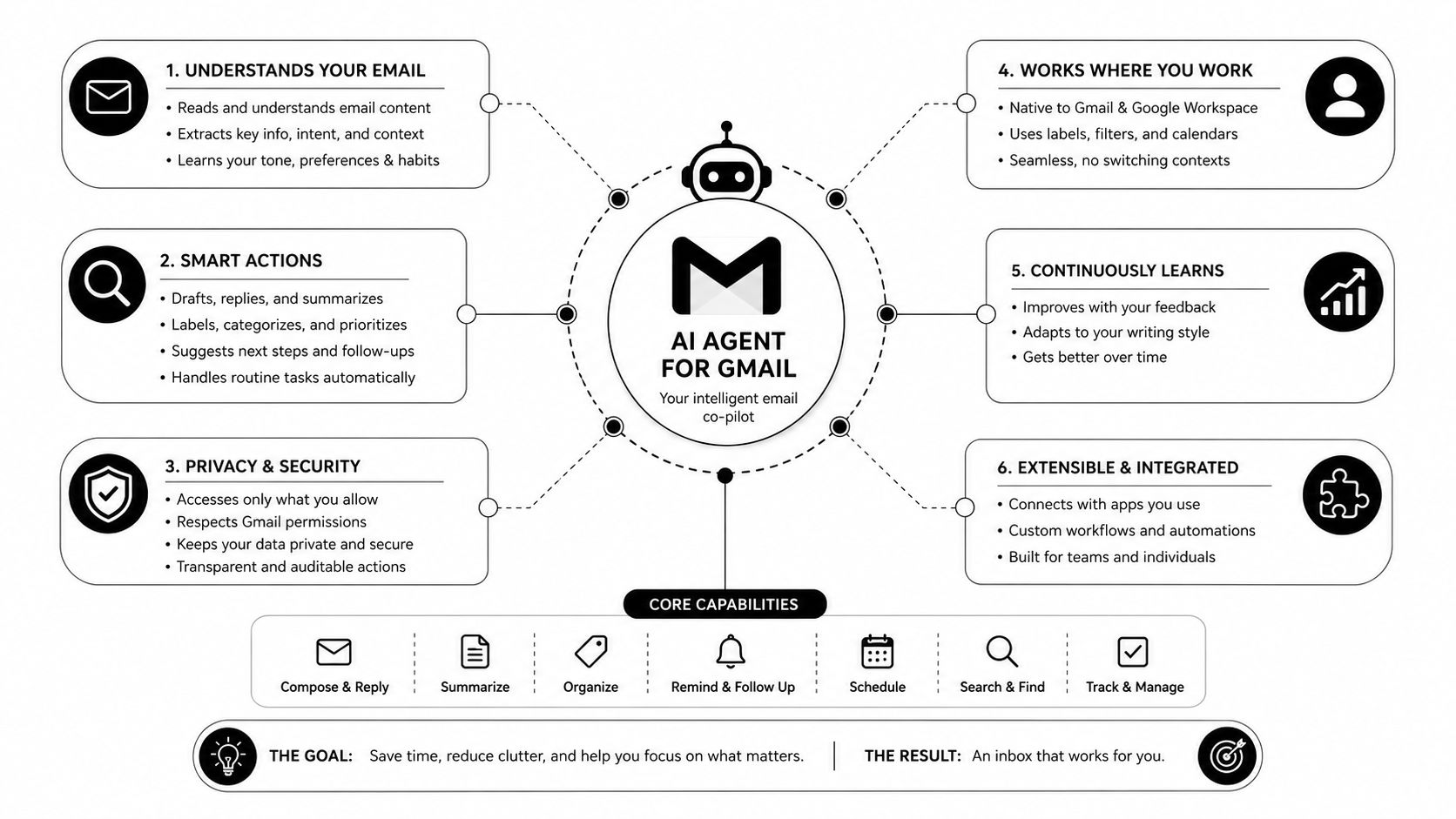
An AI agent for Gmail is not a chatbot sitting beside your inbox. It's a persistent service with its own identity that reads mailbox state through the Gmail API, reasons over thread context, and takes actions under policy. It can label, draft, send, schedule, or escalate, but only within the limits you set.
Start with triggers, not vibes
The clean model is simple. A trigger arrives, like a new thread, a label change, or an SLA breach. The agent pulls context, classifies the message, decides what action is allowed, and writes the result through OAuth-scoped APIs. That means the system is continuous, not on-demand, and the policy lives with the agent instead of being scattered across human memory.
A macro does not do that. A Gmail filter does not do that. A browser extension that auto-responds outside the permission model does not do that either. Those tools are deterministic and brittle. They can't interpret intent or adapt when the thread changes shape.
Identity and audit belong to the agent
That distinction matters because the agent should be accountable as a system component. If it drafts a reply, you should know which policy allowed it. If it escalates a thread, you should know why. If it sends on behalf of a team, the identity should be consistent, logged, and reviewable.
The inbox is not a note-taking app. It's an execution surface. Treat it that way, or the agent will feel clever in a demo and reckless in production.
That's the mental model to keep. A real AI agent for Gmail is persistent, policy-bound, and observable. Everything else is just inbox decoration.
Core Capabilities That Change Daily Inbox Work
The useful capabilities are operational, not flashy. Triage decides who owns the thread. Drafting decides what gets said. Scheduling decides whether the meeting happens without back-and-forth. Lead follow-up decides whether warm opportunities go cold. Templating decides whether the message sounds like your team or like a mass-mail blast.
Triage that routes work, not just folders
A good agent reads intent and routes by business meaning. A billing dispute goes to finance. A sales lead goes to the correct rep. An internal FYI gets labeled and parked. That eliminates missed escalations and prevents the “I thought someone else had it” problem that kills response discipline.
Drafting that uses thread context
A weak auto-reply sounds generic. A useful one pulls context from the thread, a CRM record, or a knowledge base, then drafts a response for human review when the account is sensitive. That cuts down on blank-page time without handing the keyboard to software that doesn't understand your account rules.
Templating at scale without sounding templated
Mail-merge tokens are not enough. A real agent can generate a personalized opening and closing from a structured brief, so the message stays specific even when the workflow is standardized. That matters because generic outreach is usually worse than no outreach.
Lead follow-up that doesn't depend on memory
When a thread stalls, the agent should surface it in a daily queue, draft a check-in, or hand it to the right owner. The failure mode it removes is simple, dropped leads. People don't ignore prospects on purpose, they lose them in the chaos of the day.
Scheduling that finishes the thread
An effective scheduling flow reads availability, proposes slots, and books the meeting without forcing a separate tool hop. That reduces reply chains that sprawl across days and makes the inbox behave like an actual workflow, not a negotiation log.
| Capability | What It Does | Failure Mode It Eliminates |
|---|---|---|
| Triage | Reads intent and routes threads to the right owner or queue | Missed escalations |
| Drafting | Builds context-aware replies from thread history and connected systems | Generic outreach |
| Templating | Produces personalized email text from structured inputs | Stale, robotic messaging |
| Lead follow-up | Detects stalled threads and surfaces them for action | Dropped leads |
| Scheduling | Proposes and books meetings from the thread | Endless back-and-forth |
The point is not to automate everything. The point is to remove the repetitive failure modes that eat response quality and make inbox ownership unstable.
Where Inbox Automation Quietly Disappoints
Most inbox automation looks excellent in the first demo and mediocre by week three. The model isn't usually the problem. The workflow is. Teams attach a reply drafter to a triage process that was already broken, then blame the tool when edge cases slip through.
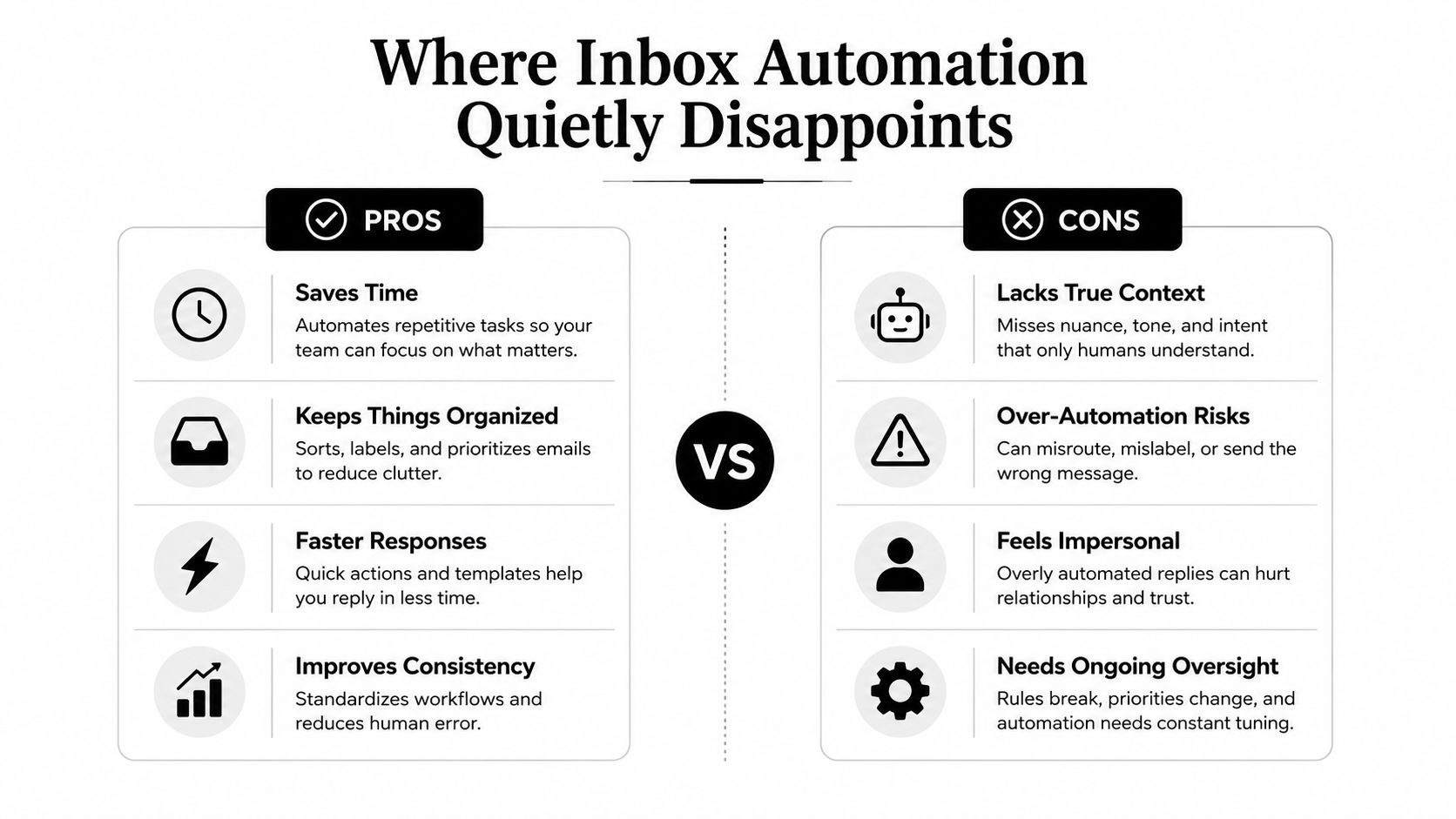
A classifier also drifts when senders change phrasing. A template that worked last quarter can sound tone-deaf now. Scheduling agents can double-book when two requests overlap in the same thread. Lead follow-up loops can still fire after a prospect has unsubscribed if that suppression logic sits in the CRM and not in the inbox workflow.
That last mistake is common. Teams automate the message, but not the policy. The agent happily drafts or sends because nobody taught it where the guardrails live. Then operators lose trust, start ignoring the suggestions, and the whole system becomes shelfware.
If you want to sanity-check outbound quality before you let automation loose, a spam word checker is a useful baseline tool, but don't confuse deliverability hygiene with workflow design. The bigger problem is not whether a sentence is flagged. The bigger problem is whether the right person should have received the thread in the first place.
Don't automate a broken process.
Fix ownership, suppression, and approval flow first, then let the agent accelerate it.
That's the lesson. Inbox automation disappoints when it's treated as content generation. It works when it's treated as workflow control.
Ways to Build a Gmail Agent and How to Choose
There are three paths teams end up evaluating. The right choice depends on who owns the inbox, who owns the risk, and how many separate mailboxes you need to govern.
| Criterion | Native Gmail API | n8n / Glue Tools | Donely (Managed) |
|---|---|---|---|
| Control | Highest | Moderate | High, with platform constraints |
| Setup speed | Slowest | Fast | Fast |
| Multi-instance governance | You build it | Weak | Built in |
| OAuth handling | Your burden | Your burden | Managed |
| Auditability | You design it | Usually partial | Centralized |
| Best fit | Compliance-heavy custom systems | Single internal workflow | Agencies, shared inbox fleets, multi-team ops |
Native API when compliance is the product
Use the native Gmail API if your team needs total control over logic, prompts, and data handling. That comes with real work. OAuth scope management is your problem. Prompt-injection defense is your problem. Logging, rollback, and instance separation are your problem too.
Glue tools when the scope stays narrow
n8n, Make, and LangChain-style orchestrators are useful for quick prototypes. They get a single mailbox moving fast. They also get brittle when token refreshes, edge-case threading, or multi-client governance enters the picture.
Managed platforms when inboxes multiply
When the goal is to run many isolated Gmail-connected agents, managed infrastructure makes more sense than hand-rolled plumbing. Donely, for example, is built to host multiple isolated instances with shared monitoring and billing, which is why it fits agency-style workflows better than a one-off bot. If you're mapping Gmail work into the rest of a revenue stack, automate sales navigator gmail workflow is a useful lens on how email stops being a standalone channel and becomes part of a larger execution path.
Donely's Hermes agent is the internal reference point if you want to see how that kind of managed orchestration is positioned.
Choose native when the system itself is your product. Choose glue when the mailbox is isolated and the risk is low. Choose managed when you need repeatability across customers, brands, or business units.
Security, Compliance, and the Governance Layer That Matters
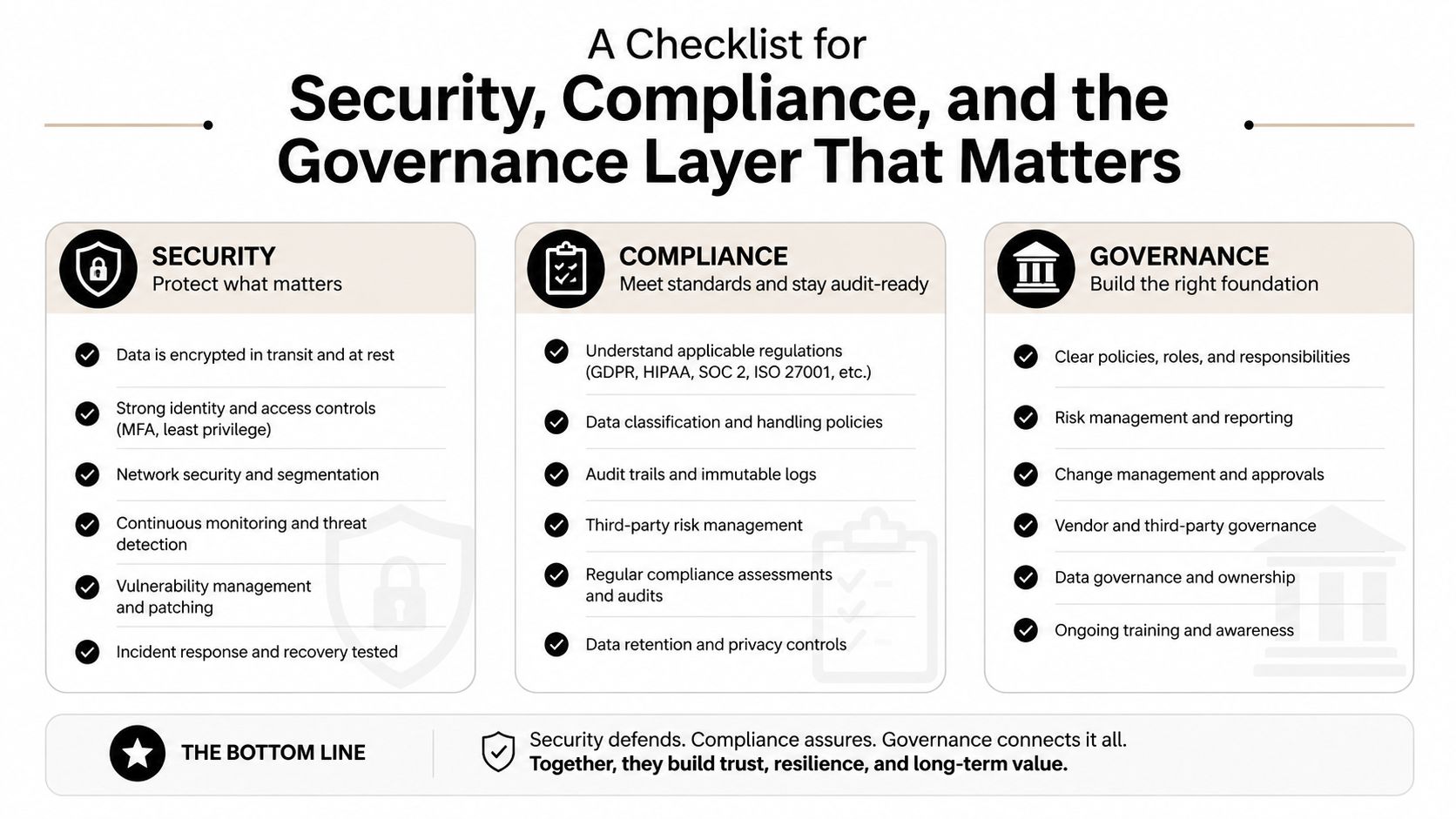
The governance layer is the product. If you are letting an agent read, classify, draft, or send email, you are exposing one of your most sensitive data surfaces to automation. That means least privilege, per-inbox permissions, and full observability are nonnegotiable.
Scope the access tightly
Request only the Gmail permissions the agent needs, not broad mailbox control by default. If the agent only drafts, don't give it send rights. If it only reads and classifies, don't let it execute. The error is treating permissioning like a setup detail instead of the core design decision.
Put RBAC on the inbox, not just the workspace
Role-based access should follow the mailbox boundary. A contractor handling client A shouldn't see client B just because both mailboxes live in the same admin console. This matters more as teams scale across agencies, departments, and temporary operators.
Log every meaningful action
Every draft, classification, and send should write to an immutable audit log with actor, prompt version, and confidence. If you ever need to explain why the agent took a step, that log becomes the difference between a controlled system and an undocumented risk.
Treat inbox content as untrusted input
Prompt injection is not theoretical. An email body can contain hidden instructions, malicious formatting, or bait designed to redirect the agent. The safe approach is simple. Sandbox the content, strip instructions that are not part of the workflow, and never let raw message text act like a command channel.
Google's 2025 guidance on securing AI agents calls out exactly this kind of runtime control, with emphasis on human controllers, tight powers, and observability, and it also reflects the shift toward inventory and posture controls as agent sprawl grows (Google's agent security guidance).
Donely's security policy is the relevant reference if you want to see how these controls are expressed in a managed platform.
Launching and Scaling Gmail Agents With Donely
Start with one mailbox and one workflow. Connect a Google Workspace account through OAuth in the Donely console, pick a starter agent for lead qualification, support triage, or follow-up drafting, then bind it to a label or shared inbox. Run it on a limited traffic slice first and watch the drafts, escalations, and replies before you widen the blast radius.
The launch sequence should be boring. That's the point.
- Connect the mailbox. Keep the scope narrow and tie the instance to one inbox or one team queue.
- Choose the workflow template. Start with the job you already understand, not the fanciest demo.
- Set the review rule. Decide what gets drafted, what gets held, and what must always be approved.
- Observe the logs. Check the audit trail, failure reasons, and rollback points before expanding traffic.
- Clone only what's stable. Once the agent behaves, duplicate it for another brand, region, or business unit and override only the variables that differ.
That cloning step is where managed orchestration starts to matter. A single agent for one inbox is convenient. A fleet of isolated instances with shared billing, per-instance controls, and central logs is operational infrastructure. Donely's model is built around that separation, so one client mailbox doesn't bleed into another and one bad prompt pack doesn't contaminate the whole account.
If you're scaling, watch the operational basics. A platform with a 99.9% uptime SLA and centralized billing is easier to run than a patchwork of scripts and webhooks, especially when multiple teams depend on the same workflow. If draft quality drops, the rollback path should be obvious, and the kill switch should be per agent, not system-wide.
The other scaling mistake is prompt drift. Teams launch one good agent, then manually fork it six times and wonder why performance becomes uneven. Donely's multi-instance setup avoids that by letting you inherit the base configuration and only change the parts that vary.
Turning a Gmail Agent Into Real Operational Leverage
A solo Gmail agent that drafts replies for one person is a convenience. A managed fleet of Gmail agents that routes, drafts, follows up, and escalates across shared inboxes is infrastructure. That difference matters because infrastructure compounds, convenience gets ignored.
The leverage comes from three places. First, shared inbox ownership becomes explicit instead of tribal. Second, prompt packs evolve across every instance instead of getting copied and forgotten. Third, audit trails give leadership a reason to trust the output instead of asking people to “just verify it manually.”
That is also why the best deployments stop thinking in terms of a person with a smarter inbox. They think in terms of a team with a controlled execution layer. Once the inbox is an auditable workflow surface, the agent can route work, preserve context, and make follow-through consistent across the organization.
Donely's company brain is the cleanest way to think about that shared layer if you want one memory and one control plane across instances.
Choose the platform that makes the inbox governable, not just faster. If the agent can't be audited, scoped, and scaled, it's not operational. It's just a nicer way to lose track of email.
If you want to stop treating Gmail automation like a one-off hack and start running it like shared infrastructure, visit Donely. You can launch isolated, auditable Gmail agents, manage them from one dashboard, and scale the workflows that move the business instead of just cleaning up the inbox.