
If you're running agency operations right now, you've probably already hit the wall. One client wants an AI support rep in Zendesk. Another wants lead qualification inside HubSpot. Your internal team is testing agents in Slack, Jira, and Gmail. Every setup has a different login, a different permission model, and a different failure mode.
That works for a pilot. It doesn't work when you have multiple clients, multiple departments, and real accountability attached to every response an agent sends. At that point, AI stops being a tool experiment and becomes an operations problem.
The question isn't whether agencies will manage AI workers. It's whether they'll do it through scattered point solutions or through hosted AI employee platforms built for control, isolation, and scale.
Table of Contents
- Why AI Workforce Management Is Now Critical for Agencies
- Understanding Hosted AI Employee Platforms
- Core Capabilities of an AI Orchestration Platform
- How to Evaluate AI Employee Platforms for Your Agency
- Real-World Use Cases for Managed AI Agents
- Putting It All Together A Solution Example
- Deploying Your AI Workforce with Confidence
Why AI Workforce Management Is Now Critical for Agencies
Most agencies don't start with a platform decision. They start with urgency.
A client asks for faster response times. An account team spins up a chatbot. Someone in ops tests an internal assistant for reporting. A strategist connects a model to Slack. Before long, the agency has AI in production, but no shared view of who owns what, where client data flows, or which agent has access to which system.
That's where the trouble starts. Not in the demo. In the second month, when three teams build similar workflows three different ways.
Adoption moved faster than agency governance
The pace of workplace adoption is the reason this category matters now. By 2024, 75% of surveyed workers were already using AI tools at work, and 46% had started within the prior six months. The technology sector reached 78% overall AI tool usage, according to Worklytics analysis of workplace AI adoption benchmarks.
Agencies feel that acceleration more sharply than many other teams because they manage layered environments. They have internal operations, client-facing delivery, and often client-specific compliance requirements at the same time.
Agencies don't just need AI output. They need a way to operate AI labor across accounts without turning every new deployment into a security exception.
The operational problem isn't model quality
In practice, the pain usually has less to do with prompts and more to do with administration.
A few common failure points show up fast:
- Siloed credentials: One account manager controls a critical bot login, and nobody else can safely administer it.
- Mixed client environments: An agent built for Client A gets copied for Client B, but permissions and connected data aren't fully reset.
- No billing clarity: Usage costs show up across separate vendors and separate users, making margin tracking messy.
- No governance trail: When a client asks what an AI worker accessed or produced, the agency has no clean audit path.
What changes when you treat AI as a workforce
Hosted AI employee platforms matter because they shift the operating model. Instead of managing disconnected agents one by one, the agency manages a fleet.
That means a single place to launch agents, separate them by client, assign access by role, watch logs, and control spend. For operations leaders, that changes AI from a collection of clever experiments into a governed service line.
For agencies, that's the difference between selling AI work and reliably delivering it.
Understanding Hosted AI Employee Platforms
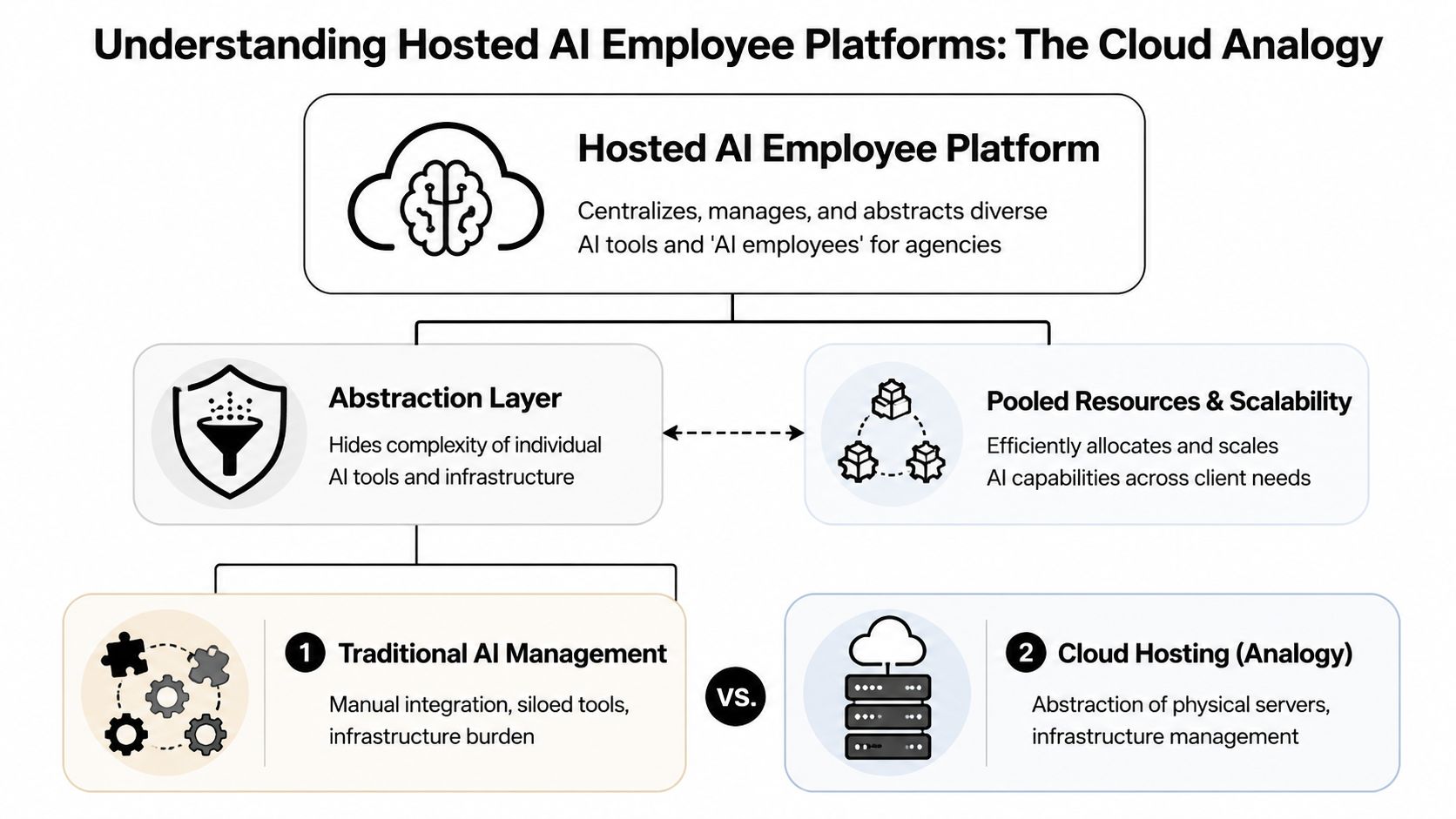
A lot of buyers get confused because the market uses overlapping language. AI assistants, copilots, agents, automations, orchestration layers. The easiest way to understand hosted AI employee platforms is to compare them to cloud hosting.
You don't buy AWS because you want to invent the server. You buy it because you want infrastructure, deployment, and scaling handled in a way your team can operate. AI employee hosting works the same way. The goal isn't to train foundation models. The goal is to deploy, govern, and run AI workers without building your own infrastructure stack from scratch.
What the platform is actually doing
At a practical level, the platform sits between your team and the complexity underneath.
It handles the parts that agencies usually don't want to own directly:
- Provisioning environments for each AI worker or client deployment
- Managing connections to tools like Slack, Salesforce, Zendesk, Gmail, or Jira
- Applying permissions so the right people can manage the right agents
- Centralizing monitoring so ops can see what is running and where issues live
- Reducing DevOps overhead so account teams aren't waiting on engineering for every launch
If you're still deciding how much of this work should be custom versus managed, this AI Agent Studio guide is a useful reference for understanding how teams approach agent building versus operational deployment.
What it is not
This category is not primarily about model R&D.
A hosted platform doesn't replace your judgment about use cases, workflows, escalation paths, or client communication standards. It doesn't make weak processes strong. If your support workflow is broken, the platform will help you deploy the agent faster, not fix the underlying process for you.
That's why agencies should think in terms of control plane, not chatbot builder.
Practical rule: If a vendor spends most of the demo talking about prompt quality and very little time on access control, instance separation, logs, and billing, it's probably not built for agency operations.
Why agencies care about the control plane
The primary value is fleet management.
An agency might need one internal AI worker for delivery operations, one for new-business qualification, and separate client-facing agents for support, lead routing, and reporting. A proper AI employee platform for agencies gives ops one surface to manage those deployments without forcing every team into a separate account structure.
One example of this operating model is Donely AI employees, which presents AI workers as hosted instances rather than disconnected one-off bots. That approach is what agencies should be evaluating across the category.
The best way to think about it is simple. Cloud hosting abstracted server management for websites. Hosted AI employee platforms abstract agent infrastructure for AI workforces.
Core Capabilities of an AI Orchestration Platform
Once you move past the category definition, the buying criteria gets more concrete. A serious AI agent orchestration platform needs to do more than launch an agent with a nice interface. It needs to support multi-client operations under real delivery pressure.
The biggest mistake I see agencies make is choosing based on surface-level convenience. The polished demo matters less than the platform architecture behind it.
Multi-instance isolation is not optional
If your agency serves multiple clients, you need hard boundaries between deployments.
According to NICE's enterprise AI architecture overview, enterprise-grade multi-tenancy depends on a layered design that includes isolated container environments, per-instance RBAC, and unified audit logs, and that structure is what enables platforms to cut deployment friction from months of setup to sub-two-minute agent launches while keeping strict data boundaries between clients.
That matters because agencies constantly reuse patterns. You may deploy a support agent for three clients in the same vertical. The workflows can look similar, but the data, integrations, and permissions cannot bleed together.
The must-have capabilities
Here are the features that separate a real fleet management system from a lightweight wrapper:
- Isolated instances: Each client deployment should run in its own environment with scoped access to connected systems and data.
- Granular RBAC: Your support lead shouldn't automatically get admin visibility into every client agent. Permissions need to map cleanly to roles.
- Unified audit logs: When something goes wrong, ops needs a clear record of actions, outputs, and administrative changes.
- Integration coverage: Agencies rarely deploy agents into a clean stack. The platform needs to connect to the messy reality of Slack, Zendesk, Salesforce, HubSpot, Gmail, Jira, and similar systems.
- Centralized monitoring: You need one place to check status, failures, and workload behavior across all active agents.
- Consolidated billing: Client work becomes hard to price when usage lives across fragmented vendors and user-owned subscriptions.
What works and what doesn't
What works is a platform that lets ops standardize the parts that should be standard, while isolating the parts that must stay separate.
That usually means:
- a repeatable launch process
- reusable templates
- per-client environments
- role-specific access
- logs that compliance or account leadership can review
What doesn't work is the common shortcut of managing client AI work through shared workspaces or loosely separated projects. That may look efficient at first. It usually creates confusion around credentials, ownership, offboarding, and accountability.
Shared convenience becomes shared risk the moment one team member connects the wrong data source or grants the wrong level of access.
Architecture shows up in day-to-day operations
This isn't abstract infrastructure talk. Architecture affects routine agency work.
If the platform handles tenant isolation well, onboarding a new client becomes a controlled process. If it handles RBAC well, agency staff changes don't create access chaos. If it handles logs well, client reviews stop turning into forensic exercises across five different tools.
A good platform also keeps orchestration close to execution. Your AI agent workforce management layer shouldn't just tell you that an agent exists. It should tell you whether it's healthy, connected, and behaving within policy.
For agency operators, that's the bar. Not whether the platform can launch one clever agent. Whether it can help you run dozens without creating a governance mess.
How to Evaluate AI Employee Platforms for Your Agency
Vendor demos tend to blur together. Everyone promises automation, scale, and easy deployment. The useful evaluation work starts when you force the conversation back to agency realities: client isolation, approval chains, billing, compliance, and support.
One fact should sharpen that lens. 57% of workers admitted to undisclosed AI use at work, which is exactly why platforms with strong audit logs and per-instance data scoping matter for compliance-sensitive teams, as noted in this Business Insider report on undisclosed AI use.
The questions worth asking in a demo
Don't ask only what the agent can do. Ask how the platform behaves when your agency structure gets messy.
Use questions like these:
- Client separation: Can we run separate client deployments without separate accounts or awkward workarounds?
- Permission control: Can we give an account lead visibility into one client instance without exposing others?
- Auditability: Can we review administrative actions and agent activity in one place?
- Integration fit: Does the platform connect to the systems our clients already use, or are we buying future promises?
- Escalation design: How does the agent hand work off to a person when confidence is low or a policy threshold is hit?
- Commercial clarity: Can finance understand usage by client, team, or deployment without manual reconciliation?
AI Platform Evaluation Checklist for Agencies
| Criteria | What to Look For | Why It Matters for Agencies |
|---|---|---|
| Client isolation | Dedicated instances, scoped data access, clean separation by account | Prevents cross-client exposure and simplifies governance |
| Access control | Per-instance RBAC tied to agency and client roles | Keeps teams productive without over-permissioning |
| Audit visibility | Unified logs for actions, outputs, and config changes | Helps with compliance reviews and client accountability |
| Integration depth | Support for the systems your clients already run | Reduces custom work and deployment friction |
| Billing controls | Centralized invoicing and usage visibility | Protects margin and makes client chargeback practical |
| Operational simplicity | Fast deployment without custom infrastructure work | Keeps launches from depending on scarce engineering time |
Total cost is broader than subscription price
A cheap platform gets expensive fast if your team has to patch around missing controls.
The hidden costs usually show up in four places:
- Ops labor spent managing logins, access, and environment setup
- Engineering time pulled into integrations or troubleshooting
- Client risk when data boundaries aren't clear
- Margin leakage when usage can't be assigned cleanly
For pricing review, I always want to see how the vendor expects teams to scale from one deployment to many. A pricing page like Donely pricing for hosted deployments is useful not because list prices answer everything, but because it reveals whether the vendor has thought through scaling paths, plan boundaries, and enterprise controls.
Buy for the operating model you'll need in six months, not the demo you'll admire for six minutes.
A platform that supports one pilot elegantly can still fail your agency if it can't support repeatable deployment across a portfolio of clients.
Real-World Use Cases for Managed AI Agents
The strongest use cases are usually boring in the right way. They remove repeat work, tighten response loops, and keep people focused on exceptions instead of routine volume.
Agencies don't need abstract AI potential. They need deployable services they can run for clients without creating a support burden for themselves.
Three patterns that hold up in delivery
A customer support deployment is one of the clearest examples. One client may need an AI worker tied only to that client's Zendesk environment, trained on approved support material, and instructed to escalate billing or cancellation issues to human staff. Another client may need the same broad pattern, but in a different system with different approval rules. The business value isn't just speed. It's consistency and containment.
Lead handling is another strong pattern. An agent can qualify inbound interest, ask follow-up questions, and route validated leads into the client's CRM. For teams exploring that workflow in sales environments, this AI SDR guide for B2B teams gives useful context on where AI-driven qualification fits and where human sales still needs to stay involved.
Internal agency operations are often the easiest win. A delivery ops agent can summarize project changes, prepare status updates, or triage repetitive internal requests in Slack or Jira. Those deployments are lower risk and help the agency build operating discipline before expanding into client-facing workflows.
Why small business clients are a real opportunity
This category isn't only for enterprise accounts.
According to Appalach's reporting on underserved small business AI demand, 65% of small business owners in underserved communities view AI tools as important, which is 11 points higher than their peers, yet many still deal with operational pain like delayed quotes and similar service breakdowns.
That matters for agencies because small businesses often don't need a giant transformation program. They need one or two managed AI agents that answer inquiries, follow up consistently, and reduce everyday friction.
Where orchestration matters most
The value rises when agencies run several agents together instead of shipping one isolated bot.
A practical setup might include:
- A front-door agent that captures inbound demand
- A qualification agent that enriches and routes leads
- A service agent that answers common support questions
- An internal coordinator that updates the delivery team
For teams thinking in those terms, multi-agent orchestration use cases are a good reference point for how these deployments can be grouped without losing control.
What matters is that each agent has a clear job, a defined boundary, and a controlled handoff path. When agencies skip that discipline, "managed AI agents" turns into a bundle of half-owned automations nobody fully trusts.
Putting It All Together A Solution Example
It helps to evaluate one real platform against the criteria above, not because one tool is the answer for every agency, but because concrete examples expose what matters.
A useful benchmark is a platform that combines multi-instance deployment, centralized operations, and governance controls in one system. That's the profile agencies should be comparing across the market.
Exploding Topics reports that 42% of businesses with more than 1,000 employees are using AI, while most organizations are still in piloting phases, which is why demand is moving toward unified platforms with zero-DevOps deployment, RBAC, and high-uptime service models that can scale from pilot to broader workforce use, as summarized in this enterprise AI adoption overview.
What a practical agency-ready setup looks like
A platform in this category should let an agency do a few things cleanly:
- launch separate AI employees for internal, client, and business workloads
- keep those deployments isolated without forcing separate accounts
- connect agents to common business tools
- give operations one dashboard for status, logs, and billing
- apply role-based control at the instance level
Those capabilities matter more than surface polish because they map directly to delivery risk.
One example of the model in market
Donely is one example of this hosted approach. It offers a unified platform for deploying and managing OpenClaw-powered AI employees, with multi-instance architecture, per-instance RBAC, isolated containers, scoped data access, unified audit logs, centralized monitoring and billing, integrations to a large tool library, and a stated 99.9% uptime SLA across its managed offering, based on the product information provided by the publisher.
That combination is what agencies should look for in any comparable vendor. Not the brand name. The operating characteristics.
Here's a product walkthrough for teams that want to see how this category looks in practice before building an evaluation shortlist.
How to use an example without turning it into a sales decision
A concrete platform example is useful if you treat it as a checklist.
Look at whether the platform:
- supports isolated client environments
- removes deployment friction
- offers role-based admin structure
- centralizes logs and cost tracking
- provides a path from one agent to many
If the answer is yes, it's worth deeper review. If the answer is vague, the platform probably isn't mature enough for agency-scale AI employee hosting.
The buying decision should still come down to your client mix, integration needs, governance obligations, and margin model. But using one tangible platform as a reference makes the trade-offs easier to see.
Deploying Your AI Workforce with Confidence
Agencies don't need more disconnected AI tools. They need a system for operating AI labor across client work, internal workflows, and growing compliance pressure.
That's why hosted AI employee platforms matter. They bring structure to deployment, control to access, visibility to operations, and discipline to scaling. Without those basics, agencies end up selling AI services on top of a shaky operating model.
The practical path is straightforward.
Start with the workflows that are repetitive, measurable, and easy to bound. Insist on instance isolation. Require audit visibility. Make billing and ownership clear from day one. Treat AI agents like production staff, not browser experiments.
The winning agencies in this cycle won't be the ones that test the most agents. They'll be the ones that can deploy, govern, and maintain them reliably across accounts.
If you're evaluating vendors in 2026, keep the bar high. Look for strong fleet management for AI agents, not just launch speed. Look for governed AI agent workforce management, not just automation demos. Look for a platform your ops team can run after the solutions engineer leaves the call.
That shift is what turns AI from scattered tooling into a dependable service capability.
If you're comparing hosted AI employee platforms and want a concrete reference point, take a look at Donely. It's a managed platform for deploying and governing AI employees across separate workloads from one dashboard, which makes it a useful option for agencies that need isolated client environments, centralized monitoring, and less DevOps overhead.