
You're probably staring at a process that worked fine when the team was small, then started breaking the moment volume picked up. Leads get duplicated, approvals sit in inboxes, support requests bounce between tools, and every “quick fix” turns into another brittle handoff someone has to babysit.
That's the starting point for how to automate workflows. The goal isn't to replace every manual step, it's to decide which parts of the process can run safely without constant human attention, and where automation should stop so your team doesn't inherit a new class of problems. The companies that do this well treat workflow automation as operational infrastructure, not a productivity trick.
Table of Contents
- Why Most Workflow Automation Projects Stall
- Mapping and Selecting the Right Processes to Automate
- Designing Triggers, Integrations, and Agent Orchestration
- Security, Access Control, and Data Isolation Best Practices
- Testing, Monitoring, and Scaling Your Automations
- Real-World Automation Deployments Across Team Sizes
- Building Your Automation Roadmap and Knowing When to Stop
Why Most Workflow Automation Projects Stall
A founder launches a lead-routing automation on Friday afternoon, then spends Monday answering Slack messages about missing assignments, duplicate records, and a sales rep who never saw the handoff. The workflow looked clean in the demo. In production, one messy edge case turned into hidden support load, and the team stopped trusting it.
That failure usually has nothing to do with the tool. It happens because the process was never scoped tightly enough, the exception paths were never defined, and nobody agreed on who owns the workflow when it breaks. That's why the better framing for how to automate workflows isn't “what can I connect?”, it's “what should this system do when the input is weird, incomplete, or late?”
Automation is an infrastructure choice
Workflow automation has clearly moved past simple convenience. McKinsey research, cited in industry summaries, says about 50% of work activities can be automated, while only 31% of businesses had automated at least one function in the referenced survey, and just 4% had fully automated workflows in one 2026 compilation. The same source also places the global workflow automation market at USD 26.01 billion in 2026, rising from USD 23.77 billion in 2025 and projected to reach USD 40.77 billion by 2031 at a 9.41% CAGR. The gap between what can be automated and what is automated shows why this is no longer a niche efficiency tactic, it's a core operating layer. workflow automation statistics
That shift changes the implementation mindset. A demo can route a form submission. Production has to deal with stale records, overlapping ownership, approval delays, and failures that need a human fallback. For a practical example of how teams connect motion in the revenue process, the idea behind streamline deal momentum with automation is useful because it reflects the same truth, automation only creates value when the handoff is dependable.
Practical rule: if a workflow failure would create support noise, compliance risk, or client confusion, design the exception path before you automate the happy path.
The teams that scale don't ask whether a workflow can be automated. They ask where the workflow should stop, who gets notified when it stalls, and what gets rolled back if the first version behaves badly.
Mapping and Selecting the Right Processes to Automate
Start with the process, not the tool
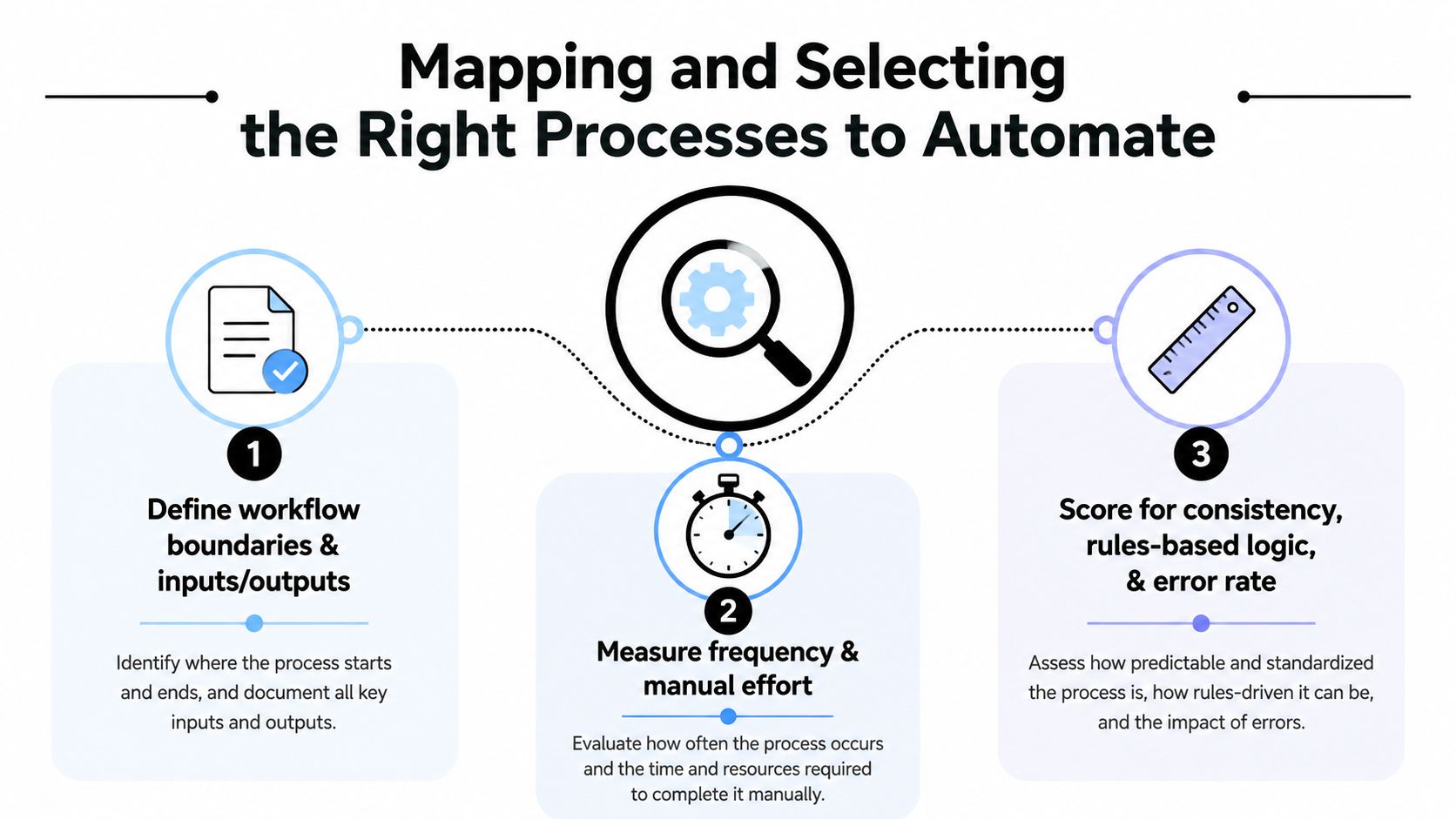
The cleanest automation builds come from ugly process maps. Before touching software, write down every step, every decision point, every handoff, every re-entry of the same data, and every place someone usually makes the same mistake twice. If you can't describe the workflow in plain language, you definitely can't automate it reliably.
A lead-routing process is a good test case. A form fills from a landing page, the system checks source, territory, and account owner, then it assigns or queues the lead. The rule-based parts are obvious candidates, but the judgment call about whether a high-value enterprise lead needs manual review stays human. That's the line many teams miss.
Use selection criteria that filter out fragile work
Not every repetitive task belongs in an automation backlog. Good candidates are high-frequency, rule-based, stable, and error-prone when done manually. Bad candidates are workflows that change every week, depend on tacit judgment, or still have unclear ownership between teams.
A simple scoring pass helps. Ask whether the process has clear inputs and outputs, whether exceptions are rare enough to model, whether the rules are already agreed on, and whether a failure would be easy to spot. If the answer is fuzzy on two or more of those, keep it manual for now.
- Define boundaries first: Write the exact start and end of the workflow so the automation doesn't wander into adjacent processes.
- Count the handoffs: Every transfer between tools or people is a point where errors multiply.
- Flag judgment calls: If someone still needs to “just know” what to do, that step usually stays manual.
- Exclude unstable processes: If the workflow changes constantly, automation just freezes the chaos in place.
Don't automate confusion. Fix the process first, then encode the rule set.
The mistake I see most often is teams trying to automate the busiest process in the business before they've made it consistent. That creates a faster version of the same mess. The better move is to start with the smallest workflow that has real volume and clear rules, then prove it can survive contact with messy data.
Designing Triggers, Integrations, and Agent Orchestration
Build workflows as trigger-condition-action chains
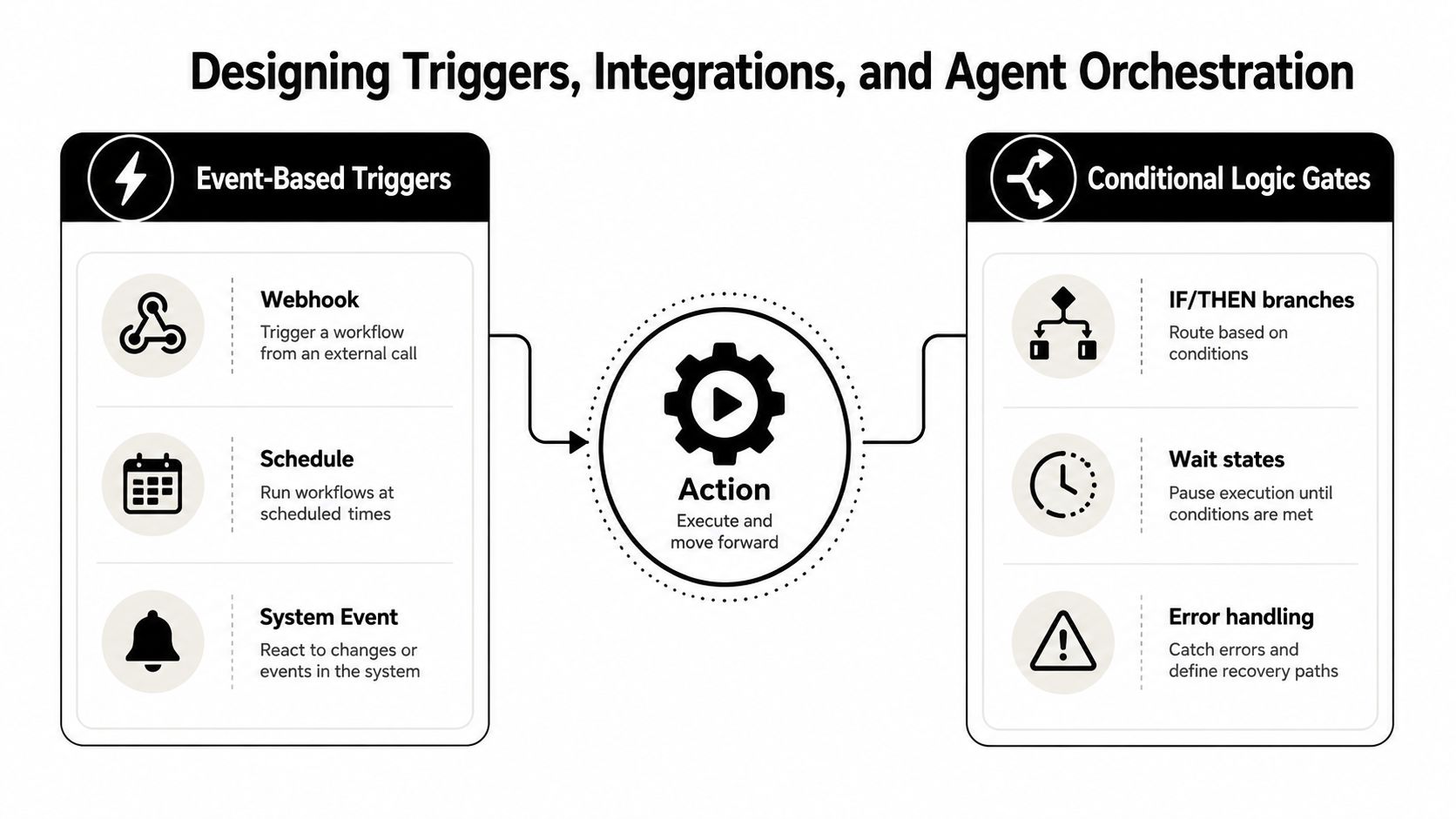
A production workflow should read like a sentence. An event starts it, the system checks conditions, an action fires, and failures route somewhere visible. That sequence sounds basic, but it's what keeps automation from turning into a pile of overlapping logic.
The trigger is the event that starts the flow. The conditions are the fields and rules the workflow reads. The action is what happens next, and the exception path is what catches records that don't fit the normal pattern. If any of those pieces are vague, the automation will eventually fail in ways that are hard to debug.
Choose the orchestration pattern that fits the job
Simple if-this-then-that logic works when the workflow is narrow and the decision tree is stable. AI-assisted orchestration fits better when the system needs to summarize context, choose between tools, or route work based on messy inputs. The important difference is not sophistication, it's control. The more autonomy you give the agent, the more carefully you need to define guardrails and handoffs.
Donely's integrations page is a useful reference point for the kind of surface area teams usually want in practice, especially when workflows need to touch common systems without custom glue everywhere, integrations overview. The same architecture idea applies whether you're routing a sales inquiry, escalating a support issue, or triaging an internal request.
| Workflow Orchestration Patterns Compared | Best For | Complexity | Example |
|---|---|---|---|
| Simple rule flow | Repetitive, stable tasks | Low | Route a lead by territory |
| Conditional branch flow | Moderate variation | Medium | Send approvals to different teams |
| AI-assisted orchestration | Messy inputs, context-heavy work | Higher | Summarize a support thread, then route it |
| Hybrid human-in-the-loop flow | Sensitive or high-risk decisions | Medium to high | Escalate exceptions for manual review |
Decompose the work before you connect everything
The fastest way to create an unreliable workflow is to cram too much into version one. Break the process into smaller subtasks, instrument each handoff, and make sure every step logs enough detail to explain what happened later. That matters even more when the workflow uses AI to interpret input, because judgment at the edges is where mistakes hide.
Operational standard: every handoff should have a visible owner, a logging point, and an exception route.
The goal is not to maximize automation depth. The goal is to create a workflow that can run without guesswork, then expand only after each branch has earned trust.
Security, Access Control, and Data Isolation Best Practices
Treat access control as a design constraint
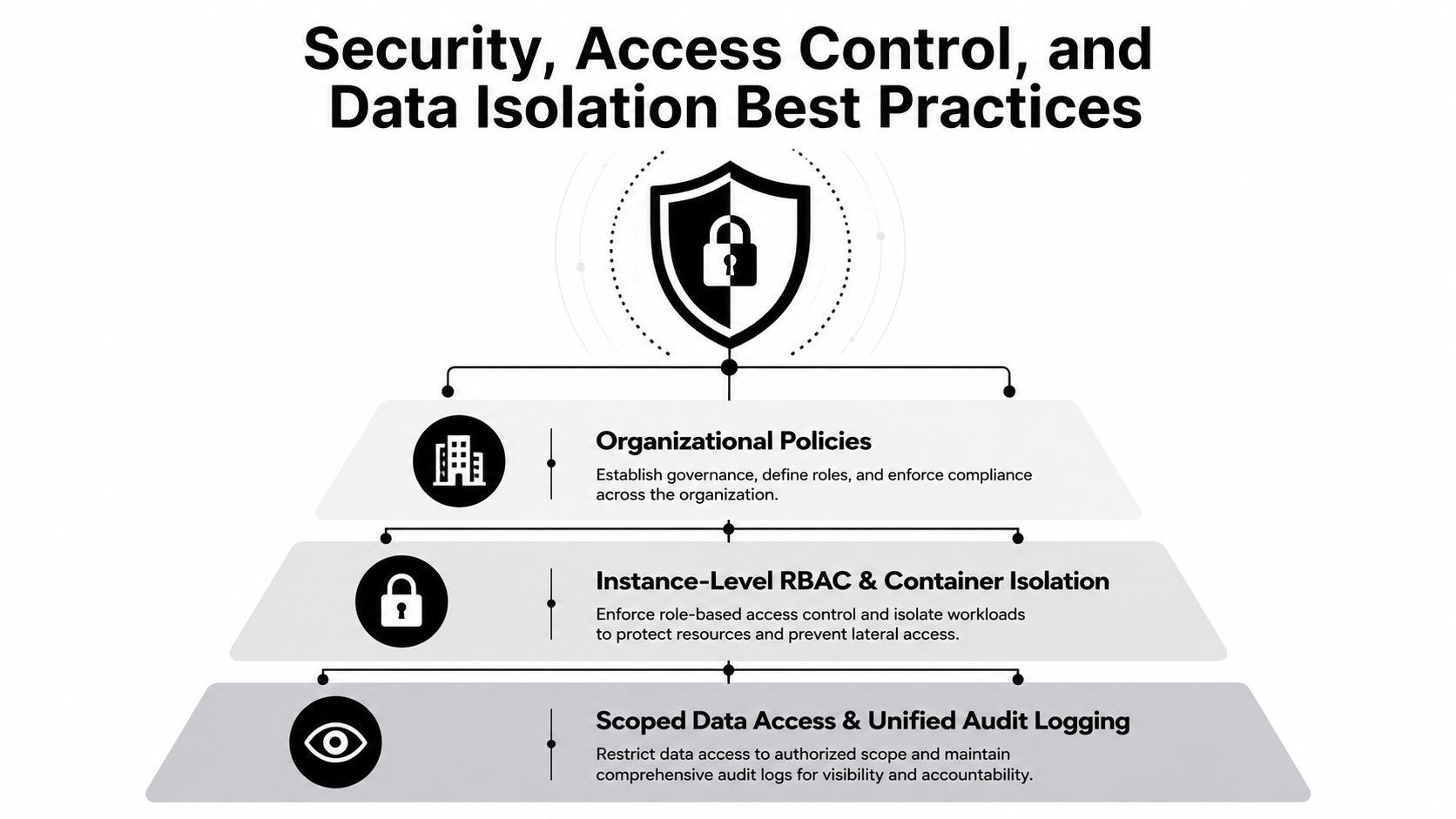
Security can't be bolted on after the automation works. If a workflow can read customer data, route approvals, or trigger actions in internal systems, then access scope, data boundaries, and logging need to be designed with the workflow itself. That's especially true in agencies and multi-client environments, where one misconfigured rule can expose the wrong record to the wrong instance.
The right pattern is granular RBAC, isolated containers, scoped data access, and unified audit logs. Those controls reduce the chance that one workflow can see or affect more than it should. They also make rollback easier, because you can isolate the problem instead of hunting through shared state.
Use instance boundaries to prevent blast radius
Multi-instance architecture matters because a single broken automation shouldn't cascade across every client or business unit. Separate instances let organizations keep personal, business, and client workloads apart without migrations or extra account overhead. That separation becomes a governance asset, not just an admin convenience.
The internal link is relevant here because security policy has to define what users can see, what agents can touch, and what gets logged when a workflow fails, security policy guidance. If you're operating in regulated environments or managing multiple customers, that policy has to be written before launch, not after an incident.
A practical security checklist looks like this:
- Scope each workflow narrowly: Give the automation only the permissions it needs for one task.
- Log every meaningful action: Keep a clear audit trail for approvals, edits, and failed handoffs.
- Separate client data by instance: Don't let one customer's workflow share state with another's.
- Define rollback triggers: If a workflow behaves unpredictably, stop it before the error spreads.
- Keep human override paths visible: Someone should be able to pause or reverse the workflow quickly.
HIPAA and SOC 2 environments raise the bar further, but the underlying principle stays the same. Security is not a compliance checkbox at the end, it's part of the workflow architecture. If the system can't prove who acted, what data it used, and where it sent the result, it's not production-ready.
Testing, Monitoring, and Scaling Your Automations
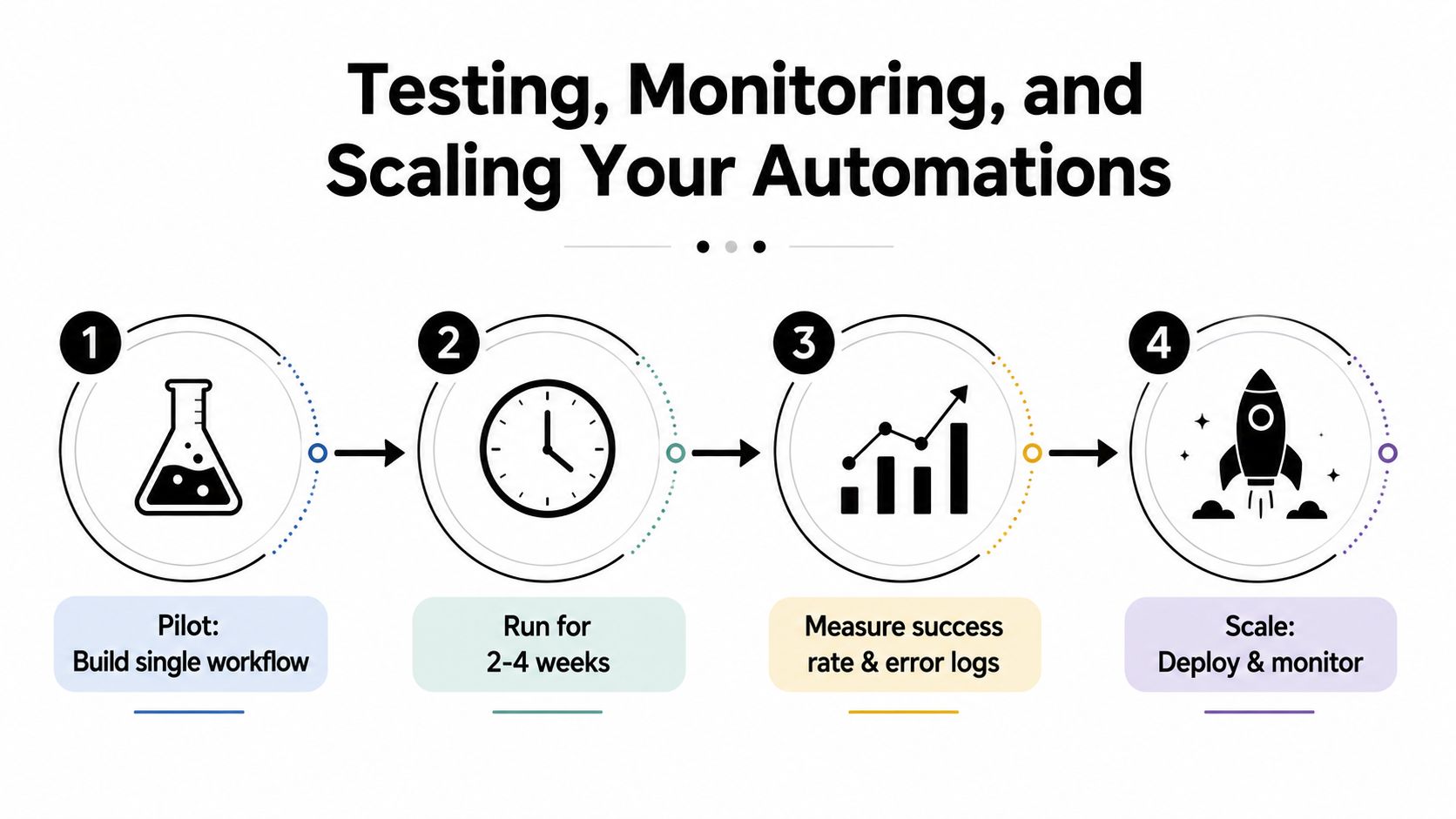
Build one workflow first, not five. Run it for a short pilot window, watch the results closely, and only expand after it proves stable in real conditions. The practical pattern is simple, pilot, measure, then scale, and it's the difference between a useful automation program and a pile of half-working flows nobody trusts.
The guide from AutomationAtlas recommends closely monitoring the first 10–20 executions after activation and adding error notifications so failures are detected early. That's the right habit because real data always shows up uglier than the test case. Missing fields, unexpected values, duplicate records, and inconsistent naming conventions are where workflows tend to drift.
Test the messy edges, not just the happy path
Good testing includes the kinds of records operators usually complain about. A lead arrives without a territory field. A customer record already exists under a slightly different name. An approval step gets skipped because a system value changed. Each of those should route somewhere predictable, ideally to a human review queue rather than a silent failure.
The platform's own guidance around starting small and instrumenting handoffs is worth using as a benchmark, especially if you're building on hosted agent infrastructure for workflows. Centralized monitoring helps here because it consolidates status, logs, usage, and billing in one place, which makes it easier to spot pattern drift before users do.
Know when to iterate and when to roll back
Use the pilot to measure time saved, error rates, and team satisfaction. If the workflow saves time but generates constant manual cleanup, that's not a win. If the error path is noisy or unclear, fix the design before adding more volume.
If the first version can't fail safely, it's not ready to scale.
The scaling rule is straightforward. Add breadth only after the first version survives messy inputs, clear ownership, and visible rollback paths. Automation quality usually degrades at the edges, so the work is never “done”, it just becomes stable enough to expand.
Real-World Automation Deployments Across Team Sizes
A solo founder usually starts with the sharpest pain point, lead qualification or onboarding. The workflow might connect Gmail, HubSpot, and Slack so inbound requests get categorized, enriched, and handed to the right next step without manual copying. The boundary stays narrow at first, if a lead looks unusual, it goes to human review, and if the enrichment step fails, the record is parked instead of half-processing the customer.
Agencies need a different shape entirely. One client's automation can't share state, permissions, or logs with another client's workflow, so isolated instances and per-client RBAC become operational requirements, not optional upgrades. The rollback criterion is also stricter here, because one broken automation can create support load across many accounts if the blast radius isn't contained.
Enterprise deployments add another layer. Support ticket triage and internal approvals often need SSO, detailed auditability, and workflow rules that can survive compliance review. In that environment, the exception path matters as much as the automation itself, because a good flow routes routine work fast while sending ambiguous cases to the right human queue without exposing unnecessary data.
The common thread across all three setups is discipline. The founder wants speed, the agency wants isolation, and the enterprise wants governance, but they all need the same fundamentals, clear boundaries, visible ownership, and a rollback plan before the workflow goes live.
Building Your Automation Roadmap and Knowing When to Stop
The best automation roadmaps don't start with a tool list. They start with decision gates. First, decide which workflows deserve automation, then define who owns each one, then write the exception rules and rollback conditions before any build work begins.
A practical first pass can look like this. In the first 30 days, map one workflow and document every handoff. In the next 60, launch a pilot, monitor the early executions, and refine the failure handling. By day 90, expand only if the process is stable, the logs are useful, and the humans in the loop know exactly when to step in.
The bigger lesson is that automation should stop wherever judgment, risk, or instability becomes too expensive to encode. That isn't a weakness in the system, it's a sign of good governance. The current shift toward AI-enabled workflows makes this even more important, because inputs, tools, and business rules keep changing, which means every automation needs ongoing review instead of a one-time launch.
If you're deciding whether to stay with no-code flows or move into hybrid AI-agent systems, use a simple test. If the workflow is predictable and low-risk, keep it simple. If the work needs context, routing, or tool selection across multiple systems, a hybrid model can help, but only if access control and auditability stay intact.
The right roadmap is the one that keeps working when real data gets messy. Automation is worth doing when it reduces manual effort without creating hidden support debt. It's not worth doing when it only moves the failure point farther downstream.
If you're ready to put this into production, Donely gives teams a single place to host, deploy, and govern AI employees with integrations, isolated instances, RBAC, and audit logs. It's built for the exact workflow problems that break when scope, exceptions, and rollback rules aren't defined up front.