
Teams often get customer support automation backward. They start by teaching a bot to answer FAQs, then wonder why escalations get messy, edge cases leak, and human agents end up cleaning up the machine's mistakes. The problem is usually routing and governance, not conversation copy. If you can't decide which customer, which issue, and which channel should be automated, the bot becomes a fast way to produce low-quality support at scale.
That matters because automation is already mainstream. 64% of support teams now use some form of automation, up from 45% in 2023, and Gartner-based reporting cited by Converge says 25% of tickets are now resolved without human intervention while automated assignment delivers 2x faster ticket routing than manual triage (support automation statistics). Salesforce's 2025 service data also shows the shift isn't experimental anymore, with 30% of service cases resolved by AI in 2025 and a projection of 50% by 2027 (service stats). The teams getting this right don't automate everything. They automate the low-judgment work first, then build guardrails around the rest.
Table of Contents
- Why Most Support Automation Projects Fail Before They Start
- Auditing Your Ticket Backlog for Automation Readiness
- Designing Conversation Flows and Fallback Protocols
- Connecting AI Agents to Your Tools and Channels
- Testing in Shadow Mode Before Going Live
- Monitoring Performance and Governing Automation at Scale
- Real-World Deployment Templates for Different Organizations
Why Most Support Automation Projects Fail Before They Start
The worst advice in support automation is still the most common, “start with your top 10 FAQs.” FAQs are useful, but they're not a strategy. A password reset can be safe for one customer tier and risky for another, and a billing question can be routine for self-serve users while requiring human review for an enterprise account with contract exceptions.
That's why how to automate customer support starts with decision rights, not prompts. If your automation can't tell the difference between a low-stakes request and a high-stakes exception, it will either over-escalate and waste time, or under-escalate and damage trust. In practice, the most reliable support teams isolate low-judgment work, such as status checks, routine policy replies, and simple routing, while reserving empathy-heavy or contract-sensitive cases for humans.
Practical rule: automate the interaction only when the risk of a wrong answer is lower than the cost of delay.
The strongest guides on customer service automation make a similar point, but the more useful operational takeaway is sharper. The question isn't “what can AI answer?” It's “what can this customer tier, in this channel, safely automate without degrading resolution quality?” That's where the article boost CSAT and grow revenue is worth a read, because the underlying business case is tied to service quality, not just deflection volume.
A good governance model also separates front-door automation from back-end decision making. Front-door automation can classify, acknowledge, and route. Decision making, especially around exceptions, refunds, legal issues, and escalations, should stay controlled until the knowledge base and fallback logic are mature. When teams skip that boundary, the first visible failure is rarely a spectacular bot crash. It's silent degradation, where customers keep repeating themselves and agents spend more time repairing the workflow than using it.
Auditing Your Ticket Backlog for Automation Readiness
Scoring what belongs in automation
Before building flows, pull a representative sample of 200 to 500 recent tickets and read them like an operator, not like a marketer. Group them by issue type, then score each group on volume, repeatability, and low risk. The point is to identify tickets that show up often, follow a stable pattern, and don't require much subjective judgment.
A simple way to do this is to assign each category a relative score from low to high for those three dimensions, then prioritize the categories that cluster at the top. A password reset request usually scores high on repeatability and low risk. A billing dispute may score high on volume, but if it often depends on contract language or prior concessions, it belongs lower on the automation list.
Operational rule: if the issue needs a human to interpret policy, emotion, or exceptions, don't push it into full self-serve too early.
Many teams over-rotate on the loudest queue. A high-volume category isn't always the best automation candidate if the failure mode is expensive. In SaaS, that often means routine access requests are safer than account ownership disputes. In e-commerce, order tracking is usually safer than chargeback or refund disputes. The right backlog audit doesn't chase the largest bucket. It finds the bucket with the best mix of consistency, value, and safety.
Sequencing from low risk to self-serve
Once the backlog is ranked, sequence the rollout from lightest automation to deepest automation. Start with canned replies and AI drafts, then move into routing, then self-serve deflection once the knowledge layer is clean and the escalation rules are stable. That order matches the practical methodology described in the source on support automation, which emphasizes auditing, scoring, and building the knowledge base before expanding automation depth (how to automate customer support).
The distinction matters because self-serve deflection is the hardest layer to recover from if it's wrong. A draft response can be reviewed. A bad routing decision can be fixed. A broken self-serve path can create a queue of frustrated customers who feel trapped by the system. That's why the first automation roadmap should usually look conservative, not ambitious.
Use the backlog to build a tiered plan:
- Canned replies: fast wins for repetitive, low-risk questions.
- AI drafts: better for issues where context matters but human approval is still required.
- Routing automation: ideal when issue type and ownership are predictable.
- Self-serve deflection: only after the knowledge base and exceptions are solid.
The clearest roadmap comes from your own tickets, not from a generic best-practice list. When the audit is honest, the first automation wins tend to be boring, and that's exactly what you want.
Designing Conversation Flows and Fallback Protocols
Happy path first, then controlled exits
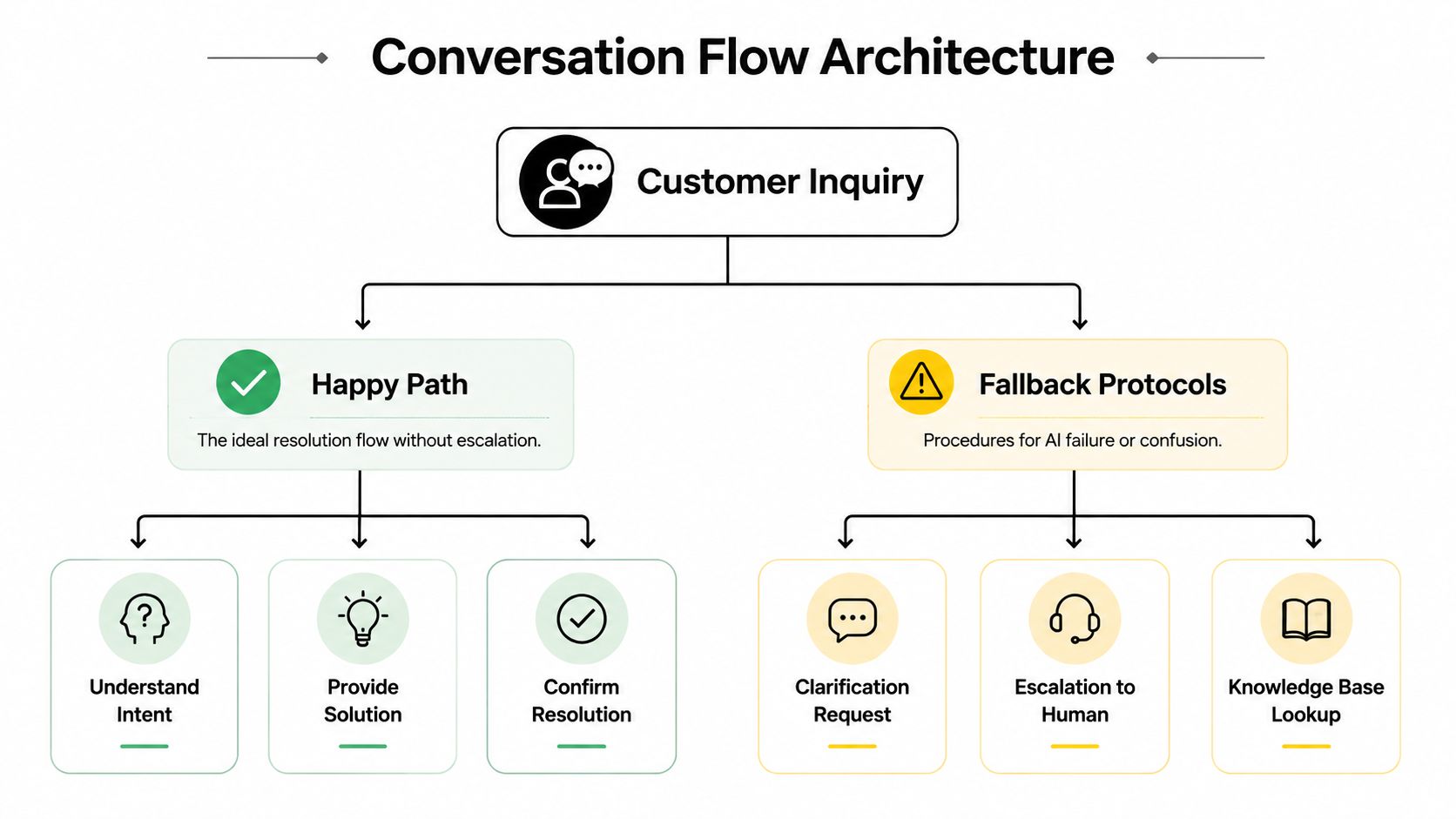
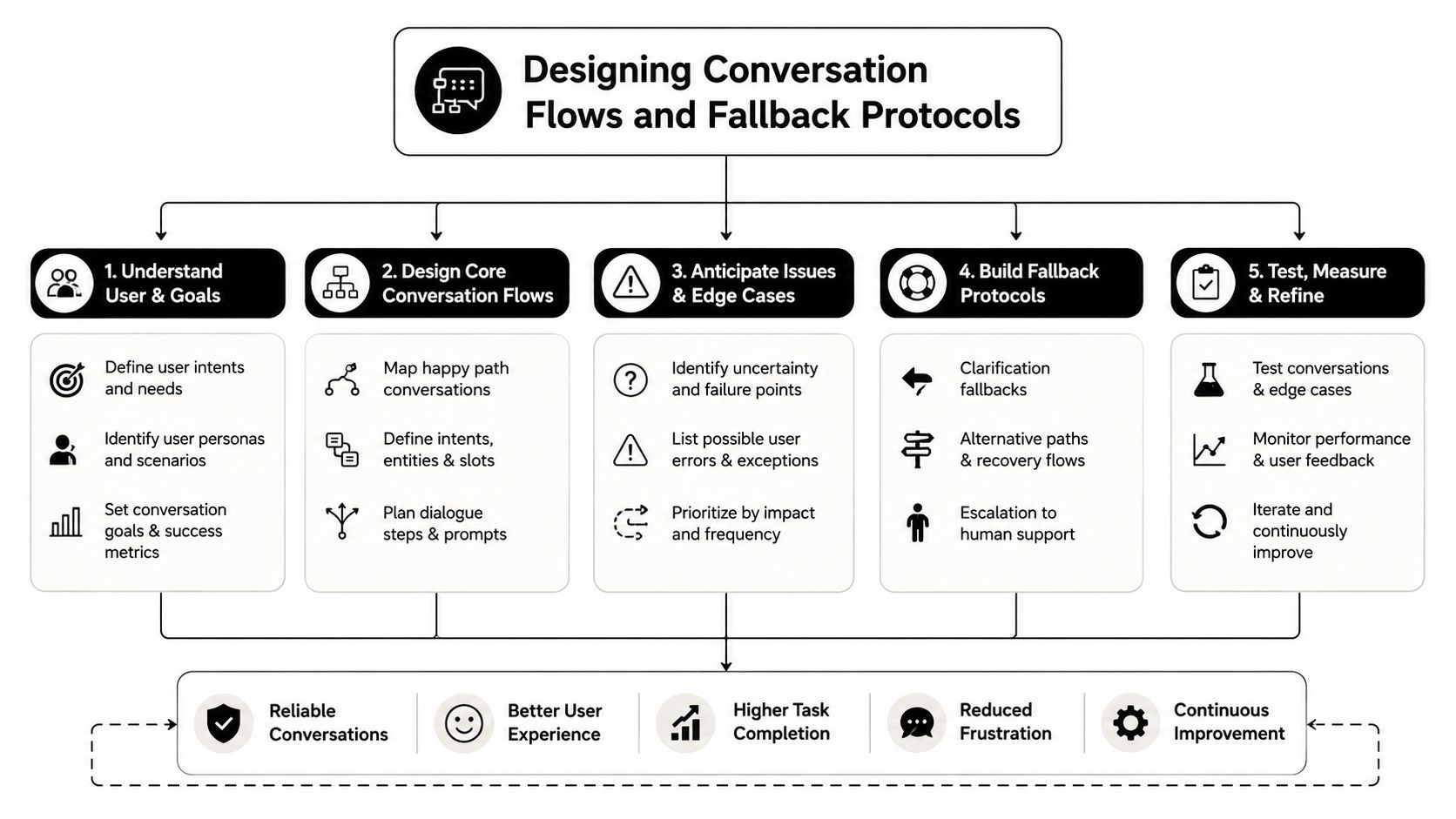
A good support flow doesn't try to be clever. It starts with intent recognition, then uses slot filling only for the details that matter. If a customer wants an order status, the system should identify the intent quickly, ask for the order identifier if needed, and retrieve the answer without adding extra steps. If the request drifts into a special case, the flow should stop pretending it can handle it and switch to a fallback.
That fallback needs to feel intentional, not apologetic. “I'm checking the account context so I can route this correctly” is much better than a loop of “I didn't understand.” When an AI agent loses confidence, the right move is usually one of three things, ask a clarifying question, hand off to a human, or query the knowledge base again with tighter context.
The backlink worth reading here is AI shopping agent, because shopping support has a similar structure problem, the assistant has to stay useful on the happy path while still exiting cleanly when it hits ambiguity or policy boundaries. That same design principle applies across support.
Channel depth and escalation rules
Different channels need different conversation depth. A quick WhatsApp exchange can support a tighter, shorter flow because customers expect speed and brevity. Email can carry more context and tolerate a slower back-and-forth. An in-app widget usually sits somewhere in the middle, with enough room for a few structured questions before handoff.
Escalation should also be tier-aware. A customer in a premium segment, a regulated account, or a contract-bound enterprise motion should hit a lower threshold for human escalation than a low-risk self-serve user. Repeated misunderstanding signals, strong negative sentiment, or the same unresolved intent appearing twice are all valid handoff triggers. The key is to make those triggers explicit before launch, not after a customer complains.
One practical pattern is to write fallback language that preserves trust:
“I want to route this correctly so you don't have to repeat yourself. I'm connecting this to a human specialist now.”
That kind of message works because it explains the reason for the handoff. It doesn't blame the user, and it doesn't pretend the bot is still in control. For teams building around support quality, the internal reference at Donely company brain is relevant because it reflects the same idea, shared knowledge needs to be structured before automation can behave consistently.
The best conversation flows are short on the happy path and decisive on the fallback path. Anything else leaves customers talking to a system that sounds active but behaves uncertainly.
Connecting AI Agents to Your Tools and Channels
Systems, permissions, and isolation
An AI support agent only becomes useful when it can do work inside the stack. That means connecting it to the CRM, helpdesk, internal docs, chat tools, and customer channels where tickets arrive and context lives. In most environments, that includes systems like HubSpot, Salesforce, Zendesk, Slack, and Gmail, plus customer-facing channels such as WhatsApp, Telegram, Discord, and in-app messaging.
The important part isn't the connector list. It's the permission model. The agent should see only the records it needs, update only the objects it's allowed to change, and leave a clean audit trail behind every action. If you skip scoped access, support automation becomes a data governance problem very quickly.
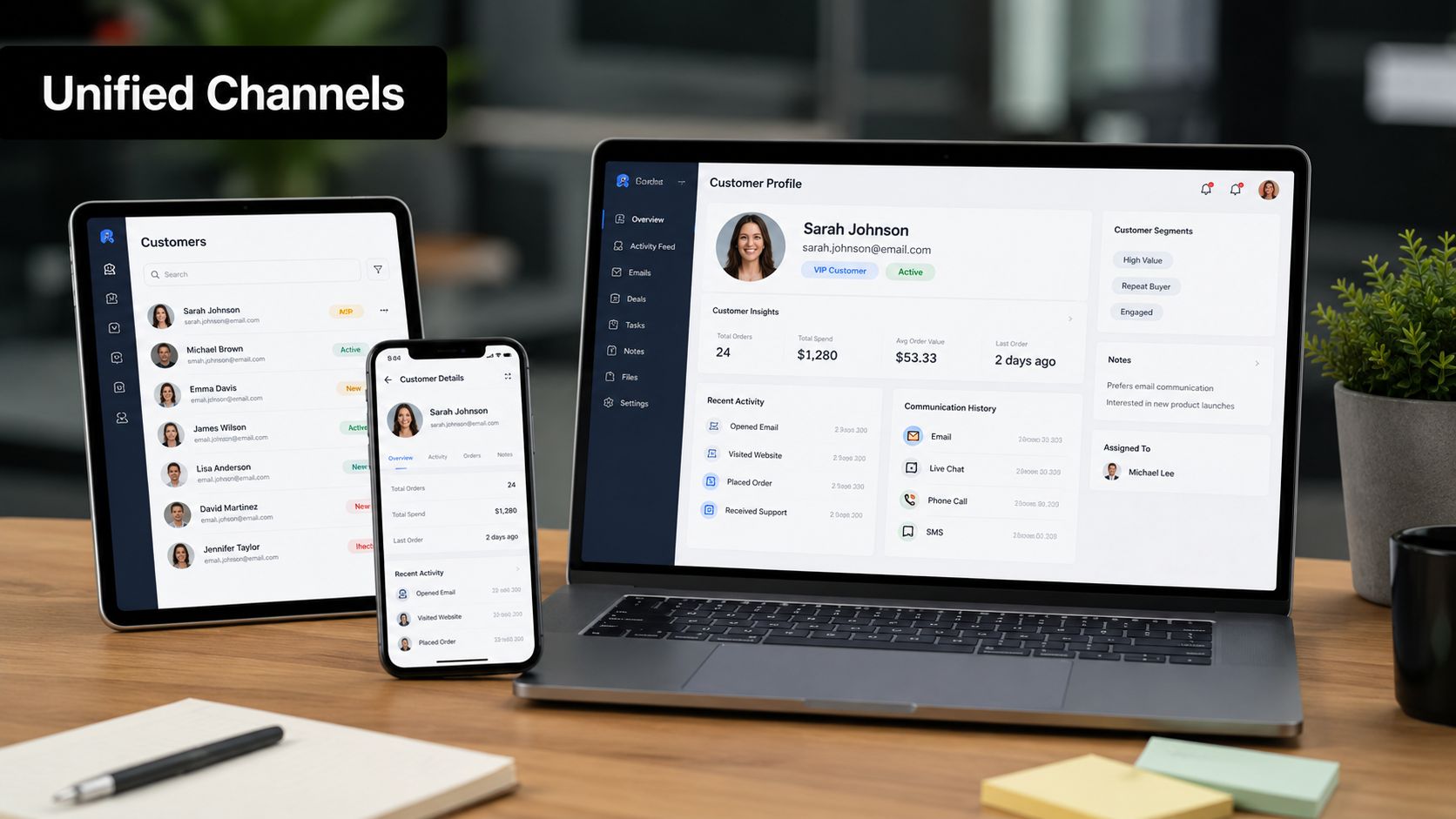
For teams that manage multiple client environments, the architecture matters even more. Donely's multi-instance model is one example of how to separate workloads so one client's data, routing rules, and knowledge base don't bleed into another's operating space. That's useful for agencies, but also for businesses that need clean boundaries between brands, regions, or business units. The relevant product page for more context is manage sales leads in Gmail, which shows how workflow tooling can live inside an existing communication surface instead of forcing a separate system.
Where multi-instance operations matter
The advantage of multi-instance support automation is operational clarity. You can run separate agents for different businesses, separate escalation rules for different client tiers, and separate knowledge bases for different product lines without mixing permissions or logs. Centralized monitoring still matters, though. If you can't see status, usage, and errors across instances from one place, the admin burden grows fast.
This is also where the internal deployment layer becomes relevant. The integration overview helps frame the practical side of connecting support workflows to external tools without turning every rollout into a custom project. The core idea is simple, keep the agent close to the systems that own the truth, and keep the access boundaries narrow enough to be auditable.
Practical rule: if the agent can't safely read the customer record and write the ticket update, don't put it in the live path yet.
The teams that handle this well treat integrations as the backbone of support quality, not as a feature checklist. Once the agent can retrieve context, write back status, and operate inside the customer's actual channel, automation stops being a demo and starts being part of the workflow.
Testing in Shadow Mode Before Going Live
Baseline metrics and go-live thresholds
A production rollout should start in shadow mode, not with customers. Run the AI alongside human agents on real tickets, but keep it from sending customer-facing responses. That gives you a clean read on whether the agent's output matches good human handling before any customer sees it (support automation 2026 guide).
Before shadow mode begins, benchmark the baseline KPIs you already use to manage the queue, including FRT, AHT, FCR, CSAT, and cost per ticket. Then compare the AI's performance on confirmed resolution rate, re-contact rate, and escalation quality after rollout. Those later metrics are more honest than deflection alone, because raw volume handled by the agent can look fine even when customers need to return for help again.
A practical go-live gate is 85%+ suggested-response accuracy. That threshold forces the team to ask whether the agent is consistently right, not just occasionally impressive.
Rollback planning and quality sampling
During shadow mode, sample edge cases aggressively. Look for repeated misunderstanding, wrong policy citations, tone mismatch, and any place where the agent sounds confident but is wrong. Those are the failures that hurt most after launch because they stay hidden until customers answer back.
Build a rollback path before launch, and make it fast. The system should be able to revert to human-only handling within minutes if post-launch metrics slide. Don't wait for a long review cycle while customers are stuck in a broken flow.
Keep support agents inside the QA loop. Their feedback shows which drafts are useful, which handoffs feel awkward, and which knowledge articles still need work. Strong support automation programs treat the shadow period as a calibration exercise, not a formality.
Practical rule: go live only when the agent is accurate enough to reduce work, not just fast enough to create more of it.
That discipline separates a demo from a deployable system. If shadow mode exposes weak knowledge, unclear routing, or brittle fallback logic, fix those parts first. The launch date matters less than the quality of the handoff.
Monitoring Performance and Governing Automation at Scale
Automation doesn't end when the bot goes live. In many ways, that's where the real work begins. Support leaders need a governance loop that watches for quality drift before customers complain, because live systems degrade in quiet ways, especially when product policy changes, new issue types appear, or one customer segment behaves differently from another.
The right monitoring stack tracks both operations and quality. Operational signals tell you whether the workflow is functioning. Quality signals tell you whether it's helping. That means watching resolution quality, re-contact patterns, escalation behavior, and audit logs together instead of treating them as separate dashboards.
A useful pattern is to treat rollback as a normal control, not an emergency panic button. If one issue category starts failing, roll back only that category. If one customer segment underperforms, narrow the automation to safer paths for that segment. If a new channel behaves differently, keep it separate until you've got enough evidence that the flow works there too.
Security matters here as much as response quality. Granular RBAC keeps support agents, managers, and administrators inside the boundaries of their roles. Unified audit logs help with both compliance and troubleshooting, because you can trace who saw what, what the agent suggested, and where the workflow handed off.
The internal deployment reference at hosting for Hermes Agent is relevant for teams comparing how infrastructure choices affect governance, especially when uptime, access control, and isolated execution matter. If the support system is going to live inside production operations, the hosting model should support controlled expansion rather than loose experimentation.
A scaling plan should be progressive, not heroic. Add one new issue type, one new channel, or one new customer tier at a time, then validate performance before expanding again. That keeps the automation program tied to evidence instead of ambition.
Real-World Deployment Templates for Different Organizations
The deployment shape changes with the organization. A solo founder doesn't need the same governance model as an agency handling multiple client accounts, and an enterprise with compliance constraints needs more than a shared inbox bot. The useful question is not whether to automate, but how much structure the business can support without creating new operational risk.
| Organization Type | Automation Scope | Instance Architecture | Key Integrations | Recommended Tier |
|---|---|---|---|---|
| Solo founder or small team | Ticket classification, routing, and FAQ replies on the front door | Single instance for one brand or product line | Gmail, Slack, Zendesk, one chat channel | Free forever for testing, then Personal at $25 per month per instance |
| Agency managing multiple clients | Separate support agents per client, isolated knowledge bases, distinct escalation rules | Multi-instance with client separation and centralized oversight | HubSpot, Salesforce, Zendesk, WhatsApp, Slack | Team, then Enterprise as the portfolio grows |
| Enterprise or compliance-focused team | Tier-aware routing, governed escalation, audit-friendly workflows, cross-channel support | Isolated instances with strict RBAC and audit logs | Salesforce, Zendesk, Slack, SSO, regulated data systems | Enterprise, with SSO, HIPAA-ready architecture, and a 99.9% uptime SLA |
For a solo operator, the fastest win is a narrow front-door workflow that handles classification and common replies without overengineering the rest. For an agency, the core problem is separation, not novelty, so the instance boundary becomes the product. For enterprise teams, the first requirement is usually governance, since the support stack has to fit inside existing security and compliance expectations.
Donely's structure matches those use cases because it supports isolated instances, scoped access, and centralized oversight in a way that fits different operating models. If you're deciding how to automate customer support without turning your queue into a quality-control problem, start with one workflow, one boundary, and one rollback plan.
If you're ready to put support automation on a real operating footing, explore Donely and map your first support workflow to the tools, channels, and access rules you already use. Build the routing and governance layer first, then let AI handle the repetitive work inside it.