
You've got Hermes Agent running on a laptop. The conversation works, tools execute, and a local webhook returns the payload you expected. It's tempting to call the deployment finished, but production starts where that demo stops. A dependable Hermes deployment needs supervision, persistent state, controlled access, observable integrations, and a recovery path for the failures that eventually occur.
The practical question isn't only how to deploy Hermes Agent. It's how to operate it after the first successful launch, across the channels, models, credentials, and workloads your team depends on.
Table of Contents
- Why a Successful Demo Is Not Production Deployment
- Choose the Right Hermes Deployment Path
- Launch Hermes Agent on Donely or OpenClaw
- Configure Integrations and Secure Access
- Test the Agent Before Production Traffic
- Troubleshoot Common Deployment Issues
- Final Production Readiness Checklist
Why a Successful Demo Is Not Production Deployment
A local demo benefits from conditions that won't exist in production. Your terminal keeps the process alive, your machine provides the filesystem, your browser handles access, and your developer credentials are already available. None of that guarantees that Hermes will restart after a crash, preserve an in-flight task, or reject an unauthorized tool call.
At 3 a.m., a container restart can interrupt a workflow if session data and pending state live only inside the container. An exposed dashboard or debug port can reveal prompt context. A shared provider key can turn one compromised credential into a failure affecting every workload. These aren't hypothetical design details. They're the operational consequences of treating installation as deployment.
Practical rule: A successful response proves that the agent works. It doesn't prove that the service is dependable.
The layers a demo hides
Production deployment adds several boundaries around the agent:
- Process supervision: systemd, Docker restart policies, or an orchestrator must bring the gateway back after crashes and host reboots.
- Persistent storage: conversation history, tool state, queued work, and callbacks need storage that survives replacement of the running process.
- Network protection: inbound traffic needs controlled routing and TLS termination rather than direct exposure of an internal dashboard.
- Credential management: API keys and OAuth tokens belong in a secrets manager, with ownership and rotation documented.
- Auditability: operators need records of integration calls, permission decisions, failures, and administrative changes.
- Provider protection: rate limits, retries, and queues should prevent one burst of work from exhausting the model provider or blocking unrelated tasks.
The Hermes project's official installation path supports local, Docker, SSH, Singularity, and Modal runtime modes, with container hardening and namespace isolation described in its official installation documentation. That flexibility helps teams move the same core setup across laptops, servers, and managed environments, but it also means the operator still has to choose the right surrounding controls.
For broader design guidance, these AI agent development tips are useful before the runtime reaches production. The important mindset shift is simple: the first launch is a checkpoint. Once the demo succeeds, start designing the service that must keep succeeding when machines restart, tokens expire, integrations reject requests, and users arrive through channels your terminal never tested.
Choose the Right Hermes Deployment Path
There isn't one universally correct Hermes hosting model. The right choice depends on how much infrastructure your team can operate, how sensitive the connected data is, whether sessions must persist continuously, and how much control you need over runtime placement.
The official deployment model gives you several practical foundations. Local installation is useful for development. Docker creates a repeatable environment for staging and production. SSH and Singularity suit teams with existing server or research infrastructure, while Modal provides a managed cloud runtime option. The same agent can therefore move through a progressive adoption path instead of being tied to one hosting pattern from the beginning.
Compare the operating models
| Path | Operational Effort | Best Fit | Main Trade-off |
|---|---|---|---|
| Managed Donely deployment | Low infrastructure ownership | Founders, agencies, and teams that want a control plane for instances, integrations, access, and monitoring | Vendor coupling and plan-based cost |
| Self-hosted OpenClaw on Kubernetes | High | Platform teams needing control over runtime, region, and data boundaries | You own orchestration, upgrades, observability, and recovery |
| Self-hosted OpenClaw on a single VM | Moderate | Small teams with a capable operator and a persistent gateway workload | The host becomes a concentrated failure domain |
| Container on a small VPS | Moderate | Staging, experiments, and low-volume agents | You still need hardening, backups, TLS, and service supervision |
| Serverless edge functions | Low for stateless handlers | Short request and response bots | A persistent session and long-running gateway model can be a poor fit |
A managed platform such as Donely favors teams that want operational controls without assembling every surrounding service themselves. Self-hosted OpenClaw offers deeper control, but the team must build the control plane around Hermes. A VPS can be perfectly practical, provided it's treated as a real service rather than a disposable shell session.
The gateway-centered pattern is especially important for Hermes. Technical coverage describes the CLI, gateway, and API as interfaces to the same underlying agent capabilities, while the gateway keeps the agent reachable through messaging adapters and other channels. The Hermes architecture overview is a useful reference for understanding why “installed” and “always available” are different states.
Use the simplest route that satisfies your requirements. A team without on-call capacity shouldn't choose Kubernetes merely because it offers control. A regulated organization shouldn't choose a quick VPS deployment without first answering where state, secrets, logs, and integration traffic will live. Vision's deployment automation guide also provides useful context for evaluating how much of the surrounding delivery workflow your team wants to own.
Launch Hermes Agent on Donely or OpenClaw
The launch procedure differs by platform, but the operating questions stay the same. You need a versioned runtime, managed secrets, persistent state, health checks, supervised processes, and a rollback plan before connecting real users.
Start by choosing the artifact you'll deploy. Pin a tested image tag or commit rather than relying on an unchanging floating reference. Define the start command explicitly, and make the health check test readiness rather than merely confirming that a process exists.

A managed deployment
For a managed Donely deployment, connect the source repository or container registry, select an instance profile appropriate for expected concurrency, and add the LLM provider credential through the platform's secret interface. Set the gateway start command, define the readiness check, and enable restart behavior and centralized logs.
Don't paste a key into a repository file or copy a token from a developer shell into a shared configuration. Give each instance its own secret scope where possible. That makes revocation and incident response much cleaner when an integration changes ownership.
The Donely OpenClaw deployment page is the relevant starting point for the managed route. Treat the dashboard as a control plane, not as proof that the agent is ready. Verify that the service restarts, that logs arrive in the central sink, and that persistent state remains available after a replacement event.
An OpenClaw deployment
With OpenClaw, create a minimal manifest that pins the Hermes image, mounts a persistent volume for session data, and defines liveness and readiness probes against the appropriate agent routes. Put an ingress in front of the workload so TLS terminates at a controlled boundary, and restrict dashboard access to authenticated operators.
Choose the update strategy deliberately. Rolling updates can preserve availability but may briefly run different versions together. Recreate updates simplify compatibility for stateful changes but create a service interruption. If tool calls can fail after a deployment, route them to a dead-letter queue or durable retry mechanism instead of discarding them.
After deployment, test supervision rather than just reachability:
- Confirm the gateway process is managed by the platform, systemd, or an orchestrator.
- Stop the process intentionally and verify that the supervisor restarts it.
- Restart the host or replace the container.
- Confirm the service returns, state remains available, and queued work follows the documented recovery behavior.
- Check that the deployed image, configuration version, and secret references are recorded.
The official installation flow supports a shell installer for Linux, macOS, WSL2, and Android, plus a separate Windows PowerShell installer and a desktop installer. That makes first setup accessible across environments, but production reliability still comes from the service controls layered around the installation.
Configure Integrations and Secure Access
Hermes becomes operationally valuable when it can reach systems such as Slack, GitHub, email, internal databases, and messaging channels. It also becomes more dangerous at that point. A conversational instruction can trigger an external action, so every integration needs a clear identity, narrowly defined scopes, and an audit trail.
Start with read-only validation. Connect the provider, confirm that Hermes can retrieve a harmless test object, inspect the request in your logs, and only then grant the minimum write permission required by the workflow. Don't use a founder's Slack token, a developer's GitHub account, or a personal mailbox as the production identity.
Build an integration boundary
Use a dedicated service identity for each provider. Store OAuth refresh tokens, bot tokens, SMTP credentials, and model keys in the runtime's secrets manager. If a credential has ever been copied into a local .env file, shell history, ticket, or chat message, rotate it before production use.
Document four things for every connection:
- Owner: the person or team responsible for the credential.
- Scopes: the exact read and write permissions granted.
- Rotation process: how the token is replaced and tested.
- Revocation process: how access is removed during an incident or offboarding.
Restrict outbound network access to the provider endpoints the agent needs. Broad egress makes a compromised tool path much harder to contain. Forward integration audit events to a central log sink, and retain enough context to answer who initiated an action, which role authorized it, and what response the provider returned.
A platform such as Donely integrations can provide a managed place to connect channels and business tools, but the security review still belongs to the operator. A convenient connector doesn't remove the need to inspect scopes and assign ownership.
Apply RBAC before enabling write actions
Application-level checks inside a prompt or skill aren't an adequate authorization boundary. Define the role mapping in the deployment control plane, then test both allowed and denied actions.
| Role | Slack | GitHub | Email/SMTP | Internal DB |
|---|---|---|---|---|
| Viewer | Read approved channels | Read repository metadata | Read selected mailbox data | Read approved views |
| Operator | Send messages in approved channels | Open issues and create branches | Send approved operational mail | Execute approved procedures |
| Maintainer | Manage configured channels | Merge changes and manage workflows | Manage templates and sender settings | Run migrations through a controlled process |
| Auditor | Read audit events | Read repository and action logs | Read delivery and access logs | Read query and change history |
Keep channel allowlists explicit. If Hermes connects to Telegram, Discord, Slack, WhatsApp, or email, decide which users, rooms, addresses, or domains can invoke it. The gateway's value is persistent reachability, but persistent reachability without access boundaries turns every connected channel into an unreviewed command surface.
Test the Agent Before Production Traffic
A green deployment screen isn't enough. Test the agent in an environment that resembles production while keeping real users and irreversible tools out of the path.
Use a five-phase verification sequence, and record the result in the deployment record.
Start with service and integration health
First, probe the runtime. Confirm that the Hermes process is alive, the secrets manager responds, persistent storage is mounted, and every configured integration can complete a safe read operation. A process that answers HTTP requests but cannot reach its model endpoint or token store isn't ready.
Next, run a permissions gauntlet. Ask the agent to perform a known-disallowed action, such as writing to a repository or sending mail from a role that should only read. The expected result is a refusal or an authorization error, not a polite explanation followed by a successful tool call.
Replay real behavior safely
Use a recorded conversation with sensitive values removed. Check prompt assembly, tool selection, callback handling, and the response path. Don't judge only the final text. Inspect whether Hermes selected the correct integration, passed the expected arguments, and emitted an auditable event.
Then test persistence. Kill the service or replace the container and confirm that session state, short-term memory, and pending callbacks follow the documented recovery behavior. If the agent forgets the session after a restart, fix storage before testing throughput.
Release gate: Don't promote because the happy path passed. Promote only when health, authorization, replay, persistence, and load signals are all acceptable.
Finally, run a synthetic burst at the concurrency level your team expects, with an additional safety margin, while watching queues, worker utilization, provider responses, and integration timeouts. The purpose isn't to manufacture a flattering benchmark. It's to expose contention before users discover it.
Capture failures as deployment artifacts. Compare the current run with the previous version, and make rollback automatic or immediate when a critical phase regresses. Limited-traffic staging and monitoring are also emphasized in practical self-hosting guidance for Hermes, including Docker and reverse-proxy deployment instructions.
Troubleshoot Common Deployment Issues
Diagnose by symptom, not by restarting everything and hoping the problem disappears. Read logs first, then inspect metrics, then use traces to follow a request across Hermes, the model provider, and the integration.
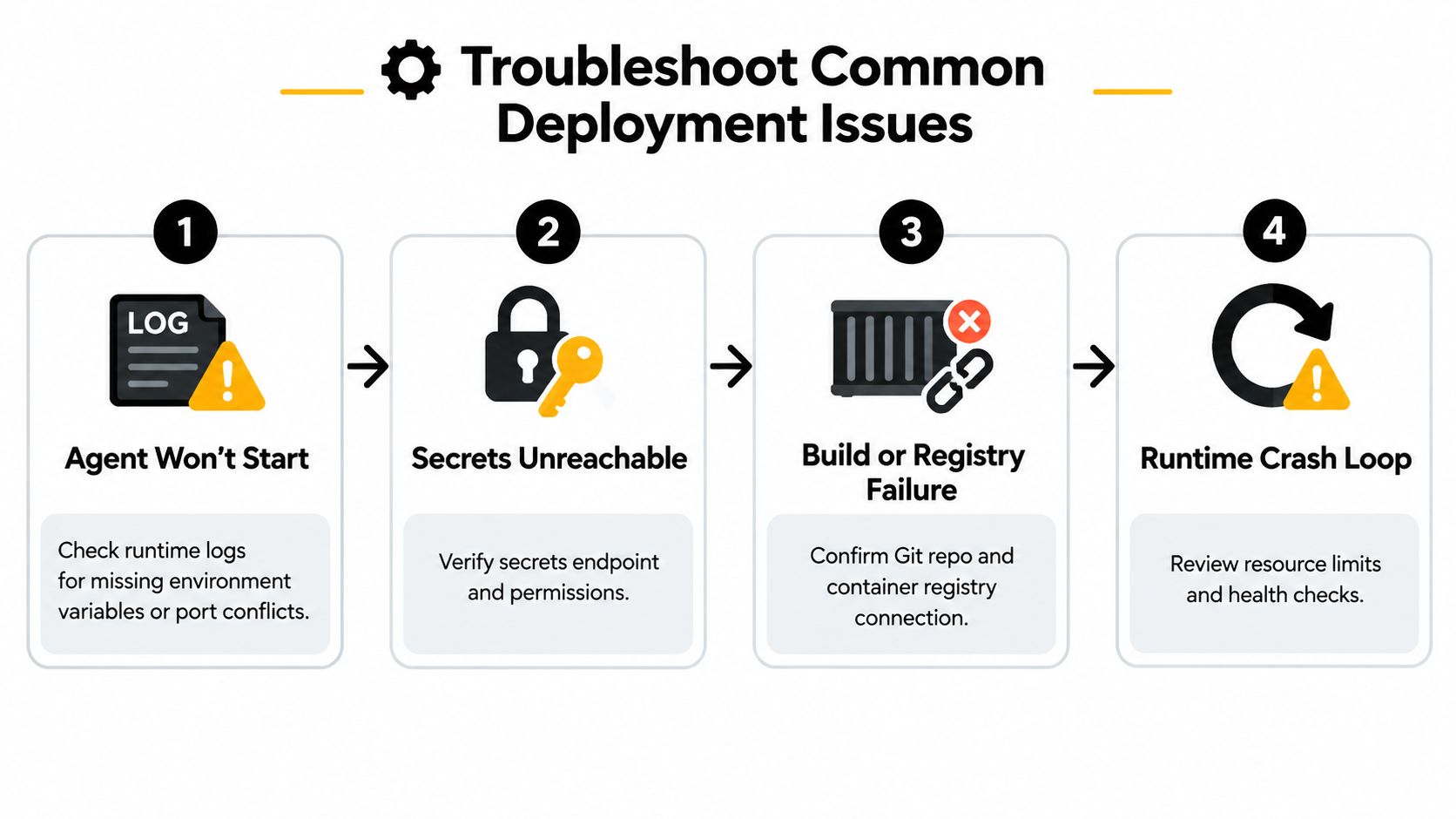
Match the failure to its boundary
- Agent won't start: Check runtime logs for missing environment variables, a port conflict, an invalid image, or a failed dependency connection.
- Secrets are unreachable: Verify the secret endpoint, workload identity, permissions, and the referenced secret version. A healthy container can still fail every model request if its credentials never load.
- Build or registry failure: Confirm that the repository reference, registry credentials, image tag, and build context match the deployment manifest.
- Runtime crash loop: Review memory and CPU limits, health-check timing, dependency startup order, and the last successful log line before each restart.
Authentication failures often come from expired OAuth refresh tokens, redirect URI mismatches, or RBAC bindings that reference a role absent from the target environment. Slow or dropped responses can originate with provider rate limits, an undersized worker pool, or a blocking integration call that holds the event loop while waiting for a timeout.
State loss points to a persistence problem until proven otherwise. Check whether the volume is ephemeral, whether the database credentials work from the running workload, and whether the application is writing to the mounted path rather than a local fallback.
Keep a living runbook with the symptom, diagnostic command or dashboard view, root cause, and verified fix. The Reddit discussion about keeping Hermes online highlights the practical gap many quick-start guides leave open, namely keeping the gateway alive after reboots through a VPS and systemd. That persistence layer deserves the same attention as the initial install.
Final Production Readiness Checklist
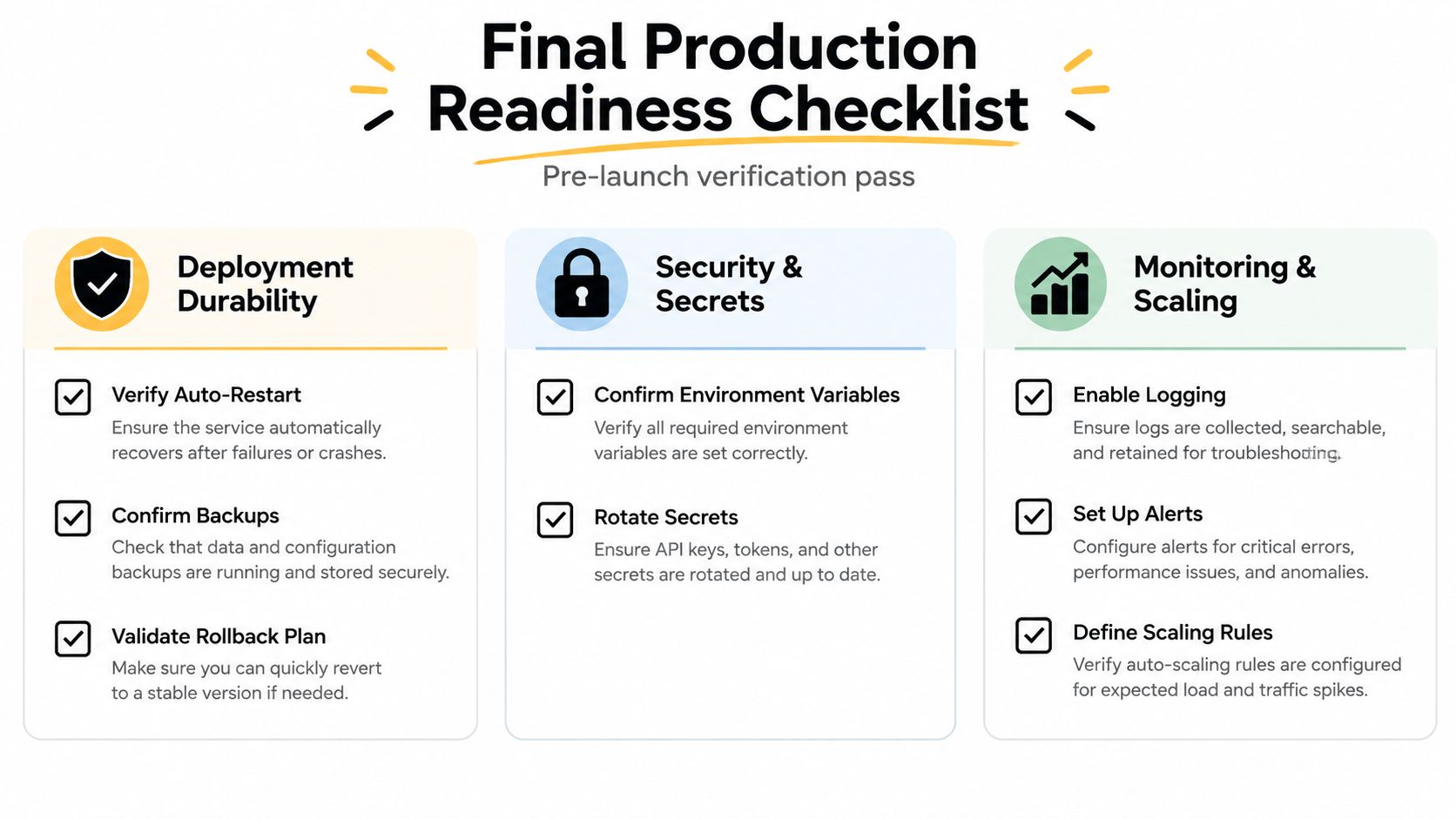
Run this checklist before each release and after any change to the runtime, credentials, integrations, or storage.
- Deployment durability: Is Hermes supervised by systemd or a container orchestrator?
- Restart behavior: Does the service recover after a process crash and host restart?
- Version control: Is the image or source revision pinned and is rollback documented?
- State protection: Is session data stored on durable storage and backed up?
- Integration security: Are scopes, channel allowlists, and RBAC bindings reviewed?
- Secret hygiene: Have credentials been rotated according to the team's runbook?
- Observability: Are logs, health results, integration failures, and audit events centralized?
- Recovery ownership: Does someone know who responds to an outage and how to restore service?
- Traffic control: Are provider limits, queues, retries, and dead-letter handling configured?
For a broader framework, Agentable's agent-readiness insights offer useful prompts for evaluating whether an agent is ready to operate, not merely answer a test message. Donely's Hermes hosting option is another route when you want managed deployment and centralized operational controls rather than building that layer yourself.
Treat any unchecked item as a release blocker. Run the checklist frequently during the first month of operation, then keep it as a recurring quarterly control, with additional reviews after incidents or material configuration changes.
Donely provides managed hosting and operational controls for Hermes and OpenClaw deployments, including isolated instances, integrations, access management, logs, and centralized monitoring. If you want to move from a successful agent demo to a governed service without taking on every infrastructure task, visit Donely and evaluate the deployment path that fits your workload.