
You've got Ollama running locally. The model answers fine in its own terminal or app. Then OpenClaw comes up, lists cloud-backed options, and somehow acts like your local models don't exist.
That's the moment most guides stop being useful.
The primary problem with OpenClaw and Ollama local models usually isn't installation. It's discovery, routing, context compatibility, and model naming. If OpenClaw can talk to Ollama but still won't use the model you already installed, you need exact configuration checks, not another happy-path walkthrough.
Running OpenClaw against local models is worth the trouble. You keep sensitive prompts on your own hardware, avoid tying every agent turn to external inference, and get tighter control over how models, tools, and orchestration behave. If you're building assistants for internal operations, coding workflows, or client environments, that control matters.
Table of Contents
- Why Run OpenClaw Agents with Local Ollama Models
- Preparing Your Local Environment for OpenClaw and Ollama
- Connecting OpenClaw to Your Local Ollama Instance
- Tuning Local Model Performance for Agentic Workflows
- Deploying and Governing Agents with Donely
- The Future is Local Your Next Steps
Why Run OpenClaw Agents with Local Ollama Models
Teams often start local for a simple reason. They don't want every prompt, file summary, code diff, or tool call flowing through an external API if they can avoid it. With OpenClaw, that matters more because agents don't just answer a single prompt. They carry context, call tools, and work through multi-step tasks.
That creates three practical advantages.
- Privacy and control: Sensitive code, internal process docs, and operational chat histories can stay on hardware you manage.
- Cost predictability: You stop treating each agent loop like a metered external event and can experiment more freely.
- Customization: You can tune model choice, routing, and prompt footprint around the workload instead of accepting one vendor's default behavior.
There's also a less obvious benefit. Local inference changes how you design agents. You stop assuming infinite context and perfect latency, and you build cleaner workflows because every extra tool and prompt token has an immediate cost in responsiveness.
Practical rule: Local OpenClaw setups work best when you treat the model as part of the system design, not as a plug-and-play backend.
That said, local doesn't mean frictionless. OpenClaw and Ollama local models can fail in ways cloud-only users never see. The common pain points are predictable: the local server isn't reachable from where OpenClaw is running, the model reference is wrong, the context window is too small for real agent work, or the model appears installed in Ollama but isn't surfaced correctly to OpenClaw.
That's why a lot of “it should just work” tutorials leave people stuck. They assume OpenClaw will auto-detect everything and pick a viable model on its own. In practice, local deployments reward explicit configuration.
If you want the operational upside without spending your week in CLI state drift, platforms built around OpenClaw hosting and deployment workflows can reduce the setup burden. The underlying constraints still matter, but they're easier to manage when the orchestration layer is opinionated.
Preparing Your Local Environment for OpenClaw and Ollama
A production-minded setup starts with boring basics done correctly. Install Ollama on the machine that will handle inference. Install Docker if your OpenClaw deployment depends on containerized services. Install the OpenClaw CLI in the environment where you'll manage and run agents.
Don't build this on a throwaway laptop profile if the end goal is a stable worker. The local model server, the OpenClaw runtime, and the filesystem or tool environment need to stay consistent across restarts.
Start with the environment you actually plan to keep
The first question isn't “Which model is smartest?” It's “Where will this run every day?”
If OpenClaw and Ollama sit on the same machine, discovery is simpler. If OpenClaw runs in a VM, container, or separate host while Ollama runs elsewhere, your chances of model discovery issues go up. That doesn't make it wrong. It just means reachability becomes part of the deployment.
Before you even choose a model, confirm these basics:
- Ollama is running continuously. OpenClaw can't discover a local model from a dead service.
- OpenClaw can reach the Ollama server from its own runtime context. Host reachability from your laptop shell doesn't prove reachability from inside a container or VM.
- You know the exact model identifier. Local setups break often because people rely on shorthand names.
- You're planning around agent context, not chat-only context. Agent turns carry more prompt weight than a simple one-off completion.
Choose models for context first and speed second
OpenClaw's local-model guidance treats 64k tokens as the minimum recommended context window for local models, and its 2026 benchmarked local stack examples include Llama 3.3 70B with 128K, Qwen 3.5 27B with 256K, and Qwen 3.5 35B-A3B with 256K in the OpenClaw integration guidance from Ollama. That recommendation matters because agent workflows aren't just chatting. They pack system instructions, tool schemas, prior turns, and intermediate execution state into the request.
A model that feels fine in a quick terminal test can collapse once OpenClaw starts doing real work.
Here's a simple selection lens I use:
| Model | Minimum VRAM | Context Window | Best For |
|---|---|---|---|
| Llama 3.3 70B | Qualitatively high | 128K | Larger local deployments that prioritize capability |
| Qwen 3.5 27B | Qualitatively moderate to high | 256K | Strong balance for serious agent work |
| Qwen 3.5 35B-A3B | Qualitatively moderate to high | 256K | Long-context local agents where throughput matters |
The table above only includes models and context windows explicitly listed in the cited OpenClaw guidance. VRAM needs vary by quantization, runtime setup, and hardware, so it's safer to evaluate them qualitatively unless you've validated the exact configuration yourself.
A local model with the wrong context profile doesn't fail loudly at first. It often degrades into flaky tool use, incomplete reasoning, or unexplained agent stalls.
When teams miss this, they over-focus on parameter count and under-focus on sustained agent behavior. For OpenClaw and Ollama local models, usable context window is the first hard filter.
Connecting OpenClaw to Your Local Ollama Instance
The failure usually looks the same in production and on a laptop. Ollama is running, the model is installed, OpenClaw starts cleanly, and the local model still does not appear. Teams often treat that as an install problem. In practice, it is usually a wiring problem between OpenClaw, the Ollama server, and the model reference OpenClaw expects.
A publicly visible OpenClaw issue shows this pattern clearly: API-backed models appeared, but local Ollama models did not. The fix was not “pull the model again.” It came down to checking provider naming, confirming the local server was reachable from the same runtime as OpenClaw, and making sure the selected model could support real agent turns, as described in the OpenClaw issue discussing local model detection problems.
Here's the shortest visual version of the debugging path:
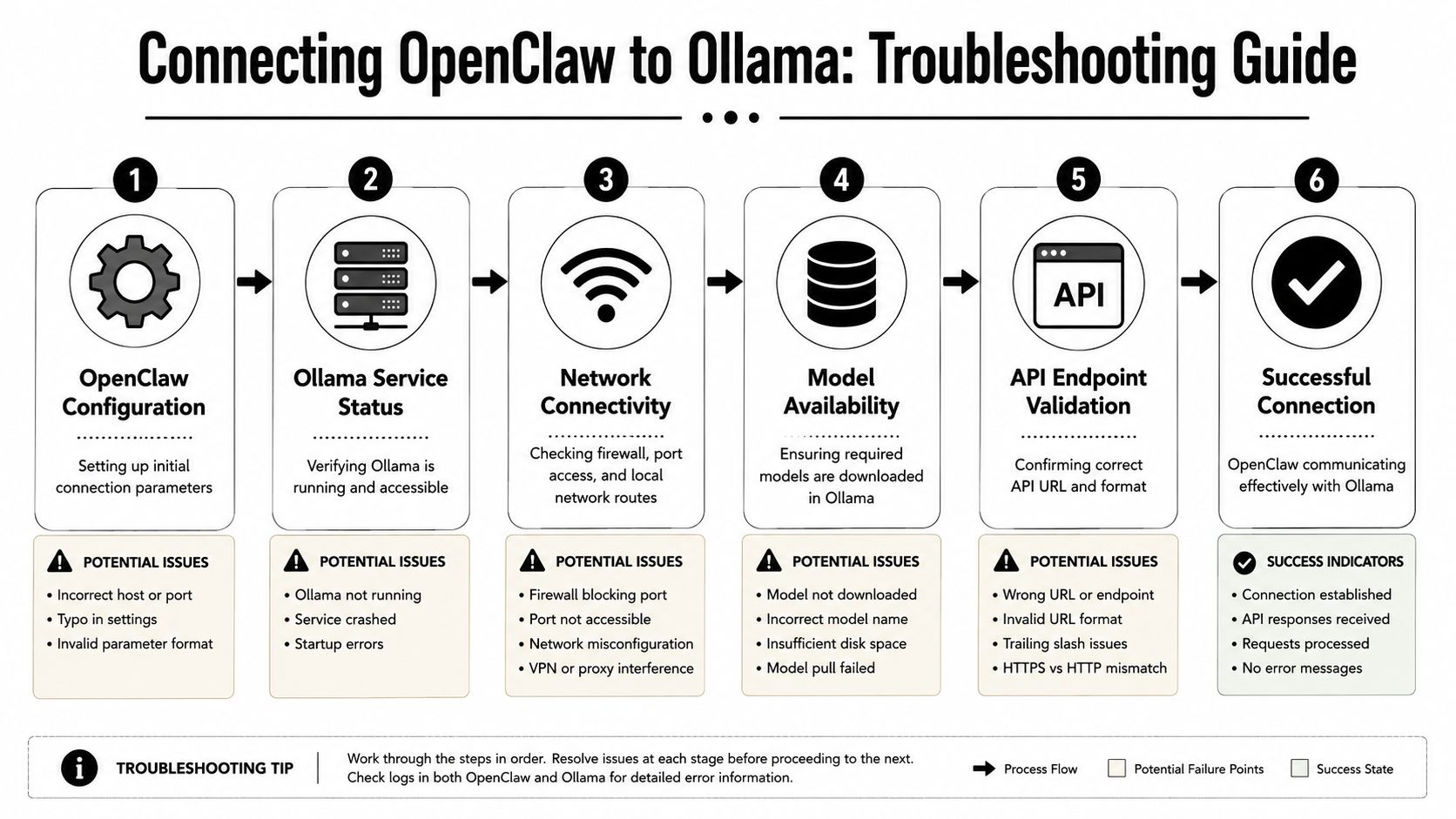
The failure pattern most people hit
The common symptom is straightforward. OpenClaw can list hosted models, but your local Ollama model is missing. When that happens, one of four things is usually off.
- The provider/model reference is incomplete. OpenClaw expects a provider-qualified model name, not just the raw Ollama tag.
- The Ollama service is unreachable from OpenClaw's runtime. A model that works in your terminal may still be invisible from a container, VM, or separate service user.
- The model is visible but not usable for agent work. Discovery and runtime stability are different checks, but they often fail in the same setup.
- Routing is still favoring cloud execution. OpenClaw may be functioning, just not against the local path you intended.
If OpenClaw sees hosted models but not your local Ollama ones, stop reinstalling. Check naming, reachability, and routing first.
This wastes time, as teams pull the same model again, restart Ollama, or replace the whole install without touching the actual fault.
The checks that usually fix model discovery
OpenClaw's Ollama integration uses Ollama's native /api/chat interface and expects a full <provider/model> reference for --model, as noted earlier in the provider guidance. That one requirement causes a large share of failed local setups.
Use an explicit model reference when launching or configuring:
ollama/qwen3.5:27b
If you are using a vision-capable model and expect OpenClaw to call it directly, the exact reference matters even more because fallback behavior can hide a bad configuration.
Use this checklist in order:
- Confirm the Ollama server is live. If the service is down, OpenClaw cannot discover or call the model.
- Test from the same environment where OpenClaw runs. Host success does not prove container success.
- Use the exact provider-qualified model reference. Shorthand aliases are a frequent source of silent failure.
- Verify the model exists in that Ollama instance. Multiple local instances and mismatched ports cause confusion fast.
- Check whether the model can handle agent context. A model can appear in discovery and still fail once tool schemas and history are added.
- Reduce complexity during first validation. If full agent turns fail, try a leaner setup before changing models.
This walkthrough is useful to keep nearby while you test configurations:
For teams running OpenClaw across local dev machines, containers, and shared environments, Donely's integration patterns for OpenClaw and related tools help standardize provider wiring and model references so each environment does not drift.
Routing mode changes what OpenClaw tries to do
OpenClaw supports three routing modes for Ollama-backed usage:
- Cloud + Local
- Cloud only
- Local only
These modes change how discovery problems show up. In Cloud + Local, some requests still succeed, so local breakage is easy to miss. In Local only, failures are immediate and easier to diagnose.
For initial setup, Local only is the better test. It removes ambiguity and forces OpenClaw to use the path you are trying to validate. Once the agent can complete real turns against the local model, hybrid routing becomes a policy decision instead of a debugging crutch.
Tuning Local Model Performance for Agentic Workflows
Once OpenClaw can see and use your local model, the next problem is different. The issue isn't visibility anymore. It's whether the agent is responsive and stable enough to be useful.
Local agent performance is a three-way trade-off between speed, VRAM pressure, and reasoning reliability. You can't maximize all three at once.
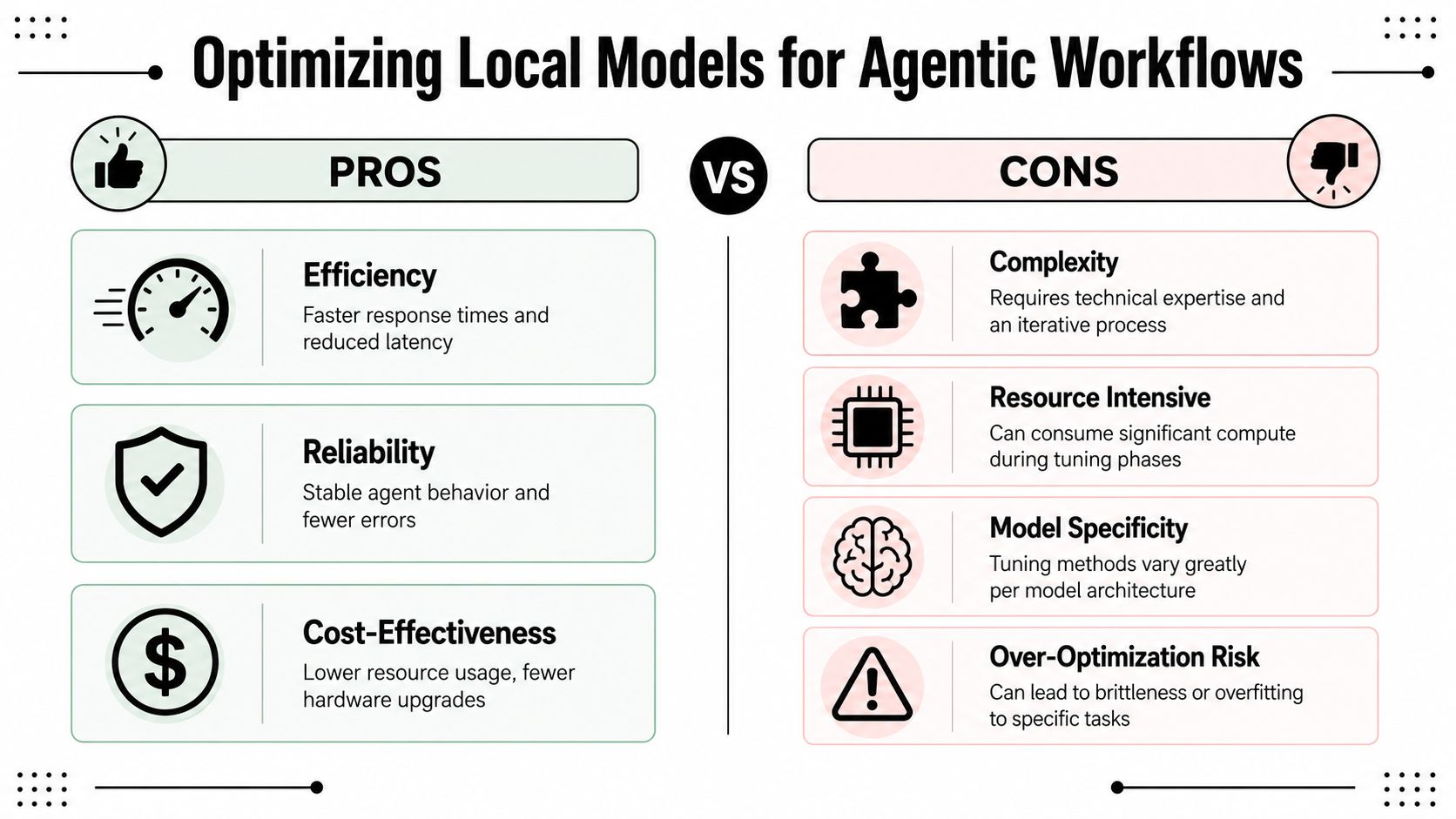
Fast enough is better than theoretically stronger
By 2026, independent OpenClaw and Ollama model rankings for coding-oriented local use reported Qwen3.6 27B at 77.2% SWE-bench Verified and about 70 tokens/sec on an RTX 5090, while Qwen3.6 35B-A3B was listed at roughly 180 tokens/sec with 16GB+ VRAM requirements in the OpenClaw local model rankings and tutorial summary. The same tutorial also describes a fully local workflow where the orchestration loop stays on-device instead of calling external APIs.
That matters because local agent work isn't judged only by benchmark quality. It's judged by whether the model can stay coherent across repeated tool calls without dragging the workflow to a halt.
Quantization sits right in the middle of that trade-off. Lower-bit quantization usually helps memory use and often improves throughput, but it can also make tool-following or structured outputs less reliable on some models. Higher precision can preserve behavior, but it narrows your hardware margin fast.
A good local setup usually follows this order:
- Stabilize first: Pick a model that fits your hardware comfortably.
- Measure real tasks: Don't tune against toy prompts. Use the agent flows you care about.
- Adjust quantization only after prompt load is under control: Quantization won't rescue a bloated agent definition.
- Watch sustained sessions: A model that feels good on turn one can degrade after tool-heavy history accumulates.
Lean agents often beat heavyweight defaults
One of the most practical fixes for local OpenClaw deployments is to make the agent smaller in prompt terms. If the local model struggles with multi-step turns, removing heavy default tools can improve consistency more than swapping models.
Smaller prompt footprints often produce better local agent behavior than chasing a slightly stronger model.
This is especially true when a model technically supports the workflow but gets brittle under large tool manifests or long system instructions. Lean mode helps by reducing prompt overhead and making the model's job narrower.
What tends to work:
- Remove tools the agent never uses. Every exposed tool increases prompt and decision complexity.
- Narrow the agent role. A coding agent, support agent, and ops agent shouldn't share the same heavyweight defaults.
- Reset aggressively during testing. Long histories can mask whether the model is stable.
- Tune for repeatability, not one impressive run. A stable local worker beats an inconsistent “smart” one.
What usually doesn't work is trying to brute-force weak local behavior with more instructions. Extra prompt scaffolding often makes local models worse, not better.
Deploying and Governing Agents with Donely
A single local OpenClaw agent is manageable from the CLI. Two or three agents across different business functions are where operational friction starts showing up. Client isolation, access control, billing boundaries, log visibility, and environment drift become real issues fast.
That's the gap between “I have a working local agent” and “I can operate this reliably for a team or customer.”
What breaks when one local agent becomes several
The first problem is usually isolation. Founders want one agent for personal productivity and another for business operations. Agencies need separate environments for each client. Internal teams want different connectors, permissions, and data scopes.
The second problem is governance. Once agents touch customer communication, internal knowledge bases, or revenue systems, access control stops being optional. Someone has to answer basic questions like who can deploy an agent, who can view logs, and which data each instance can reach.
Manual setups can handle this, but they become fragile. You end up managing a patchwork of local configs, shell history, secrets placement, and ad hoc restart procedures.
Where a managed layer helps
A platform like Donely's OpenClaw hosting layer serves this purpose. It provides a unified way to host, deploy, and manage OpenClaw-based agents with multi-instance isolation, per-instance RBAC, isolated containers, scoped data access, unified audit logs, and centralized monitoring and billing.
That matters for local-model workflows too. Even if inference stays local or partially local, the operational layer around the agents still needs discipline. Teams usually don't want to hand-roll tenancy boundaries and governance controls just to keep a few OpenClaw workers manageable.
The useful distinction is this:
- Local inference solves model control and privacy
- A management layer solves operations and governance
Those are different jobs. Treating them as the same thing is why many local agent projects work in a demo but stall in production.
The Future is Local Your Next Steps
A common production failure looks deceptively small. OpenClaw starts, Ollama is running, the model is installed, and the agent still cannot see it. In practice, that usually comes down to one of three things: OpenClaw is pointed at the wrong Ollama host, the model name is slightly wrong, or the model you chose falls over once tool calls and longer agent prompts enter the loop.
Treat the setup like infrastructure from day one. Verify the exact model reference you pass to OpenClaw. Confirm that the Ollama instance you expect is reachable from the process, container, or VM where OpenClaw runs. If discovery fails, assume configuration drift before assuming a broken install.
That mindset saves time.
The teams that get good local results usually start smaller than they planned. They pick one agent, one local model, one workflow, and test the full path under realistic prompt load. That surfaces the failures that benchmark prompts hide, especially around context length, tool latency, and memory pressure.
Performance tuning follows the same rule. A bigger model is not automatically a better agent model. For many OpenClaw workloads, a smaller model with tighter prompts, fewer tools, and a narrower task boundary is faster, cheaper, and more reliable than a larger model that looks stronger in isolation.
Once that first agent is stable, the next decision is operational. You can keep running local workers by hand, but the work quickly shifts from model setup to environment control, access policy, logging, and incident cleanup. Donely gives teams a unified way to host and manage multi-instance AI employees when they need isolation and governance without building that layer themselves.