
WhatsApp sits at a scale that most support stacks never get close to. It has 3 billion+ monthly active users globally, an estimated 98% average message open rate, and 175 million+ people messaging businesses daily (WhatsApp AI agents guide 2026). That combination is why an AI agent for WhatsApp is not a novelty feature, it's an operating layer for sales, support, and commerce.
The catch is that the channel's strengths also create the failure modes. A bot that looks fine in a demo can collapse under real message volume, session rules, handoff edge cases, and messy mobile inputs. What works is a production system with transport, orchestration, memory, business-tool integrations, logging, and escalation all designed together, not bolted on after launch.
Table of Contents
- Why WhatsApp Demands Production-Grade Architecture
- Setting Up Your Donely Instance and WhatsApp Connection
- Wiring Integrations for Real Business Workflows
- Implementing Security and Access Control
- Testing and Monitoring for Production Reliability
- Scaling Across Multiple Instances and Clients
- Choosing the Right Donely Plan for Your Deployment
Why WhatsApp Demands Production-Grade Architecture
The business case for WhatsApp is already settled by user behavior. The channel has 3 billion+ monthly active users, 98% average message open rate, and 175 million+ daily business conversations, while conversational commerce is projected to reach USD 290 billion by 2027 (WhatsApp AI agents guide 2026). WhatsApp Business is also described as being used by over 200 million companies worldwide with 2 billion+ messages sent to business accounts daily. That kind of volume is why a WhatsApp AI agent cannot be treated like a side project.
A production deployment has to hold up under bursty inbound traffic, business-hour handoffs, template rules, and the expectation that replies arrive quickly and stay accurate. Once the agent handles orders, appointments, or account-specific answers, it sits inside the service path and the revenue path at the same time. The operational bar changes immediately.
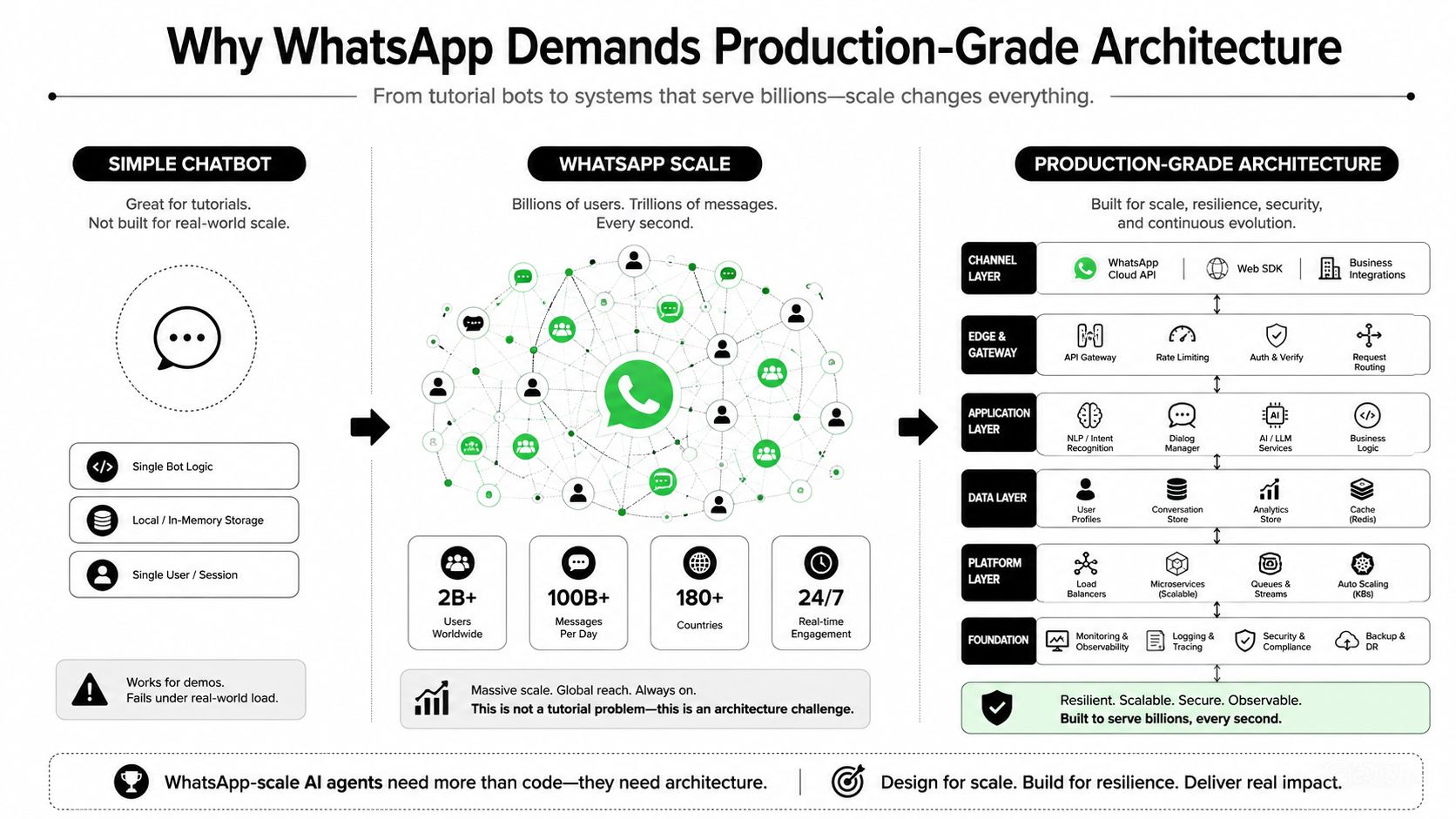
Simple chatbot thinking breaks fast
Most setup guides stop at connecting the number and writing a prompt. That holds until the first unsupported price question, until a customer sends a voice note, or until someone asks the agent to book something that depends on live system data. A production-grade architecture has to fetch facts from business systems, keep state across turns, and stop itself when the answer is not available.
Practical rule: if the answer depends on business data, the agent should retrieve it or escalate. Free-form guessing is the fastest path to a customer complaint.
WhatsApp also imposes a specific operating model. Proactive outbound messages outside the session window require approved templates, so any design that assumes unrestricted broadcasting will fail under real traffic. The channel also rewards disciplined agent design, which is why build LLM-based agents is a useful reference point, even if the WhatsApp implementation details are stricter than a generic agent stack.
The governance layer matters just as much as the model layer. If you are running multiple instances for different clients or business units, credential separation, audit logs, and message retention boundaries are part of the architecture, not afterthoughts. Security gaps and shared state are the kinds of mistakes that show up only after a handoff goes wrong or the wrong customer sees the wrong reply.
Economics matter too. Every extra retry, duplicate webhook call, or unnecessary model invocation adds cost, and at scale those inefficiencies become visible in the monthly bill. Production architecture is what keeps the system predictable when traffic rises, support teams change, and more than one instance is in play.
The strategic takeaway is simple. WhatsApp is a high-trust channel where response speed, message integrity, security boundaries, and operating cost all need to hold together.
Setting Up Your Donely Instance and WhatsApp Connection
A production WhatsApp setup starts with isolation. Keep a separate instance for each business unit, client, or environment so credentials, logs, and data boundaries do not bleed together once more than one team needs access. For the transport layer, choose the path that fits your operating model, either the Cloud API directly or a BSP if you need more managed delivery and support around transport.
Webhook handling is the next pressure point. It has to acknowledge quickly, because slow acknowledgment is where message drops and duplicate processing start. Register a verified business number, point WhatsApp events to a secure webhook, and make the handler idempotent so retries do not create duplicate replies or duplicate tool calls.
Configure the agent before you connect traffic
The instruction set should describe the job, not the personality. A narrow, typed task definition works better than a long, generic prompt because the agent can route to order lookup, appointment booking, or ticket creation without improvising unsupported behavior. The platform guidance for production WhatsApp agents consistently warns against treating the model like a standalone chatbot, and that warning is right.
Use the transport and orchestration split early, before you expose the instance to live traffic. Donely's WhatsApp support flow is worth checking if you want a setup that already wraps the connection steps into a structured deployment path, and the same logic applies to other WhatsApp agent platforms such as Mallary.ai AI agents. Donely's WhatsApp support agent setup should sit at the transport layer, while orchestration stays separate from business logic. In both cases, the useful pattern is the same, keep the transport layer separate from the orchestration layer, and keep the orchestration layer separate from the business logic.
A strong first launch is boring. It replies only to the intents you actually wired, logs every handoff, and refuses to guess when the data is missing.
Session behavior is where a lot of teams get burned. If you design around always-on outbound messaging, policy problems show up later. If you design around the 24-hour session window and approved templates from day one, the agent stays deployable instead of turning into a policy exception waiting to happen.
Wiring Integrations for Real Business Workflows
A WhatsApp agent without integrations is just a nicer inbox. The value starts when it can read a customer record, create a support ticket, book an appointment, or check payment status in the systems your team already uses. That's why tool definitions matter so much, they're the bridge between language and action.
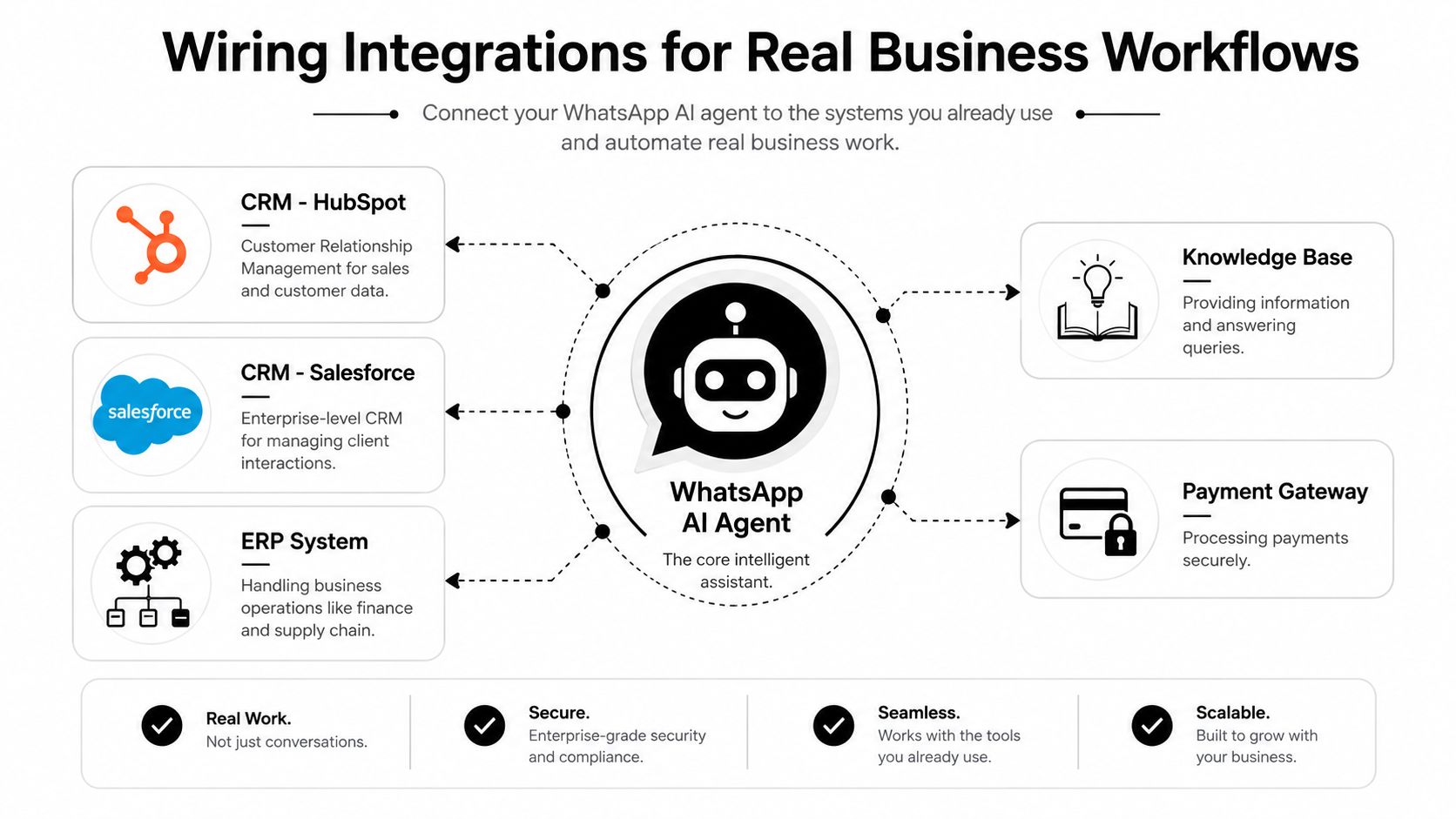
Build tools around verified actions
The safest pattern is typed, purpose-built tools. For example, an order lookup tool should accept an order ID or customer identifier, return only the fields you're prepared to expose, and never let the model invent a status. The same rule applies to appointment booking and support ticket creation, the agent can decide when to call the tool, but the tool decides what data is real.
CRM and ticketing systems are the obvious first layer. HubSpot and Salesforce can give the agent customer context, Zendesk and Jira can create and route support work, and Stripe can handle payment-related checks or confirmations. Internal knowledge systems like Notion and Slack are useful too, but only if the agent can cite them as retrieved context rather than treating them as conversational memory.
Donely's integrations layer is one place to centralize those actions, especially if you're connecting the agent to multiple systems at once, and the same kind of architecture is the reason many teams standardize on a single integrations surface instead of wiring every API by hand. Centralization matters because every extra custom connector is another place where timeouts, schema drift, or bad auth can break the workflow.
Handle failures like a system, not like a prompt problem
External APIs fail, and the agent needs to degrade gracefully. If CRM lookup times out, the right move is to tell the customer the request is being checked and hand off, not to fabricate a status. If the payment processor returns an error, the conversation should stop at the point of uncertainty and move into a supported path.
Keep audit logs for every action the agent takes. That's not just for debugging, it's how you answer compliance questions later, trace a bad tool call, and prove whether a customer was told something by the model or by the source system. The strongest deployments log the original user message, the retrieved context, the chosen tool, the tool response, and the final answer.
Implementing Security and Access Control
Security gets serious the minute one WhatsApp deployment serves more than one client or business line. At that point, access control is no longer a nice-to-have wrapper around the UI, it's the boundary that keeps one team from seeing another team's messages, keys, or logs. The architecture needs to separate instances, scope credentials, and keep audit trails per environment.
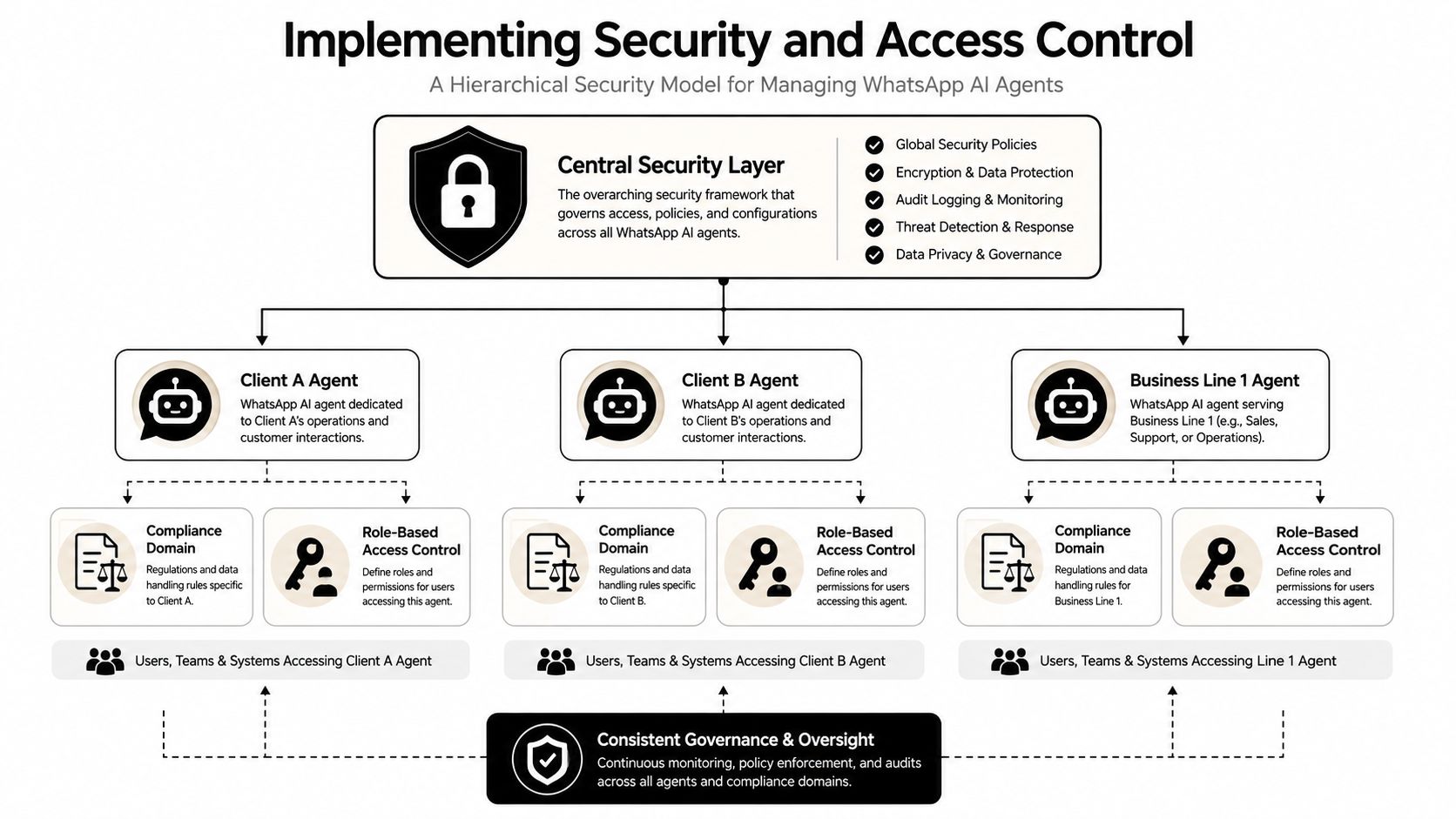
Isolate by instance, not by convention
Multi-tenant safety fails when teams try to simulate boundaries with naming conventions. Real isolation means separate instances, scoped data access, and credentials that only work where they should. If an agency runs several client agents, each client should have its own data boundary and its own audit trail, otherwise one misrouted tool call can expose the wrong conversation history.
RBAC needs to be granular enough that support staff can view conversations without editing tools, while engineers can manage routing without seeing everything by default. The point is to reduce the blast radius of any one account or action. That matters for teams that need strong internal controls as well as regulated environments that care about how messages are stored and reviewed.
Treat the webhook and logs as security assets
Signed webhook handling is a baseline requirement, not an advanced feature. If the inbound event can't be validated, the agent shouldn't process it. The same applies to logging, because logs are where you reconstruct conversations, investigate failures, and support compliance review after the fact.
Practical rule: if a message can trigger a tool call, the event path needs authentication, validation, and an audit record before the model touches it.
Donely's security model is useful here because it centralizes per-instance boundaries, RBAC, and audit logging in one operating layer, and its security policy should be the first place you check when you need a structured view of how controls are applied. For agencies and enterprises, the significant win is not just safety; it's the ability to prove who had access, what changed, and when.
The long-term control question is simple. If you can't explain which agent saw which data, you don't really control the deployment.
Testing and Monitoring for Production Reliability
Testing has to start with real prompts, not idealized prompts. The practical suite should include multilingual messages, typos, fragmented mobile texts, voice notes, images, and edge cases that force the agent to either retrieve context correctly or escalate. That lines up with the main failure mode in WhatsApp, where people don't write like they do in a product spec.
The operational benchmark that matters most is not model cleverness, it's whether the agent only answers when the retrieved context supports the reply. If the business data isn't there, the agent should hand off immediately. That's the difference between a helpful assistant and a liability.
Use a launch checklist, then watch it for two weeks
A good test plan starts with at least 50 real-world prompts, including multilingual inputs and failure cases, then moves into a two-week post-launch monitoring period to catch hallucinations, missing tool coverage, and handoff failures. If the agent can't survive that period with clean logs and predictable routing, it isn't ready for broad traffic.
The metrics that matter are practical. Watch message delivery, escalation frequency, tool call success, and whether conversations complete or stall. If users keep getting routed to humans on the same intent, the problem is usually missing knowledge coverage, weak tool definitions, or broken state handling rather than “prompt quality.”
Escalation is part of reliability
Confidence-gated routing should be the default. The agent answers only when it has enough evidence, and it escalates the rest. That makes support teams faster instead of slower because the human only gets the cases the machine can't settle cleanly.
Test the ugly conversations first. If the agent behaves well on broken grammar, incomplete requests, and media-heavy messages, the polished conversations usually fall into place.
The strongest deployments also keep a clean alerting path. If message errors spike, if webhook validation fails, or if a tool starts timing out, the team should know immediately and stop trusting the agent until the fault is explained.
Scaling Across Multiple Instances and Clients
Single-instance deployments are easy to understand and hard to govern once the business grows. The minute you add another brand, another region, or another client, you need a structure that keeps billing, logs, and access controls separate without turning operations into a manual spreadsheet exercise. That's where multi-instance architecture becomes an economic decision as much as a technical one.
The operational upside is clear. Isolated instances let agencies keep each client's automation, credentials, and audit records separate. Enterprises can split business units without losing centralized visibility, and consultancies can standardize deployment patterns while still preserving data boundaries for each customer.
Cost visibility matters more than raw volume
At scale, the key questions are template spend, deflection rate, and revenue influenced. If you can't tie agent activity back to those measures, you'll know the system is busy but not whether it's paying for itself. Centralized monitoring helps because it puts instance status, logs, usage, and invoicing in one place instead of scattering them across separate tools.
There's also an advantage in having consolidated billing across isolated deployments. You get clean ownership at the instance level and a coherent financial picture at the portfolio level, which is much easier to manage when clients or business lines grow unevenly. Automatic volume discounts change the economics further, because the cost profile of many instances doesn't need to scale linearly with each new deployment.
Governance is the scaling lever
The best multi-instance setup is boring in the right way. Each deployment has its own scope, each team sees only what it should see, and each client gets an audit trail that stands on its own. That structure makes it possible to add agents without re-litigating every security and billing decision from scratch.
Donely is built around that model, with isolated instances, per-instance access control, and centralized ops for teams that need to run many WhatsApp agents at once. In practice, that means less time stitching together admin rules and more time deciding which workflows are worth automating.
Choosing the Right Donely Plan for Your Deployment
The right plan depends on what you're running, not how ambitious the roadmap looks. If you're prototyping a single workflow, the free forever tier is enough to validate the idea. If you need a production instance with predictable ownership, the Personal plan at $25/month per instance is the point where the setup stops feeling like a test environment and starts behaving like an operational asset.
| Donely Plan Comparison | Price | Best For | Key Features |
|---|---|---|---|
| Free Forever | Free | Prototyping and early validation | Basic launch path, single-instance exploration |
| Personal | $25/month per instance | Solo builders and small production deployments | Isolated instance, production workflow setup |
| Team | Not specified | Growing teams | Multi-user collaboration, stronger operational controls |
| Enterprise | Not specified | Regulated or high-scale deployments | SSO, SOC 2, HIPAA-ready architecture, dedicated support, 99.9% uptime SLA |
The threshold for moving up is usually governance, not feature envy. If you need SSO, stronger compliance posture, dedicated support, or formal uptime expectations, the Enterprise tier is the one designed for that operating reality. If you're an agency or a business with several live agents, the multi-instance model itself can justify the move because it keeps client data and billing separate while still leaving you with one control plane.
For cost planning, think in terms of instance count and operational overhead, not just message volume. If a new deployment needs its own data boundary, its own logs, or its own support workflow, the price of separation is part of the product.
If you want a WhatsApp deployment that's built for real operations, Donely gives you isolated instances, access control, audit logs, and a path from prototype to portfolio management without rebuilding the stack each time. Visit Donely to see how its WhatsApp agent setup fits your workflow, then map your first production instance to the systems and permissions it needs.