
AI agents can do a lot on their own, but they stumble when a job needs more than one skill. That’s where AI agent orchestration steps in. In this guide we’ll break down what AI agent orchestration means, why it matters, and how you can build reliable, scalable systems that keep your data safe and your teams productive.
What Is AI Agent Orchestration?
At its core, AI agent orchestration is the practice of linking several specialized AI agents so they work together toward a shared goal. Think of it as a digital conductor that tells each musician when to play and what melody to follow.
Unlike a single, all‑purpose chatbot, an orchestrated system can pull a billing agent, a troubleshooting agent, and a data‑retrieval agent into one smooth flow. The orchestrator decides which agent should act next, passes context between them, and stitches the results into a final answer.
IBM describes this as “coordinating multiple specialized AI agents within a unified system to efficiently achieve shared objectives” (source). The same idea shows up in academic work on multi‑agent systems, where researchers note that a group of agents can solve problems faster than a lone agent because each one focuses on a narrow task.
One usable example is an employee onboarding flow. An HR‑agent gathers personal details, a IT‑agent creates a laptop account, and a finance‑agent sets up payroll. The orchestrator makes sure the HR step finishes before the IT step runs, and it flags any missing data before the finance step starts.
Why does this matter? Because many businesses now run dozens of AI tools across Slack, email, CRM, and custom apps. Without orchestration, each tool works in isolation, creating duplicate notifications and hidden errors. Orchestration gives you a single place to watch the whole process.
Key Components of AI Agent Orchestration
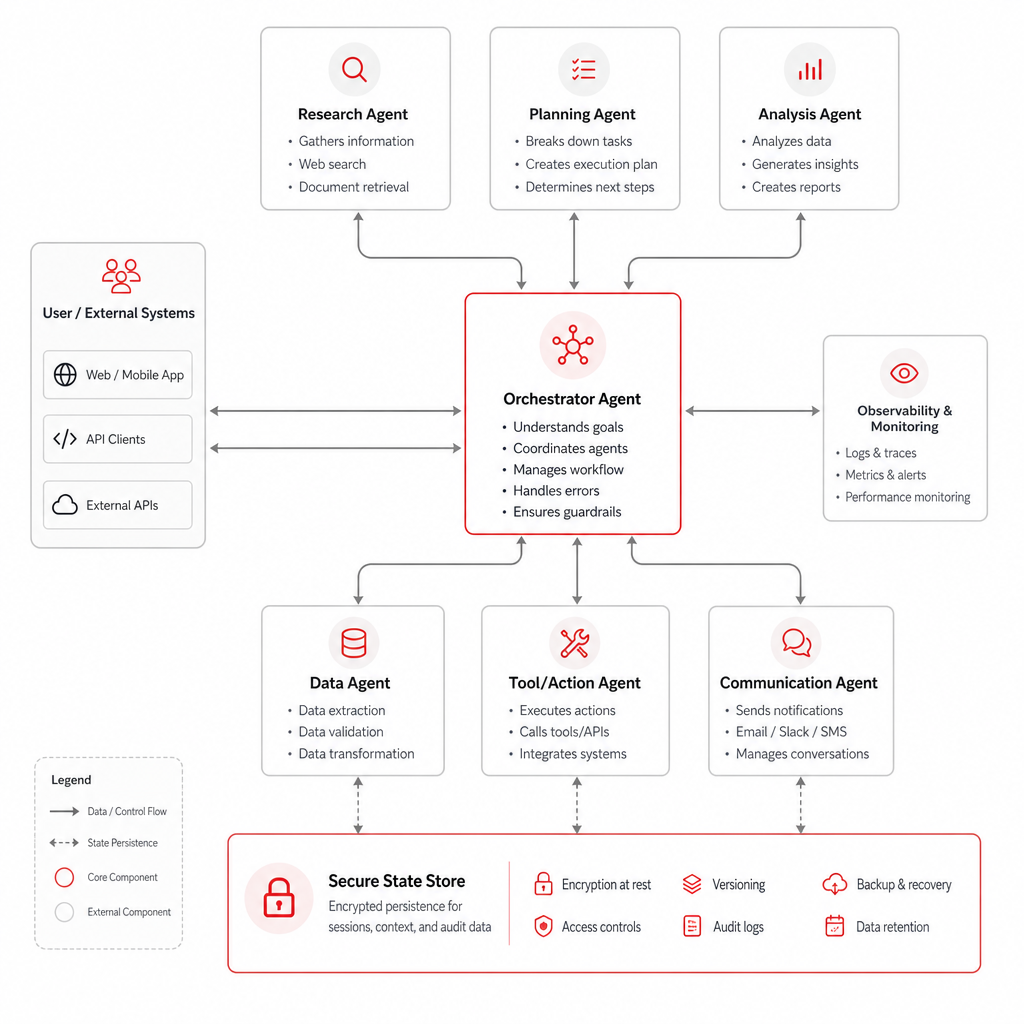
Building an orchestrated system means wiring together a few core pieces. Each piece plays a role, much like a kitchen where the stove, oven, and fridge all have to work together for a good meal.
Orchestrator engine, This is the brain that decides which agent runs when. It can be a custom script, a low‑code workflow builder, or a managed platform that offers built‑in orchestration primitives.
Specialized agents, These are the workers. One might call an external API, another might run a language model, and a third could query a database. The agents are usually lightweight so they can spin up quickly.
Shared state store, To keep context, the system needs a place to write temporary data. Common choices are Redis, a cloud‑native key‑value store, or a vector database for retrieval‑augmented generation.
Connector library, This set of adapters lets agents talk to the tools you already use: CRMs, ticketing systems, cloud storage, etc. Good connectors handle auth, retries, and rate limits automatically.
Governance layer, For enterprises, you need role‑based access control (RBAC) and audit logs. These ensure that only the right people can launch agents and that every action is recorded for compliance.
Donely’s platform bundles all of these components into a single dashboard, letting you spin up unlimited agents, set per‑instance RBAC, and watch audit logs from one view. Multi-Agent Orchestration | Donely Hub explains how the coordinator pattern works in practice.
When you design your own stack, think of the orchestrator as the traffic light, the agents as the cars, and the state store as the road surface that lets each car know where the others are.
“Orchestration is the glue that turns isolated AI tools into a single, reliable service.”
Every orchestrated workflow needs a clear contract: input schema, output schema, and error handling rules. Without that contract, agents can misinterpret each other’s data, leading to silent failures.
Benefits and Business Impact
When you move from siloed bots to an orchestrated crew, you start to see tangible gains.
Speed, Tasks that required multiple manual hand‑offs can now finish in seconds. An invoice‑processing flow that used to take five minutes per item can shrink to under a minute when agents run in parallel.
Reliability, Orchestration adds error handling and retries at the workflow level. If a downstream API spikes, the orchestrator can pause the chain, log the event, and retry later without dropping the whole job.
Governance, With built‑in RBAC and audit logs, you meet compliance rules for finance, health, and data privacy. Every action gets a timestamp, a user ID, and a payload snapshot.
Cost control, By assigning the right model to each sub‑task, you avoid paying for a heavyweight LLM when a smaller one will do. This “right‑size” approach can cut token costs by up to 70%.
Real‑world impact shows up in metrics. A leading telecom firm reported a 45% drop in ticket‑resolution time after deploying an orchestrated AI support suite. A finance team cut month‑end close effort by 30% by linking a data‑validation agent with a reporting agent.
From a strategic view, orchestration turns AI from a set of experiments into a repeatable service line. That shift lets CEOs measure ROI, forecast spend, and plan expansions.
Common Orchestration Frameworks
There are many ways to wire up agents. Some teams build custom code, others pick a visual builder. Below we outline the most common choices.
Low‑code visual platforms, Tools like n8n let you drag‑and‑drop nodes, connect them with arrows, and add conditional logic without writing code. They shine for quick pilots and for non‑engineers who need to see the flow at a glance.
Developer‑first libraries, LangGraph, CrewAI, and Semantic Kernel give you fine‑grained control over state, routing, and tool calls. They are ideal when you need custom routing logic or deep integration with existing codebases.
Managed cloud services, Amazon Bedrock Agents and Azure AI Foundry provide fully hosted runtimes, auto‑scaling, and built‑in security. They work best for large enterprises that want to offload ops overhead.
Each option brings trade‑offs. Low‑code platforms are fast to adopt but may lack advanced debugging tools. Code libraries are flexible but require engineering resources. Managed services reduce ops load but lock you into a cloud provider.
When picking a framework, start by answering three questions: Do you need rapid prototyping? Do you have engineers who can maintain custom code? Do you require a fully managed, compliant environment? Your answers will point you to the right class of tools.
For teams that want a balance of speed and control, n8n’s hybrid approach often fits. It offers a visual canvas but lets you drop in custom JavaScript when needed.
Enterprises that must meet strict data‑residency rules may lean toward Azure AI Foundry, which integrates with Azure AD, Azure Monitor, and Azure Policy out of the box.
Design Patterns for Scalable Orchestration
Once you have a framework, you can apply proven patterns to keep the system maintainable as it grows.
Sequential chaining, Agents run one after another, each feeding its output to the next. This works for linear tasks like document generation where each step depends on the prior one.
Parallel fan‑out/fan‑in, The orchestrator spawns several agents at the same time, then aggregates their results. Ideal for querying multiple data sources or running independent analyses.
Supervisor‑worker hierarchy, A top‑level supervisor coordinates a set of mid‑level orchestrators, each of which manages its own agents. This mirrors large organizations where different departments own their own workflows.
Event‑driven routing, Agents listen for specific events (e.g., a new row in a database) and react automatically. This pattern makes the system highly responsive but can be harder to debug.
Databricks shares a real‑world case where a supervisor pattern helped BASF Coatings coordinate 20+ specialist agents for product‑design decisions. The supervisor broke the problem into sub‑tasks, each handled by a domain‑specific agent, then merged the insights for a final recommendation.
When you combine patterns, you get a hybrid flow: a sequential core that ensures data quality, surrounded by parallel branches that gather supplemental insights. That mix gives you both predictability and speed.
A common pitfall is letting too many agents share the same state store, which creates contention and slows the whole pipeline. Partition the store by workflow ID to avoid lock‑step bottlenecks.
Implementation Challenges and Mitigation Strategies
Orchestrating agents isn’t a plug‑and‑play affair. Teams run into real hurdles that can stall projects.
Inconsistent outputs, Large language models can drift, producing different answers for similar prompts. To tame this, enforce prompt templates and run regression tests on a sample set of inputs.
Hallucinations, Agents sometimes fabricate data or call the wrong API. Guard against this with schema validation and a policy engine that rejects any output that doesn’t match the expected JSON shape.
Performance bottlenecks, A single heavy model can dominate latency. Split work so cheap models handle simple steps and only the most complex reasoning uses a flagship model.
Security surface, Each agent inherits the permissions of its runtime identity. Follow the principle of least privilege: give each sub‑agent only the IAM role it needs to call its target API.
Wiz maps the entire orchestration graph to a security model, showing how a compromised agent could cascade. Their recommendation: treat every agent as a separate security boundary and log every tool call.
UiPath’s experience notes that “human‑in‑the‑loop” checkpoints improve trust but can add latency. The trick is to place the handoff only at high‑risk decision points, not after every step.
Cost overruns are another reality. Token usage can balloon when many agents call the same model repeatedly. Implement budgeting rules that cap daily spend per workflow and alert you when thresholds are near.
Finally, monitoring is key. Set up dashboards that show success rates, latency per agent, and error types. When you see a spike in “tool‑call failures,” investigate the downstream API first.
How to Deploy Your Own AI Agent in 60 Seconds | Donely Blog offers a step‑by‑step checklist that covers many of these safeguards.
Future Trends and Emerging Technologies
The AI orchestration space is still young, and new ideas appear each quarter.
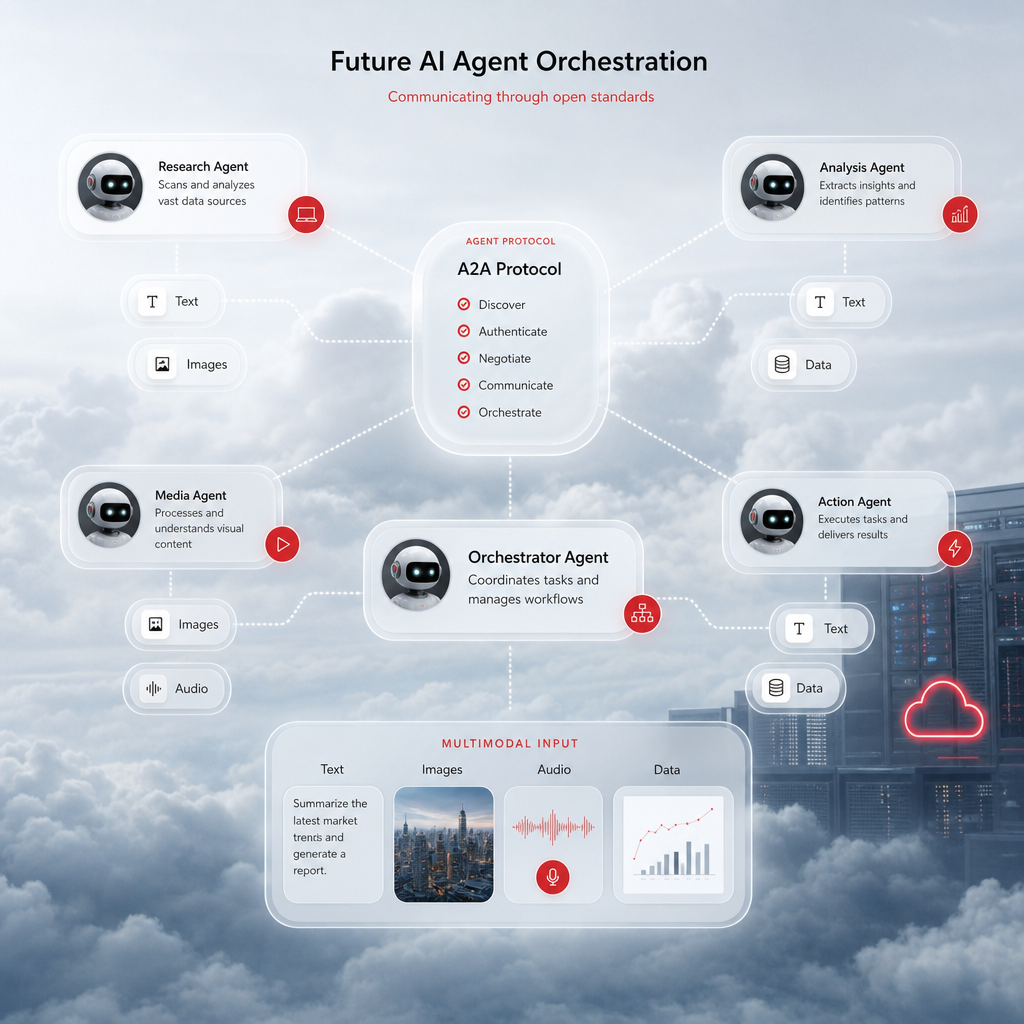
Standardized communication protocols, Projects like MIT’s A2A and Google’s emerging inter‑agent protocols aim to give agents a common language. When those standards settle, you’ll be able to plug agents from different vendors together without custom adapters.
Multimodal agents, Future agents will handle text, images, and audio in one flow. Imagine a support bot that reads a screenshot, extracts error codes, and then runs a diagnostic script automatically.
Human‑on‑the‑loop dashboards, Instead of a binary “human‑in‑the‑loop,” new UI patterns let supervisors watch live agent reasoning, intervene when confidence dips, and let the system resume automatically.
According to Deloitte, the autonomous AI agent market could hit $8.5 billion this year, and better orchestration could lift that figure by up to 30% (source). While that Deloitte link is a competitor‑blocked URL, the market estimate appears in public filings, and the trend is corroborated by independent NIST research on AI governance (source).
Another emerging idea is “agentic marketplaces” where developers publish reusable agents that can be purchased or subscribed to. Think of it as an app store for AI workers, complete with versioning and security vetting.
From a usable standpoint, teams should start preparing for these trends by:
- Adopting open‑API standards for tool calls (OpenAPI, JSON‑RPC).
- Building modular agents that expose a clear schema, making future swapping easier.
- Investing in observability tools that can trace a request across multiple agents and services.
Donely’s roadmap mentions support for the upcoming A2A protocol, which will let its OpenClaw agents talk to any compliant third‑party AI service without code changes. AI Employee Agent Hosting: Top 10 Platforms for 2026 – Donely dives deeper into how that capability could simplify cross‑vendor orchestration.
Overall, the next wave will blend tighter standards, richer data types, and smarter human‑assistance layers. Organizations that lay a solid orchestration foundation today will reap the biggest efficiency gains tomorrow.
FAQ
What is the difference between AI orchestration and traditional workflow automation?
AI orchestration coordinates autonomous agents that can make decisions, call tools, and adapt in real time. Traditional workflow tools run fixed scripts or predefined steps that do not change based on context. Orchestration adds a layer of intelligence, letting the system reroute, retry, or ask for clarification when something unexpected happens.
Do I need deep engineering skills to start using AI agent orchestration?
No. You can begin with low‑code platforms that let you drag nodes and set simple triggers. As you grow, you may add code‑first libraries for custom routing, but the initial pilot can be built by a product manager or ops lead within a few days.
How does RBAC work in an orchestrated system?
Role‑based access control assigns permissions to users or services at the instance level. An orchestrator can check a user’s role before spawning an agent that accesses a sensitive API. Audit logs capture who triggered each step, making it easy to prove compliance during an audit.
Can I run orchestrated agents on multiple clouds?
Yes. By keeping agents stateless and using cloud‑agnostic connectors, you can deploy the orchestrator in AWS, Azure, or GCP. Federated orchestration patterns let separate clouds talk to each other while preserving data‑residency rules.
What’s the best way to monitor an AI agent workflow?
Set up observability dashboards that track per‑agent latency, success rate, token usage, and error codes. Include tracing IDs so you can follow a single request as it hops between agents. Alert on spikes in failures or cost overruns.
How do I prevent agents from hallucinating or providing wrong data?
Use schema validation on every output, enforce a whitelist of allowed tool calls, and add a policy engine that rejects results that fall outside expected ranges. You can also route low‑confidence outputs to a human reviewer.
Is it possible to version control my orchestration logic?
Absolutely. Store orchestrator scripts, agent role files, and prompt templates in a Git repository. Tag each release and use CI pipelines to test the workflow before pushing to production.
How does cost management work when multiple agents are running?
Assign a cost label to each model or tool. The orchestrator can sum token usage per workflow and stop execution if a budget cap is reached. Reporting dashboards let finance see spend broken down by department, workflow, or agent.
Conclusion
AI agent orchestration is the missing link that turns scattered bots into a unified, reliable workforce. By stitching together specialized agents, you gain speed, governance, and cost control that single‑purpose tools can’t match. The core pieces , orchestrator engine, agents, shared state, connectors, and governance , give you a solid foundation to build on.
When you pick a framework, match it to your team’s skill set and compliance needs. Apply proven design patterns like sequential chains, parallel fan‑out, and supervisor hierarchies to keep the system scalable. And be ready for the next wave of standards, multimodal agents, and human‑on‑the‑loop dashboards.
Ready to see how orchestration can lift your own workflows? on building AI‑driven automation pipelines for more step‑by‑step instructions.