
You might be searching for “jobs in isolation” because your day already feels split in two. On one side, there's human work: remote teammates, solo contributors, and people trying to focus without constant interruption. On the other side, there's machine work: scripts, bots, and AI agents handling tasks in the background, often with little visibility or control.
Those two worlds sound separate, but they're converging. The same questions keep showing up in both. Who has access? How do you monitor the work? What happens when one part fails? How do you keep isolation useful instead of lonely, chaotic, or risky?
Table of Contents
- The Three Meanings of Jobs in Isolation
- Navigating the Human Challenges of Isolated Work
- The Operational Drag of Disconnected Technical Jobs
- How Isolated Instance Architecture Creates Order
- Putting Isolated AI Workflows into Practice
- From Isolated Chaos to Coordinated Control
The Three Meanings of Jobs in Isolation
A product manager reviews updates from a home office. A medical coder spends hours in concentrated solo work inside a busy building. An AI agent sorts support tickets in a contained runtime with its own permissions and memory. All three can be described as jobs in isolation, but they are not the same kind of isolation.
One phrase, three islands
The phrase covers three separate ideas, and confusion starts when those ideas get flattened into one.
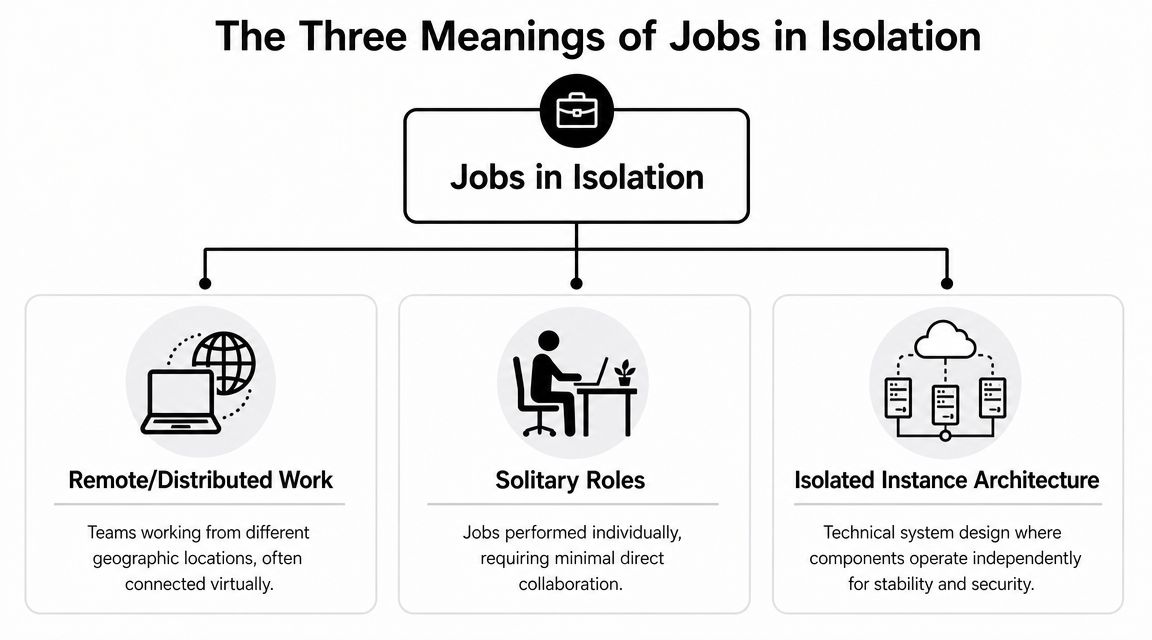
The first meaning is remote or distributed work. Here, isolation is mostly about physical distance. The person is away from the central office, but still part of a team system with meetings, deadlines, approvals, and shared goals.
The second meaning is solitary roles. These jobs can happen at home, in an office, or in a lab. What defines them is long stretches of uninterrupted concentration. A writer, archivist, researcher, or analyst may sit near other people and still work in isolation because the task requires protected focus.
The third meaning is jobs running in isolated technical environments. In this case, “job” means a process, not a person. It might be a scheduled workflow, a data sync, or an AI agent handling support, sales qualification, or record updates across tools like Slack, HubSpot, Jira, or Zendesk. Isolation means that process runs inside its own boundary, with scoped access, separate context, and controls that keep one failure from spreading everywhere else.
A simple comparison helps. Remote work isolates a worker from a place. Solitary work isolates a worker from interruption. Technical isolation isolates a process from other processes.
That overlap in language is not accidental. In all three cases, the goal is to create a boundary around work so it can happen with fewer disruptions and clearer rules. The boundary might be a home office, a block of uninterrupted time, or a contained runtime for an AI agent.
This is also why people talk past each other. Someone looking for low-interruption careers may use the same phrase a systems engineer uses when discussing sandboxed automations. The words match. The operating model does not.
Why task mix matters more than title
Job titles hide the pattern. Tasks reveal it.
McKinsey examined remote-work potential at the task level across many roles and found that some jobs contain a high share of work that can be done independently, while others depend heavily on coordination, in-person service, or constant interaction, according to McKinsey's task-based remote work analysis.
That distinction matters because “remote,” “solo,” and “isolated” often get treated as synonyms. They are closer to three different lenses. One describes location. One describes how attention is used. One describes how a system is contained.
A remote account manager may spend the entire day in calls. An on-site records specialist may work for hours with little interruption. An AI support agent may run alone in a technical sense, yet still create chaos if it shares credentials, memory, or data boundaries with unrelated workflows.
The human version has a psychological side too. People who do well in isolated work often show a stronger internal locus of control, because they can regulate effort and make progress without constant external reinforcement. The technical version follows the same logic. An isolated process also performs better when its inputs, permissions, and responsibilities are clearly defined rather than mixed into a shared pool.
| Meaning | Unit being isolated | Main goal |
|---|---|---|
| Remote work | A person from a location | Flexibility and access |
| Solitary role | A person from interruption | Focus and deep work |
| Isolated architecture | A process from other processes | Security, control, and resilience |
The useful thread across all three meanings is bounded communication. People rarely want zero contact. Teams rarely want zero coordination. Systems rarely want zero integration. What they need are clear limits on when work is interrupted, how work is handed off, and what each worker or process can touch.
That is the bridge to AI operations. The same management instinct that helps a remote employee do focused work also helps an automated job run safely. Give it a defined space, a defined role, and defined rules.
Navigating the Human Challenges of Isolated Work

Isolation can feel productive at first. There's less office noise, fewer drop-ins, and more time to think. But the same conditions that protect focus can also remove the small signals that help people feel connected, supported, and seen.
A systematic review found that extended telework is associated with anxiety, depression, reduced job satisfaction, productivity losses, and weakened collaboration, with social disconnection identified as a core mechanism in the review published at PMC. That finding matters because it explains why isolated work can go wrong even when the individual is capable and motivated.
When independence turns into disconnection
Many readers get stuck on a false choice. They assume the answer is either “work alone and protect focus” or “collaborate constantly and stay connected.” In practice, healthy isolated work sits between those extremes.
The problem usually isn't solitude itself. It's unstructured solitude.
A remote designer with clear check-ins, a stable brief, and reliable feedback loops can do excellent work. A solo analyst who has to guess priorities, chase answers in chat, and wait hours for missing context will often feel stranded. The difference isn't personality. It's operating design.
Practical rule: If a role removes hallway interaction, it needs a replacement system for context, support, and escalation.
That's where managers often underestimate the issue. They think communication volume is the fix. It usually isn't. More messages can create more fatigue. What isolated workers need is a smaller set of predictable touchpoints.
How teams reduce the isolation penalty
The review above points to the Job Demands-Resources model. In plain language, that means isolated roles work better when organizations add support structures that balance the added strain of working apart.
Some patterns help more than others:
- Cadenced check-ins: A brief weekly manager sync and a clear team update rhythm often work better than constant ad hoc pings.
- Asynchronous defaults: Shared notes in Notion, recorded walkthroughs, and documented decisions reduce meeting sprawl.
- Fast support channels: People need to know where to ask for help when they're blocked.
- Deliberate peer contact: Pair reviews, buddy systems, or short working sessions restore some of the social texture that isolation removes.
- Clear ownership boundaries: Workers can focus when they know which decisions are theirs and which need input.
For many people, the personal side matters too. A strong sense of agency helps isolated work feel less like drift. If you're trying to build that skill, this short piece on internal locus of control is a useful companion because it frames how people can respond to constraints without pretending those constraints don't exist.
A short discussion on solo work and burnout helps illustrate the emotional side:
There's another common misunderstanding. People searching for introvert-friendly work often don't want silence. They want predictable communication. That's different. A role can be socially light but still require constant client calls, approvals, and handoffs. Good advice should separate low-contact work from low-interruption work, because those are not the same thing.
The Operational Drag of Disconnected Technical Jobs
A remote team can have clear calendars, documented decisions, and good response norms, yet still lose hours every week inside its automation stack. The pattern is familiar. Human work gets organized first. Technical work grows in fragments.
One manager approves a Slack support bot. An operations lead keeps a few scripts running on a shared server. A contractor sets up an AI flow for lead routing. Another teammate connects Gmail, HubSpot, Salesforce, and Jira through separate accounts. Each job solves a local problem. Together, they create a system nobody fully owns.
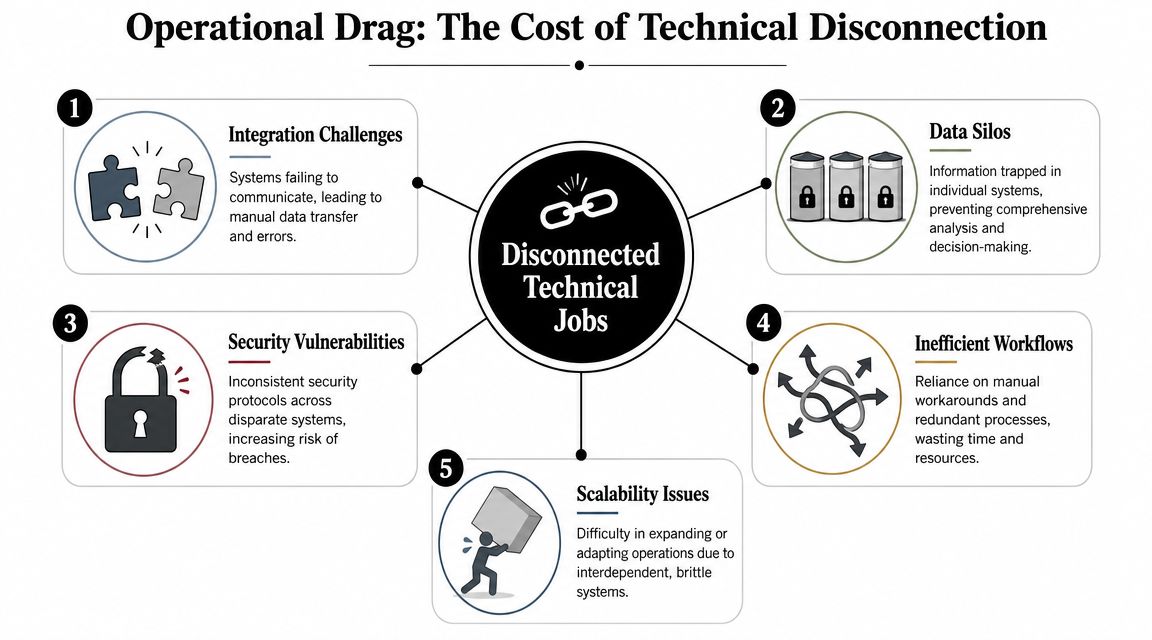
The result looks a lot like unmanaged remote work in its early phase. If people work alone without shared rules, work starts to drift. If automations run alone without shared boundaries, systems start to drift. The difference is that software drift is harder to see until something breaks, bills spike, or client data shows up in the wrong place.
Why scattered automation becomes expensive
A disconnected automation stack works like a restaurant kitchen with shared containers, unclear labels, and no ticket history. Meals still go out. Then a customer reports a problem, and nobody can trace which ingredients were used, who prepared the dish, or which table was affected.
That is what disconnected technical jobs do to operations.
- Shared credentials erase accountability: If several jobs use the same login or API token, tracing a change becomes guesswork.
- Crossed data boundaries raise compliance risk: This is especially painful for agencies, consultancies, and multi-client teams.
- Fragmented logs slow diagnosis: Teams jump between tools trying to reconstruct a failure after the fact.
- Usage costs become hard to assign: It gets difficult to tie compute, API calls, or workflow volume back to a client, project, or department.
- Temporary fixes harden into infrastructure: A quick script built for one task often becomes a dependency for five others.
Poor isolation in technical systems does not remove complexity. It stores complexity in hidden places until an incident forces it into view.
A lot of confusion comes from the word "isolated." In human work, isolation can sound like disconnection or lack of support. In technical work, healthy isolation means something more precise. A job has its own runtime boundary, its own permissions, and its own records, while still operating under shared oversight.
That distinction matters because distributed work created a matching systems problem. As noted earlier, remote and hybrid work are now normal for many organizations. Once people are spread across locations, schedules, and tools, the support layer also needs cleaner structure. Otherwise, the company ends up managing disciplined humans on top of undisciplined machines.
You can see this shift in the kinds of requests non-engineering teams make. Sales asks for a lead-handling agent. Support wants an auto-response workflow. Operations needs nightly reconciliation. Marketing wants enrichment before campaigns launch. Each request sounds small on its own. In aggregate, they form an estate of technical jobs that needs boundaries, monitoring, access control, and policy.
Teams dealing with that buildup often find the same pattern in infrastructure work, which is why this guide to DevOps task automation use cases is relevant even outside a formal DevOps team.
The drag does not come from automation itself. It comes from automation that runs alone, shares too much, and reports too little.
How Isolated Instance Architecture Creates Order
Order appears when isolation is designed at the same level as responsibility.
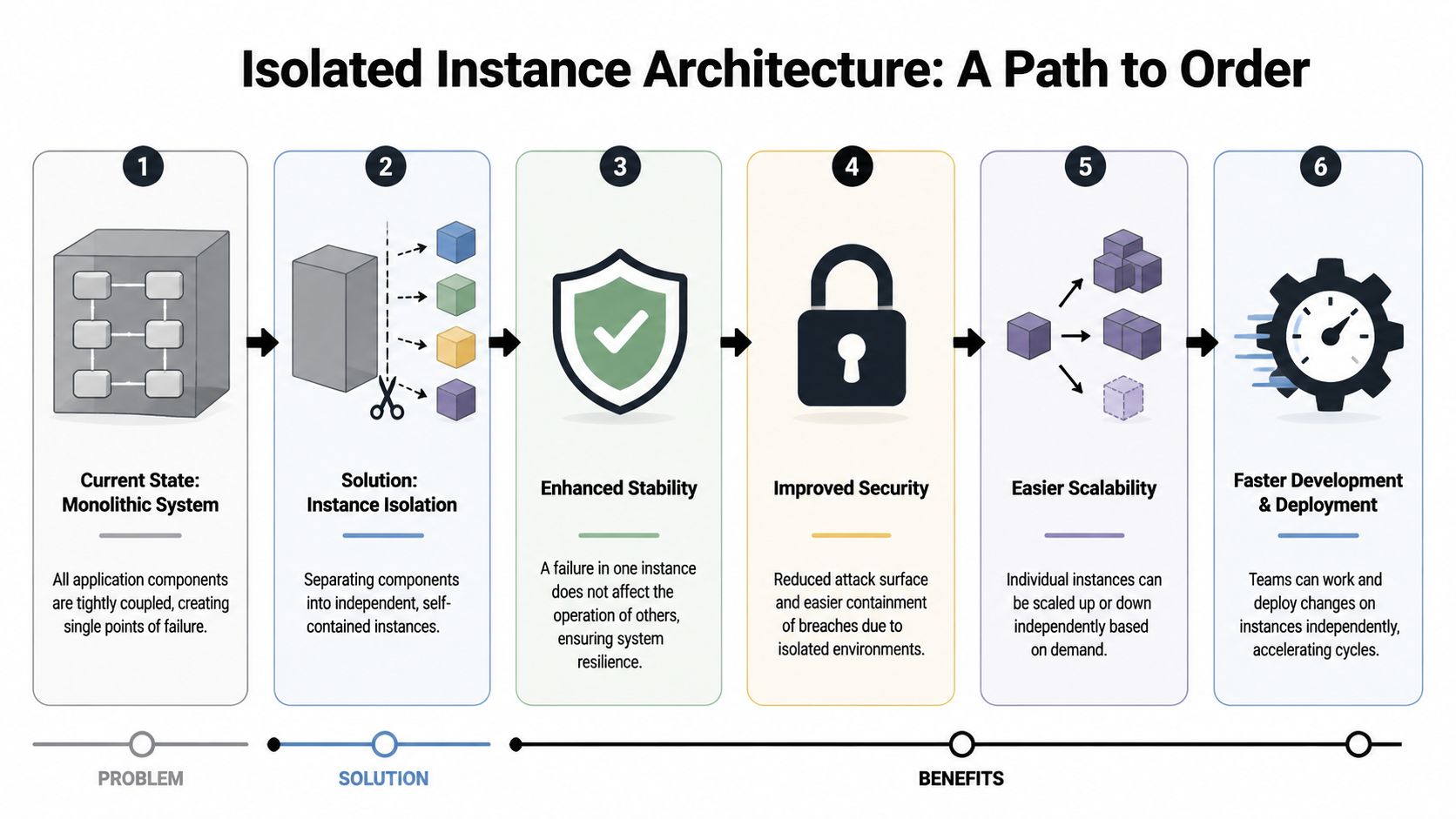
An isolated instance architecture gives each client, team, project, or AI employee its own operating space inside a shared system. It works like a well-run office building. Every group has its own room, keys, records, and approved visitors, while facilities, security, and reception stay centralized. That is the bridge between human remote work and automated work. A distributed company needs people to work independently without losing oversight, and an AI-driven company needs processes to run independently without losing control.
Digital office space for software
In a monolithic setup, new automations often move into the same shared room. They reuse credentials, inherit broad permissions, and scatter logs across tools. The arrangement feels efficient at first because nothing has to be partitioned. Then a client asks for an audit trail, a workflow fails at midnight, or finance wants usage split by account. The shared room becomes hard to manage for the same reason a shared desk becomes hard to manage. Nobody is fully sure what belongs to whom.
An isolated instance model answers those questions at the unit level.
| Operational question | Monolithic answer | Isolated instance answer |
|---|---|---|
| Who can access this workflow? | Often broad and messy | Scoped per instance |
| What data can it touch? | Frequently shared | Limited to its boundary |
| How do you audit activity? | Across many tools | Through consolidated logs |
| How do you separate billing? | Manual mapping | Aligned to instance usage |
That change affects scaling more than teams expect. Instead of treating each new workflow as a one-off exception, you treat it as a managed unit with known rules. This is the same management move companies made with remote work. Once people were no longer sitting in one room, strong teams built repeatable systems for access, communication, accountability, and support. Isolated technical jobs need the same kind of structure.
Separate the workspace, not the visibility. That's the difference between fragmentation and architecture.
As noted earlier, remote work performs better when independence sits inside a clear operating model. The technical version follows the same logic. Isolation without oversight creates sprawl. Oversight without isolation creates bottlenecks. Isolated instance architecture gives you both boundaries and supervision in the same design.
What good isolation gives you
The first gain is security through scoping. A support agent should not inherit access to sales systems, finance records, and every client workspace because it runs on the same platform. Per-instance boundaries make narrow permissions the default instead of a cleanup project.
The second gain is cleaner compliance work. Role-based access, activity trails, and data separation are easier to reason about when each workflow has a defined home. That matters to agencies serving multiple accounts, internal teams with different data rights, and founders exploring AI agents for small businesses. They are rarely asking for more automation alone. They are asking for automation they can assign, review, and contain.
A third gain is operational clarity.
When one workflow breaks, the team needs to know which unit failed, what inputs it used, what systems it touched, and who owns the fix. Central monitoring across isolated units gives leaders the same advantage a good remote-work manager has with distributed staff. Everyone can work independently, but performance, accountability, and support remain visible from one control layer.
Cost management improves for the same reason. A founder can separate a personal assistant from a sales workflow. An agency can map usage to each client without rebuilding its setup every time a new account arrives. Billing follows the unit of work because the architecture does.
You can see that model in Donely's OpenClaw content machine pipeline example, which shows AI work organized as repeatable operational units rather than loose scripts. The broader pattern is what matters. Separate instances, per-instance RBAC, isolated containers, scoped data access, centralized monitoring, and unified audit logs all line up around the same object: the job being managed.
That alignment creates order. Each isolated process gets the technical equivalent of its own office, while leadership still has one building to run.
Putting Isolated AI Workflows into Practice
Agency example
A marketing agency usually starts with one automation and ends up with many. One client wants a lead-response agent connected to Gmail and HubSpot. Another wants campaign reporting pushed into Slack and Notion. A third wants support triage tied to Zendesk.
If the agency runs all of that in one shared setup, boundaries blur fast. Client credentials mix. Reporting gets messy. Troubleshooting becomes political because every failure raises the question of whether another client was affected.
With isolated instances, the agency can give each client its own AI employee setup, its own access scope, and its own billing logic. That's the practical version of what many small firms are looking for when they research AI agents for small businesses. They don't just need automation. They need automation they can govern.
Startup example
A startup founder often begins with a personal assistant agent. It handles calendar cleanup, inbox triage, and routine follow-ups. Then the company adds a support agent, then a sales qualification agent, then an operations workflow.
That growth creates a hidden management problem. The founder doesn't want one giant AI blob touching everything. They want one agent for support, another for pipeline work, and another for internal admin, each with its own access rights and cost footprint.
That setup also helps human workers. Many jobseekers want work with predictable, bounded communication rather than constant interruption, and that preference shows up in career guidance like Monster's discussion of jobs for introverts. AI employees can take routine, repetitive communication off the human team's plate so people get longer stretches for focused work.
If you want a concrete deployment path, this guide to how to deploy AI agents is a useful starting point for turning isolated workflows into a repeatable operating model.
Developer example
Developers usually feel this problem before anyone else does.
They're asked to test a new agent, connect a few tools, and avoid disrupting production. In a weak architecture, that means juggling environment concerns, shared secrets, and fragile dependencies. Even a harmless test can create side effects.
In an isolated instance model, the developer can spin up a contained environment, test behavior, inspect logs, and shut it down without stepping on live workflows. That's not just safer. It also lowers the coordination load. Fewer warnings. Fewer “please don't touch this right now” messages. Fewer accidental collisions.
For technical teams, that's the main gain. Isolation stops being a workaround and becomes a normal part of delivery.
From Isolated Chaos to Coordinated Control
“Jobs in isolation” now describes a much bigger scope than it did a few years ago. It includes remote employees, highly focused solo roles, and AI agents running technical work behind the scenes. The phrase stayed the same, but the operating challenge expanded.
Across all three meanings, the core lesson is consistent. Isolation only works when it has structure. A remote worker needs predictable support. A solitary role needs bounded communication and clear expectations. An AI workflow needs a clean runtime boundary, scoped access, and central oversight.
That's why this topic matters to founders, agencies, and technical teams. They aren't just deciding where work happens. They're deciding how separated units of work stay productive, visible, and safe at the same time.
The future of jobs in isolation isn't about pushing people or processes farther apart. It's about giving each one the right boundary, then managing those boundaries with discipline.
If you're building from a single AI assistant to a broader AI workforce, Donely offers a way to host, deploy, and manage separate OpenClaw-powered instances with centralized monitoring, billing, scoped access, and audit visibility, so isolated work stays controlled instead of fragmented.