
A single AI agent looks impressive in a demo. It answers questions, calls a few tools, drafts a response, and seems ready for production. Then the actual workflow arrives. Sales wants lead research tied to CRM updates. Support needs ticket triage with policy checks. Operations wants approvals, audit trails, and role-based access. One agent now has too much context, too many tools, and too many failure modes.
That's usually the moment teams start looking at multi agent architecture. Not because the concept is fashionable, but because the work has become too broad for one AI “brain” to manage reliably. A better model is a staffed kitchen. One chef handling prep, cooking, plating, inventory, and expediting slows the whole service. A head chef with specialists works faster because responsibilities are separated and handoffs are intentional.
This isn't a new idea. The term multi-agent systems was formally created in the 1980s, and modern references describe them as multiple autonomous AI agents that perceive an environment, make decisions, and interact with one another to solve problems collectively. That shift from a single controller to coordinated specialists is why the architecture remains useful in enterprise AI today, where teams use it to separate responsibilities, reduce bottlenecks, and improve reliability across complex workflows, as outlined in Cognizant's overview of multi-agent systems.
The practical question isn't whether multiple agents sound smarter. It's whether the work benefits from specialization enough to justify the coordination overhead. That's where most advice gets thin. It explains the pattern, but not the operating model.
Table of Contents
- Introduction Beyond a Single AI Brain
- The Core Components of a Multi-Agent System
- Common Multi-Agent Architectural Patterns
- Key Implementation Considerations for Production
- Deployment Models Single-Instance vs Multi-Instance
- Real-World Use Cases and Applications
- Your Implementation Checklist and Getting Started with Donely
Introduction Beyond a Single AI Brain
The failure mode of a single agent is rarely dramatic at first. It starts with small cracks. The agent can draft customer replies, but it forgets the account status it fetched earlier. It can call HubSpot, but then mixes sales context with support context. It can use Slack, Gmail, Jira, and Notion, but each added tool makes its prompt heavier and its behavior less predictable.
That's why teams move to multi agent architecture. They stop asking one agent to do everything and instead assign separate agents to defined jobs. One agent qualifies incoming leads. Another checks policy or pricing rules. A third prepares a final response. An orchestrator routes the work and combines the outputs.
A practical mental model
A restaurant kitchen is still the cleanest analogy. The head chef doesn't dice onions, grill fish, plate desserts, and manage suppliers at the same time. The head chef coordinates specialists who are faster because they stay inside their lane.
AI systems benefit from the same separation.
- A research agent gathers facts or internal documents
- A transaction agent updates systems like Salesforce or Jira
- A compliance agent checks whether the action is allowed
- A supervisor agent decides sequence, retries, and escalation
The benefit isn't just speed. It's control. When a specialist fails, you know where the failure occurred and what permissions that agent had.
Practical rule: Split agents by responsibility, not by vague personality. “Sales agent” is often too broad. “Lead enrichment agent” and “reply drafting agent” are easier to govern.
Why this matters to operators, not just architects
Founders usually care about outcomes. Developers care about maintainability. Operations and compliance teams care about boundaries. Multi agent architecture matters because it gives all three groups something useful.
For founders, it turns broad automation ideas into discrete workflows. For developers, it reduces prompt sprawl and tool overload. For operators, it creates cleaner security, logging, and ownership boundaries.
The hard part is that more agents also create more coordination. Every handoff needs context. Every tool call needs policy. Every agent needs an identity, a permission scope, and a log trail. If you don't design that upfront, you don't have a workforce. You have a distributed debugging problem.
The Core Components of a Multi-Agent System
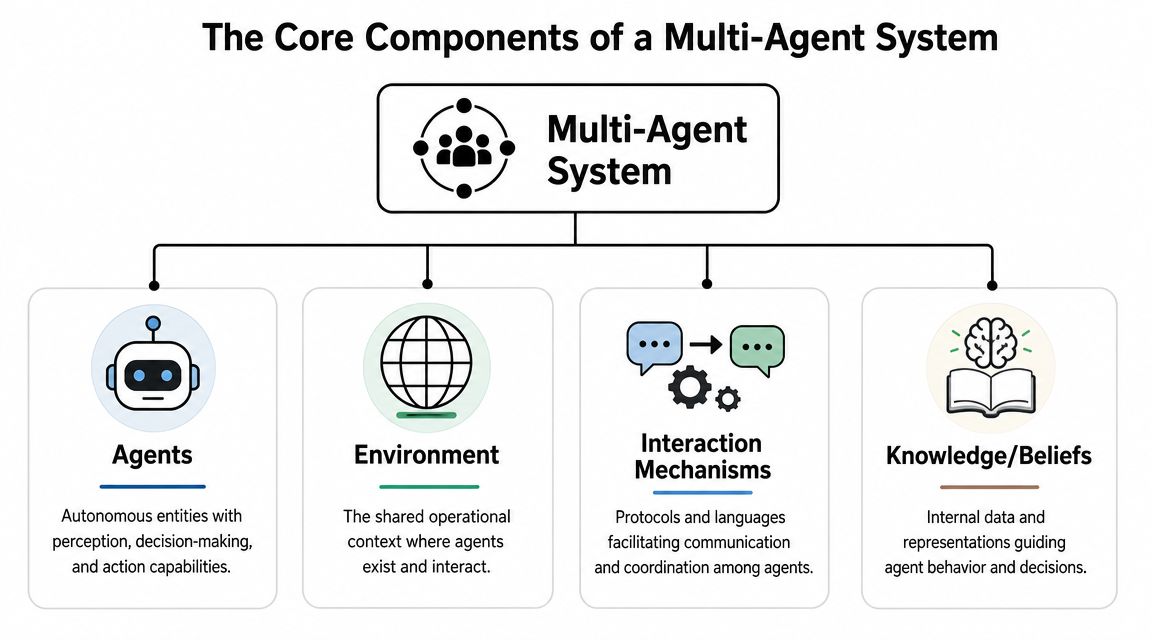
A useful way to understand a multi-agent system is to think like a construction crew building a house. The plumber, electrician, and framing team all work on the same project, but each one sees different details, uses different tools, and follows different rules. The project succeeds because they share enough context to coordinate without collapsing into one giant role.
Agents need hard boundaries
An agent is the worker. In production, that means more than “an LLM with a prompt.” It means a unit with a defined job, a set of tools, and a decision boundary.
The cleaner the boundary, the more reliable the system. A calendar agent should own scheduling logic. A CRM agent should own record updates. A policy agent should decide whether a request can proceed. If one agent handles all three, you've recreated the monolith you were trying to escape.
Teams implementing subagent-based systems often benefit from examples like Cyndra Sub Agents, which show how narrower agents can sit under a supervising layer instead of competing for the same broad context.
The environment carries the job context
The environment is the shared worksite. In AI systems, that can include conversation state, retrieved documents, app data, task queues, or event streams. Agents don't work in a vacuum. They respond to what's in front of them.
Many early builds get messy because teams focus on prompts and overlook where state lives. If your agents can't access the right context, they become brittle. If they can access too much, they become risky.
A managed knowledge layer helps here. A central source of internal context such as a company brain gives agents shared reference material without forcing every prompt to carry the entire business.
Interaction is a system design problem
The interaction mechanism is the crew's radio system. Agents need a reliable way to pass tasks, share outputs, and escalate failures. That can look like direct calls, routed requests, queue-based events, or orchestrated handoffs.
LangChain identifies four modern pattern families for LLM systems: subagents, skills, handoffs, and routers. Confluent separately highlights orchestrator-worker, hierarchical agent, blackboard, and market-based patterns. That matters because it shows the field has moved from general theory to named engineering patterns, as described in LangChain's guide to choosing a multi-agent architecture.
The moment you define routing, handoffs, and state boundaries, you're not prompt engineering anymore. You're doing architecture.
A practical system usually also includes a coordinating layer. Microsoft's reference design emphasizes an orchestrator for intent routing and context preservation, alongside domain agents and shared context services, in its discussion of designing multi-agent intelligence. That's why foreman-style control appears so often in real deployments. Someone, or something, needs to maintain order.
Common Multi-Agent Architectural Patterns
Teams usually don't struggle to imagine specialized agents. They struggle to decide how those agents should relate to each other. That decision shapes governance, debugging, and scaling more than the model choice does.
Why orchestrator models dominate business workflows
In a centralized architecture, one orchestrator receives the task, decides which specialists to call, and merges the result. This pattern is common for support operations, internal copilots, and workflow automation because it keeps decision-making in one place.
The attraction is simple. You get one point for routing, one place to preserve intent, and one place to enforce policy before downstream agents act. That reduces context overload and improves reliability when a workflow spans multiple domains.
Common versions include:
- Orchestrator-worker for task routing and aggregation
- Hierarchical agents for larger workflows with supervisors under a top-level coordinator
- Router patterns when queries need dispatch to domain-specific agents
- Subagents when the main agent treats specialists like callable tools
Where decentralized designs fit
A decentralized architecture gives agents more direct autonomy. Peers may negotiate, contribute to a shared blackboard, or independently react to events. These patterns fit environments where no single coordinator should own all decisions.
That sounds elegant, but the trade-off is operational. Decentralized systems can be harder to test, harder to audit, and harder to explain to security teams. They're viable when agents operate semi-independently, but most business workflows still need a clear authority path.
Here's the practical comparison.
| Criterion | Centralized (Orchestrator Model) | Decentralized (Peer-to-Peer Model) |
|---|---|---|
| Routing control | One agent or service decides task flow | Agents decide locally through direct interaction |
| Governance | Easier to apply approvals, policies, and logging consistently | Harder to enforce consistent rules across peers |
| Debugging | Clear trace through orchestrator decisions | Requires tracing interactions across multiple agents |
| Scalability | Easier to scale operationally for business workflows | Can scale autonomy, but adds coordination complexity |
| Fault isolation | Worker failures are easier to contain and retry | Peer failures can create harder-to-track side effects |
| Best fit | Support, sales ops, internal assistants, controlled automations | Distributed research, event-driven collaboration, specialized independent teams |
A lot of teams overestimate how much decentralization they need. In practice, they need limited autonomy under clear supervision.
Most production systems don't fail because the agents weren't clever enough. They fail because nobody owned routing, permissions, or recovery when one step broke.
If you're building for regulated operations, client separation, or cross-functional teams, start centralized. Move toward decentralized patterns only when the work itself demands independence.
Key Implementation Considerations for Production
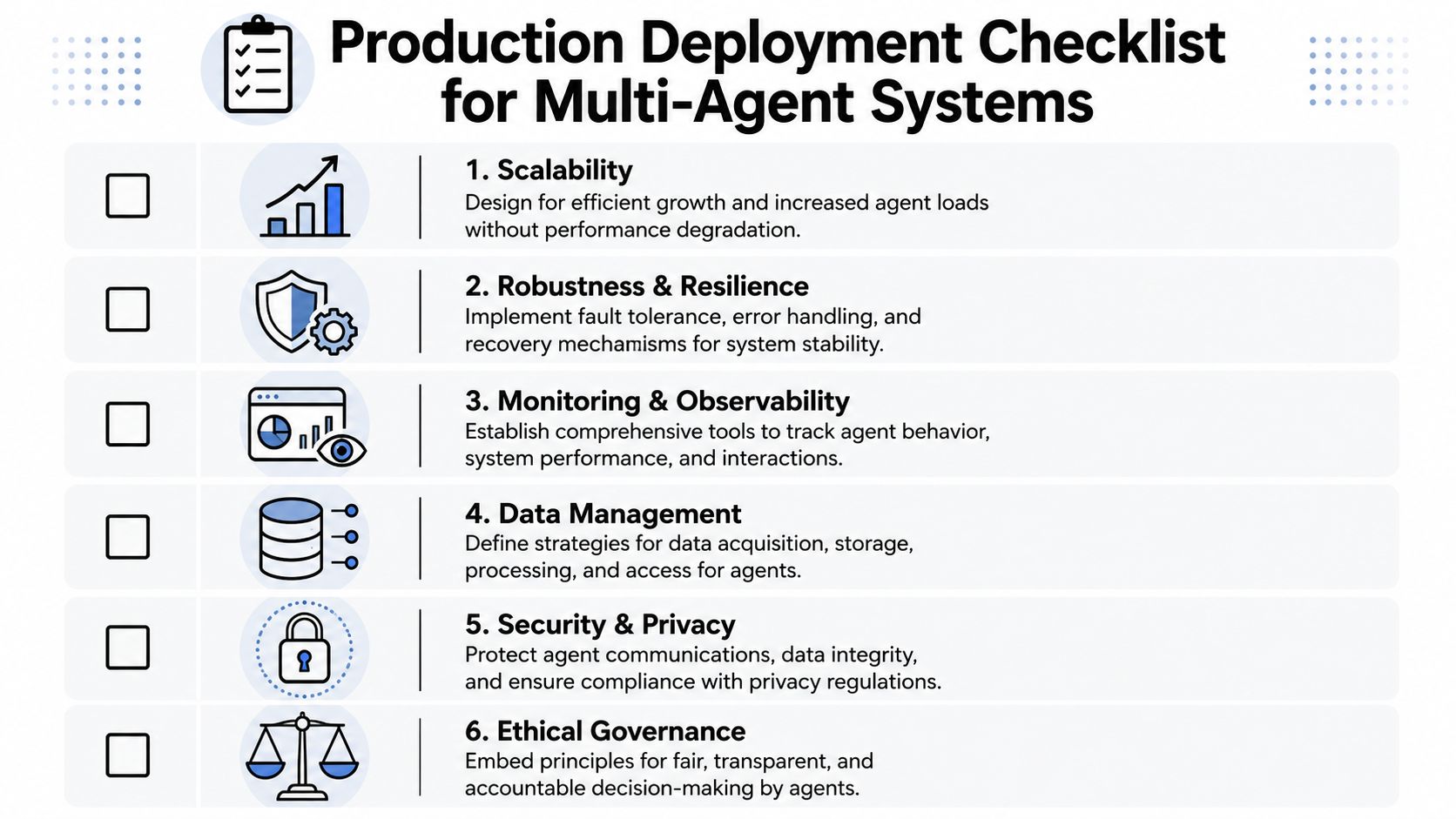
The technical diagram is the easy part. Production is where multi agent architecture becomes an operations discipline. The first question isn't “how many agents should we create?” It's “what will this cost us in latency, state complexity, security review, and incident response?”
The coordination tax is real
Microsoft notes that multi-agent systems add latency at each handoff and require explicit state management, while Anthropic says these systems are best when work exceeds single context windows or benefits from heavy parallelization, as summarized in Microsoft's guidance on single-agent versus multiple-agent design choices. That's the core production trade-off.
If a task is mostly sequential, splitting it across agents can make it worse. You pay for routing, state sync, retries, and result synthesis without getting enough benefit from specialization. If a task has clear parallel branches or distinct permission boundaries, the trade starts to make sense.
Use this quick filter before splitting a workflow:
- Keep it single-agent when one coherent reasoning chain matters more than modularity
- Split it into specialists when tasks are parallel, domain-specific, or permission-sensitive
- Add an orchestrator when multiple agents need shared sequencing, retries, or approvals
- Stop expanding the graph when handoffs add more complexity than useful control
Governance is part of the architecture
Security teams don't care that your flowchart looks elegant. They care who can access customer data, who can send messages, and how you prove what happened. In multi-agent systems, governance isn't a wrapper you bolt on later. It sits inside the architecture.
Each agent should have:
- A scoped identity tied to its function
- Tool restrictions based on least privilege
- Data boundaries that match the business unit or client it serves
- An approval path for sensitive actions
- A log trail for every meaningful decision and tool call
Managed platforms change the operating burden. Instead of building custom isolation, per-agent roles, and audit collection from scratch, teams can use infrastructure that already supports isolated instances, scoped data access, unified logs, and per-instance RBAC. One example is Donely, which provides those controls for hosted AI employees and multi-instance operations.
Observability has to follow every handoff
Logs from a single agent are often readable. Logs from multiple agents can turn into noise fast. You need observability that captures not only tool calls, but also routing decisions, intermediate outputs, and failure states between agents.
A practical observability setup answers these questions quickly:
- Who made the decision
- What context they saw
- Which tools they invoked
- What state changed after the action
- Why the workflow stopped, retried, or escalated
If you can't reconstruct a failed handoff from logs, you don't yet have a production-ready system.
State management is part of this too. Shared state is useful, but uncontrolled shared state creates contamination between agents. The safer approach is selective context sharing. Give each agent its own local memory for narrow work, then expose only the required state to the orchestrator or the next approved step.
That approach keeps failures contained. It also makes it much easier to review how a workflow handled regulated data, customer records, or internal approvals.
Deployment Models Single-Instance vs Multi-Instance
A lot of teams make a quiet mistake early. They design a solid agent graph, then place the whole thing inside one shared environment. That works for a solo builder. It becomes painful once multiple teams, clients, or business units need their own boundaries.
When one shared environment is enough
A single-instance model puts all agents, credentials, logs, and workflows inside one operational space. That's often fine when the team is small, the data is homogeneous, and nobody needs strict separation.
This model is useful when:
- You're prototyping and want the shortest path from idea to test
- One team owns everything from prompts to operations
- The tool access is uniform across all agents
- Billing and reporting don't need to be broken out by client or department
The risk is that the convenience doesn't last. Shared environments accumulate exceptions. One client needs isolated data. One department needs separate permissions. One implementation partner needs independent billing and logs.
When isolation stops being optional
A multi-instance model separates workloads into distinct operational environments. Each instance can hold its own agents, credentials, access controls, data boundaries, and audit records.
That matters for three common cases.
First, agencies need client isolation. They can't have one client's automations touching another client's tools or records.
Second, enterprises need departmental separation. HR, sales, support, and finance rarely share the same permissions or retention expectations.
Third, growing startups need a clean way to split personal experimentation from customer-facing operations. Without that separation, internal testing bleeds into production behavior.
A hosted infrastructure option such as OpenClaw hosting is relevant here because deployment structure affects governance as much as app logic does. If the platform supports instance-level isolation from the start, you avoid painful migrations later.
The deployment model is a business decision disguised as an infrastructure choice.
Single-instance is simpler. Multi-instance is cleaner. If you expect multiple owners, multiple customers, or multiple compliance requirements, choose the cleaner boundary earlier than feels necessary.
Real-World Use Cases and Applications
Multi agent architecture stops sounding abstract when you map it to work people already do every day.

Founder workflow
A founder wants an AI system to act like a lightweight revenue team. One agent monitors inbound leads from forms or email. Another enriches the account using CRM and public data. A third drafts the outreach or follow-up based on segment, urgency, and prior history.
This works because each agent has a narrow responsibility. The routing layer decides whether the lead should go to self-serve onboarding, a demo sequence, or a human rep. The founder gets a structured pipeline, not a chatbot that tries to improvise every step.
A practical version of this model often looks like an internal workforce of AI employees assigned to repeatable business functions rather than one overloaded assistant.
Agency workflow
Agencies run into a different problem. They don't just need automation. They need separation. Each client needs its own playbooks, credentials, communication channels, and reporting history.
A multi-agent setup fits well here when each client gets an isolated environment with agents for intake, campaign updates, support requests, and reporting. The agency team can standardize the architecture while keeping data and access boundaries clean.
That operational design has parallels with how technical teams structure specialist roles in robotics and automation. For a useful hiring and team-building perspective, TekRecruiter has practical insights for building robot engineering teams. The same principle applies here. Specialization only works when responsibility lines are explicit.
The human side matters too. Agencies need to know who changed what, which workflow ran, and why a client-facing action occurred. That's where centralized visibility becomes more important than raw model capability.
Here's a live discussion that helps make the operating model more concrete:
Enterprise workflow
Enterprises usually start with internal support. It's a natural fit. One agent handles intake from Slack or a help desk. Another classifies the request. A domain-specific agent checks policy, system data, or prior knowledge. A final step drafts the resolution or routes it to the right team.
This architecture works because internal support combines structured tasks with strict boundaries. IT, HR, finance, and legal don't want one assistant sharing all tools and all context. They want controlled delegation with observable handoffs.
The win isn't that the system feels more autonomous. The win is that the organization can automate more tasks without giving one agent unlimited reach.
Your Implementation Checklist and Getting Started with Donely
If you're evaluating multi agent architecture for a real business system, start with discipline, not agent count.
A practical checklist
- Define the failure of the current setup. If the single agent isn't hitting a real limit, don't split it yet.
- Draw role boundaries first. Create agents around distinct responsibilities, permissions, or domains.
- Choose the coordination model intentionally. Most business workflows benefit from orchestration before peer autonomy.
- Decide where state lives. Shared context without rules turns into cross-agent confusion.
- Set governance rules upfront. Identity, access, approvals, and logging belong in the initial design.
- Pick the deployment boundary early. Shared environments are easy to start and hard to untangle later.
- Instrument every handoff. If you can't trace the workflow, you can't trust it in production.
The biggest shift is mental. Multi agent architecture isn't just a smarter prompt setup. It's an operating model for AI work. Once you treat it that way, the design choices become clearer and the trade-offs become manageable.
If you want to move from diagrams to a working deployment, Donely provides a way to host and manage AI employees with instance isolation, centralized monitoring, audit logs, and per-instance access control, without taking on the DevOps work yourself.