
Running a small business today means juggling sales, support, finance, and ops, all at once.AI agents for small businesscan take the load off by handling repetitive tasks, pulling data, and acting on it without you lifting a finger. In this article we break down the five most capable agents on the market, show how they differ, and give you a quick checklist to pick the right one for your team.
We’ll also show why Donely’s OpenClaw platform tops the list when you need enterprise‑grade security without the headache.
1. SmartBiz AI Agent , All‑in‑one assistant for sales & ops
SmartBiz markets itself as a single dashboard that can manage leads, qualify them, and push updates into your CRM. It works with Gmail, Slack, and HubSpot out of the box, so you don’t need a developer to get started.
The agent watches your inbox for new inquiries, extracts key details, and creates a new contact record in seconds. It then scores the lead based on past behavior and notifies the sales rep with a short briefing.
Pricing starts at $49/month for up to three agents, with a free trial that lets you run a pilot on a single workflow. For a small team that wants a quick win on lead routing, this is a solid entry point.
One of the biggest strengths is the built‑in analytics. Every action the bot takes is logged, so you can see conversion rates and spot bottlene‑spots in your funnel.
According to Wikipedia’s definition of an AI agent, an autonomous software entity can perceive its environment, reason, and act. SmartBiz fits that bill by pulling email data, reasoning about lead quality, and acting in your CRM without a human in the loop.
“SmartBiz turned our lead triage from a daily manual grind into a 2‑minute automated flow.”
Bottom line:If you need a fast, affordable way to automate lead capture and scoring, SmartBiz is a strong contender.
2. FlowGPT AI Agent , Conversational workflow automation
FlowGPT shines when you need a chat‑first experience. It can talk to customers on WhatsApp, Instagram DMs, or your website chat widget, and then spin up multi‑step workflows behind the scenes.
Imagine a visitor lands on your product page, asks a question in Spanish, and the bot not only replies in Spanish but also books a demo slot in your calendar, updates the CRM, and sends a reminder to your sales team, all without you writing a line of code.
The platform supports 95+ languages, so expanding globally doesn’t mean hiring multilingual staff. It also offers a visual flow builder that lets you map out each step with drag‑and‑drop blocks.
Pricing is tiered: a free plan with limited runs, and paid plans starting at $79/month for unlimited conversations.
FlowGPT’s biggest advantage is its deep integration with support tools. It can pull ticket history from Zendesk, enrich the conversation with past interactions, and close the loop automatically.

Real‑world example: a boutique e‑commerce shop used FlowGPT to qualify Instagram leads, saw a 35% lift in booked calls, and cut support tickets by a third.
Bottom line:Choose FlowGPT if you want a conversational AI that can handle sales, support, and scheduling across many channels.
3. Zapier AI Agent , Easy integrations for SMBs
Zapier is already a household name for no‑code automation. Its new AI Agent layer adds a reasoning engine that can read data, draft replies, and trigger actions across 8,000+ apps.
Set up a Zap that watches new rows in a Google Sheet, asks the AI to summarize the content, and then creates a task in Asana. The AI can also enrich the row with data from a CRM before the task lands on your team’s board.
Zapier’s strength is the sheer volume of integrations. Whether you use QuickBooks, Shopify, or HubSpot, there’s likely a Zap template ready for you.
Pricing starts with a free tier that lets you run up to 100 tasks a month. Paid plans begin at $19.99/month and unlock higher task limits and multi‑step Zaps.
Zapier also offers a built‑in guardrails feature that flags PII or toxic language before the agent takes action, keeping your data safe.
We use Zapier’s AI Agents to pull daily sales numbers from Stripe, generate a quick Slack summary, and file the report in Google Drive, all without touching a spreadsheet.
Bottom line:If you need a versatile connector that can talk to almost any app, Zapier AI Agent is the go‑to choice.
4. AgentGPT , Customizable task bots for small teams
AgentGPT lets you build bots that follow a specific script or chain of actions. It’s a good fit when you have a clear, repeatable process that doesn’t fit a generic template.For example, a small SaaS startup can create a bot that watches their support inbox, extracts the ticket category, updates a Notion database, and notifies the product team on Slack.
The platform offers a simple JSON‑based workflow definition, which you can edit directly in the web UI. No heavy coding, but you still get fine‑grained control over each step.
Pricing is transparent: $59/month for up to five bots, with a free tier that lets you test one bot on a limited run count.
AgentGPT shines in environments where you need to tweak the logic often. You can add conditional branches, loop over a list of items, or call external APIs without leaving the builder.
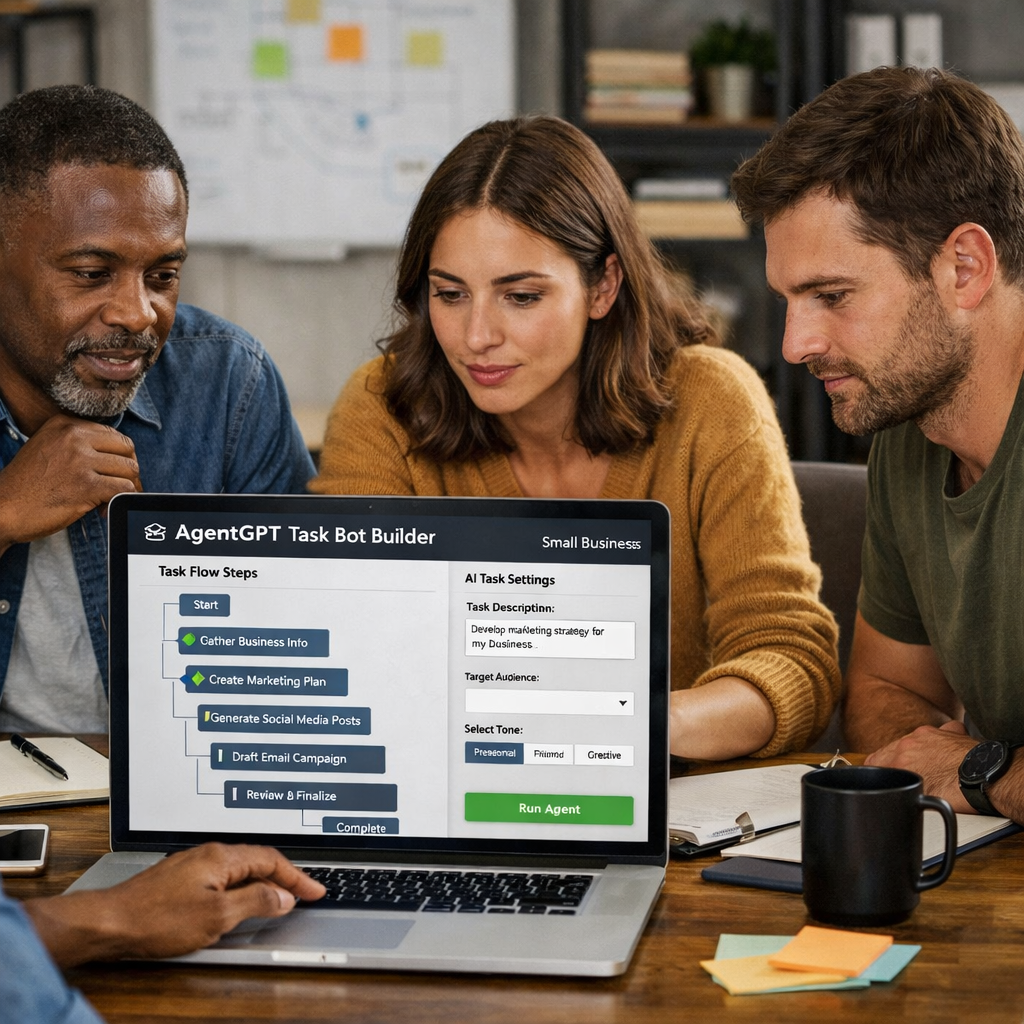
A case study from a digital agency shows that using AgentGPT to automate client onboarding cut the setup time from three days to under an hour.
Bottom line:Pick AgentGPT when you have a well‑defined workflow and want to fine‑tune every action.
5. Microsoft Copilot for Business , Enterprise‑grade AI in familiar apps
Microsoft’s Copilot embeds a large‑language model inside Word, Excel, Teams, and more. It can draft a contract, create a sales forecast, or generate a presentation slide with a single prompt.
What sets Copilot apart for small businesses is the trust built into the Microsoft ecosystem: single sign‑on, Azure AD security, and compliance certifications (SOC 2, GDPR, ISO 27001). You get enterprise‑grade safeguards without leaving the apps you already use.
Pricing is per‑user, starting at $22/month for the Business plan. That includes the AI assistant across the whole Microsoft 365 suite.
Copilot also features a “Copilot Studio” where you can build custom agents that run inside Teams or Outlook. Those agents can pull data from your SharePoint files, run calculations in Excel, and push results back to a channel.
According to Microsoft 365 Copilot official page, users see a 30% boost in document creation speed and a 20% cut in meeting prep time.
Bottom line:Microsoft Copilot delivers powerful AI inside the apps you love, with the governance small businesses need.
How to Choose the Right AI Agent for Your Small Business
Choosing an AI agent isn’t about picking the flashiest name. It’s about matching the tool to the problem you want to solve.
First, write down the exact workflow you want to automate. Include the trigger (email, form, webhook), the data sources (CRM, spreadsheet), and the desired outcome (record creation, notification, report).
Next, score each candidate on three axes: integration depth, security & governance, and ease of use. Use a simple table to rank them from 1‑5.
Donely’s platform, for example, gives you multi‑instance isolation and RBAC out of the box, which many competitors lack. If that matters to you, give it a higher score.
Finally, run a short pilot. Set a baseline metric (time to close a lead, tickets resolved per day) and compare after the agent is live for two weeks.
Bottom line:Follow a three‑step checklist, define, score, pilot, to avoid costly mis‑fits.
Quick Comparison of the 5 AI Agents
The table below distills the core differences you’ll notice when you test each platform.
Hosted AI Employee Platforms guide
Bottom line:Use the table to spot the agent that aligns with your workflow, security needs, and tech stack.
FAQ
What is the difference between an AI agent and a chatbot?
An AI agent can act on data, make decisions, and trigger actions across apps. A chatbot mainly replies to user input. Agents can read an email, update a CRM, and send a Slack alert without you typing a command.
Do AI agents need coding skills to set up?
Most of the tools in this list offer no‑code builders. You drag a trigger, pick an action, and the platform writes the code behind the scenes. Only AgentGPT and custom frameworks may need a bit of JSON editing.
How secure are these agents with customer data?
Security varies. SmartBiz and FlowGPT use OAuth and role‑based access. Zapier adds guardrails and audit logs. Microsoft Copilot inherits Azure AD protections. Donely provides true multi‑instance isolation and built‑in RBAC, which is rare for SMB‑focused tools.
Can I try an AI agent before buying?
All five providers have free tiers or trial periods. SmartBiz and FlowGPT let you run a single bot for free. Zapier’s free plan includes 100 tasks a month. Microsoft offers a 30‑day trial for Copilot Business.
What kind of ROI can I expect?
Small businesses report 30‑40% efficiency gains and up to 50% cost cuts in the first six months when they automate repetitive tasks. Your ROI will depend on the volume of work you move from human to bot.
How do I scale the AI agents as my business grows?
Start with one isolated workflow, then add more agents per department. Choose a platform that supports multi‑instance dashboards, Donely lets you spin up separate agents for sales, support, and finance, each with its own permissions.
Conclusion
AI agents are no longer a futuristic buzzword. They’re practical assistants that can trim hours from your day, cut errors, and keep your data safe. The five agents we covered each bring a unique mix of integrations, security, and ease of use. If you need a quick sales boost, SmartBiz is a solid starter. For multilingual chat, FlowGPT leads the pack. Zapier remains the integration heavyweight, while AgentGPT gives you granular control. Microsoft Copilot is the go‑to for teams already on Microsoft 365.
For most small businesses that care about data segregation, audit trails, and easy scaling, Donely’s OpenClaw platform still tops the list. You can spin up a new AI employee in under two minutes, connect any of the 800+ tools you already use, and manage every bot from one dashboard.
Ready to see how an AI agent can free up your team’s time? Start your free trial today and watch the automation take shape.