
AI in customer support has already crossed the line from pilot project to operating model. Independent industry reporting says over 70% of customer service organizations had either deployed AI or were actively piloting it by 2026, up from roughly 45% in 2023 as reported here. That pace matters because the conversation is no longer about whether to try AI. It's about how quickly a support org can rework routing, oversight, and measurement before competitors do it first.
The biggest mistake I see is treating ai for customer support like a chatbot purchase. The change is structural. AI now sits inside the support workflow, classifies intent, retrieves context, drafts replies, and decides when a human should take over. Market forecasts in the same reporting project 85% of customer interactions without human agents by 2028, while the global conversational AI market is projected to exceed $30 billion by 2028 and grow at roughly 22% to 25% CAGR source. In other words, support is becoming an automation layer with escalation paths, not a queue of tickets waiting for manual triage.
The speed of deployment tells the same story. The average time to deploy an AI chatbot has reportedly fallen from 3 to 6 months in 2022 to 1 to 7 days in 2026 with modern platforms source. That compression changes the buying decision. Teams don't just need better models, they need governance, integration, and a way to scale across multiple workflows without rebuilding every instance from scratch. For a practical support benchmark and workflow reference, I'd also look at 60 as a useful example of how support operations are being packaged for speed.
Table of Contents
- The State of AI in Customer Support
- Automation Versus Augmentation
- Building the Technical Architecture
- Real-World Use Cases and ROI
- Metrics That Actually Matter
- Phased Rollout Strategy
- Compliance Security and Scaling
The State of AI in Customer Support
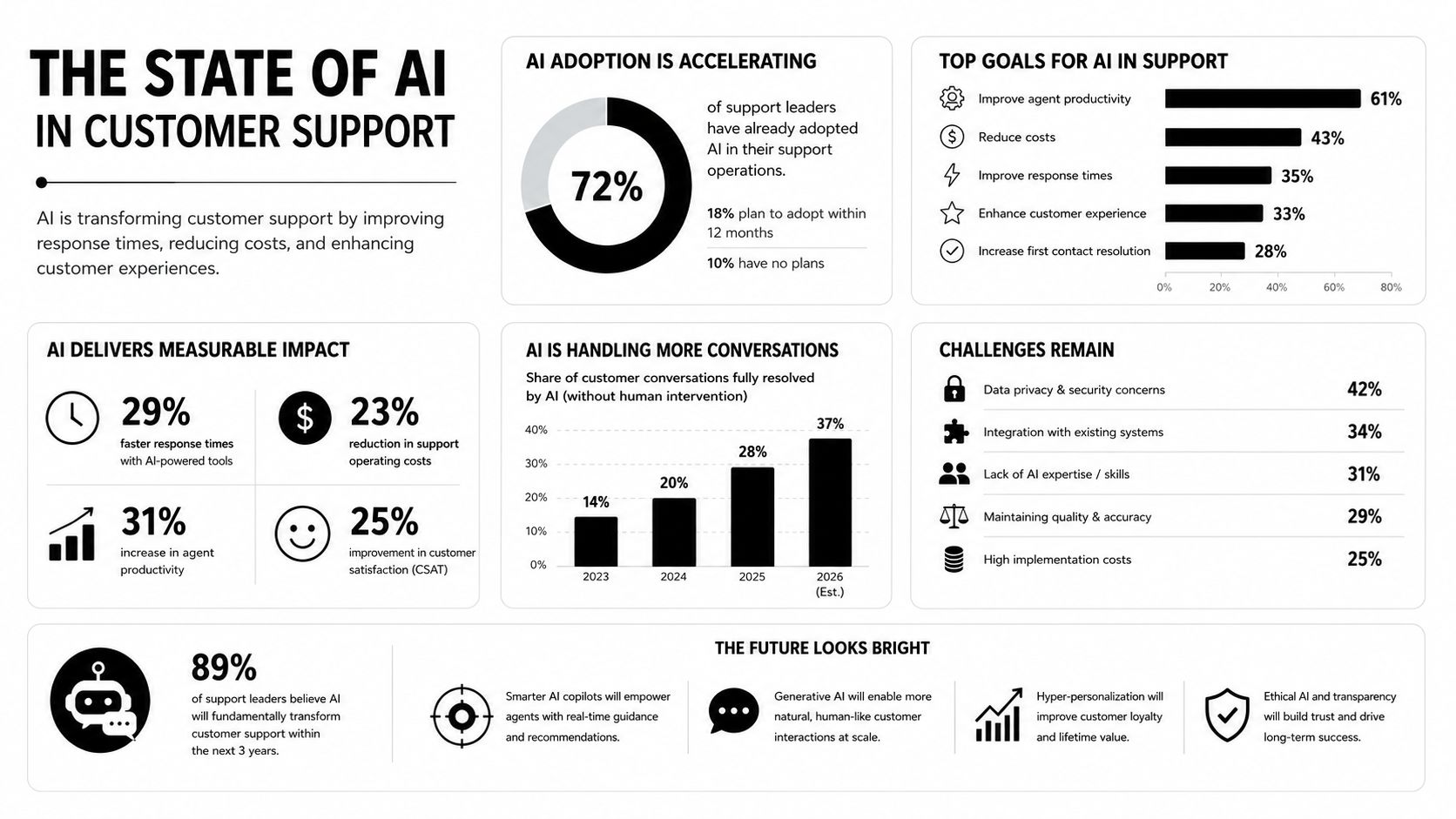
The adoption curve is steep enough that waiting is already a decision. When over 70% of customer service organizations are either deployed or piloting AI, the operational baseline has changed source. Teams that still run support as a fully manual queue are competing against groups that can sort, respond, and escalate in minutes rather than hours.
AI support is now an operating model change
Organizations are getting better results when they treat AI as part of the workflow, not a chat widget. Analysts at Robylon report that AI-powered support is expected to handle 85% of customer interactions without human agents by 2028, and that the conversational AI market is moving past $30 billion by 2028 source. Those figures point to a real shift in how support leaders budget, staff, and design service delivery.
The economic case is just as clear. Freshworks cites forecasts that place the AI-for-customer-service market at around $12.06 billion in 2024, rising to $47.82 billion by 2030 at 25.8% CAGR, with another sequence putting it at $15.12 billion in 2026, up from $12.06 billion in 2024 source. The direction matters more than the exact estimate. AI is no longer being added to support, it is being planned as part of support infrastructure.
Practical rule: if AI only answers FAQs, you haven't changed the operating model. If it routes, drafts, escalates, and learns from the same interaction, you have.
The organizations seeing real return usually do two things well. They place AI where repetitive intent dominates, and they connect it to knowledge sources, ticketing systems, and human handoff rules so each interaction becomes a routing decision instead of a dead-end conversation. That is why vendor evaluation should focus less on “does it chat” and more on “does it operate.”
Why deployment speed matters as much as model quality
Deployment speed changes the economics of adoption. The move from 3 to 6 months to 1 to 7 days for chatbot setup shows how much setup friction has dropped source. A team that can stand up a workflow quickly but cannot govern it will scale chaos faster than service.
That is also why platform choice matters after the first pilot. The backlog usually appears in the second or third implementation, when a support team needs isolation, repeatable controls, and a way to manage multiple workspaces without cross-contamination. Donely is one example of a multi-instance platform built to launch and manage isolated AI workspaces for different teams or clients, which becomes relevant once support stops being a single sandbox and starts becoming a shared operating system. For teams comparing implementation paths, 60 is the kind of operational detail that can separate a quick demo from a system that actually scales.
Automation Versus Augmentation
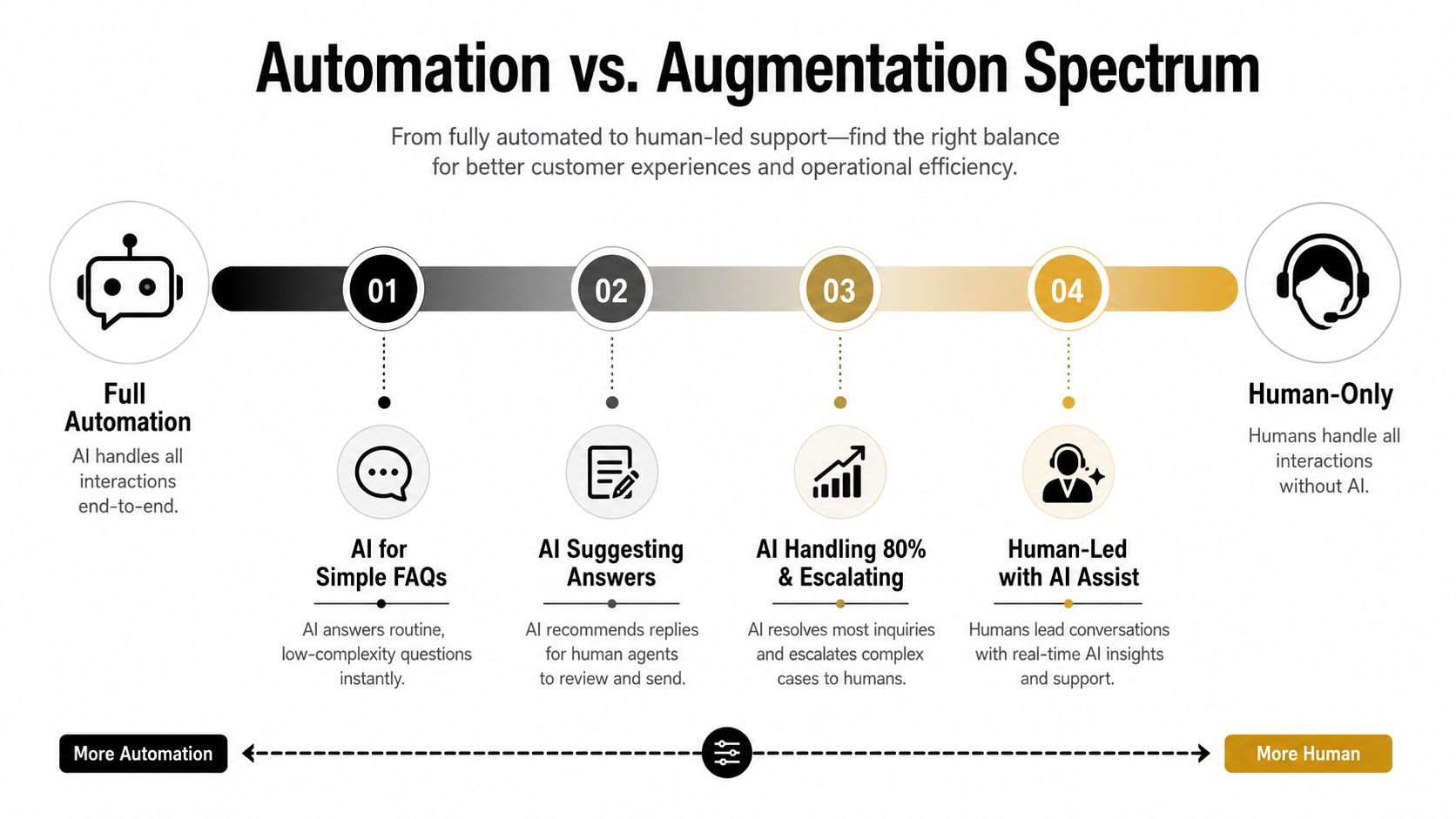
The wrong debate is automation versus humans. The decision is where AI should own the interaction, where it should assist, and where it should only route. In support environments with simple, repetitive requests, full automation is usually the right answer. In sensitive or regulated workflows, augmentation is safer because the agent keeps control while AI removes search work and drafts the next step.
Pick the level of AI involvement by ticket type
For routine FAQs, order status checks, and appointment confirmations, AI can handle the entire conversation if the business rules are tight and the escalation path is clear. That's the zone where customers usually want speed more than conversation. When the request involves exceptions, billing disputes, or any case with emotional friction, augmentation works better because the human keeps authority while AI shortens handling time.
The middle ground is where many teams should start. AI can classify intent, suggest answers, and surface knowledge while the agent decides whether to send, edit, or escalate. The handoff quality matters most, because a bad transfer feels like a broken promise rather than an efficiency gain.
Customers forgive automation when it's accurate and invisible. They don't forgive being bounced between systems.
A useful filter is to ask three questions for every ticket family. Is the request repetitive enough to standardize? Is the risk low enough to automate? Does the customer expect a human judgment call? If the answer to the first two is yes and the third is no, automation is usually appropriate. If the third is yes, augmentation is safer.
Match the model to operational reality
The service team's maturity changes the right answer. A small SaaS support queue with a narrow product surface can automate more aggressively than a regulated finance team handling account changes. A high-volume e-commerce operation often benefits from AI taking first pass ownership because the intent patterns repeat constantly. A professional services business may need AI to stay in assistant mode longer because each case carries more context and customer-specific nuance.
Staffing strategy intersects with AI design. If a queue still needs flexible human coverage, a resource like Hire Virtual Assistants can complement AI by handling overflow, transcription review, and back-office follow-up while automation covers the repetitive front line. The key is not replacing every human touchpoint. It's deciding which touchpoints need one.
Building the Technical Architecture
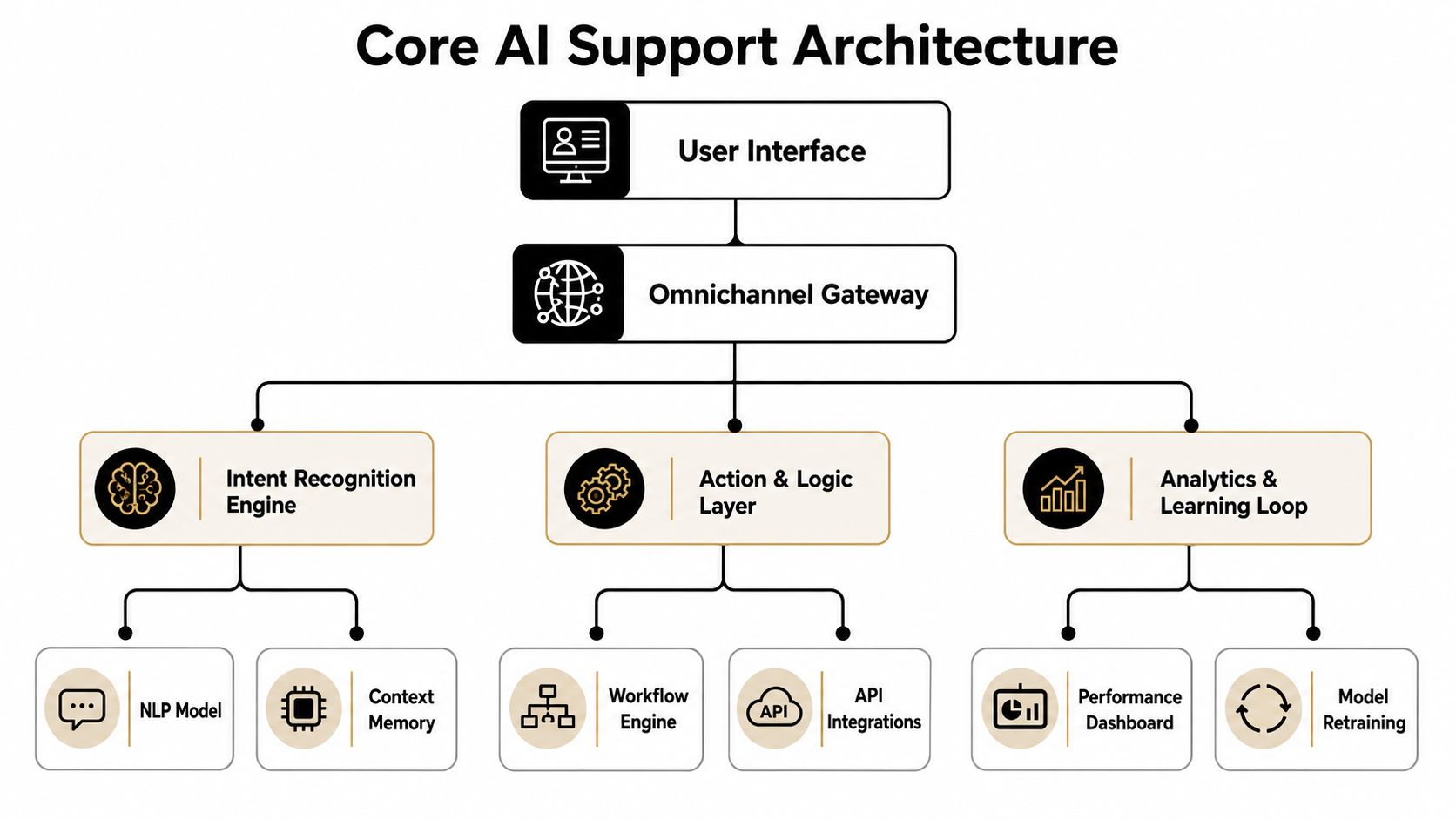
Modern support AI works best when it behaves like a workflow system, not a glorified FAQ widget. The architecture that performs combines intent classification, retrieval, response generation, and escalation logic in a single stack source. That combination matters because it cuts both first-response time and agent search time.
Start with the routing layer
Intent classification is the first job. The model needs to identify what the customer wants, not just what words they used. Once the intent is clear, the routing logic decides whether the request can be answered automatically, needs suggested drafting, or should be escalated.
Connect retrieval to the knowledge base
Retrieval is where many deployments fail. If the model can't pull the right article, policy, or account context, it'll improvise. That's why retrieval-augmented generation is so useful. The system uses your knowledge source first, then drafts a response grounded in that material. In support, accuracy is more valuable than creativity.
Add generation only where it helps
Response generation should sit on top of verified context, not replace it. Good support AI drafts replies, summarizes the issue, and suggests the next action. It doesn't need to invent new policy or guess at account status. The best systems preserve a clear escalation path for exceptions, because every support leader eventually runs into edge cases that should never be auto-resolved.
Technical rule: if the AI can't show its work through knowledge retrieval or system context, don't let it answer as if it knows the truth.
Design for omnichannel reality
Support doesn't live in one channel. A production setup should connect to chat, email, messaging apps, and the helpdesk without creating isolated data silos. The point of the omnichannel gateway is continuity. A customer who starts in WhatsApp and moves to email shouldn't have to repeat the same issue from zero.
Internal workflow platforms separate themselves from standalone chatbots. A chatbot handles a conversation. A workflow layer takes action across systems, logs the result, and keeps the human agent informed if escalation happens. If you're assessing architecture, the right question isn't “does it have a bot?” It's “can it preserve context across systems and channels?”
For a closer look at a workflow-oriented setup, the internal reference at Hermes agent architecture is a useful example of how these layers can be organized in production.
Real-World Use Cases and ROI
A support team rarely gets value from AI all at once. The first wins usually come from narrow, repetitive workflows where the integration burden is manageable and the result is easy to see. E-commerce, SaaS, and appointment-driven service businesses are often the first places where the economics make sense.
E-commerce and order inquiries
In e-commerce, AI performs well on order status, shipping updates, refund intake, and return eligibility checks. These requests are repetitive, time-sensitive, and usually driven by simple intent. When the AI can pull customer context from the order system and answer without waiting for an agent, queue pressure drops quickly.
The key integration point is the commerce stack. If the AI cannot access order data and policy rules, it only deflects the question instead of resolving it. The stronger setups connect to the backend systems that close the loop and reduce recontact.
SaaS and technical support
SaaS support benefits when AI handles ticket triage, troubleshooting guidance, and knowledge lookup. The hard part is not the answer itself, it is surfacing the right article or next step without making the customer hunt through the help center. Independent research reports that AI-powered support systems can process customer queries up to 4.2× faster than traditional methods and can cut resolution time for complex queries by 41% source. Those gains point to faster triage and guided resolution, not just more automation volume.
That matters most in teams where support volume is high and the same issue keeps returning in different forms. In practice, AI adds value when it reduces search time, improves routing, and keeps agents from re-reading the same context in every ticket.
Appointment-based service businesses
For appointment requests, AI can confirm availability, reschedule bookings, and answer common policy questions. These flows work well because they are structured, transactional, and easy to hand off if the customer needs a human. The operational win comes from reducing back-and-forth, not from replacing the service relationship.
A useful reference point for chat-first operational design is Donely's WhatsApp support agent, which shows how messaging-based support can be organized around intake, routing, and follow-through instead of isolated chats.
Where ROI shows up first
The fastest payback usually comes from high-volume, low-complexity tickets where the human team spends too much time searching for the same answer. That is also where the economic case is easiest to justify. Market analysis from source points in the same direction, with conversational AI reducing labor pressure by taking routine work off the queue. At the category level, that is why support leaders move from experimentation to operating-model redesign.
Metrics That Actually Matter
Most support dashboards still reward activity instead of outcomes. They track CSAT, AHT, resolution rate, and deflection rate, then assume better numbers in one column mean better support overall. They don't. Those metrics often conflict, and teams get stuck optimizing whichever one moved last.
| Metric Type | Traditional Approach | Outcome-Based Approach | When to Use |
|---|---|---|---|
| CSAT | Track average satisfaction across the queue | Track satisfaction for the exact workflow AI touched | When customer experience is the priority |
| AHT | Reduce average handle time everywhere | Reduce handling time only where AI removes search or triage work | When agent efficiency is the bottleneck |
| Resolution Rate | Count closed tickets | Count successful outcomes by ticket family | When closure alone is misleading |
| Deflection Rate | Maximize tickets avoided | Measure whether customers got the right outcome without recontact | When automation volume is crowding out quality |
Choose a metric that matches the workflow
If AI is doing first-pass triage, resolution rate matters more than raw deflection. If it's assisting agents on complex cases, AHT and quality of handoff matter more than chatbot activity. If it's handling a narrow transactional flow, customer effort and recontact rate often tell you more than a generic satisfaction score.
The contrarian point is simple. Don't judge AI support by how busy the bot looks. Judge it by whether the workflow got better for the customer and the agent. That means the success metric should belong to the specific use case, not the platform.
Build a decision rule for conflicts
When metrics conflict, the team needs a rule before launch. Higher deflection is meaningless if customers have to come back twice. Lower AHT isn't a win if agents are rushing through incomplete resolutions. Better governance means defining which outcome wins for each workflow, then keeping that rule stable long enough to compare performance cleanly.
A support leader doesn't need a bigger dashboard. They need a narrower one with better attribution. That's how you know whether AI improved outcomes or just moved volume around.
Phased Rollout Strategy
AI support rollouts fail when teams try to automate the whole queue at once. The safer pattern is phased adoption, with each stage proving a specific operational claim before the next one starts. The sequence below keeps risk contained while building enough control to scale.
Discovery and pilot
Start with one high-volume, low-risk use case. Ticket triage, FAQs, or order status checks are usually the cleanest first tests. At this stage, the goal is not broad automation. It's learning where the model breaks, how often handoffs occur, and which systems need to be connected first.
Keep humans in the loop from the start. Let them review outputs, correct failures, and flag edge cases that the system should never treat as routine. If the pilot can't operate safely with partial automation, it isn't ready for expansion.
Build and train
Once the initial use case behaves predictably, connect the knowledge base, helpdesk, and any system of record the AI needs to do real work. Train the workflow around actual ticket language, not idealized examples. Response quality usually improves because the model finally has the same context the human agents use.
If the support docs are stale, the AI will surface stale answers faster than a human ever could.
Pilot expansion
Expand only into adjacent ticket families that share the same operational shape. Don't jump from FAQ automation to sensitive account changes just because the first test went well. The right signal at this stage is stable handoff quality, accurate routing, and fewer repeat contacts.
This is also the phase where change management matters most. Agents need to know what the AI owns, what they still own, and where the escalation boundary sits. Ambiguity creates resentment fast.
Production and scale
Once the workflow is stable, scale by pattern, not by enthusiasm. Replicate the architecture across similar ticket types and keep the oversight model consistent. The aim is to turn one reliable support flow into a repeatable deployment template.
That's where platforms like Donely make operational sense, because multi-instance setup and isolated environments reduce the friction of moving from a single workflow to multiple separate deployments without turning every new instance into a fresh implementation project.
Compliance Security and Scaling
Production AI support has to satisfy three things at once. It needs to stay secure, it needs to stay auditable, and it needs to scale without collapsing into messy shared access. That's why role-based access control, isolated environments, and unified logs aren't optional features. They're the control plane.
Separate access from capability
Different team members need different permissions. Support agents should not have the same access as admins, and client-facing teams should not be able to see unrelated customer data. Granular RBAC keeps those boundaries clear, especially when multiple internal teams or external clients operate inside the same platform.
Keep environments isolated
Multi-instance architecture solves a problem many guides skip. When each customer, business unit, or client gets a separate instance, you avoid data leakage, tangled permissions, and the painful migrations that come with one shared environment. Donely's security policy is relevant here because it shows how isolated containers, scoped data access, and audit logs can support a governance model instead of just a chat interface.
Make auditability part of the design
Compliance teams need to know who changed what, when it changed, and which workflow touched the data. Audit logs should be readable enough for operations and detailed enough for incident review. If the platform can't explain its own actions, it won't survive serious review in regulated or multi-stakeholder environments.
The scaling question isn't just “can the model handle more tickets?” It's “can the platform handle more instances, more permissions, and more oversight without turning into a migration project?” That's where isolated containers and centralized monitoring matter more than a flashy demo. They let support teams grow into dozens of deployments while keeping boundaries intact.
If you're planning an AI support rollout, Donely gives you a practical path to host, deploy, and manage isolated AI employees from one dashboard, with built-in integrations, RBAC, audit logs, and multi-instance separation. If you want to move from a fragile pilot to a governed support system, visit Donely and evaluate how your workflows would run inside a secure, scalable instance model.