
Automation can feel like a maze. You click, copy, paste, and still end up behind. The good news? AI can run those repeatable steps for you. In this list we break down the tools that let you add AI power to everyday tasks, connect the apps you already use, and keep control over data and security. By the end you’ll know which platform fits your team, budget, and compliance needs.
1. Zapier , Best for No-Code Workflows
Zapier stays popular because it makes automation feel like building a Lego set. You pick a trigger , a new email, a form submission , then add an AI step that reads the content, decides what to do, and passes the result to another app. No code, no servers.
One of the biggest draws is the sheer number of integrations. Zapier lists over 8,000 apps, from Gmail to Salesforce. That means you can stitch together the exact tools your team already loves. The AI actions let you add a language model in the middle of a flow, so you can classify tickets, summarize notes, or enrich leads without writing a script.
Zapier’s free tier limits you to two‑step Zaps, which works for simple alerts but not for full AI‑driven pipelines. Paid plans start at $19.99/month and unlock multi‑step flows and unlimited AI actions. Security is decent , you get basic permissions on the free plan, while audit logs and advanced RBAC appear on higher tiers.
When you need a quick proof of concept, Zapier gets you up and running in minutes. Imagine you want to auto‑tag incoming support tickets. An AI step reads the ticket, decides the priority, and a Zap writes the tag back to your help‑desk app. The whole loop runs without a developer.
But if you need strict role‑based access control from day one, Zapier can feel thin. That’s where a platform like Donely shines , we give you unlimited AI employees, built‑in RBAC, and audit logs on a forever‑free plan.
Bottom line: Choose Zapier if you want a low‑learning‑curve tool with thousands of connectors and can live with basic security features.
2. Make (Integromat) , Visual Automation Builder
Make gives you a canvas that looks like a flowchart. Each node is a step , a trigger, a filter, an AI action, a data transform. You can drag, drop, and connect them to build complex logic without touching code.
The platform supports about 1,500 integrations, but where it stands out is the depth of each connection. For example, its Google Sheets node lets you read, write, and even run formulas directly, something Zapier’s basic connector can’t do.
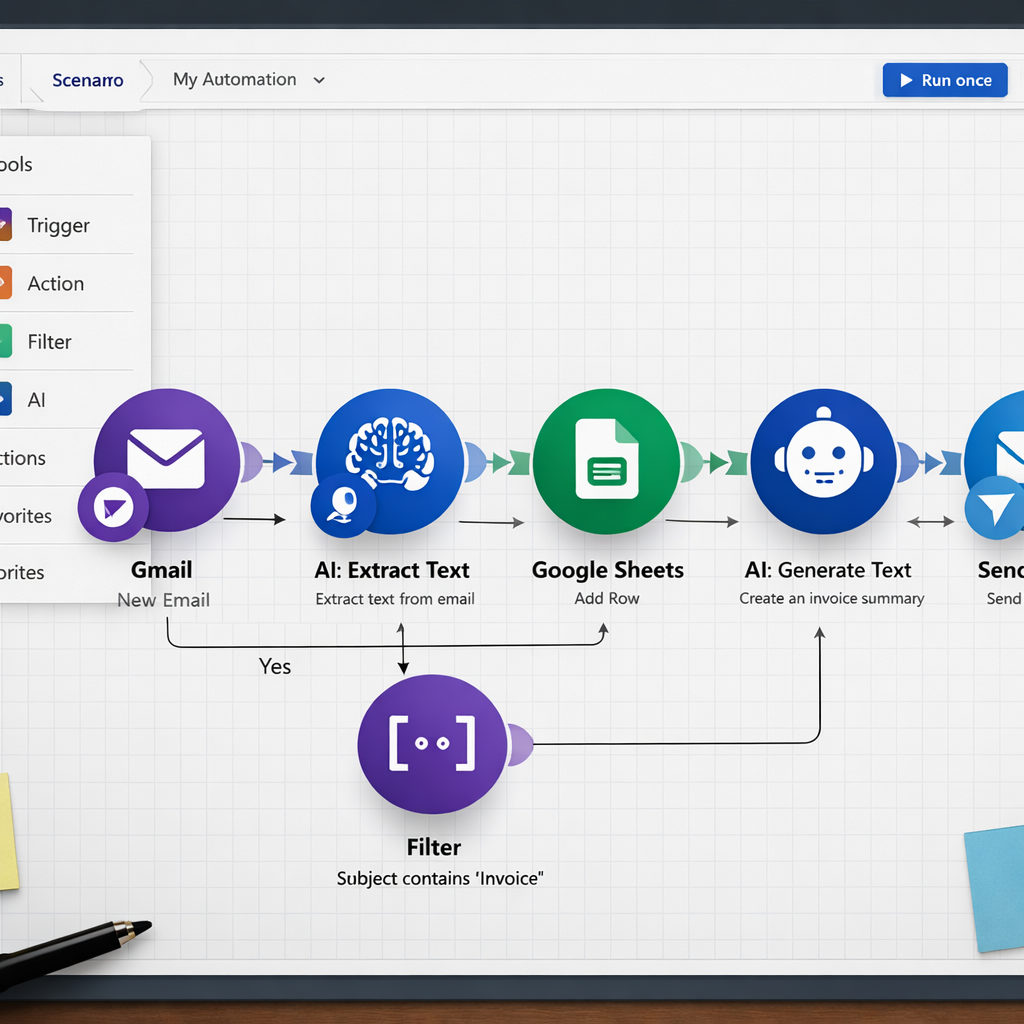
Make’s AI module lets you call any large language model via an HTTP request. You can feed the model the output of a previous step, then use the response to decide the next branch. This makes it ideal for data‑heavy jobs like enriching leads or generating reports from raw CSV files.
Pricing is friendly for small teams: a free tier with 1,000 operations per month, then $9/month for the basic plan. AI actions count against your operation quota, so heavy AI use may push you to a higher tier.
Because the canvas is visual, you get a clear view of the data flow. That helps when you need to debug a branch that isn’t working or when you want to show a non‑technical stakeholder how the process runs.
Here’s a real‑world flow: an e‑commerce store pulls new orders, runs an AI prompt that writes a personalized thank‑you email, and then sends the email via Gmail. All of this happens without a developer writing a single line of code.
Make also offers built‑in error handling. You can set a “watchdog” node that catches failures and routes them to a Slack channel, keeping you in the loop when something goes wrong.
Bottom line: Pick Make when you need a visual builder that can handle complex data manipulation and you’re comfortable managing an operations quota.
3. n8n , Open-Source Workflow Automation
n8n lets you run automations on your own server or on their managed cloud. The open‑source nature means you own every line of code and can add custom nodes whenever you need them.
One standout feature is the AI node that wraps any LLM you point it at. Because you host the workflow, you can keep API keys in a secret store and never expose them to the internet. That gives you a security edge over many SaaS‑only tools.
The community has built over 1,000 nodes, covering everything from HTTP requests to database queries. If an integration you need isn’t there, you can drop a little JavaScript in a Function node and call any REST API.
n8n’s free Community Edition gives you unlimited executions, which is a big win for startups that can’t afford per‑task pricing. Paid cloud plans start at €24/month and add features like SSO, RBAC, and audit logs.
Because you control the environment, you can run AI agents that talk to internal services behind a firewall , something most hosted platforms can’t do. A security‑focused team can self‑host n8n on an air‑gapped server, then still call an LLM that lives in a private VPC.
Here’s a simple example: a marketing team wants to auto‑generate blog outlines from a list of keywords. They feed the list into n8n, call an OpenAI node for each keyword, collect the outlines, and push them into a Notion database. The whole thing runs on their own infra, keeping data private.
While n8n offers flexibility, it does require some ops work , you need to keep the server patched and back up the database. If you lack that bandwidth, the managed cloud option removes most of the hassle.
Bottom line: Use n8n when you want open‑source freedom, deep security, and the option to run AI on your own infrastructure.
4. UiPath , Enterprise Robotic Process Automation
UiPath started as a screen‑based robot that clicks buttons for you. By 2026 it added AI agents that can read text, make decisions, and hand off work to a human when needed.
The platform blends classic RPA with modern AI. You can record a UI workflow, then insert an AI step that interprets the data on the screen and decides the next action. This works well for legacy applications that don’t have APIs.
UiPath also offers Process Mining, which scans your logs to find automation candidates. That helps you spot high‑impact processes before you build a bot.
Robotic Process Automation on Wikipedia
Security is strong , you get role‑based access, audit logs, and the ability to run bots on‑premises or in a private cloud. The downside is cost and complexity. UiPath’s licensing can run into the tens of thousands per year, and you often need a developer to set up the initial bots.
One real‑world case: a mid‑size bank used UiPath to pull transaction logs from a mainframe, run an AI model that flagged suspicious activity, and automatically opened a case in their fraud system. The automation cut investigation time by almost half.
“UiPath blends UI automation and AI, letting legacy apps join the modern workflow.”
For teams that already use UiPath for RPA, adding AI agents is a natural next step. But if you don’t need to click through old UIs, a lighter AI‑first platform may save you time.
Bottom line: Choose UiPath if you must automate legacy screens and need enterprise‑grade governance.
5. Microsoft Power Automate , AI‑Powered Workflows for Office 365
Power Automate lives inside Microsoft 365, so it talks to Word, Excel, Teams, and SharePoint natively. If your org already pays for Office 365, you get a lot of value out of the box.
The 2026 update added AI‑driven Copilot actions. You can type a plain English request , “Summarize the latest sales meeting notes” , and Power Automate builds a flow that pulls the Teams transcript, runs an LLM, and posts the summary back to a channel.
Because it’s part of the Microsoft ecosystem, governance is baked in. Admins see audit logs in the Security Center, and RBAC works the same way as other Microsoft services.
Pricing starts at $15/user/month, but you need a license for each person who creates flows. That can add up for large teams.
A practical example: an HR team uses Power Automate to collect new‑hire forms, run an AI step that extracts key dates, then automatically creates calendar events and onboarding tasks in Planner.
If you’re a Microsoft‑centric shop, the deep integration and familiar UI make Power Automate a strong contender. However, it can feel heavy if you only need a few simple AI steps, and you’re locked into the Microsoft stack.
Bottom line: Pick Power Automate if you need tight Microsoft integration and are comfortable with per‑user licensing.
6. Workato , Enterprise Integration and Automation
Workato markets itself as an AI‑first iPaaS. It lets you build “recipes” that connect apps, and now you can add AI agents called Genies that sit next to those recipes.
Genies have a defined role, a chosen LLM, and a set of policies that control what they can do. You can give a Genie permission to read from Salesforce, write to Slack, and call an external API, all while keeping audit logs and RBAC in place.
Donely Blog , Best AI Automation Platforms in 2026
One big win for Workato is the pre‑built MCP servers that let AI agents talk to enterprise tools securely. That means you can let Claude or GPT‑4 call your internal ticketing system without exposing secrets.
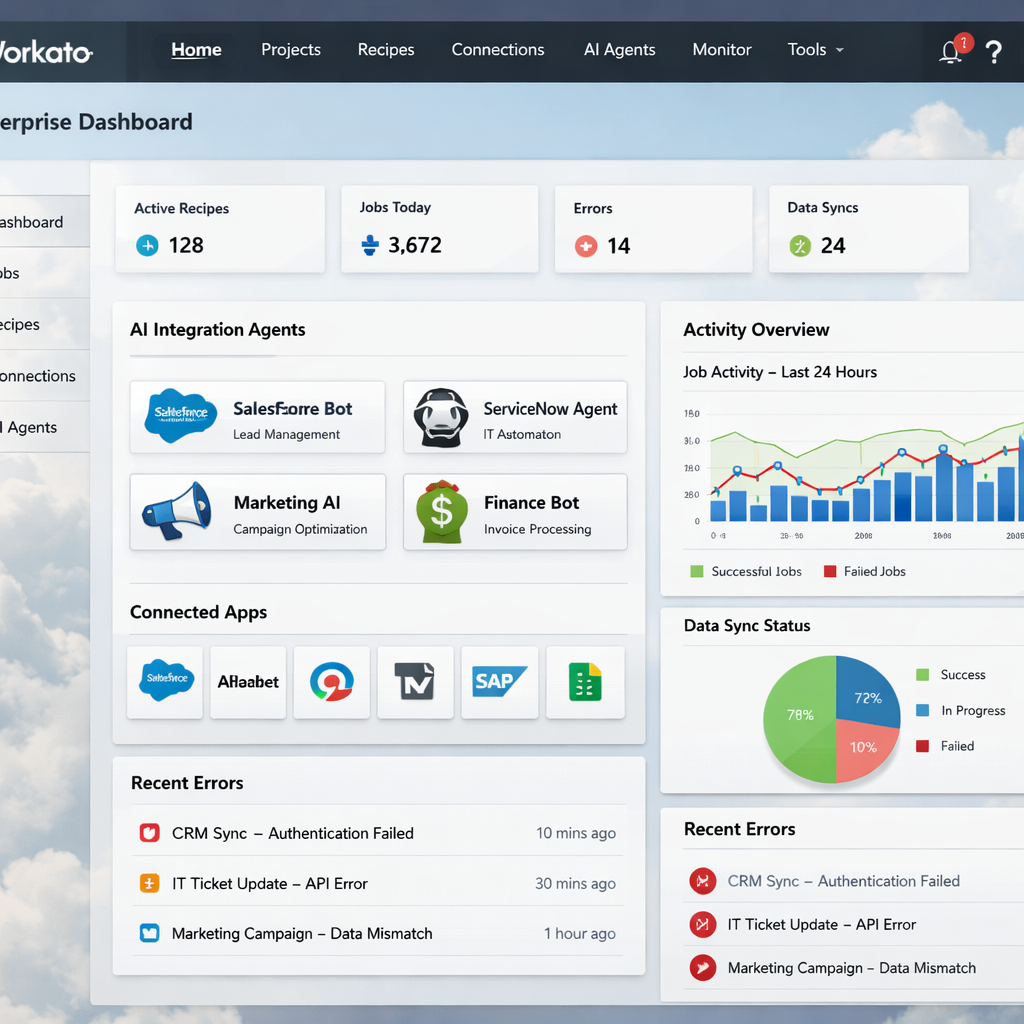
Pricing is quote‑based, reflecting the enterprise focus. You’ll pay more than a hobbyist platform, but you get versioned agents, test environments, and a governance layer that IT loves.
Think of a sales AI Genie that watches new leads in HubSpot, runs an AI model to score them, and then creates a task in Asana. The same recipe can be reused across multiple regions, with each region’s Genie respecting its own access rules.
Bottom line: Choose Workato if you need a full‑stack iPaaS with AI agents and enterprise‑grade security.
7. Tray.io , Low‑Code Automation for Scalable Workflows
Tray.io offers a low‑code canvas that sits between Zapier’s simplicity and Make’s depth. Its visual builder lets you add loops, conditional branches, and custom JavaScript in the same flow.
One claim from the vendor is that they have over 30 AI‑infused processes built in under a year. Those include things like AI‑driven lead scoring, sentiment analysis on support tickets, and automated content generation.
Tray.io’s connector library covers 500+ apps. While it’s not as massive as Zapier’s, the connectors go deep , you can fetch specific fields, run batch updates, and handle pagination out of the box.
Pricing starts at $9/month for the basic plan, with higher tiers for enterprise features like SSO, RBAC, and dedicated support. The platform also offers a “workflow as code” export, letting devs version the flow in Git.
A common use case is a content team that pulls topics from a brainstorming board, runs an AI to generate article outlines, then pushes the outlines into a CMS. All steps happen on Tray.io’s canvas, and the AI node can be swapped out for a different LLM if you need a new model.
Bottom line: Pick Tray.io when you need a balance of visual ease, custom code, and enterprise‑grade features.
How to Choose the Right AI Task Automation Tool
Choosing a platform feels like picking a new teammate. You want the right skill set, the right level of supervision, and a salary that fits your budget.
Assess Your workflow shape
- Linear, event‑driven flows: Zapier or Power Automate work well.
- Data‑heavy pipelines with many transforms: Make or Tray.io shine.
- Self‑hosted, security‑first needs: n8n or Donely give you full control.
- Legacy UI automation plus AI: UiPath is the go‑to.
- Enterprise integration with AI agents: Workato offers a unified stack.
Check security and governance
Look for built‑in RBAC, audit logs, and SSO. If you handle sensitive data, pick a tool that lets you keep secrets on‑premises or in a secret manager.
Consider cost of scale
Task‑based pricing can explode when you run AI on thousands of rows. Platforms that charge per user or per month with unlimited runs (like Donely) often stay cheaper as you grow.
Test the AI integration
Most vendors let you run a free trial. Build a small flow that pulls data from one app, runs an AI step, and writes back. Measure latency, error handling, and how easy it is to tweak prompts.
Bottom line: Match the tool’s strengths to your workflow shape, security needs, and budget to avoid overpaying or over‑engineering.
Frequently Asked Questions
What is AI task automation?
AI task automation blends traditional workflow automation with large language models. It lets a system not only move data between apps but also understand, summarize, and act on unstructured text. The result is a smarter flow that can make decisions, generate content, or classify inputs without a developer writing custom code each time.
Do I need a developer to set up these tools?
Not necessarily. Platforms like Zapier, Power Automate, and Make are built for no‑code users. You can drag a trigger, add an AI step, and map fields in minutes. For deeper custom logic, tools like n8n, Tray.io, or UiPath let you drop in JavaScript or Python, but they also offer visual builders for non‑technical users.
How secure are AI automation platforms?
Security varies. Zapier offers basic permissions on its free tier, while Donely, Workato, and UiPath provide RBAC, audit logs, and SSO out of the box. If you need to keep data on‑premise or behind a firewall, self‑hosted options like n8n or Donely give you full control over where API keys live.
Can AI agents handle large data sets?
Yes, but the pricing model matters. Task‑based platforms (Zapier, Make) charge per execution, so running an AI step on thousands of rows can get pricey. Platforms with unlimited runs per user, such as Donely’s free tier or Workato’s enterprise plans, scale more predictably.
What’s the difference between an AI agent and a chatbot?
An AI chatbot waits for a prompt and replies. An AI agent (or AI employee) can own a whole workflow, keep memory across sessions, and act on multiple tools without human input. Think of a chatbot as a conversation partner and an AI agent as a digital coworker that can complete tasks from start to finish.
How do I evaluate ROI on AI task automation?
Start by measuring the time spent on the manual task you want to replace. Multiply that by hourly cost to get a baseline. Then run a pilot with the automation tool and track how many minutes the flow saves per run. The difference, multiplied by volume, gives you a rough ROI. Add in factors like reduced errors and faster response times for a fuller picture.
Is there a free way to try these tools?
Most vendors offer a free tier or trial. Zapier, Make, and Power Automate have generous free plans for low‑volume use. Donely offers a forever‑free tier with unlimited AI employees, built‑in RBAC, and audit logs, making it a strong starting point for teams that want to test AI automation without a credit card.
Conclusion
Automation is no longer a nice‑to‑have; it’s a core part of modern work. The tools we listed each have a sweet spot , Zapier for quick no‑code flows, Make for data‑rich pipelines, n8n for open‑source control, UiPath for legacy UI tasks, Power Automate for Microsoft‑centric shops, Workato for enterprise‑grade AI agents, and Tray.io for low‑code scalability.
Across the board, Donely stands out with a free tier, unlimited AI employee instances, and built‑in RBAC and audit logs. That mix of speed, security, and cost makes it a strong contender for teams that want to move fast without sacrificing control.
Ready to give your workflow a brain? Start your free trial with Donely today and launch an AI employee in under two minutes.