
You can tell when an AI program is still a pilot. Sales has one assistant in ChatGPT Enterprise. Support is testing a separate bot in Zendesk. Operations built a workflow in Make. Someone in RevOps is passing prompts through a model API. Security has no clean answer for where prompts, files, and logs are stored. Nobody agrees on who owns access, billing, or auditability.
That setup works for a few weeks. Then enterprise problems appear. One department wants a private knowledge base. An agency needs isolated client workspaces. A compliance lead asks for prompt logs and role boundaries. A non-technical manager wants an agent that can act in Salesforce, HubSpot, Slack, and Gmail without filing a ticket with engineering.
At that point, the question isn't “which model should we use?” It's “what operating layer will let us deploy, govern, and scale AI work across the business?” If your team is still trying to connect point tools by hand, this guide on achieving business value with AI is a useful companion because it frames AI as an operating decision, not just a tooling experiment.
Table of Contents
- Beyond the Hype The Rise of the Enterprise AI Platform
- What Is an Enterprise AI Platform Really
- Anatomy of a True Enterprise AI Platform
- Deployment Models DIY Versus a Managed Platform
- How to Evaluate an Enterprise AI Platform
- An Adoption Checklist for Your Team
- Conclusion From Platform to Performance
Beyond the Hype The Rise of the Enterprise AI Platform
The market has already moved past curiosity. The enterprise AI platform market captured 65.89% of total revenue in the broader enterprise AI ecosystem in 2025, and the total enterprise AI market reached USD 114.87 billion in 2026 with a projection to USD 273.08 billion by 2031 at a CAGR of 18.91%, according to Mordor Intelligence's enterprise AI market analysis.
That matters because it confirms what operators are seeing on the ground. Companies aren't just buying model access. They're buying control layers. They need one place to connect data, launch agents, assign permissions, monitor behavior, and avoid rebuilding the same stack for every team.
Pilot chaos is usually operational chaos
Most failed AI rollouts don't fail because the model was weak. They fail because the operating model was sloppy.
A common pattern looks like this:
- Fragmented ownership: Marketing owns one tool, support owns another, and IT is asked to secure all of it after the fact.
- No repeatable deployment path: The first assistant gets built manually. The second takes just as long. The fifth breaks the pattern completely.
- Security gaps: Shared credentials, over-broad access, and unclear data boundaries creep in fast.
- Unclear cost visibility: Teams know they're spending on AI, but they can't tie usage back to a client, department, or workflow.
Most AI pilot problems are platform problems wearing a model label.
An enterprise AI platform is the answer to that mess, but only if it solves the business reality behind the pilot. That means isolated environments for different teams or clients, clear governance, integrations that let agents do useful work, and operations that don't depend on a small internal group stitching tools together every week.
The platform shift is about control, not novelty
The practical shift is simple. Teams are moving from “we have a few AI experiments” to “we need a managed AI workforce.”
That changes the buying criteria. The conversation moves away from prompt quality alone and toward questions like:
- Can we deploy separate agent instances without creating separate accounts?
- Can non-technical staff launch something useful without engineering involvement?
- Can security review one system instead of six?
- Can finance see usage and billing by instance, team, or client?
Once those questions show up, standalone apps stop being enough.
What Is an Enterprise AI Platform Really
An enterprise AI platform is the operating system for your AI workforce.
That's the cleanest definition I know because it explains what a platform does without the usual vendor fog. It doesn't just run one assistant. It manages identity, access, integrations, orchestration, monitoring, lifecycle, and policy across many assistants, automations, and agents.
If a model API is raw compute, and a single-purpose AI app is one program, the platform is the layer that makes all of them usable inside a business.
It's not just another chat interface
A lot of tools call themselves platforms because they wrap a model with a UI. That's not enough.
A true enterprise AI platform has to answer operational questions:
- Where does context come from?
- Who can access which systems and data?
- How do agents act inside business tools?
- How do you monitor prompts, responses, and failures?
- How do you deploy the same pattern repeatedly across teams?
Those questions matter because enterprises are putting money into the layer where people interact with AI systems. In 2025, the application layer captured $19 billion, more than half of all generative AI spending, as described in Menlo Ventures' state of generative AI in the enterprise.
That spend tells you something important. Buyers aren't only chasing model access. They're funding the interface, orchestration, and operational layer where work gets done.
A practical analogy
Think about the difference between buying a database and running a business application. The database is necessary, but it isn't the system employees use to execute work safely at scale.
The same applies here. You can wire together OpenAI, Anthropic, or open-source models yourself. You can also combine workflow tools, vector stores, and custom connectors. But until you have a stable layer that handles execution, permissions, integrations, and monitoring, you don't have an enterprise AI platform. You have ingredients.
For teams evaluating tools that already package analysis and execution into usable workflows, even outside the AI agent category, an automated SEO analysis platform is a useful example of what buyers increasingly expect: not raw capability, but a system that turns capability into repeatable work.
A platform earns the name when operations, not just demos, become easier.
What it should let your business do
At minimum, the platform should let you:
- Launch agents without rebuilding infrastructure each time.
- Connect them to the systems where work already lives.
- Apply policy and access controls consistently.
- Monitor behavior centrally.
- Support different teams, clients, or departments without mixing data and permissions.
If it can't do that, it's a tool. Not a platform.
Anatomy of a True Enterprise AI Platform
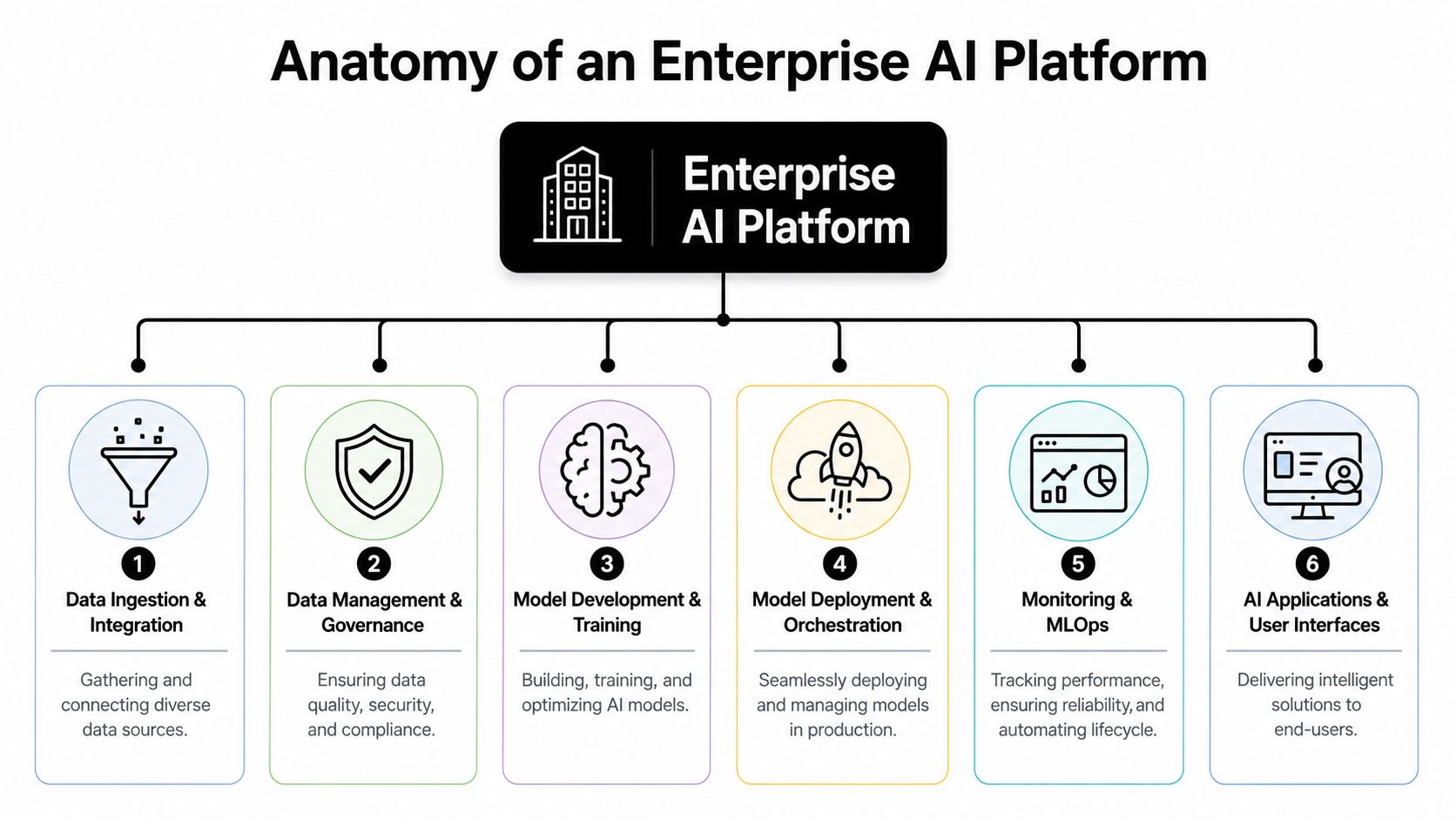
The easiest way to spot a serious platform is to stop looking at the homepage and inspect the architecture. Production systems have a shape. Toy systems don't.
A scalable platform separates core concerns instead of burying everything in one service. IBM's enterprise AI architecture guidance argues for modular separation between orchestration, data, and governance, with governance treated as a first-class component that supports real-time token usage tracking, prompt tracing, and detailed audit logging in this IBM community discussion on enterprise AI architecture patterns.
Why modular architecture matters
When orchestration, data access, and governance are fused together, every change becomes dangerous. Swap a model and you risk breaking policy enforcement. Adjust retrieval and you create logging gaps. Add a new department and RBAC becomes an afterthought.
Modular architecture avoids that.
A robust stack usually contains these layers:
- Data foundation: Connectors, ingestion, storage, and retrieval over business data.
- Model layer: Model selection, versioning, deployment, and rollback.
- Execution layer: The runtime where prompts, tools, and actions happen.
- Integration layer: APIs, events, workflows, and app connectors.
- Governance layer: Access policy, auditability, usage control, and observability.
For teams that already know integration work is where projects slow down, specialized support such as Technioz API integration services can help when a platform needs to connect into older systems or custom data sources.
The multi-instance layer most teams miss
This is the piece many buyer guides skip.
A lot of platform content talks about scale as if you're deploying one giant AI system for one giant company. Real operations rarely look like that. Agencies manage multiple clients. Enterprises have departments with different data boundaries. Consultants run separate environments for each account. Internal teams often need one agent for sales, another for support, another for finance, and they can't all share the same state, access, or logs.
That creates a design requirement: multi-instance architecture.
Multi-instance management means the platform can spin up isolated, production-ready environments repeatedly, without forcing separate accounts, ad hoc migrations, or one-off infrastructure work. Each instance should carry its own permissions, connectors, data scope, logs, and ideally billing view.
A useful mental model is a company brain plus many scoped workers attached to it. The value of a structured knowledge layer is easier to see in systems designed around a shared organizational context, such as a company brain for AI agents.
If your platform can deploy one impressive agent but struggles to run twenty isolated ones, it won't survive agency or multi-department reality.
Later operational pain usually traces back to this omission. Teams launch a strong first use case, then hit a wall when they need client-by-client separation or department-specific governance.
Here's what multi-instance maturity looks like in practice:
| Capability | What it means operationally |
|---|---|
| Isolated execution | One client's workflows and data don't bleed into another's |
| Scoped credentials | Agents only see the apps and records assigned to that instance |
| Per-instance RBAC | Managers can control access without granting global permissions |
| Central dashboard | Operations can monitor many instances without many admin surfaces |
| Separated billing views | Finance can map usage back to clients, teams, or business units |
Governance, observability, and operational control
Video is useful here because architecture gets abstract fast. This walkthrough gives a decent mental model for how enterprise AI systems move from demo logic to production control.
Governance isn't a checkbox. It's the mechanism that keeps AI systems usable after the first deployment.
The controls that matter most are usually mundane:
- Prompt and response logs for review and troubleshooting
- Usage tracking so cost and volume don't disappear into one bucket
- Role boundaries that let managers delegate without exposing everything
- Audit trails for policy, compliance, and incident review
- Central monitoring across active agents, channels, and integrations
This is also where a managed platform can be more practical than a pure framework. A platform such as Donely packages multi-instance deployment, isolated containers, unified audit logs, centralized monitoring, and broad pre-built integrations into one control surface. That matters if your team wants to scale agents without carrying permanent DevOps overhead.
Deployment Models DIY Versus a Managed Platform
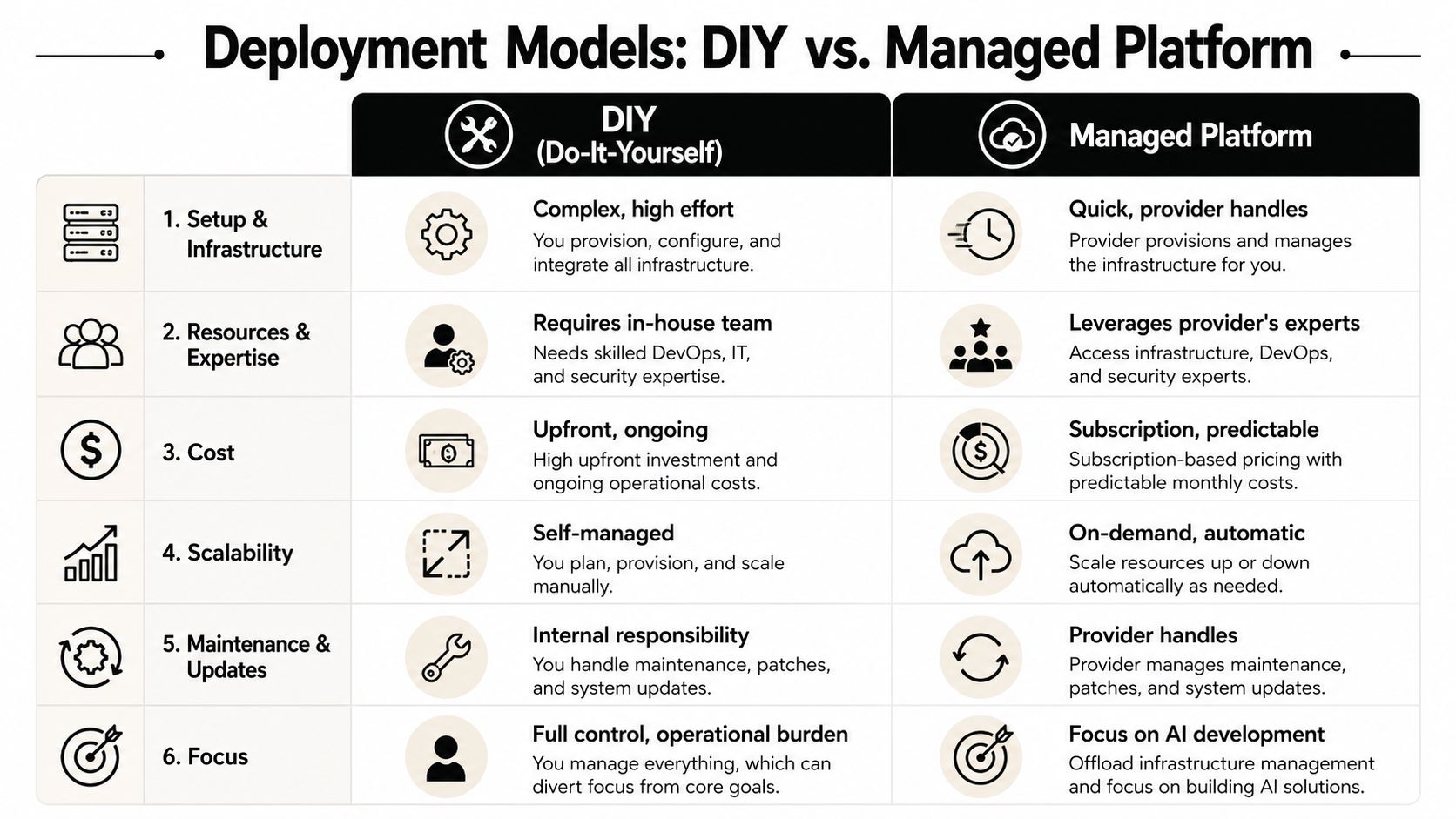
There are two honest ways to build an enterprise AI platform. You assemble it yourself, or you adopt a managed platform that already handles the messy layers.
Neither path is automatically right. The trade-off is control versus operating burden.
The trade-off in plain terms
DIY usually means combining cloud infrastructure, model providers, orchestration frameworks, vector storage, workflow tooling, authentication, observability, and custom integrations. For some teams, that's exactly what they want.
Managed platforms start with a different assumption. They package hosting, instance management, integrations, security boundaries, usage visibility, and agent operations so the business team doesn't need to turn every new use case into an infrastructure project.
Here's the comparison organizations should make before buying anything:
| Decision area | DIY stack | Managed platform |
|---|---|---|
| Setup | You assemble infrastructure, runtime, connectors, and controls | Core environment is already available |
| Speed to first deployment | Slower if you need governance and integrations from day one | Faster when standard patterns are built in |
| Customization | Highest flexibility | Constrained by product boundaries |
| Operational burden | Your team owns updates, failures, scaling, and access logic | Provider handles most day-two operations |
| Multi-instance management | Usually custom work | Often native if the platform is designed for it |
| Cost visibility | You can design it exactly how you want, but you must design it | More predictable if usage is exposed clearly |
| Security model | Full control, full responsibility | Shared responsibility with packaged controls |
For buyers evaluating whether pre-built connections change the speed of rollout, the real test is whether the platform can connect into the systems your teams already use. A broad integration catalog like Donely integrations is often more important in practice than another model selector.
When DIY still makes sense
DIY is a valid choice when you have all of the following:
- A strong platform engineering function: Not just developers who can prototype, but people who can own runtime reliability and access control.
- A reason to customize extensively: For example, proprietary workflows, unusual hosting requirements, or internal standards that managed products can't meet.
- Tolerance for slower standardization: Teams accept that repeatability will take time.
- A plan for day-two operations: Logs, rollback, permission reviews, incident response, and integration maintenance all need owners.
Build it yourself only when the custom architecture is a strategic advantage, not because no one wants to choose a platform.
Where managed platforms win
Managed platforms usually win when the bottleneck isn't model science. It's operational sprawl.
That's especially true for:
- agencies running separate client environments
- enterprises with departmental isolation needs
- non-technical teams that need to deploy agents without engineering queues
- organizations that care more about repeatable rollout than unlimited architecture freedom
The fastest way to stall AI adoption is to make every deployment depend on the same small technical team. Managed platforms reduce that dependency if they're designed with governance and multi-instance control built in.
How to Evaluate an Enterprise AI Platform
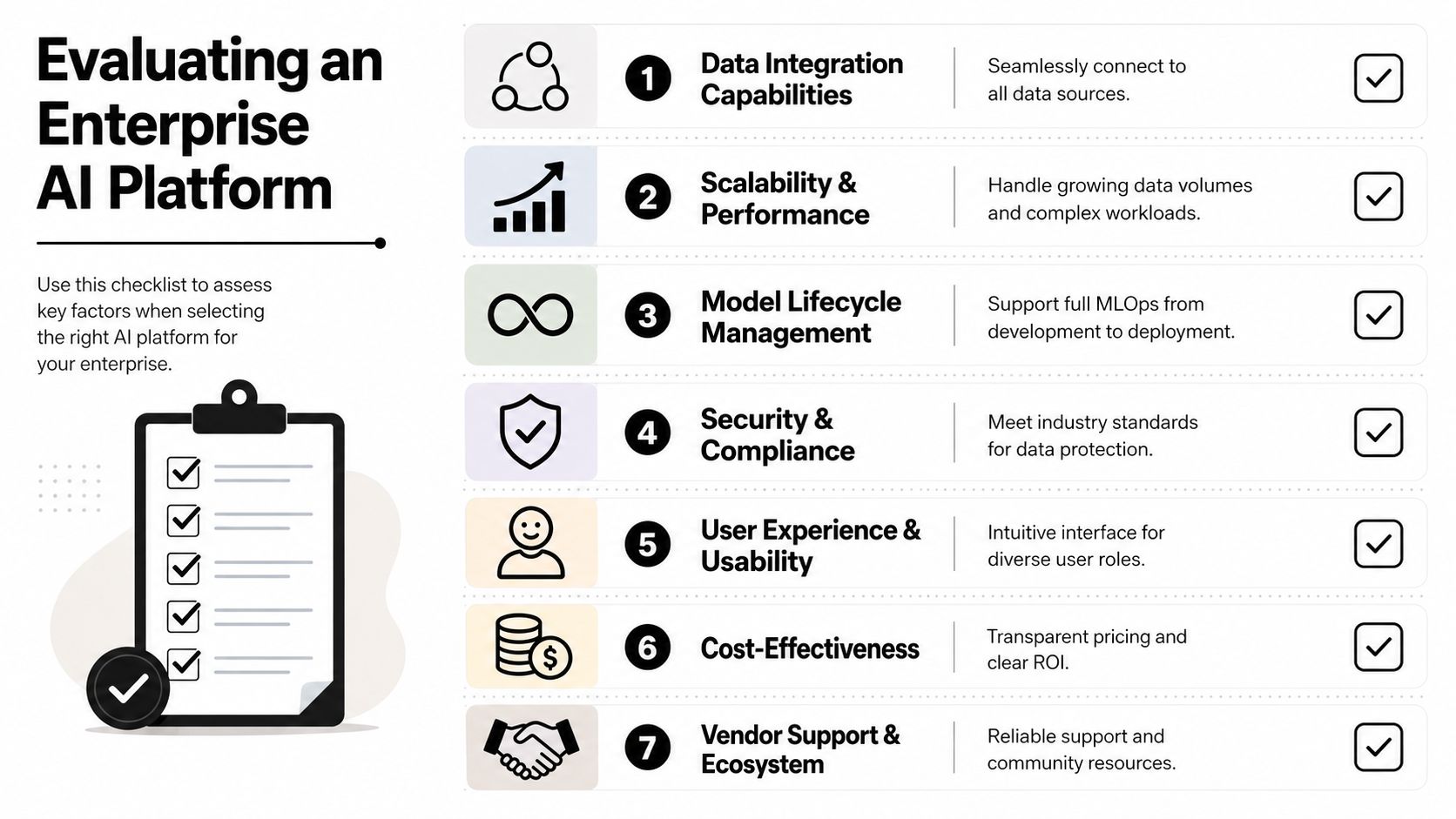
Most vendor evaluations spend too much time on model support and not enough time on production friction.
That's backwards. Kore.ai notes that much of the market still fails to answer how organizations can economically deploy unlimited, isolated AI agents across client workloads, and highlights “multi-instance economics” as the essential question behind repeatable deployment in its guide to enterprise AI platforms. That observation lines up with what operators run into after the first few pilots.
Start with multi-instance economics
If you manage more than one team, client, region, or business unit, ask this before anything else:
Can this platform run separate, isolated instances cleanly?
Not “can we create another project if engineering helps us.”
Not “can we open a second account and duplicate setup.”
Can the platform support many isolated deployments as a normal operating pattern?
Look for:
- Per-instance isolation: Separate data scope, credentials, and logs
- Per-instance billing or usage visibility: So client work and internal work don't blend together
- No migration gymnastics: You shouldn't need to move accounts around just to create operational boundaries
- Central oversight: One admin view should manage many instances
If a vendor can't answer those questions directly, they're probably selling a single-workspace product with enterprise language on top.
Then test for integration depth
The next failure point is what I call integration poverty. The agent can talk, summarize, and classify. It can't do much.
A platform only becomes useful when it can work inside the tools your business already runs on. That means systems like Salesforce, HubSpot, Slack, Gmail, Jira, Zendesk, Stripe, Notion, and internal APIs. More importantly, it means the agent can execute within permissions that make sense for the user and instance involved.
Hosting is part of that evaluation because runtime and integration control are connected. A useful example is managed agent hosting for Hermes, where the question isn't just whether an agent can be deployed, but whether it can be deployed repeatedly with isolation and governance intact.
Practical rule: If a demo uses a CSV upload instead of your actual business systems, assume the hard part hasn't been solved yet.
Questions that expose platform reality
Use these questions in vendor calls. They cut through most polished demos.
How are instances isolated?
Ask whether isolation applies to runtime, credentials, data scope, logs, and user access. “Workspace” can mean many things. You want specifics.Can non-technical users launch and manage agents?
This is not about whether the UI looks simple. It's about whether the operating model still requires engineering for routine deployment, permissions, or connector setup.How granular is RBAC?
“Admin” and “member” are not enough for enterprise use. Department leads, client managers, compliance reviewers, and operators need different scopes.What does observability include?
Ask for prompt traces, usage visibility, action logs, failure review, and centralized monitoring. If the vendor only shows chat transcripts, keep digging.How are integrations handled?
Ask which connectors are native, which are custom, and who owns maintenance when APIs change.What happens when we scale from one agent to many?
A real platform should make the tenth deployment easier than the first.Can the platform support permission-aware execution?
An agent should act within the boundaries of the systems and roles assigned to it, not through a shared super-admin credential.
Here's a simple scoring lens:
| Evaluation area | Weak answer | Strong answer |
|---|---|---|
| Isolation | Separate projects with manual setup | Native isolated instances with scoped access |
| Integrations | API available, build it yourself | Broad pre-built connectors plus extensibility |
| Governance | Basic roles and logs | Granular RBAC, audit trails, traceability |
| Usability | Technical users only | Business users can launch and manage safely |
| Operations | Monitoring is fragmented | Central dashboard for logs, usage, and status |
The best buying decision usually comes from testing one high-friction use case, not the easiest one. Pick a workflow that needs real app access, separate permissions, and repeatable deployment across more than one environment. That's where platform truth shows up.
An Adoption Checklist for Your Team

Adoption fails when teams buy one platform and assume everyone will use it the same way. They won't. Founders, agencies, DevOps, and compliance leaders care about different failure modes.
Sema4.ai's 2026 platform guidance makes an important point here. The bottleneck isn't model sophistication. It's integration poverty and the lack of permission-aware execution across the business tools people already use, especially when non-technical users need to launch agents quickly through pre-built integrations to tools like Salesforce and HubSpot in minutes, as noted in Sema4.ai's buyer guidance for enterprise AI platforms.
Founders and solo builders
- Start with one business-critical workflow: Lead follow-up, customer replies, or internal research beats a generic assistant.
- Separate personal and business contexts early: Don't let one workspace become a junk drawer of experiments and production tasks.
- Choose tools with built-in integrations: If you need engineering help for Gmail, Slack, or CRM access, your rollout will stall.
- Check access boundaries before launch: Even small teams need clean permission habits.
Agencies and multi-client operators
- Demand isolated client instances: Don't accept soft separation when clients expect hard boundaries.
- Map billing to each client environment: If finance can't trace usage, margins get blurry fast.
- Standardize a reusable deployment template: Intake, connector setup, RBAC, audit review, handoff.
- Avoid account sprawl: Separate accounts sound clean until operations, reporting, and support become painful.
Agencies should buy for the fifteenth client, not the first one.
DevOps and platform teams
- Review governance as architecture: Logging, tracing, policy, and access control shouldn't be bolted on later.
- Test rollback and failure handling: Production agents need the same operational discipline as any other service.
- Inspect integration ownership: Know which connectors the platform maintains and which your team must support.
- Protect execution boundaries: Keep credentials scoped and avoid shared high-privilege service accounts where possible.
Compliance and enterprise leaders
- Require auditability from day one: Prompt history, action history, and access history all matter.
- Validate role granularity: Business owners, reviewers, and admins should not share the same scope.
- Review data isolation assumptions: Departmental and client boundaries need technical enforcement, not policy language alone.
- Tie adoption to approved systems: Agents should act through sanctioned tools and known permissions, not shadow workflows.
A practical rollout usually starts small, but it should never start sloppy. The cleaner the operating model, the easier it is to expand from one team to many.
Conclusion From Platform to Performance
The enterprise AI platform isn't just another category label. It's the layer that turns scattered AI experiments into something a business can operate with confidence.
The shift that matters most is mental. Stop treating AI as a collection of chats, prompts, and isolated automations. Start treating it as a workforce that needs identity, permissions, supervision, integrations, and repeatable deployment.
Teams that get this right don't just pick a strong model. They choose a platform that can support isolated instances across departments or clients, give non-technical users real execution power, and reduce the DevOps burden that keeps pilots stuck in limbo.
That's why the practical buying criteria are different now. Multi-instance management matters. Permission-aware execution matters. Integration depth matters. Governance matters.
If the platform handles those realities well, AI stops being a side project and starts becoming operational capacity.
If you're comparing platforms and want a concrete example of a system built around multi-instance deployment, centralized monitoring, per-instance RBAC, and pre-built integrations, Donely is worth reviewing alongside your other options. The useful test is simple: take one real workflow, give it real permissions, isolate it for one team or client, and see whether the platform makes deployment and governance easier or harder.