
Your WhatsApp inbox usually doesn't get noisy all at once. It creeps up. A few leads from ads. Support follow-ups. Appointment reminders. Payment confirmations. Then one day the team is copying the same answer into chats, missing replies after hours, and discovering that “we'll just handle it manually” stopped working weeks ago.
That's when people start searching for how to automate WhatsApp message workflows. The mistake is treating it like a chatbot setup task. It isn't. At this point, WhatsApp automation is an operations problem shaped by routing rules, template approvals, billing changes, and platform restrictions that got sharper in 2025 and 2026.
The teams that get this right don't start with clever prompts. They start with the correct platform, a clear template strategy, and safeguards for throughput, quality, and cost. That's what keeps an automation setup useful after the demo.
Table of Contents
- Why Automating WhatsApp Messages Is Now Essential
- Choosing Your Automation Foundation and API Path
- Understanding Templates Session Windows and Approval
- Building and Connecting Your WhatsApp Automation
- Scaling Safely With Throughput Billing and Compliance Guardrails
- Putting Your WhatsApp Automation Into Practice
Why Automating WhatsApp Messages Is Now Essential
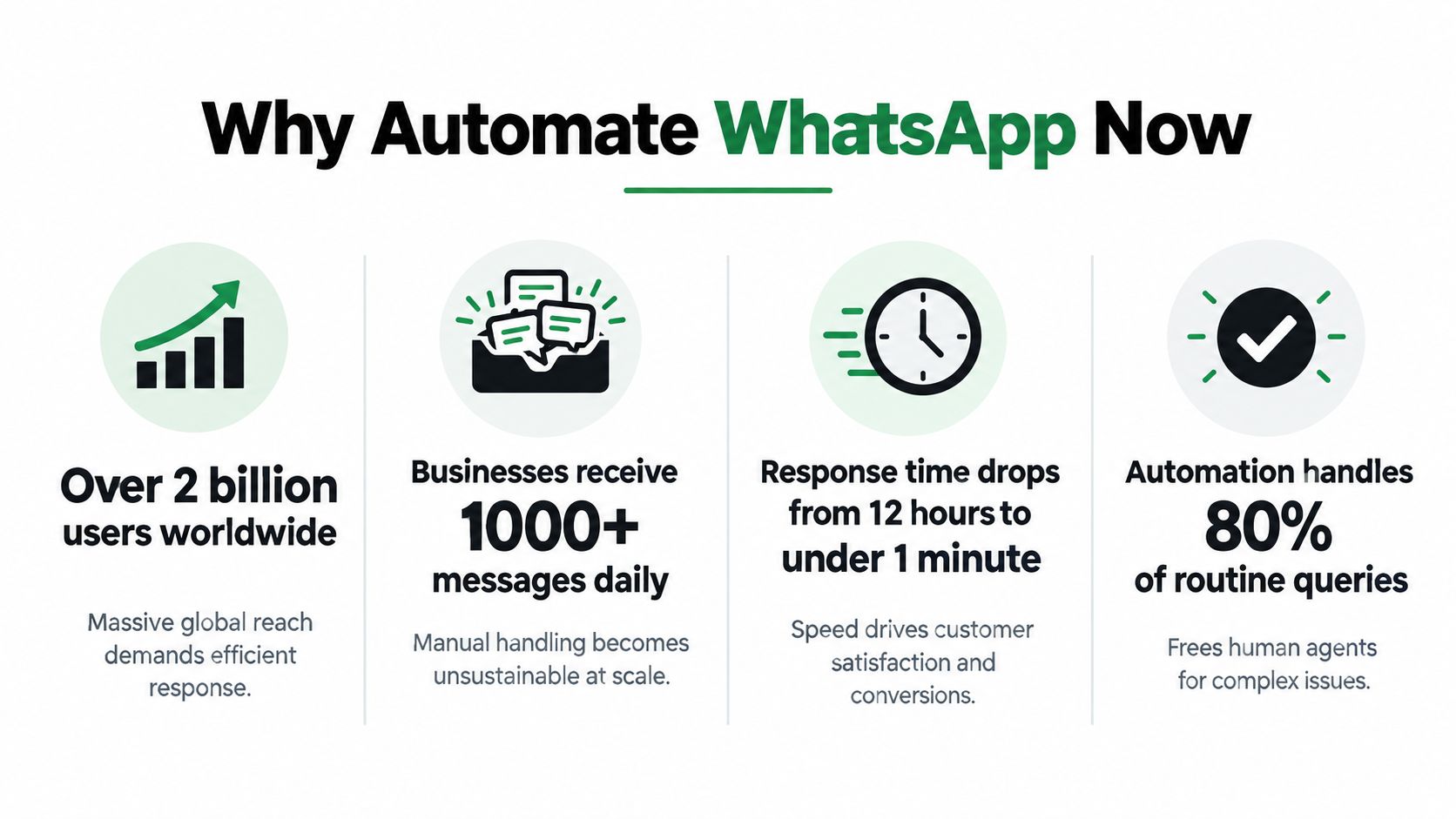
A team can survive manual WhatsApp replies for a while. Then the first real spike hits. Leads come in after a campaign launch, support asks stack up at the same time, and reminders need to go out on schedule. The inbox turns into queue management, but without queue controls, audit trails, or reliable handoffs.
That operational gap matters more now than it did a few years ago.
WhatsApp Business became a real automation channel in 2018, when Meta introduced the WhatsApp Business app and then the API layer for programmatic messaging, as noted in this WhatsApp Business statistics breakdown. Since then, business usage has grown far past the point where one phone and a disciplined team can keep up for long.
In 2025 and 2026, the case for automation is no longer just volume. It is policy and unit economics. Template categories affect what you can send and when. Session windows still shape reply logic. Per-message billing changes the cost of sloppy outbound design. AI agents can assist, but they do not remove the need for approved templates, routing rules, human escalation, and consent controls.
Manual inboxes fail in ways that cost money
The failure pattern is predictable:
- Agents repeat the same work: order updates, pricing answers, onboarding steps, verification prompts
- Replies arrive too late: the customer asked inside business hours, but the team answered after the buying moment passed
- Systems stay disconnected: the CRM has the lead status, the billing tool has the payment event, and WhatsApp has none of that context
- Headcount becomes the fallback: each jump in message volume gets solved by adding another person to the queue
That last point is usually where margins get hit. Manual handling scales linearly. Message volume does not.
Automation now needs an operating model
A useful setup is not just "send messages automatically." It has to decide which conversations belong in a live session, which need a template, which events should trigger outbound sends, and where an AI assistant is allowed to act without creating policy risk.
| Operational need | What manual teams do | What a production setup does |
|---|---|---|
| Inbound triage | Read every message one by one | Classify intent, route by queue, and escalate edge cases |
| Transactional updates | Send status messages manually | Trigger sends from CRM, order, or booking events |
| Follow-ups | Rely on memory or spreadsheets | Schedule approved templates with stop conditions |
| AI assistance | Let the bot answer too broadly | Limit scope, log actions, and hand off cleanly |
Analysts at Quantumrun estimated strong business usage and revenue growth tied to WhatsApp's commercial products in 2024, including API activity and click-to-WhatsApp demand, according to their market analysis. The exact estimates matter less than the practical reality. WhatsApp is now a revenue and service channel, not a side inbox.
Teams that treat automation as an ops system usually avoid the expensive mistakes. They map message types, template dependencies, escalation paths, and cost controls before they build. Teams that skip that work often end up with a bot that demos well, fails under real throughput, and sends more paid messages than the business can justify.
Practical rule: If WhatsApp handles lead response, support updates, reminders, or post-purchase service, design the workflow around policy, billing, and handoff rules from day one.
Choosing Your Automation Foundation and API Path
The first decision isn't which bot builder to use. It's whether you're building on the right WhatsApp product.
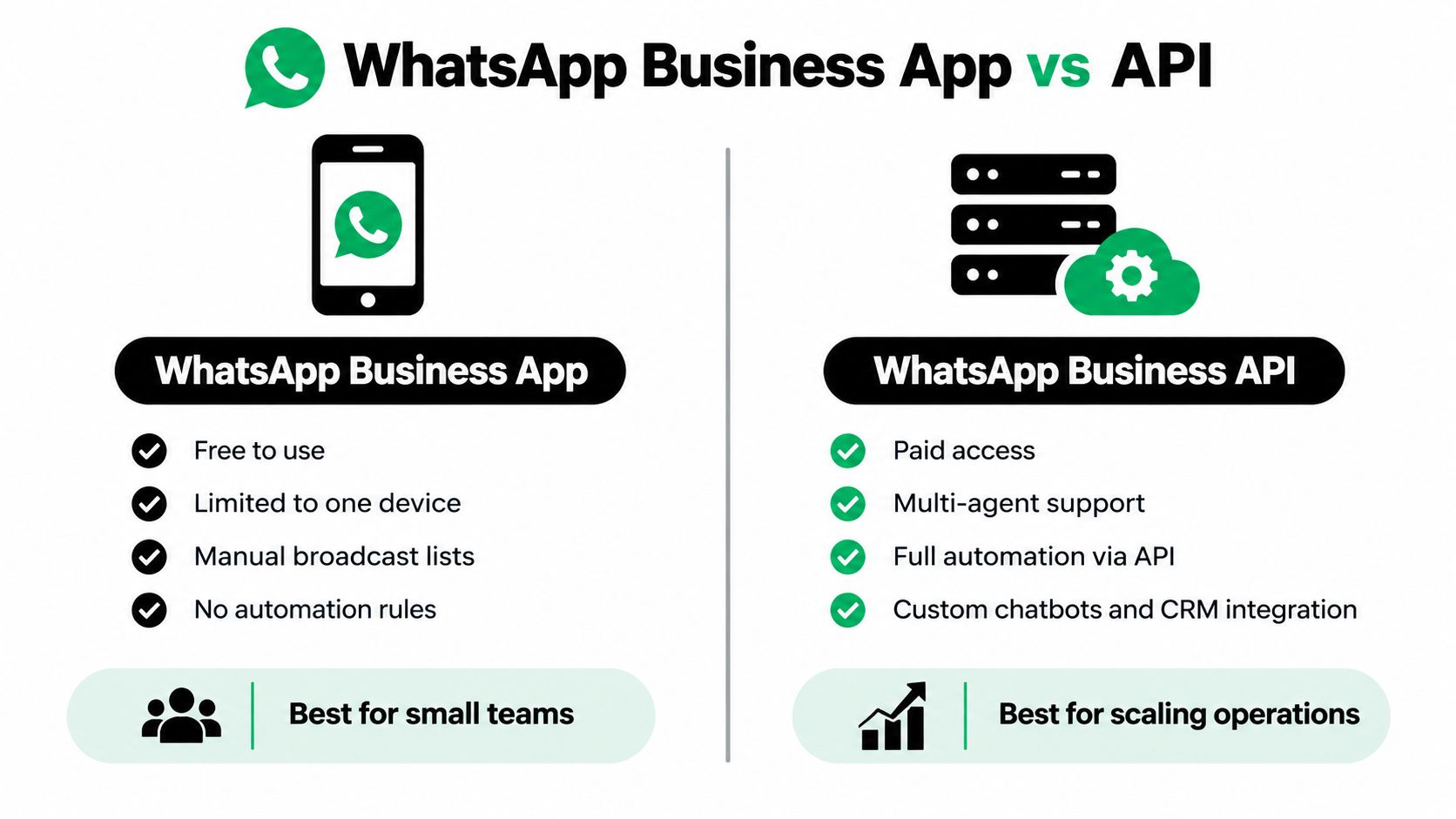
A lot of failed setups start on the WhatsApp Business app because it feels faster. It is faster, right up until you need multi-agent access, event-driven sends, or system-level control.
App versus platform
Here's the practical split.
| Option | Good for | Breaks when |
|---|---|---|
| WhatsApp Business app | Very small teams doing mostly manual replies | You need automation rules, CRM sync, or shared operational ownership |
| WhatsApp Business Platform API | Teams that need routing, templates, webhooks, and scalable sends | You haven't planned governance, approvals, and integration work |
If you're serious about how to automate WhatsApp message workflows, use the WhatsApp Business Platform, not the consumer app and not a manual workaround disguised as automation.
The platform is what gives you webhook events, templates, programmatic sends, and connection into systems like HubSpot, Salesforce, Zendesk, or internal tools. That's the difference between “messages go out” and “messages go out because a real business event happened.”
Direct Meta Cloud API or provider layer
Once you choose the API route, the next decision is whether to integrate directly with Meta's Cloud API or go through an intermediary such as Twilio or another messaging layer.
A direct Meta setup usually makes sense when you want:
- More control: You manage payload structure, webhooks, and logic directly.
- Lower abstraction: Fewer layers between your app and WhatsApp behavior.
- Cleaner governance: Useful for teams that already run integration infrastructure.
A provider layer often makes more sense when you want:
- Faster launch: Prebuilt tooling reduces setup friction.
- Hosted plumbing: Less work around delivery infrastructure and webhook handling.
- One vendor for multiple channels: Helpful if SMS, voice, or email sit beside WhatsApp.
The trade-off is straightforward. Direct gives flexibility but asks more from your ops and engineering discipline. A provider gives speed but can limit how precisely you shape the workflow.
Match the path to your operating model
Different teams should make different choices.
- Solo builder or founder: Start with a managed path if you need results quickly and don't want to own hosting details.
- Agency handling multiple clients: Prioritize tenant isolation, per-client numbers, and separate webhook consumers from day one.
- Internal ops or product team: Go direct if WhatsApp is becoming a core system rather than just another outbound channel.
If you're evaluating infrastructure for direct control and agent-driven workflows, Hermes API is worth reviewing as part of that architecture decision.
The wrong foundation usually doesn't fail in week one. It fails when marketing wants triggered campaigns, support wants CRM context, and finance asks why one shared number is tied to three different clients.
Understanding Templates Session Windows and Approval
A common production failure looks like this: a CRM fires an "appointment reminder" event at 8:00 a.m., the send job runs, and WhatsApp rejects the message because the customer has not messaged your business in the last 24 hours. The workflow worked in staging because someone had an active chat open. It breaks in production because session state was never part of the send logic.
WhatsApp has two outbound modes, and your automation has to choose correctly every time. Inside the customer-care window, you can send a free-form reply. Outside that window, business-initiated outreach has to use an approved template under WhatsApp Business policy guidance: https://whatsappbusiness.com/policy/
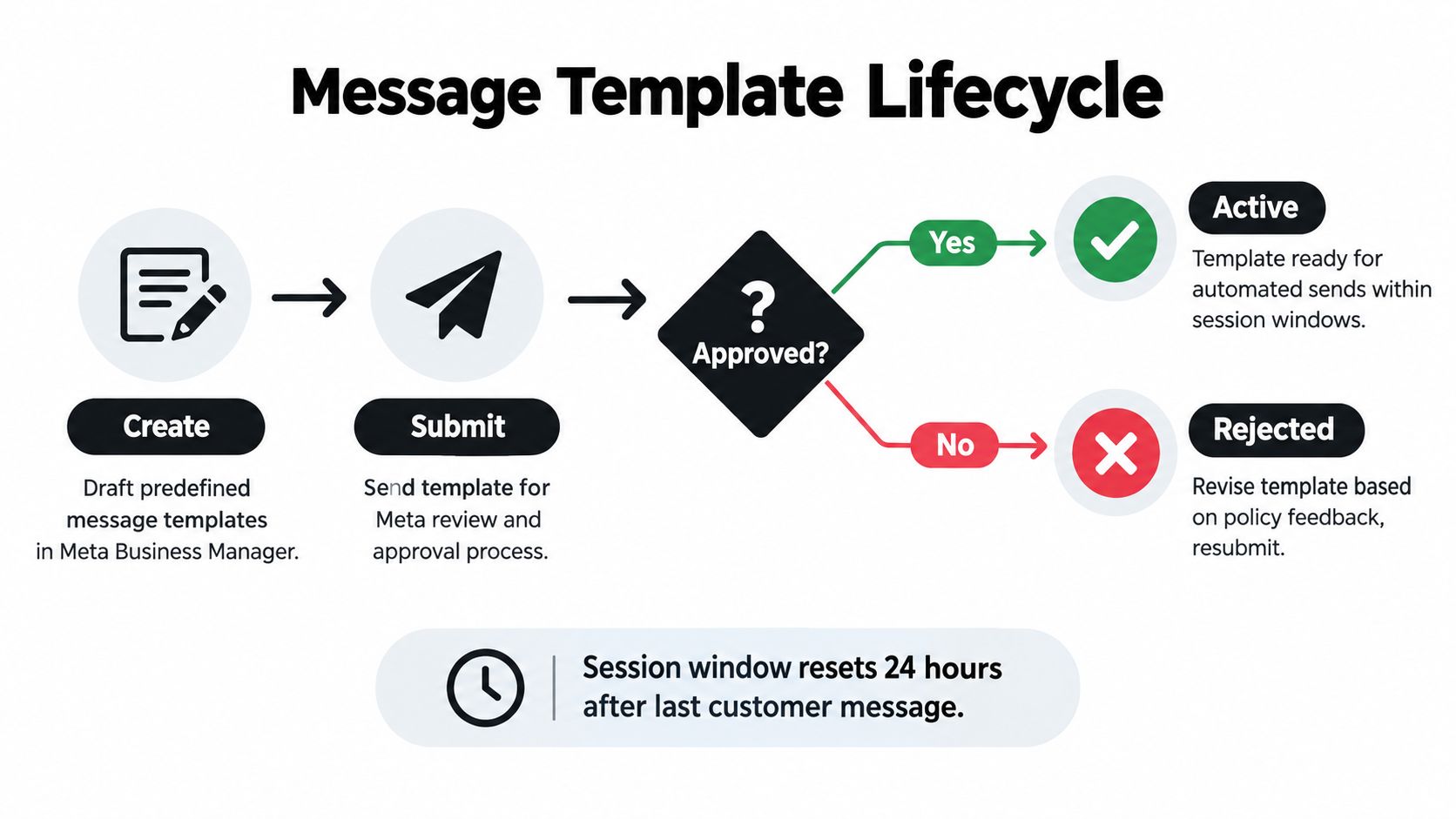
That distinction matters more in 2025 and 2026 than many tutorials admit. Category choice affects both approval and cost. Utility, marketing, and authentication messages are treated differently, and AI agents still do not get a free pass to initiate open-ended outbound conversations outside the rules. If an agent sends the message, the template and session rules still apply.
The routing rule that belongs in your send layer
Do not let upstream systems decide message type. CRM events, ecommerce triggers, and AI agents are bad at policy decisions unless you force that logic into the messaging layer.
A reliable outbound classifier should answer four questions before send:
Is there an open customer-care window?
If yes, send a free-form reply.If not, is there an approved template for this event?
If yes, send the correct template with the right language variant.Does the content match the template category?
Utility for transactional updates, marketing for promotions or re-engagement, authentication for one-time verification flows.Should a human handle this instead?
Use escalation for sensitive account issues, billing disputes, and messages likely to confuse the customer without context.
Teams get into trouble when they wire "event occurred" directly to "send message," then wonder why delivery becomes inconsistent, templates get rejected, or costs jump after a campaign goes live.
Template setup is an operations problem, not a copywriting task
Template approval is straightforward if the library is designed around business events instead of ad hoc requests from sales or support. Create the template, assign the right category, define variables cleanly, add any header or button elements you need, then submit it for review.
The naming standard matters more than people expect. Use names that map to an actual trigger and purpose:
- order_update_shipped
- appointment_reminder_24h
- payment_confirmation
- lead_followup_demo_request
That convention helps in three places: debugging failed sends, reporting template usage by team, and controlling billing by message category. Finance will ask which flows are driving marketing volume. Ops will need to find the exact template version that failed. A sloppy library turns both jobs into manual cleanup.
What gets templates rejected, and what gets them disabled later
Approval problems usually come from preventable mistakes, not edge cases.
- Duplicate content: Re-submitting the same body text under a new name is a common rejection path.
- Bad variables: Placeholder fields that are vague, unbounded, or grammatically awkward create review risk and poor customer output.
- Wrong category: A promotional offer submitted as utility may get rejected, or approved patterns may create policy trouble later if the live use does not match the intent.
- Sensitive requests: Asking for personal or financial details in the wrong format is a fast way to trigger scrutiny.
- Complaint-heavy sends: Even approved templates can be paused or disabled if recipients react badly.
The trade-off is simple. Highly reusable templates save setup time, but narrow templates are easier to govern, easier to categorize correctly, and easier to audit when pricing or policy changes.
Design each template as part of a system: trigger, category, locale, variables, fallback path, and owner.
A practical classification model
Use a simple decision table before you automate at volume.
| Trigger | Window open | Window closed |
|---|---|---|
| Customer asks a support question | Free-form reply | Reopen with an approved template, then continue in-session |
| Order status changes | Free-form if conversation is already active | Utility template |
| Promotion or win-back | Free-form only if the context is active and appropriate | Marketing template |
| Login or verification step | Free-form inside an active support exchange | Authentication template |
One more rule is worth hard-coding. If your AI agent generates outbound text and the session is closed, block the send unless it selects an approved template first. That single check prevents a lot of avoidable policy violations.
Building and Connecting Your WhatsApp Automation
Once the foundation and messaging rules are clear, the build itself is straightforward. The work is mostly in wiring the right events to the right outputs, then testing for all the boring production behaviors people skip in demos.
A practical stack has five moving parts: the WhatsApp channel, an automation engine or agent layer, webhooks for inbound and status events, business-system triggers, and logging.
Start with a narrow workflow
Don't begin with “build a full AI WhatsApp assistant.” Start with one bounded workflow that has clear inputs and outputs.
Good first workflows include:
- Lead intake and qualification
- Appointment confirmation and reminder flows
- Order and delivery updates
- Support triage with human handoff
Bad first workflows are broad, open-ended assistants expected to answer anything, fetch from every system, and sell at the same time. Those setups usually fail because nobody defined escalation logic.
Wire inbound and outbound separately
Teams often blur responsibilities.
Inbound flow should handle:
- user message received
- intent or keyword detection
- route to agent, queue, or workflow
- open or continue session state
Outbound flow should handle:
- trigger event from CRM, help desk, booking tool, or payment system
- classify session versus template send
- attach approved template and variables if needed
- record delivery and failure states
If you're mapping CRM triggers into WhatsApp, this guide on WhatsApp API and CRM integration is useful context because it focuses on the workflow side rather than only the send action.
Set up webhooks before you trust anything
A WhatsApp send without webhook handling is incomplete. You need inbound messages, delivery events, failures, and read states flowing back into your system.
At minimum, log these event types in a way your ops team can inspect:
| Event | Why it matters |
|---|---|
| Inbound message | Opens or continues service logic |
| Sent or accepted | Confirms dispatch path |
| Delivered | Confirms handset-level progress |
| Read | Helps support and sales timing |
| Failed | Triggers retry or human review |
This is also where idempotency discipline matters. Real systems retry. Webhooks can arrive more than once. If the same booking event fires twice and your reminder workflow has no dedupe key, customers get duplicates and your team wastes time investigating “random” behavior.
Field note: Most “AI problems” in WhatsApp projects are actually event-handling problems. The model isn't the thing double-sending your reminders.
Connect business tools to real triggers
The best automation setups don't start with message composition. They start with business events.
Examples:
- A payment is confirmed, so a utility update goes out.
- A deal stage changes, so a follow-up task is created or routed.
- A support ticket is opened, so the customer gets an acknowledgment and queue expectation.
- A user replies with a keyword, so the flow branches to a booking or support path.
That usually means connecting WhatsApp to your existing systems rather than treating it as a standalone inbox. If you want lower DevOps overhead, Donely integrations can connect agent workflows with a large set of business tools and channels, which is useful when WhatsApp needs to sit beside Slack, HubSpot, Salesforce, Zendesk, or Stripe rather than operate alone.
Test the failure paths, not just the happy path
Test only one path: message sent, user replies, automation answers. That's not enough.
Run through these before launch:
Closed-window send test
Trigger an outbound event when no active session exists and confirm the system uses a template.Missing variable test
Send a template event with incomplete data and verify it fails safely instead of sending broken content.Duplicate webhook test
Replay the same incoming event and make sure the workflow doesn't create duplicate records or replies.Human handoff test
Confirm that escalations move into a staffed queue with context attached.Opt-in and expectation test
Make sure the user understands why they're receiving messages and how to continue the conversation.
After you've seen a production-style build in the abstract, it helps to watch one in motion:
Keep client and number boundaries clean
For agencies and multi-brand teams, isolation matters more than convenience.
Use separate phone numbers, template libraries, and webhook consumers per tenant. Don't share one automation layer casually across unrelated clients just because it's faster to launch. When one client's messaging quality drops, shared setups make diagnosis and containment harder.
That's one of the least glamorous parts of learning how to automate WhatsApp message operations well, but it's the part that prevents one account's mistakes from contaminating the rest of your setup.
Scaling Safely With Throughput Billing and Compliance Guardrails
A WhatsApp workflow can look healthy at 500 messages a day and turn expensive or unstable at 50,000. That usually happens in three places at once: dispatch speed, template mix, and policy scope.
The fix is an operating model, not more automation.
Meta and BSPs publish throughput rules per sending number, and some providers document common starting limits such as 80 messages per second with higher tiers available after review, as summarized in Messangi's throughput documentation. In practice, the exact ceiling matters less than what sits in front of it. If CRM events, billing notices, reminders, and support follow-ups all fire directly into the same sender, bursts will collide, retries will stack up, and the wrong traffic will win.
Build dispatch like a queue, not a feature
Treat outbound WhatsApp as a controlled dispatch service with priorities, rate limits, and cost rules.
That means:
- Queue outbound traffic by event type: authentication, utility updates, support follow-ups, and marketing should not compete blindly.
- Throttle per phone number: the bottleneck is usually the number, not your app server.
- Retry with idempotency keys: duplicate retries create duplicate sends, duplicate tickets, and duplicate charges.
- Set priority lanes: password resets and delivery alerts should move ahead of lower-value campaigns.
- Isolate tenants and brands: separate numbers, template libraries, logs, and webhook consumers reduce blast radius when one account runs into quality or policy trouble.
I have seen more production issues caused by missing queue discipline than by API outages. A single retry storm after a webhook delay can drain budget fast if template sends are billed per message and every upstream system keeps resubmitting the same job.
2025 pricing changes should change your workflow design
A lot of WhatsApp tutorials still teach conversation-era thinking. That is outdated for template traffic.
Recent industry coverage says Meta shifted the WhatsApp Business Platform to per-message billing for template messages on July 1, 2025, paused marketing template delivery to +1 numbers on April 1, 2025, and ended On-Premises API support on October 23, 2025, according to this 2025 to 2026 WhatsApp Business API changelog summary. If your automation plan still assumes template sends are just a compliance step after the 24-hour window, costs will drift.
Here is the practical reframing:
| Decision area | Outdated assumption | Better operating model |
|---|---|---|
| Template usage | Any valid outbound event can send | Each template send needs a business case, owner, and budget threshold |
| Category choice | Category is mostly administrative | Category affects cost, delivery behavior, and review risk |
| Number strategy | One number can carry everything | Split workloads when support, utility, and promotional traffic have different risk profiles |
| US marketing rollout | +1 campaigns behave like other markets | Check current restrictions before forecasting volume or revenue |
| Infrastructure | Legacy On-Prem is acceptable if it still works | Cloud-first planning avoids a dead-end migration path |
Finance and ops need the same dashboard. Track sends by template category, market, trigger source, and outcome. If you cannot answer which workflow generated yesterday's paid template volume, you do not control spend.
Compliance guardrails are narrower for AI agents
Policy risk has also shifted. Broad AI assistant behavior inside WhatsApp is getting harder to justify than bounded workflows tied to support, transactions, or account actions.
Reporting from Green API says WhatsApp introduced restrictions affecting general-purpose AI assistants on the Business Platform, with enforcement timelines tied to new and existing users, and that Meta is rolling out a Model Context Protocol server for approved setup tasks such as account creation, phone verification, Cloud API registration, template management, and webhook configuration, according to Green API's coverage of recent WhatsApp platform changes.
The operational takeaway is straightforward. Keep your automation narrow, auditable, and easy to explain to policy reviewers.
Lower-risk patterns:
- order and delivery updates
- appointment reminders
- authentication messages
- support triage
- bounded FAQ flows with clear handoff rules
Higher-risk patterns:
- open-ended AI companions
- multi-purpose assistants with no clear domain limit
- promotional chat agents that keep pushing after weak engagement
- flows that casually request sensitive personal or financial data
The teams that scale cleanly ask three questions before adding any automation: Is it allowed, is it worth the send cost, and can a human take over when the flow fails. That standard prevents a lot of expensive mistakes.
Putting Your WhatsApp Automation Into Practice
The cleanest rollout is usually the least ambitious one. Pick a single workflow, tie it to a real business event, and make sure the operational basics are solid before you expand.
A practical launch checklist looks like this:
- Confirm the platform choice: Use the Business Platform path, not a manual app workaround.
- Classify every outbound send: Route each event as session-based or template-based before dispatch.
- Build a small template library: Start with utility, support, or authentication flows that are easy to justify operationally.
- Log all webhook activity: You need delivery, failure, and inbound visibility in one place.
- Set billing and quality guardrails: Review template usage by category and market so costs don't drift.
- Protect account boundaries: For teams and agencies, isolate instances, numbers, access, and audit trails per workload.
If you're deploying a support-oriented flow, WhatsApp support agent setups are a practical place to start because they naturally fit the session-window model and produce fewer policy surprises than broad outbound campaigns.
The teams that scale cleanly treat WhatsApp like a governed operating channel. They use RBAC, isolate client workloads, keep centralized logs, and expand from one number to many only after the first workflow is stable. That discipline matters more than having the fanciest bot.
If you came here asking how to automate WhatsApp message workflows, the short answer is this: choose the API path early, build around session and template rules, and design for billing and policy changes before they become expensive.
Donely gives teams a way to deploy and manage AI agents across channels like WhatsApp without building all the surrounding ops infrastructure from scratch. If you need isolated instances, centralized monitoring, and integrations across your support, sales, and workflow stack, visit Donely and see how it fits your WhatsApp automation setup.