
AI agents are changing how teams get work done. You can spin one up in a day instead of weeks. In this guide you’ll walk through every step you need to define, build, test, and launch an AI agent that actually helps your business.
We’ll cover purpose definition, framework selection, architecture design, knowledge‑base setup, and production deployment. You’ll also see where Donely’s platform fits in, so you can go from idea to live agent without wrestling with servers.
Step 1: Define the AI Agent’s Purpose and Scope
Before you write any code, ask yourself what problem the agent will solve. A clear purpose keeps the project focused and avoids feature creep. Start by listing the exact task you want the agent to automate , for example, “answer common support tickets” or “draft LinkedIn posts for our brand.”
Next, map the workflow. Identify the trigger (a Slack message, an email, a webhook), the data the agent needs (customer record, product catalog), the decision points, and the final action (send a reply, create a ticket, publish a post). Sketch this on a whiteboard or a simple diagram. The more explicit you are now, the less you’ll have to re‑engineer later.
Consider the level of autonomy. Some agents only suggest actions and wait for human approval; others act fully on their own. Decide which steps need a human safety net. This decision ties directly to security and compliance , you don’t want a sales bot that can approve refunds without oversight.
When you have a solid purpose statement, turn it into a short “role card.” One sentence that tells the model who it is and what it must achieve. For example: “You are a friendly support assistant that resolves billing questions within 30 seconds.” Keep it under 50 words so the prompt stays crisp.
“A well‑defined purpose is the single biggest predictor of an AI agent’s success.”
Donely’s dashboard lets you store this role card in the agent’s BOOTSTRAP.md file, which the platform reads on every start‑up. That way you can edit the purpose later without touching code.
Finally, validate the scope with stakeholders. Ask the sales lead, the support manager, or the product owner: “If the agent fails, what’s the impact?” If the answer is “high,” tighten the guardrails or add a hand‑off step.

When you’ve nailed the purpose, you can move to the tech side with confidence.
IBM’s AI agents guide explains how purpose drives the agentic architecture and why clear scope reduces hallucinations.
Bottom line:Define a single, concrete goal, map the trigger‑to‑action flow, and lock the purpose in a role card before any code is written.
Step 2: Select the Right Framework and Tools
Choosing a framework is like picking the right toolbox. The right one gives you coordination primitives, state handling, and built‑in observability so you don’t rewrite plumbing for every project.
There are several production‑grade options in 2026. OpenAI’s Agents SDK offers a simple handoff model that works well if you’re already on the OpenAI stack. LangGraph gives you a graph‑based visual workflow with checkpointing, which is handy for complex branching logic. CrewAI focuses on role‑based delegation and is great for quick prototypes. Microsoft’s AutoGen shines for iterative code‑review loops, while Google’s ADK adds native multimodal support.
To decide, compare three factors:
- Orchestration model:Do you need a linear chain, a hierarchy, or a swarm of peers?
- State management:Will agents share a mutable state, or should each keep its own snapshot?
- Tool integration:Does the framework let you call external APIs, databases, or browser automation easily?
For most small‑to‑mid‑size teams, starting with a model‑agnostic framework like LangGraph saves future re‑writes because you can swap LLM providers later.
Donely’s platform already bundles OpenClaw, which supports all major frameworks under the hood. You can spin up a LangGraph‑style graph in the visual builder, then export the JSON to run on any compatible runtime.
Here’s a quick decision matrix you can copy into a spreadsheet:
Having a huge integration catalog matters because you’ll spend less time building custom connectors. Donely lists over 800 native integrations, from CRM to finance tools, so most workflows can be wired with a few clicks.
Watch this short video for a visual walk‑through of framework selection:
Once you pick a framework, add the right SDKs to your project and configure the model provider. Donely lets you choose OpenAI, Anthropic, or Gemini with a single dropdown, which cuts the setup time to minutes.
Need a concrete example? The Business Advisory Council use case shows how a coordinator agent can spawn eight sub‑agents in parallel using OpenClaw’ssessions_spawntool. The code lives in a few lines of JSON, yet the pattern scales to any number of specialized agents.
GuruSup’s multi‑agent framework comparison gives a deeper dive on orchestration patterns if you want to explore beyond the basics.
Bottom line:Pick a framework that matches your workflow complexity, supports the tools you need, and fits your team’s skill set.
Step 3: Design the Agent’s Architecture and Knowledge Base
Architecture is the skeleton that keeps the agent alive when traffic spikes or data changes. Start with a design pattern that matches the problem size. Google Cloud’s guide outlines three common patterns: single‑agent, sequential multi‑agent, and parallel multi‑agent. A single‑agent works for simple, one‑off tasks. Sequential pipelines are cheap and easy for linear processes. Parallel pipelines shine when you need several specialists to work at the same time.
Map out the components:
- Model layer:The LLM that does reasoning. Choose a provider that balances cost and capability for your use case.
- Tool layer:APIs, database connections, browser automation, etc. Each tool should have a clear input‑output contract.
- Orchestrator:Either the framework’s built‑in scheduler or a custom state machine that decides which agent runs next.
- Knowledge base:Structured data the agent draws from , FAQs, product catalogs, policy documents.
When you build the knowledge base, structure it for AI consumption. Instead of long narrative articles, break content into discrete sections with clear headings, bullet lists, and explicit actions. Observe.ai notes that agents struggle with unstructured prose; turning each article into “question → answer” pairs boosts retrieval accuracy dramatically.
For example, a support FAQ should have a heading like “How do I reset my password?” followed by a concise 2‑sentence answer and a JSON‑style snippet of the exact steps. Tag each entry with metadata (category, confidence score) so the retrieval layer can rank results.
Donely’s platform lets you connect a Notion database as a live knowledge source. The Health & Food Tracking Journal use case demonstrates how a daily‑log knowledge base powers a nutrition assistant without any extra code.
Don’t forget context engineering. The agent must know which pieces of knowledge to pull for a given request. Use a simple rule: if the user mentions “order status,” query the orders table; if they mention “refund policy,” hit the policy doc. This keeps the prompt short and reduces token waste.
Security also plays a role in architecture. Apply RBAC (role‑based access control) so the agent can only read the data it needs. Donely adds RBAC and audit logs out of the box, which satisfies most compliance checks for SMBs.
Finally, prototype the design on paper. Sketch a diagram that shows the model, the tools, the orchestrator, and the knowledge store. Then validate it with a small “hello world” flow before you commit to full implementation.
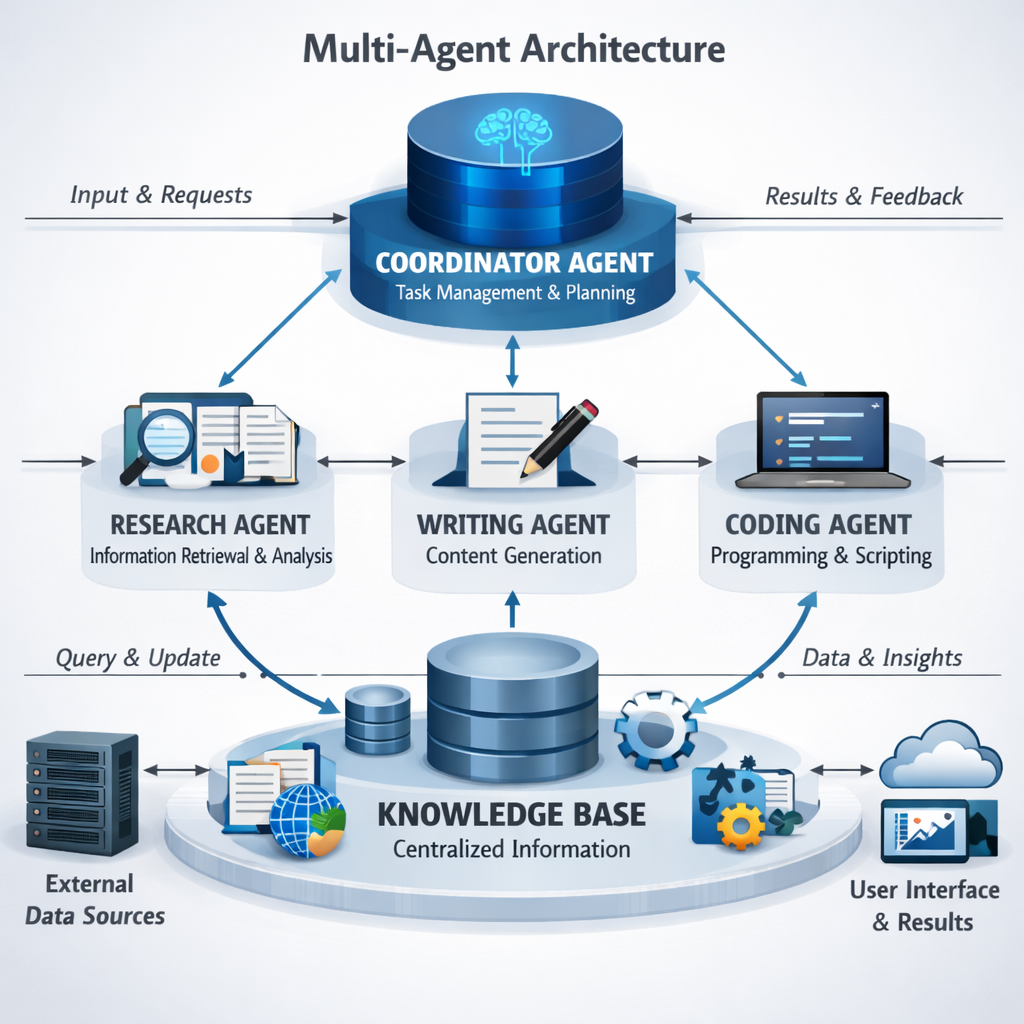
Google Cloud’s agentic design patterns provide templates you can copy‑paste into your own diagrams.
Bottom line:Choose a pattern that fits your workflow, build a modular knowledge base, and lock down access with RBAC before you start coding.
Step 4: Implement, Test, and Deploy Your AI Agent
Implementation is where code meets the design you built. Start by cloning a starter repo from Donely’s OpenClaw templates. The repo includes a pre‑filled BOOTSTRAP.md, a sample openclaw.json, and CI scripts that hook into MLflow for evaluation.
Write the prompt logic in the BOOTSTRAP file. Keep it short, use the role card you created earlier, and list the tools the agent can call. For example, add a line like “You may use the `search_orders` tool to look up a customer’s order ID.”
Next, write thin wrappers for each external tool. Use Donely’s integration plugins , a simple JSON block that maps a tool name to an API endpoint, authentication token, and request schema. This approach avoids hard‑coding secrets and lets you swap providers later.
Testing should cover three layers:
- Unit testsfor each tool wrapper , ensure the HTTP call returns the expected shape.
- Agent flow teststhat simulate a full conversation. Feed the agent a user request and assert the final action matches the goal.
- Evaluation metricsusing an agent‑focused framework. MLflow’s evaluation suite can score goal‑plan‑action (GPA) compliance, tool‑call correctness, and hallucination rate across multi‑turn dialogs.
Run the tests locally, then push the code to a Git branch. Donely’s CI/CD pipeline picks up the change, builds a container, and runs the MLflow test suite automatically. If any metric falls below your threshold, the pipeline blocks the deploy.
When tests pass, click Deploy in the Donely dashboard. The platform provisions a dedicated container, installs the model, attaches the selected integrations, and exposes the agent on the channels you enabled (Slack, WhatsApp, API). Within seconds you get a live URL and health metrics.
After launch, monitor the audit log and the MLflow dashboard. Look for spikes in tool‑call failures or unexpected token usage. If you see a pattern, tweak the prompt or add a guardrail in the BOOTSTRAP file.
For a real‑world example, the AI Customer Support Agent use case shows how a support bot can triage tickets, fetch order data from Stripe, and hand off complex cases to a Slack channel, all while keeping a full audit trail.
Remember to version your agent configuration. Each time you change a prompt or add a new tool, increment the version number in openclaw.json. This makes rollback painless if a new change breaks something.
Bottom line:Build with modular prompts, test with unit and flow checks, use MLflow for evaluation, and let Donely handle the one‑click deployment.
FAQ
What is the first thing I should do before building an AI agent?
Start with a clear purpose and scope. Write a one‑sentence role card that tells the agent who it is and what outcome it must achieve. This step saves time later by keeping the prompt focused and the workflow bounded.
Which framework is best for a beginner?
If you are new to agentic AI, CrewAI offers the quickest start‑up with under 20 lines of Python. It handles task delegation and tool calls out of the box, so you can prototype a simple workflow before moving to a more feature‑rich option like LangGraph.
How do I choose the right LLM for my agent?
Match the model to the task. For short, factual answers, a smaller model like Claude Sonnet works well and keeps costs low. For creative drafting or long‑form generation, GPT‑5.4 offers higher quality. Donely lets you switch providers without redeploying the whole container.
Can I use multiple AI agents at the same time?
Yes. Donely supports unlimited multi‑instance deployment, meaning you can run dozens of agents in parallel, each with its own permissions and knowledge base. Just make sure each instance has the appropriate RBAC settings to keep data isolated.
What security measures should I add?
Enable role‑based access control (RBAC) so each agent only sees the data it needs. Turn on audit logs in Donely to record every API call and decision. Also, store secrets in a managed vault and never hard‑code them in the prompt.
How do I know if my agent is performing well?
Use an evaluation framework like MLflow to track metrics such as goal‑plan‑action compliance, tool‑call accuracy, and hallucination rate. Combine those scores with business KPIs , for example, tickets resolved per hour or posts drafted per day , to get a full picture of performance.
Conclusion
Building an AI agent is now a matter of following a clear process: define purpose, pick a framework, design a modular architecture, and deploy with built‑in testing. Donely’s platform removes the infrastructure hassle, offers unlimited multi‑instance support, and provides RBAC plus audit logs out of the box, which makes scaling from a single bot to an entire AI workforce painless.
If you want a visual, no‑code way to spin up agents even faster, check out our No‑Code AI Agent Builder guide. It walks you through the same steps with a drag‑and‑drop canvas, so you can get a production‑ready agent up in minutes.
Remember, the secret to a reliable AI agent is a crystal‑clear purpose, a well‑structured knowledge base, and continuous testing. Follow the steps in this guide, use Donely’s built‑in tools, and you’ll have an AI employee that boosts productivity without the usual headaches.
Bottom line:With a solid plan and Donely’s all‑in‑one platform, you can create, test, and launch AI agents that work reliably at scale.