
You've got an OpenClaw agent working locally. It can reason, call tools, and handle real work. Then you try to put that same agent into Discord, where customers, teammates, or a client community will use it, and the risk profile changes fast.
A local agent can be messy and still useful. A live openclaw discord bot needs tighter control. Tokens have to be stored safely. Channel access has to be scoped on purpose. Logs need to exist when the bot goes quiet at midnight. If you're running separate bots for internal ops, client support, and a founder community, you also need boundaries between them so one mistake doesn't leak context across workloads.
Most setup guides stop at “bot connected.” That's not enough for production. The hard part starts after the green status dot appears.
Table of Contents
- From Local Agent to Live Discord Bot
- Preparing Your Assets for Deployment
- Deploying Your Bot with Donely in Minutes
- Governing Bots with RBAC and Instance Isolation
- Centralized Monitoring for Health and Performance
- Troubleshooting When Your Bot Goes Silent
- Frequently Asked Questions
From Local Agent to Live Discord Bot
The usual pattern looks like this. A founder builds an agent on a laptop, tests it in a terminal, and gets excited because it already feels like an extra operator. Then the first real request arrives: “Can we put this in our Discord?”
That's where the hidden work shows up. Discord isn't just another output channel. It's a shared environment with roles, categories, threads, DMs, public history, and a permission model that punishes lazy configuration. The bot that felt safe in a private workspace can become noisy, silent, or overexposed once it lands in a real server.
I've seen teams hit the same wall repeatedly. They assume deployment is mainly about uptime. It usually isn't. The first production problem is governance. Who owns the token? Which channels can the bot read? Can support staff see logs from the client success bot? What happens when a second bot for another team needs the same stack but different access?
Practical rule: Treat your first Discord deployment like the start of a fleet, even if you're only launching one bot today.
That's why a managed path matters. You want the mechanics of hosting, process management, and channel connectivity handled in a way that leaves you free to decide scope, ownership, and access. If you're moving from a hobby setup to something operational, managed OpenClaw hosting is the category to look at, not another weekend of hand-rolled bot plumbing.
The goal isn't a clever demo. The goal is an AI employee that can survive contact with a live server.
Preparing Your Assets for Deployment
Before you deploy anything, gather two assets cleanly: your Discord application and your OpenClaw agent configuration. If either one is half-finished, the bot may connect but fail in ways that waste hours.

The Discord side
Start in the Discord Developer Portal and create a new application. From there, create the bot user, generate the bot token, and prepare the invite URL with the bot scope and the permissions your workflow needs.
The permission baseline matters more than many guides admit. A production-grade setup needs Message Content Intent enabled in the Developer Portal. Without it, the bot may receive events but won't be able to read user text, which breaks command handling and often shows up as startup failure or an invalid session pattern, as documented in this OpenClaw Discord configuration guide.
Use a practical minimum for permissions:
- Send Messages so the bot can reply in normal channels.
- Read Message History so it can operate with conversational context.
- Use Slash Commands if you expose actions through slash interfaces.
- Add Reactions if part of your workflow uses lightweight acknowledgment.
If your server uses forum or media threads, add Send Messages in Threads as well. Missing thread permissions creates one of the most misleading failure modes in Discord. The bot looks healthy in the member list, works in some places, then mysteriously does nothing inside thread-based workflows.
If you only test in one flat text channel, you can ship a broken bot without noticing.
The OpenClaw side
Your OpenClaw config should reflect the bot's job, not just its existence. Decide whether it should respond in DMs, specific guild channels, or only when mentioned. The fastest way to create operational noise is to let the bot “hear” more than it needs.
Keep these decisions explicit before deployment:
| Area | Good default |
|---|---|
| Channel scope | Start with one dedicated channel |
| Mention behavior | Require mentions in shared spaces |
| DM behavior | Disable unless you need onboarding or private flows |
| Server reach | Allowlist specific guilds instead of broad access |
That scoping work pays off later when users report odd behavior. A narrow policy is easier to reason about than a permissive one.
For the agent itself, verify that its prompts, tools, and expected outputs fit Discord's interaction style. A terminal-oriented agent often assumes long responses, unconstrained output, or direct access to local files. A Discord bot needs tighter turn-taking, clearer replies, and less room for accidental oversharing.
Deploying Your Bot with Donely in Minutes
The deployment step should be boring. If it isn't, the platform is leaking infrastructure concerns back onto you.
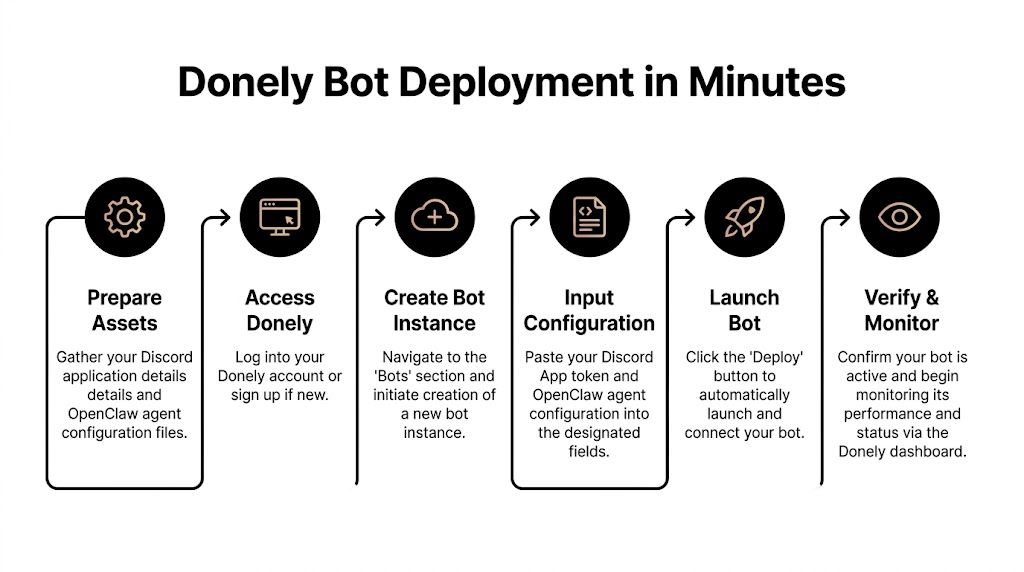
What the platform should abstract away
An OpenClaw Discord integration is a token-based bot setup. The docs are specific about token handling: a config-sourced token takes precedence over an environment fallback, and if multiple enabled Discord accounts resolve to the same token, OpenClaw starts only one gateway monitor for that token rather than duplicating monitors, as documented in the OpenClaw Discord channel docs.
That's a useful operational detail because it tells you what the system is protecting against. Duplicate token usage creates confusion fast. You think you have two bots or two accounts doing work, but underneath you may just have one gateway connection winning deterministically while another path is disabled.
In practice, you want your deployment layer to absorb this complexity. The team deploying the bot shouldn't need to reason through token precedence every time a new instance gets created.
The fast deployment path
For most founders and operators, the sensible path is a hosted control plane that lets you launch an isolated instance, provide the agent config, and connect Discord from a channel settings screen instead of wiring everything manually. This walkthrough on deploying an AI agent quickly shows the kind of workflow to aim for.
The sequence should look like this:
Create an isolated bot instance Keep the Discord bot separate from any other agent workload unless they share the same purpose and access model.
Add the OpenClaw agent configuration
Bring in the system prompt, enabled tools, and whatever workspace rules the bot needs.Connect Discord in the channel layer
Paste the bot token from the Discord Developer Portal into the designated connection flow.Store the token in one place
Don't split bot identity across half a dozen environment files and local overrides unless you enjoy debugging precedence issues later.Launch and test in a controlled channel
Use one private or low-risk channel first. Watch behavior before broadening access.
Here's the point most teams miss. Fast deployment doesn't mean permissive deployment. The best launch path is the one that gets the bot online quickly inside a narrow blast radius.
A short demo helps if you want to see the shape of that flow before touching production:
What to verify before you call it live
Don't stop at “bot is online.” Verify behavior in the contexts that matter.
Normal channel replies Mention the bot in the exact channel it will serve.
Thread behavior
If your server uses support threads, test inside a thread, not just the parent channel.Policy boundaries
Confirm the bot ignores channels and servers where it should remain silent.Bot identity consistency
Make sure the token in use matches the intended application and invite.
Launch status is not production readiness. Controlled replies, correct scope, and predictable identity are.
Governing Bots with RBAC and Instance Isolation
Running one Discord bot is manageable. Running several for different teams, clients, or business units is where weak architecture starts to hurt.
The gap in most OpenClaw Discord content isn't setup. It's operational governance at scale. Existing guides usually explain intents, allowlists, and initial pairing, but they don't answer how to run many Discord-connected agents without cross-contamination of data, permissions, or logs. That gap is called out directly in this analysis of OpenClaw Discord governance problems.
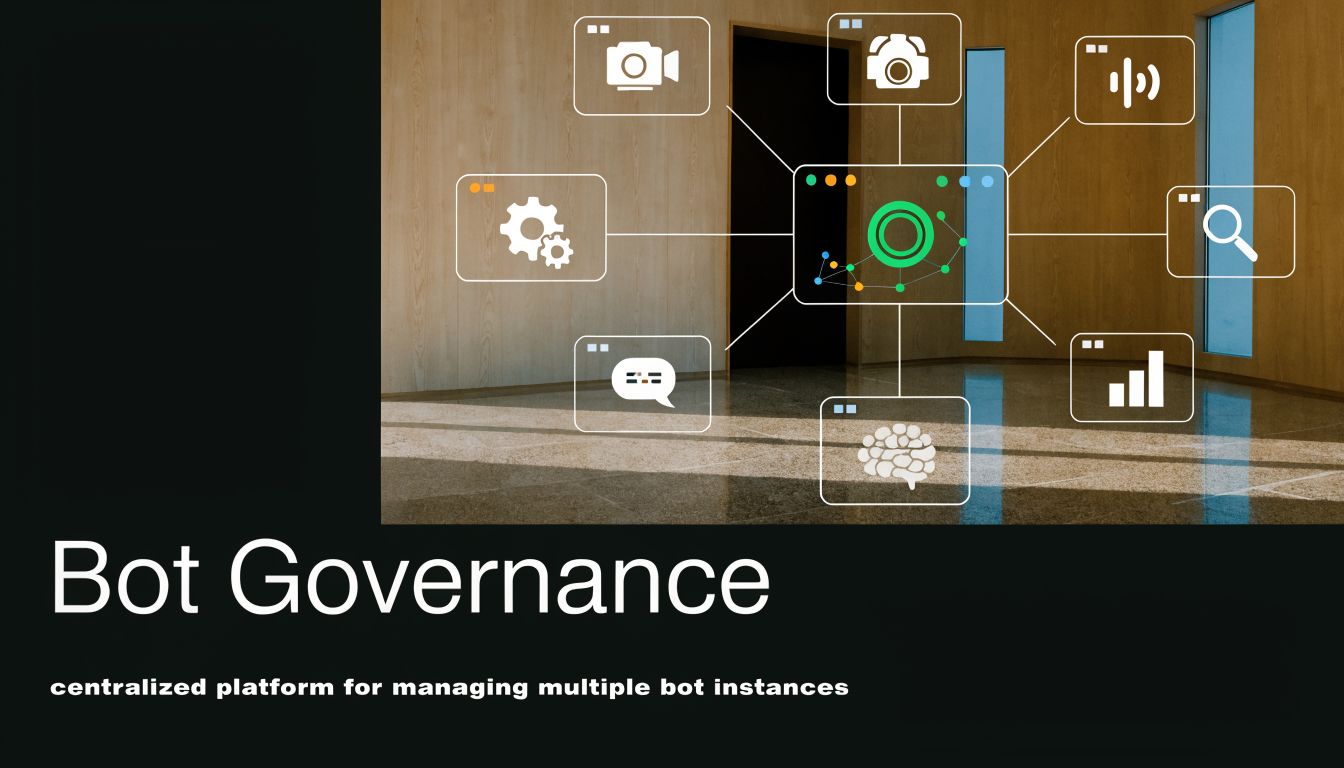
Why one bot becomes many fast
A founder rarely stops at a single deployment. The first bot handles internal questions. Then support wants one for the community server. Then a client asks for a separate agent in their own Discord. Then sales wants a bot for partner channels.
If those all live in one shared runtime, trouble follows:
- Shared logs make it too easy for the wrong person to inspect the wrong workload.
- Shared data scope raises the chance of context bleed between unrelated teams.
- Shared credentials turn routine maintenance into a trust problem.
- Shared ownership means nobody is fully sure who can change what.
Instance isolation effectively stops being an enterprise buzzword and becomes a practical safety mechanism.
A sane operating model
Use one instance per distinct trust boundary. That usually means one instance for internal operations, one per client-facing deployment, and separate instances for experimental or personal workloads.
If your platform supports it, layer RBAC on top so access maps to responsibility:
| Workload | Who should access it | Who should not |
|---|---|---|
| Internal ops bot | founders, ops, platform admins | clients, contractors outside ops |
| Client A bot | account team for Client A | Client B team, internal unrelated staff |
| Community support bot | support leads, community managers | finance, unrelated client teams |
That model is why platforms such as Donely for enterprise AI operations are relevant in this space. The useful part isn't marketing language. It's the combination of isolated instances, per-instance access control, and auditability when you stop thinking in terms of “a bot” and start managing a bot fleet.
Separate workloads by trust boundary first. Organize for convenience second.
One more practical point. Discord itself encourages shared surfaces. A server can contain public channels, private team channels, forum threads, and role-restricted spaces all under one roof. If the bot's runtime and operator access are both broad, one bad change can expose private context in places it doesn't belong. Governance from day one is cheaper than cleanup after a leak.
Centralized Monitoring for Health and Performance
A bot that's deployed but unobserved is a support incident waiting to happen. Discord users don't file elegant bug reports. They say “the bot stopped answering,” and now you need enough visibility to tell whether the problem is the gateway, policy, channel permissions, or the agent itself.
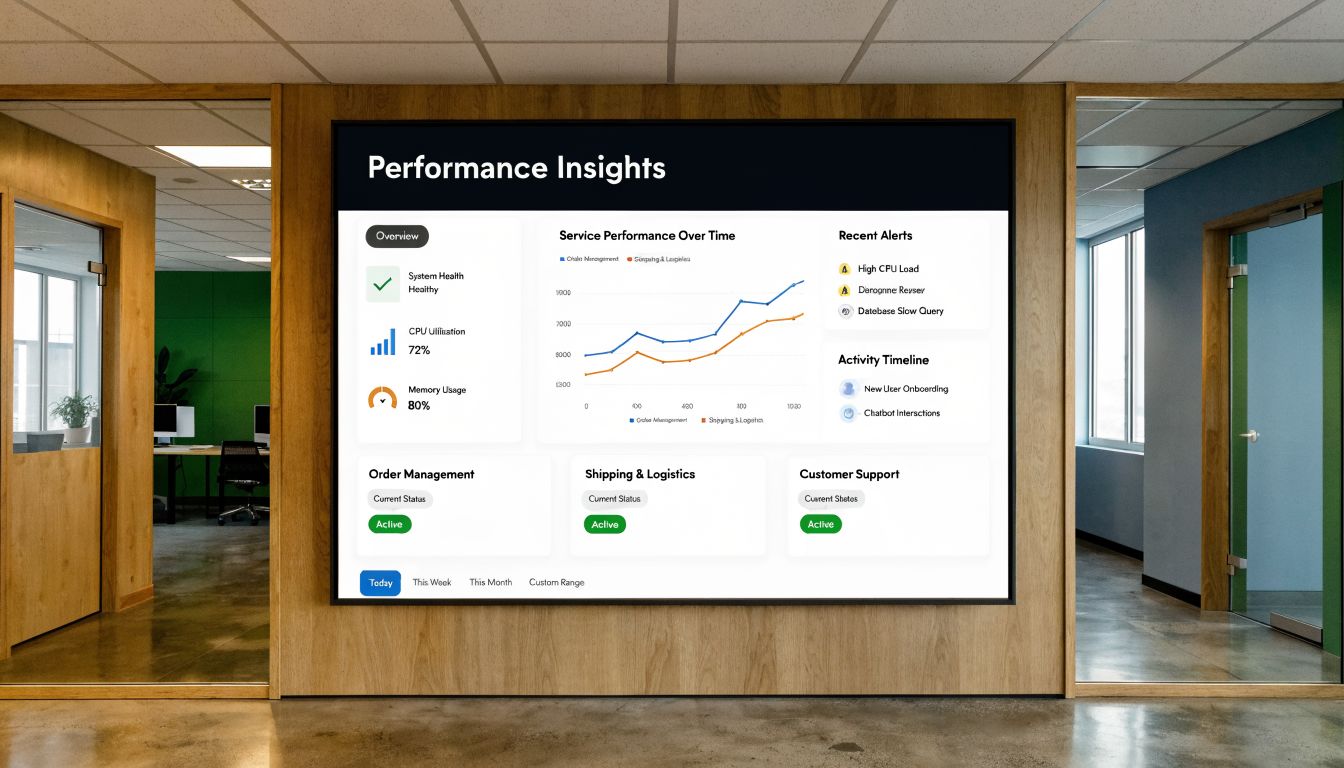
What to watch every day
For a live openclaw discord bot, I care about three categories more than anything else: status, logs, and usage patterns.
Status tells you whether the runtime is healthy. Logs tell you what failed and where. Usage patterns tell you whether the bot is helping or just occupying server space.
A centralized dashboard matters because Discord failures often look similar from the outside. The member list still shows the bot online. The actual clues live in per-instance logs, recent errors, and whether message handling has dropped off in one environment but not others.
Use a simple review loop:
- Check instance health for runtime issues before blaming Discord.
- Filter logs by bot instance so one noisy deployment doesn't bury another.
- Look for drops in command activity that may indicate a policy or permission drift.
- Compare environments when one bot responds and another doesn't under similar conditions.
Why Discord history matters operationally
OpenClaw's Discord positioning is stronger when you treat it as a system for structured server intelligence, not just chat automation. Tencent Cloud's TechPedia describes OpenClaw in terms of analytics such as message activity, user engagement, command usage, chat trends, and system performance, and notes that OpenClaw can index every message, thread, and attachment into SQLite for fast search over large Discord histories while allowing AI agents to query that local database directly in place of relying on the Discord API for every historical question, as described in Tencent Cloud's OpenClaw overview.
That architectural detail changes how you monitor the bot. You're not only checking whether it replied. You're managing a system that can turn Discord history into a searchable operational knowledge base.
A healthy bot answers questions. A useful bot also helps you understand what's happening in the server.
When monitoring is done well, you can spot more than errors. You can identify which channels create the most useful interactions, whether certain commands are confusing users, and whether a support bot is getting pulled into threads where it lacks the right context.
Troubleshooting When Your Bot Goes Silent
The most annoying Discord failure mode is a bot that looks alive but says nothing. It's online in the member list. It may even work in DMs. In channels, nothing.
That problem is often misdiagnosed. The fastest diagnostic order is intents, then policy, then server permissions, as laid out in this OpenClaw Discord troubleshooting guide.
Check intents first
If the bot can connect but can't read user text, everything after that becomes noise. Recheck the privileged gateway intents in the Discord Developer Portal, especially the one that governs access to message content.
Symptoms that point here include the bot joining successfully, appearing online, and failing to react to normal text prompts that should trigger it. Teams often assume this is a channel permission issue because the bot is visibly present. It often isn't.
Use a clean test. Mention the bot in the one channel you know is in scope. If it still shows no sign of reading the message, go back to the application settings before changing anything else.
Then check policy
A lot of “silent bot” incidents are self-inflicted by good security hygiene. The bot is working exactly as configured, but you're testing in the wrong place.
Review your OpenClaw and platform-level restrictions:
- Guild allowlists may exclude the server you're testing in.
- Channel allowlists may permit one channel while blocking the one you picked.
- Mention requirements may mean the bot ignores plain messages by design.
- DM-only or DM-disabled behavior may explain why one path works and another doesn't.
If the bot works in one controlled channel but nowhere else, that's usually useful evidence. It suggests the runtime is fine and the issue is policy or permissions, not a dead process.
Then check Discord permissions
After intents and policy, inspect the actual channel and category permissions in Discord. Don't trust inherited assumptions. Discord permission stacks can get messy fast.
Focus on the exact channel where the failure occurs:
- Can the bot read messages there
- Can it send messages there
- Can it reply inside threads if the conversation moved into one
- Is a category override blocking access despite broader server permissions
The discipline here matters. Randomly changing roles, toggling intents, and broadening channel access all at once makes root cause harder to find. Work the stack in order and you'll usually isolate the fault quickly.
Frequently Asked Questions
Can one bot join multiple servers
Yes, if you invite that bot application into multiple Discord servers and your configuration allows the right guilds and channels. The operational question isn't whether it can. It's whether it should.
For related communities under one trust boundary, one bot can be fine. For unrelated clients, separate instances are safer because they reduce the risk of policy mistakes, mixed logs, and operator confusion.
How should I handle high activity and rate limits
Design for restraint first. Keep replies concise, avoid triggering on every message in busy channels, and prefer mention-gated behavior in shared spaces. If a workflow is high volume, move it into dedicated channels so the bot only processes traffic that's meant for it.
Operationally, watch logs for bursty behavior and tool-call patterns that create unnecessary chatter. Most rate-limit pain starts with poor scope, not scale.
Can I limit bot use to a specific role
Yes, usually through a mix of Discord permissions, role-restricted channels, and bot policy. The cleanest setup is to place the bot in channels only the target role can access, then require mention-based interaction if needed.
That approach is easier to audit than trying to simulate role checks through prompt logic alone. Access control belongs in the platform and server settings first, not only in the agent's instructions.
If you're moving from a single experiment to a managed AI workforce, Donely provides one dashboard for hosting OpenClaw agents, connecting channels like Discord, isolating instances by workload, and controlling team access with per-instance RBAC.