
You already have an OpenClaw agent doing useful work. It writes follow-ups, summarizes inbox threads, checks systems, drafts updates, and handles the kind of repetitive work that used to sit on someone's task list. Then the same bottleneck shows up every time. Someone still has to remember to trigger it.
That gap is where most openclaw cron jobs automation starts. A builder gets the first scheduled task running, sees one successful execution, and assumes the job is now "automated." In production, that assumption breaks fast. Jobs don't just need schedules. They need failure handling, visibility, access control, and a way to keep one client or team from breaking another team's workflow.
The hard part isn't getting a cron job to fire once. The hard part is trusting it when nobody is watching.
Table of Contents
- Beyond Manual Triggers Why You Need Production-Grade Automation
- Understanding the Native OpenClaw Cron Scheduler
- Scheduling Patterns and Agent Invocation Methods
- Building for Production Reliability and Monitoring
- Scaling with Multi-Instance Architecture and Governance
- Troubleshooting Common Cron Job Failures
Beyond Manual Triggers Why You Need Production-Grade Automation
Many organizations eventually hit the same wall. The agent works, but only when a founder, operator, or engineer manually kicks it off. That works for a personal workflow. It doesn't work for lead routing, support triage, recurring reporting, or anything tied to revenue or customer response time.
A local cron setup feels like the obvious next step. Schedule the command, move on, and call it automated. That approach is fine for experiments. It starts to break when the job depends on external APIs, model availability, shared secrets, or a result that needs to land in Slack, HubSpot, Gmail, or Stripe on time.
The practical shift is this. You're no longer scheduling a task. You're operating a service.
The creator bottleneck shows up first
One person usually owns the whole chain at the start. They know which prompt to run, which environment variables matter, which model behaves well, and what "good output" looks like. Then that person gets busy, goes offline, or forgets.
Now the process is fragile in a different way:
- Execution depends on memory: someone has to remember to run it.
- Recovery depends on one operator: only one person knows what to check when it fails.
- Business logic lives in scattered places: part in a prompt, part in a shell script, part in someone's head.
If you're doing things like syncing MCP-compatible agents with ads, the cost of weak automation shows up quickly. The problem isn't just missed runs. It's stale data, bad timing, and teams making decisions off incomplete outputs.
Practical rule: If a workflow matters enough to schedule, it matters enough to monitor.
What changes in production
Production-grade automation has different requirements than hobby automation.
A useful standard is to ask five direct questions:
- Will the job survive restarts?
- Will it retry in a controlled way when dependencies fail?
- Will someone know quickly if it stops running?
- Can you prove who changed it and when?
- Can you isolate workloads across teams or clients?
If the answer to most of those is no, you don't have business automation yet. You have a timed script.
That distinction matters when multiple departments depend on the same OpenClaw estate. Marketing wants content generation. Sales wants lead qualification. Support wants triage. Operations wants summaries and alerts. Without production guardrails, one bad workflow turns into shared instability.
Understanding the Native OpenClaw Cron Scheduler
A scheduler that survives a restart is useful. A scheduler you can inspect, control, and recover under pressure is what matters in production.

What runs the job
OpenClaw cron jobs run in the Gateway process, not in the model runtime, and the job definitions are stored on disk in ~/.openclaw/cron/jobs.json. That gives the native scheduler a legitimate operational base. Jobs persist across restarts, and scheduling lives in the application layer where operators can reason about it.
That distinction matters once a workflow starts carrying business impact. If a daily agent generates sales summaries, syncs content pipelines, or checks support queues, the scheduler needs to behave like part of the service, not like a temporary prompt session.
The management surface is also better than many teams expect. You can inspect jobs, edit them, trigger runs, review execution history, and remove stale schedules from the CLI. That makes the native scheduler workable for single-instance deployments and controlled internal automation.
For teams comparing that model with a centralized platform, managed OpenClaw hosting and control plane workflows shift scheduling and administration away from one machine and into a system that is easier to govern across environments.
What the CLI gives you
The native command set covers the core operator tasks:
openclaw cron listshows the jobs currently registered.openclaw cron getandshowexpose configuration details for review.openclaw cron editupdates an existing job without recreating it.openclaw cron runandrun --duelet you test execution paths and force due work.openclaw cron runsprovides execution history for debugging.openclaw cron removedeletes schedules that should no longer exist.
That is enough for a basic runbook. Inspect the job, trigger it on demand, verify the outcome, adjust configuration, and remove obsolete entries before they become drift.
The defaults are sensible, not complete
OpenClaw's documented examples show useful guardrails out of the box: jobs can be enabled explicitly, concurrency is capped with maxConcurrentRuns: 1, and retries are limited with defined backoff intervals and named failure conditions such as rate limits, network issues, and server errors.
Those defaults help prevent self-inflicted instability. A concurrency cap reduces pileups on one instance. Explicit retry conditions keep the system from retrying everything blindly. Backoff delays give upstream APIs time to recover instead of turning one transient failure into a larger incident.
That said, a native scheduler is still local infrastructure. It does not provide tenant isolation across teams, approval workflows for schedule changes, centralized alert routing, or a clean governance model for many agents spread across many environments. Silent failure is the most significant risk once more than one team depends on the same OpenClaw estate.
Use the built-in scheduler for what it is. A capable single-instance execution layer. If the job needs auditability, separation between clients, or fleet-wide visibility, plan for controls outside the local Gateway process.
Scheduling Patterns and Agent Invocation Methods
A cron job is only half about time. The other half is how the agent gets invoked and what systems surround that invocation. Teams often choose the invocation method based on what's fastest to ship. That usually creates cleanup work later.
Scheduling patterns that map to real work
Good schedules reflect business processes, not just technical convenience.
A few patterns show up repeatedly:
- End-of-day reporting: useful when a team wants summaries after work closes, not during active collaboration.
- Morning preparation runs: generate drafts, meeting notes, or queue triage before people start work.
- Weekly publishing workflows: compile content ideas, prepare social drafts, or generate internal recaps.
- Event buffer schedules: run after upstream systems have had time to settle, such as after billing updates or data imports.
What doesn't work well is stacking many heavy jobs at the same moment because "top of the hour" feels organized. In practice, simultaneous starts make diagnosis harder and create unnecessary contention across shared APIs, models, and tools.
Agent Invocation Method Comparison
Different invocation methods solve different operational problems. Pick the one that matches the workflow boundary.
| Method | Ideal Use Case | Pros | Cons |
|---|---|---|---|
| CLI execution | Local scripts, simple internal jobs, operator-driven maintenance tasks | Direct, easy to test, fits native OpenClaw cron flows well | Tied closely to host environment, weaker for distributed integrations |
| API calls | Application integrations, product workflows, service-to-service automation | Easier to integrate with other systems, cleaner for software teams | Requires stronger auth handling, request validation, and lifecycle management |
| Webhooks | Event-driven workflows such as payments, form submissions, support events | Good for reacting to external systems in near real time, cleaner than polling | Requires careful verification, idempotency, and failure handling when senders retry |
The wrong choice creates operational drag. A CLI trigger is easy until multiple services need to call the same workflow. A webhook is elegant until nobody handles duplicate deliveries. An API path is flexible until secrets and permissions are spread across too many systems.
Match method to blast radius
Use direct CLI execution when the job belongs to the instance and the operator controls the environment. That's common for report generation, housekeeping, or scheduled content preparation.
Use APIs when another application owns the event and OpenClaw is part of a larger system. This is usually the cleanest path when product engineering teams need predictable integration boundaries.
Use webhooks when the outside world should trigger the automation. Payments, inbound forms, CRM updates, and support platform events often fit here. The key is to design for retries and repeated delivery, because external systems rarely care whether your first handler attempt succeeded cleanly.
If you're juggling multiple trigger sources, an integrations layer can help centralize the edges. Teams comparing approaches usually look at integration management options for OpenClaw workflows when they want one place to connect external systems without rebuilding every trigger path separately.
The best invocation method is the one that makes failure obvious and recovery boring.
Building for Production Reliability and Monitoring
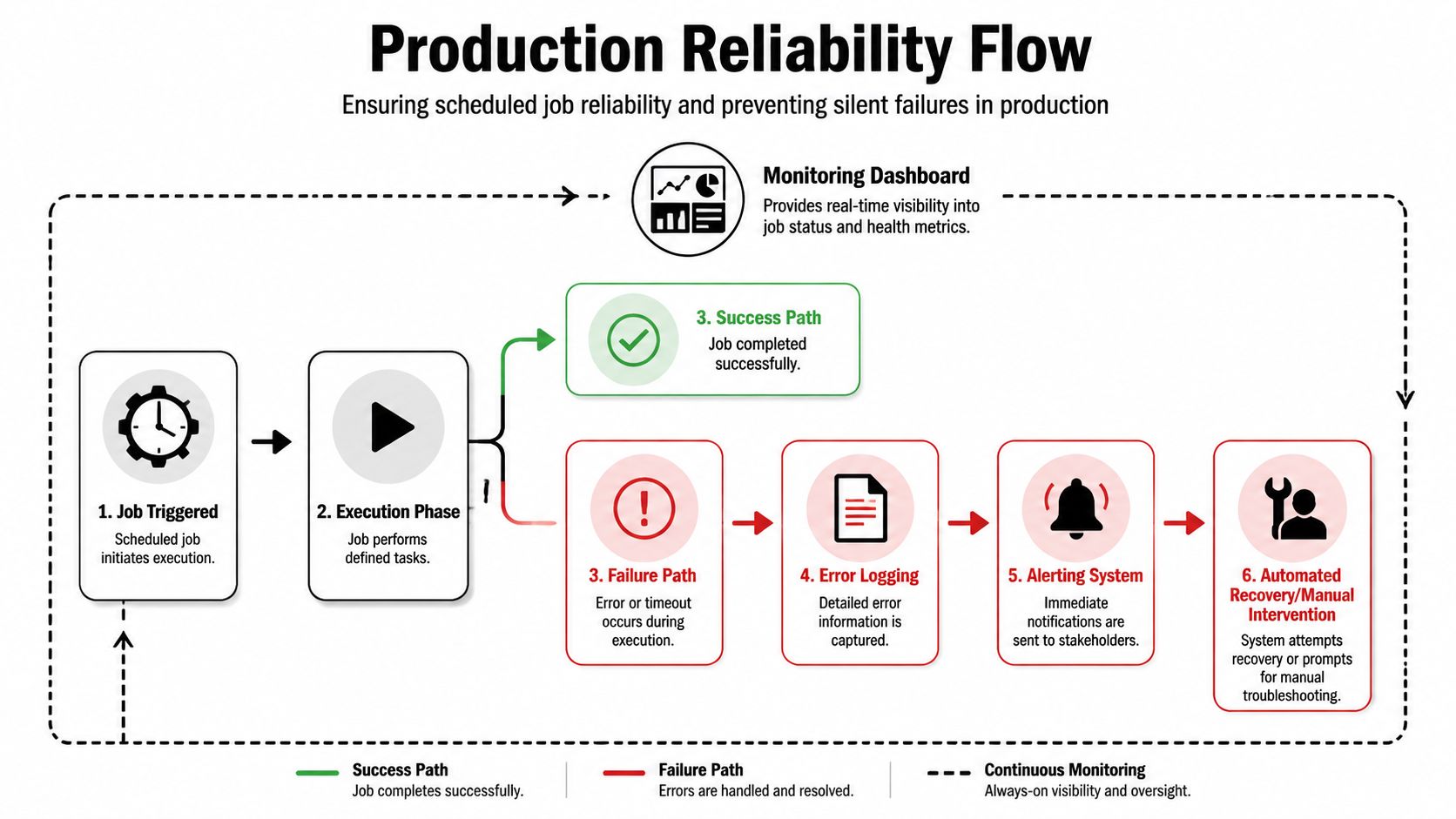
A cron job can look healthy right up until the morning finance report is missing, a customer follow-up never goes out, or a cleanup task stops running and nobody notices for half a day. Production failures usually start that way. The scheduler still shows a job. The configuration still exists. The business outcome is gone.
Silent failure is the biggest risk
One issue report exposed a gap that matters in operations: OpenClaw "every" interval jobs stopped firing after repeated LLM errors such as rate limits and timeouts, and there was no automatic catch behavior to recover them, as documented in the OpenClaw issue discussion on stalled cron intervals.
That pattern is more dangerous than a hard crash. Hard failures create noise. Silent failures create false confidence. A team sees a configured schedule and assumes the workflow is still protecting a business process.
The practical takeaway is simple. Scheduling starts work. Reliability keeps it running under bad conditions.
Here's a useful walkthrough of the control loop you need around scheduled jobs.
What reliable operations look like
A production cron workflow needs four layers around the task.
Execution logging
Log the run context, not just the model output. Capture trigger time, duration, completion state, retry count, error class, and which downstream systems were touched. When an incident starts, operators need enough detail to answer two questions fast: what failed, and what else might be inconsistent.Error classification
Separate transient faults from deterministic failures. Provider rate limits, network instability, and short-lived dependency outages often justify retries. Bad prompts, malformed payloads, and permission errors usually need intervention instead of another loop through the same failure path.Alerting
Alert on missed runs, repeated failures, unusual runtime spikes, and stuck jobs. Do not page on every retry. Teams ignore noisy channels, and alert fatigue is how real incidents get buried.Recovery policy
Define what happens after failure before the first production incident. Some jobs should retry with backoff. Some should pause and require approval. Others should skip a window and continue with the next run to avoid replaying stale work.
Design for bounded failure
Reliable cron automation is less about perfect execution and more about containing mistakes.
- Keep jobs idempotent where possible: a rerun should not create duplicate tickets, double-send customer messages, or repeat destructive changes.
- Limit each run to one business action: small units are easier to retry, inspect, and roll back.
- Keep orchestration outside the prompt: retry logic, timeout handling, and escalation rules belong in the control plane, not buried in instructions to the model.
- Monitor absence as a first-class signal: a job that stops emitting runs is often a higher-priority incident than a job that throws visible errors.
A dashboard with no red status can still hide a broken schedule if nothing has executed recently.
At small scale, teams patch around these gaps with shell scripts, local logs, and Slack alerts. That breaks down fast once several agents, environments, or business units depend on the same automation estate. A managed layer such as OpenClaw hosting with centralized run visibility and operational controls gives teams one place to inspect job history, permissions, failures, and recovery state across deployments.
Browser-driven jobs need extra care because failures often come from the page, not the scheduler. Timeouts, anti-bot challenges, session expiry, and DOM changes can all make a cron run look flaky when the underlying problem is the automation target. For teams operating that class of workflow, this expert guide for browser automation engineers is a useful companion to cron-level monitoring.
Scaling with Multi-Instance Architecture and Governance
One OpenClaw automation is easy to reason about. A portfolio of automations across internal teams, client accounts, or business units is not. The challenge stops being cron syntax and becomes governance.
Inline prompts don't scale
As deployments grow, community guidance has increasingly moved toward reusable, GitHub-managed skills, but the playbook for versioning, testing, approval, rollback, and auditing across many jobs and instances is still underdeveloped, which is the key governance gap highlighted in this community discussion on reusable OpenClaw skills.
That tracks with what operations teams see in the field. Inline cron prompts are fine at the start. Then the same logic gets copied into several jobs with tiny edits. One client needs a safe variation. Another team changes a prompt without telling anyone. A rollback becomes manual diff archaeology.
A better pattern is to treat skills and automation assets like deployable software:
- keep reusable logic in version-controlled units
- test changes before broad rollout
- define who can approve production edits
- record where each asset is referenced
Without that discipline, openclaw cron jobs automation becomes fragile the moment more than one operator touches it.
Isolation is not optional
Multi-tenant environments create a different class of risk. A stuck automation, a bad secret, or an overly broad permission model can affect workloads that should never have been in the same blast radius.
That's why agencies and enterprise teams usually need hard boundaries:
- Separate instances for separate workloads: personal, business, and client automations should not share one flat runtime.
- Granular RBAC: operators need access to the instances they manage, not every customer environment.
- Scoped data access: jobs should only see the tools and data required for their function.
- Auditability: changes to schedules, skills, secrets, and execution paths should be visible after the fact.
For teams doing browser-based automation alongside agent workflows, this becomes even more important. If your cron jobs trigger scraping, validation, or UI-driven tasks, the operational concerns start to overlap with the kind of anti-detection, isolation, and environment hygiene covered in this expert guide for browser automation engineers.
Shared infrastructure is cheap until one tenant's failure becomes everyone else's incident.
A hosted multi-instance model can remove a lot of platform work. For example, managed OpenClaw hosting with instance isolation is designed around separate environments, per-instance access control, isolated containers, and unified audit logs. Those controls matter more than convenience once multiple clients, departments, or compliance requirements are involved.
The underlying point is simple. Governance isn't paperwork. Governance is how you keep automation usable after the team grows.
Troubleshooting Common Cron Job Failures
When a scheduled workflow breaks, the fastest path is to narrow the failure domain. Is the problem the schedule, the runtime, the model call, the downstream system, or the secret it depends on? Most cron incidents become manageable once you separate those layers.
Job exists but doesn't run
Start with the scheduler state, not the prompt.
Use the native CLI to check whether the job is present, enabled, and due. If you can force a manual run successfully but the scheduled run still doesn't happen, the issue is usually in timing, process state, or environment assumptions.
Quick checks:
- Confirm the Gateway process is the runtime you expect: cron jobs live there, so the process itself matters.
- Inspect the stored job definition: drift between what you think is scheduled and what is on disk is common.
- Force a run manually: if
runworks and the schedule doesn't, focus on scheduler behavior rather than agent logic. - Check whether the job depends on an environment variable only available in interactive shells: that mismatch breaks many "works on my machine" setups.
Runs fail or hang during execution
If the job starts but doesn't complete cleanly, stop looking at cron first. Look at the task body and its dependencies.
Common causes include:
- Model timeouts: break large tasks into smaller units instead of trying to push a long, brittle run through one execution.
- Rate limits or overloaded upstreams: make sure your recovery behavior is explicit and your job can resume safely.
- Network-sensitive integrations: external APIs fail differently from local scripts, so the job should log enough detail to distinguish them.
- Prompt sprawl: giant inline prompts often hide the actual failure point.
A good operational habit is to keep the scheduled wrapper thin. Let the cron job trigger a well-defined skill or workflow unit. That makes debugging easier because the schedule and the business logic aren't tangled together.
Secrets and debugging discipline
Hardcoded secrets don't belong in cron definitions. They create rotation problems, access problems, and incident response problems.
Use environment-based secret injection or managed secret storage tied to the runtime. Ensure that the execution environment for scheduled jobs matches the one you tested. A lot of failed automations aren't logic failures at all. They're missing credentials, different paths, or unscoped permissions.
For urgent debugging, use a simple order of operations:
- trigger the job manually
- inspect the latest run output and metadata
- isolate whether the failure happened before or after the model call
- test the downstream integration separately
- only then edit the schedule
That sequence saves time because it avoids changing the wrong layer.
If you're past the stage of managing all this by hand, Donely is one option for running OpenClaw agents and cron-driven workflows with centralized management, isolated instances, monitoring, billing, and access controls in one platform.
If your OpenClaw automations are moving from personal experiments to client work or business-critical workflows, treat scheduling as an operations problem, not just a convenience feature. The teams that succeed are the ones that build for recovery, isolation, and governance early. Donely gives you a practical path to do that without assembling the whole control plane yourself.