
Your newsletter probably lives in a messy middle state right now. Someone on the team gathers links from RSS, social, docs, maybe GitHub. Someone else rewrites the highlights. Then another person formats the email, checks the list, sends a batch, handles unsubscribes, and tries to remember what performed well last time.
That process works until volume rises or clients stack up. Then the newsletter stops being a marketing asset and turns into recurring operational drag. The problem isn't just writing faster. It's building a system that can collect, rank, package, send, observe, and recover without creating new failure points.
That's where OpenClaw newsletter automation becomes useful. Not as a toy agent that drafts blurbs, but as an operational workflow with guardrails. In production, the hard parts aren't prompt writing. They're source control, scheduling, deliverability, access boundaries, failure handling, and keeping one client's data out of another client's workspace.
Table of Contents
- From Manual Grind to Automated Growth
- Designing Your Automated Newsletter Agent
- Deploying Your Agent and Integrating Email Services
- Crafting Dynamic Templates and Personalization
- Scheduling Triggers and Monitoring Performance
- Scaling with Multi-Instance Architecture and RBAC
- Mastering Deliverability and Ensuring Compliance
From Manual Grind to Automated Growth
Most newsletter teams don't fail because they lack ideas. They fail because the work repeats, the quality drifts, and the process depends on whoever remembers to do the boring parts.
A founder starts with a weekly update. An agency adds one client digest, then three more. A product team wants release notes, a sales team wants vertical-specific roundups, and suddenly the same staff is doing editorial triage across multiple channels. That is where manual work starts leaking quality. Links get duplicated. Context gets lost. Sends go out late. Unsubscribes sit too long in the wrong inbox.
OpenClaw newsletter automation fixes the repetitive layer first. The agent can watch sources, shortlist candidates, assemble a draft, prepare distribution, and hand the result off for approval or release. That doesn't remove human judgment. It moves human attention back to the part that matters: story selection, positioning, and brand voice.
I've seen teams get the most value when they stop thinking about "an AI that writes the newsletter" and start thinking about "an operator that runs the pipeline." That mindset changes the build. You stop obsessing over prompts and start caring about source priority, review gates, send windows, and recovery behavior.
If you're trying to map newsletter work into a broader growth system, Stamina's piece on marketing automation for SMBs is a useful companion read because it frames automation as a strategic advantage, not just software adoption.
The newsletter itself is rarely the bottleneck. The bottleneck is the invisible coordination work around it.
Designing Your Automated Newsletter Agent
The strongest OpenClaw newsletter automation setups look more like editorial systems than email scripts. If you skip the design work, the agent will still produce output. It just won't produce reliable output.
Start with the editorial job
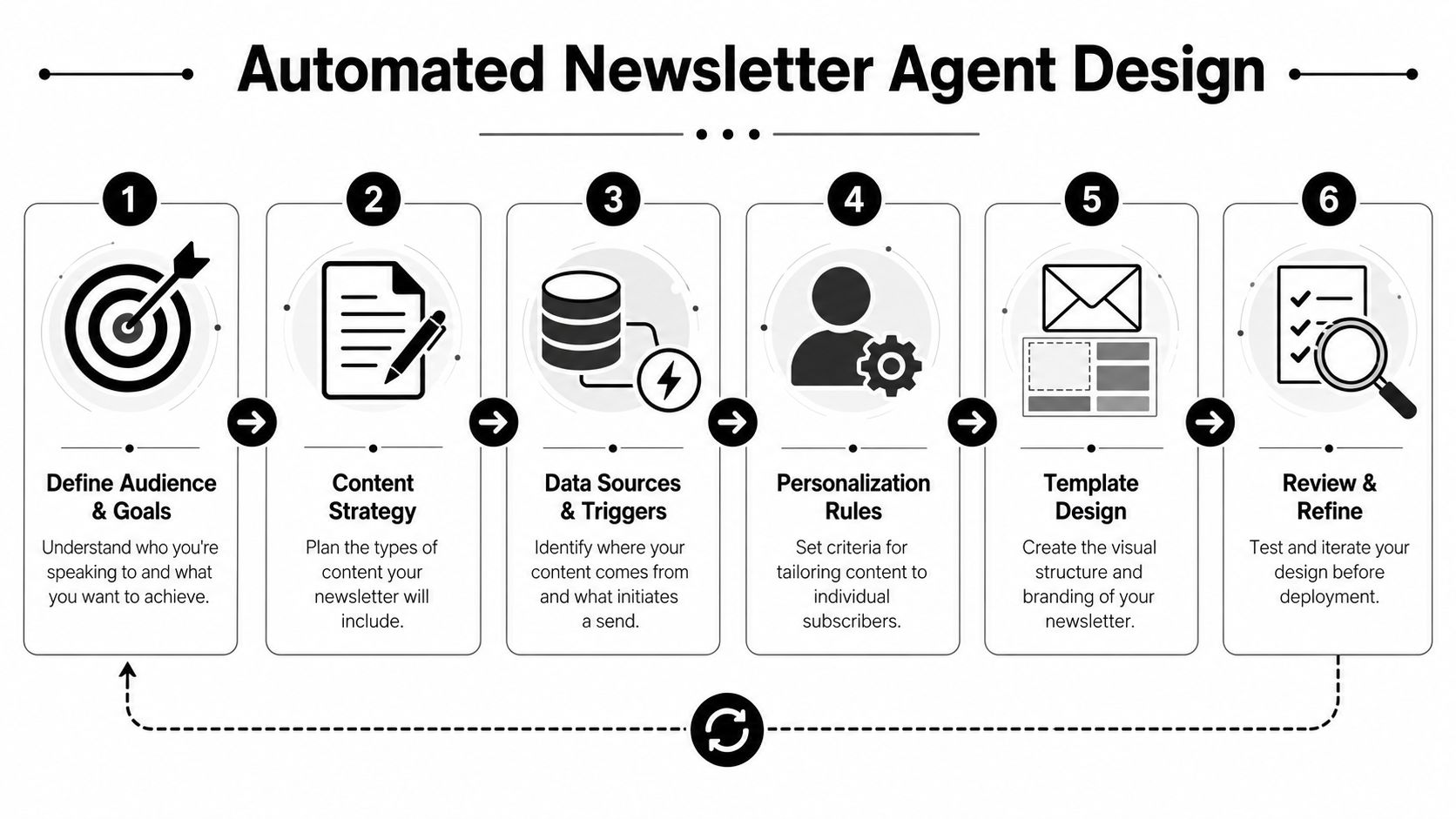
Before you configure tools, define what the newsletter is supposed to do.
A founder update, an industry roundup, a customer education digest, and a multi-client agency newsletter all have different jobs. That means they need different source mixes, different ranking logic, and different send rules. A newsletter that exists to surface product-relevant market changes should overweight timeliness. A thought-leadership digest should overweight originality and commentary.
Use this as a design checklist:
- Audience definition: Who receives it, what they already know, and what they need from each issue.
- Content boundaries: What belongs in the newsletter, what doesn't, and which topics require human approval.
- Voice constraints: Whether the agent can summarize neutrally, add a point of view, or only prepare raw material.
- Send intent: Is this a recurring digest, a triggered briefing, or a segmented campaign based on subscriber attributes?
When teams skip this stage, they usually over-automate the wrong thing. They build a sending agent before they build a curation agent. That produces polished emails filled with mediocre picks.
Model the pipeline before you build the agent
A representative OpenClaw newsroom pipeline shows the pattern clearly. It scans 5 data sources every 2 hours, then reduces about 100 raw items to roughly 50 after AI filtering, 8 enriched articles, and finally 3–7 curated picks per run through staged collection, deduplication, enrichment, and narrowing in the OpenClaw newsroom example. That's the useful mental model. Collection first. Reduction second. Editorial selection last.
That has two practical consequences.
First, your sources should be intentionally mixed. RSS alone is too narrow for many markets. If the publication depends on emerging technical topics, source types like Reddit, GitHub, or social feeds may matter because they surface early movement before traditional coverage catches up.
Second, filtering should happen in layers. A good design usually includes:
- Source fetch layer for pulling candidate items on schedule.
- Deduplication layer to remove repeated links, mirrored coverage, and re-posts.
- Scoring layer that ranks items by novelty, relevance, and usefulness.
- Enrichment layer that adds context, extracts the core angle, and prepares summaries.
- Editorial gate where the system selects what earns a place in the issue.
A lot of teams ask for one massive prompt that does everything. That approach breaks fast. When one prompt fetches, evaluates, summarizes, formats, and decides, you can't inspect where quality dropped.
For teams that want managed agent deployment rather than self-hosting all of this, Donely AI employees is one way to run OpenClaw-based agents with hosted operations around the workflow. The value isn't magic prompting. It's reducing the deployment and maintenance burden around the agent.
Practical rule: Design the newsletter as a pipeline with checkpoints, not a prompt with ambition.
Deploying Your Agent and Integrating Email Services
Once the design is clear, deployment becomes mostly an integration job. The dangerous mistake here is treating email as the easy part. Sending is simple. Sending reliably, observably, and in a way that won't hurt your domain is not.

Choose the sending path based on risk
Not every newsletter setup needs the same sending infrastructure.
A solo builder sending a low-volume founder update can often start with a simple mailbox integration and a conservative schedule. A product newsletter tied to CRM segments may fit better with a platform like HubSpot. A higher-volume operation or a workflow-heavy implementation may use API-driven delivery through a dedicated email service.
The right question isn't "what can send email?" It's "what can send email with the controls this workflow needs?" Those controls usually include batching, event visibility, unsubscribe handling, and a clean split between content generation and delivery execution.
A practical OpenClaw email workflow can be orchestrated by a single agent that loads a subscriber list, personalizes content, sends in batches to avoid rate limits, tracks opens and clicks, processes unsubscribes, and compiles a post-send report, as described in the AgentMail OpenClaw email automation guide.
Here's how I usually map the options:
| Sending setup | Good fit | Main concern |
|---|---|---|
| Gmail or similar mailbox | Early-stage internal or low-volume sends | Quotas, reputation sensitivity, limited operational headroom |
| ESP or marketing platform | Segmented marketing newsletters | More moving parts between agent, CRM, and template logic |
| API-based inbox and send workflow | Automated pipelines and programmatic email operations | Requires cleaner process discipline and event handling |
Build the workflow as one controlled loop
The implementation should look like an operational loop, not a collection of scripts.
A solid deployment usually includes these steps:
- Credential isolation: Give the agent only the credentials needed for that workflow. Don't let the same token reach editorial docs, CRM records, and outbound email if those can be separated.
- Subscriber ingestion: Pull the list from a defined source of truth, then validate segment logic before the run begins.
- Content assembly: Generate summaries and fill the template only after the curated items are finalized.
- Batch execution: Send in controlled groups instead of one burst. This lowers stress on provider limits and makes rollbacks easier if something looks wrong mid-run.
- Event capture: Record opens, clicks, bounces, replies, and unsubscribe events where the team can inspect them later.
- Post-send reporting: Summarize operational and engagement outcomes after the send finishes.
A lot of failures happen because teams split those steps across unrelated tools with weak handoffs. The agent drafts in one place, the list lives somewhere else, unsubscribe handling sits in a third system, and nobody owns the state transitions in between.
If you're wiring multiple systems into the same workflow, Donely integrations shows the kind of integration layer you need around OpenClaw-based agents. The practical advantage is less custom glue code between the agent, messaging channels, and business systems.
This walkthrough gives a useful visual reference for the integration side of the build:
What to test before the first real send
Don't test only the happy path. Newsletter automation breaks at the edges.
Run pre-production checks for these cases:
- Empty issue: No strong content candidates were found. The agent should skip, defer, or escalate, not fabricate filler.
- Duplicate candidates: Two sources reference the same story. The agent should collapse them into one editorial item.
- Broken personalization data: A missing first name or invalid segment shouldn't corrupt the entire send.
- Unsubscribe event during campaign execution: The system should suppress future sends immediately for that contact.
- Partial provider failure: If the email API times out, you need idempotent send behavior so the agent doesn't create duplicates on retry.
Plain text fallback matters too. HTML-only sends are harder to debug and can create rendering and trust issues. I also prefer approval gates for external newsletters even when the rest of the process is automated. Full autonomy sounds efficient until one bad issue leaves your system before a human sees it.
Crafting Dynamic Templates and Personalization
A newsletter can be fully automated and still feel crude. That usually happens when the team confuses variable insertion with personalization.
Templates need stable structure
The template should behave like a durable shell. The agent fills it, but it shouldn't redesign it on every run.
Keep the structure predictable. Header, intro, primary stories, secondary links, CTA, footer, and compliance elements should remain stable unless a human deliberately changes the format. This gives the agent clear content slots and makes QA much faster.
The most reliable template systems usually separate three layers:
- Layout layer: Brand-safe structure, spacing, and fallback text blocks.
- Content block layer: Reusable modules like featured item, roundup list, sponsor slot, or product note.
- Decision layer: Rules that decide which blocks appear for each segment or subscriber state.
That split matters because content changes more often than design. If the agent can swap content blocks without touching the layout layer, the workflow stays much easier to maintain.
Personalization should never force the template to become unpredictable.
Personalization should be earned
A lot of teams over-personalize too early. They insert first names, dynamic subject lines, and behavior references before they have stable segmentation. The result feels uncanny, not useful.
The better path is to personalize by relevance first. Show different links, examples, product notes, or topical emphasis based on known subscriber attributes. If the newsletter serves multiple cohorts, let the body content change before you start changing the tone.
Here are the personalization levels I trust most:
| Level | What changes | Why it works |
|---|---|---|
| Basic | Name, company, role label | Low risk, but limited value |
| Segment-based | Topic mix, featured links, CTA | Strong relevance without sounding invasive |
| Behavior-aware | Follow-up content based on prior clicks or preferences | Useful when event data is clean |
| Contextual commentary | Tailored intro or framing | High value, but needs careful review |
The hardest part isn't generating the personalized version. It's proving the data behind it is correct. If a CRM field is stale or a preference tag is wrong, the email becomes less trustworthy than a generic one.
I also recommend writing templates so they degrade gracefully. If a personalization field is missing, the message should still read naturally. If a segment has too little content for a custom edition, the system should fall back to a broader issue rather than forcing weak substitutions.
Good OpenClaw newsletter automation doesn't try to simulate friendship. It delivers stronger editorial relevance at scale.
Scheduling Triggers and Monitoring Performance
A newsletter agent that runs beautifully once is still not production-ready. Reliability comes from execution discipline and observability.
Scheduled runs versus continuous listeners
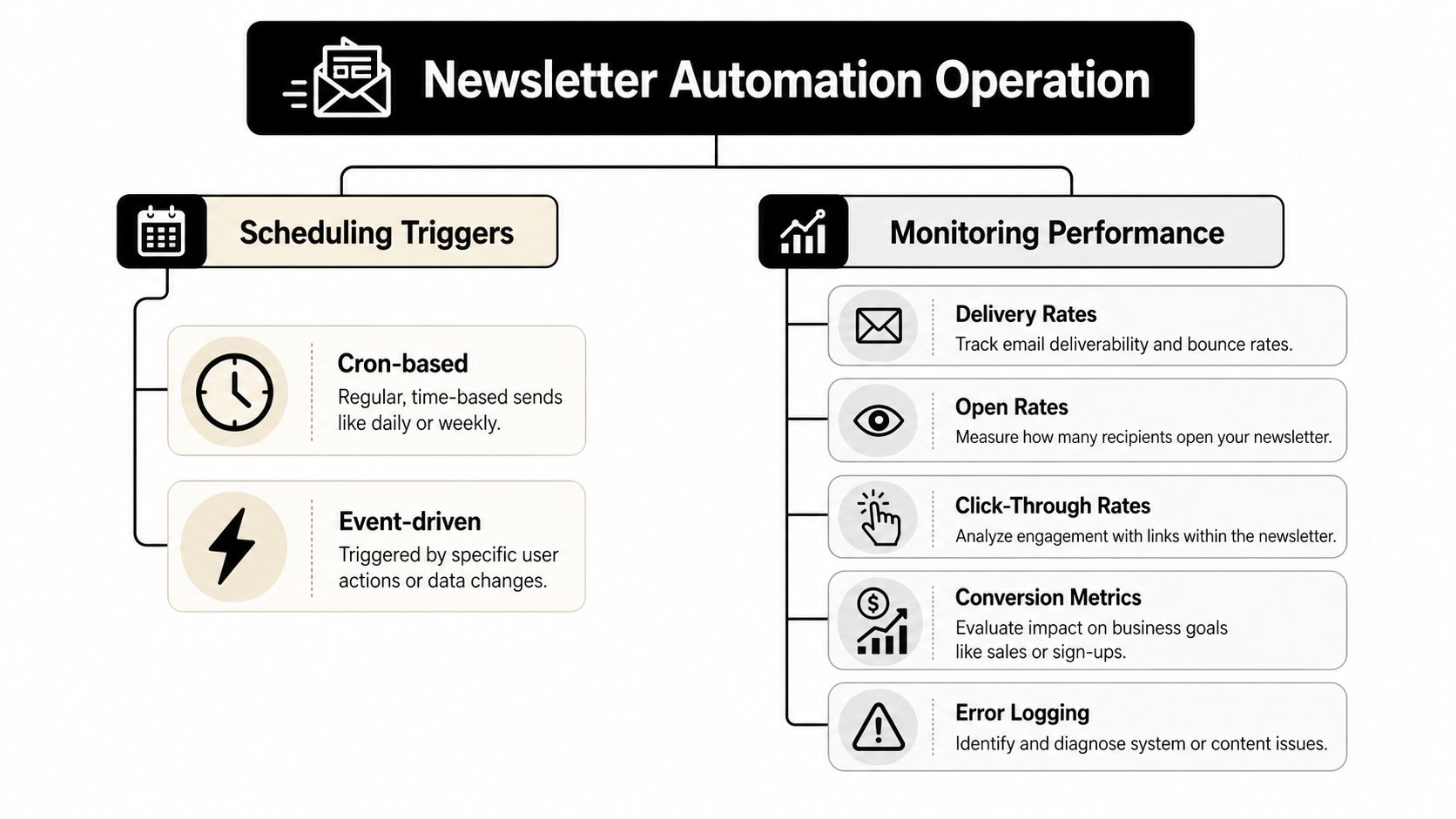
Most newsletter workflows should start with a scheduled trigger. For production email automation, a fixed daily trigger such as 7 AM is a common pattern, and teams also need to understand the difference between cron-based jobs and a continuous heartbeat process that may run every 30 minutes by default for monitoring and failure detection, as noted in the Contabo OpenClaw operations guide.
Those two modes solve different problems.
Scheduled runs fit daily briefings, weekly digests, and recurring roundups. They give you predictability, easier QA windows, and simpler operational review.
Continuous listeners fit workflows triggered by an event, such as a new content drop, inbound approval signal, or urgent alert.
A common mistake is using continuous execution for a workflow that should be batched. That creates noisy sends, harder debugging, and more pressure on deliverability. Another mistake is using a single nightly cron for a workflow that depends on upstream systems being healthy at one exact moment. If one dependency is late, the whole issue fails.
What operators should watch
After deployment, the real work is operational visibility. You need to know whether the agent ran, what it touched, and where it failed.
Monitor these categories consistently:
- Run health: Did the workflow start, complete, retry, or stop halfway through?
- Content quality checks: Were candidate items found, deduplicated, enriched, and approved as expected?
- Send execution: Were batches processed in sequence, and were suppression rules respected?
- Event anomalies: Did bounce, complaint, or unsubscribe behavior spike enough to justify intervention?
- Dependency status: Were the source feeds, APIs, and storage layers available when the run executed?
If you only inspect opens and clicks, you're measuring the outcome but ignoring the machine that created it.
I prefer dashboards that combine execution logs with business metrics. A marketer wants to know whether the issue performed. An operator wants to know why one segment got delayed or why a workflow retried twice before sending. Those need to live close together or incidents take longer to resolve.
For newsletter operations, the best monitoring setups answer four practical questions fast: Did it run, did it send, did it reach people, and did it do anything suspicious?
Scaling with Multi-Instance Architecture and RBAC
Single-agent setups are manageable with discipline. Multi-client or multi-department newsletter operations are not. At that point, architecture decides whether the system stays governable.
Why one workspace becomes a liability
For multi-workspace operations, OpenClaw's persistent memory and broad integrations can amplify risk if an agent is compromised, which is why isolated instances, scoped data access, and unified audit logs are central requirements for trustworthy automation at scale in the security discussion on OpenClaw use cases.
That risk isn't theoretical. Newsletter agents often touch drafts, subscriber records, outbound channels, collaboration tools, and performance data. If all of that sits inside one broad workspace, a mistake or compromise has a much larger blast radius than commonly realized.
This is where multi-instance architecture matters. Separate instances give each client, brand, department, or publication its own execution boundary. That changes operations in useful ways:
- Isolation of data: Editorial memory, subscriber context, and connected apps stay scoped to the right environment.
- Clearer troubleshooting: Failures don't blur across unrelated newsletters.
- Safer experimentation: One team can test a new workflow without creating risk for another.
- Billing and ownership clarity: Agencies and larger teams can map costs and responsibility cleanly.
I don't recommend running multiple client newsletters from one shared agent with broad permissions. It saves setup time at the start and creates cleanup pain later.
RBAC needs to match the real team
Role-based access control isn't a checkbox. It should reflect who works on the workflow.
A practical permission model usually separates these responsibilities:
| Role | Should access | Should not access |
|---|---|---|
| Editor | Drafts, source review, approval queue | Credential management, workspace-level secrets |
| Campaign operator | Send controls, schedule settings, suppression behavior | Full content editing across all instances |
| Developer or automation lead | Integrations, logs, workflow configuration | Broad subscriber export access unless required |
| Account manager or client stakeholder | Reports and approvals | Underlying system credentials and unrelated instances |
When teams don't formalize these roles, they default to shared admin access. That's how a content editor ends up with unnecessary integration privileges, or a contractor can inspect data from the wrong client account.
For agencies in particular, the combination of isolated instances, scoped permissions, and centralized oversight is what makes OpenClaw newsletter automation sustainable. Without that, you don't have scale. You have hidden operational debt.
Mastering Deliverability and Ensuring Compliance
The technical build can be excellent and still fail in the inbox. Deliverability decides whether your automation is useful or expensive noise.
Deliverability is an architecture problem
A key operational target for email automation is keeping delivery rate above 98%, and the same comparison notes that good email automation tools should handle authentication and rate limiting transparently in the Sequenzy overview for OpenClaw email tools. The operational takeaway is simple. Deliverability isn't a finishing touch. It's a design constraint from day one.
The biggest deliverability mistakes in automated newsletter systems are usually self-inflicted:
- Burst sending: The agent finishes assembly and dumps the whole list at once.
- Unclear audience hygiene: Old contacts, weak consent history, or stale lists remain active too long.
- Missing suppression discipline: Unsubscribes, bounces, and complaints don't feed back into the workflow fast enough.
- Template volatility: Every send looks structurally different because the agent rewrites too much of the message each time.
A lot of founders need a grounding in inbox operations before they automate aggressively. This founder's guide to email deliverability is useful because it explains the sender reputation side in plain language.
Reliable sending comes from pacing, list discipline, and controlled templates. Not from clever copy alone.
My baseline rule is conservative autonomy. The agent can assemble, personalize, queue, and report. It should not have permission to improvise sending behavior without boundaries around batch size, schedule, and suppression logic.
Compliance belongs inside the workflow
Compliance problems usually appear when the newsletter process is treated as pure marketing output instead of a data workflow.
Every production system should make these behaviors automatic:
- Consent-aware list handling: The send list should come from a trusted source, not a copied spreadsheet.
- Immediate unsubscribe processing: The removal event needs to affect future sends without waiting for manual cleanup.
- Retention discipline: Keep only the subscriber data and event history the workflow needs.
- Auditability: Teams should be able to review who changed templates, lists, rules, or sending permissions.
Privacy review matters more once the agent touches subscriber attributes for personalization. If you're operating in regulated environments or handling client data across instances, your workflow documents and policies need to match the actual behavior of the system. For reference, Donely's privacy policy shows the kind of formal policy layer that should sit alongside any managed automation platform.
Legal compliance and deliverability support each other. Clean consent handling improves list quality. Fast unsubscribe processing reduces frustration. Stable governance makes it easier to explain what the system did and why.
If your OpenClaw newsletter automation can't prove who approved a send, who had access to subscriber data, and how unsubscribes are enforced, the system isn't mature yet.
If you're building newsletter workflows with OpenClaw and want less operational drag around hosting, instance isolation, permissions, and monitoring, take a look at Donely.