
Most AI‑agent SaaS platforms say they are multi‑tenant, but less than a third actually spell out how they keep each client’s data separate. If a tenant’s secrets leak into another’s dashboard, the fallout can be costly and damage trust.
In this guide you’ll learn how to assess your tenancy needs, pick the right isolation model, set up per‑client credential management, lock down access with encryption, and automate rotation plus logging. Follow each step and you’ll have a solid, compliant setup for per‑client isolated data and credentials for SaaS.
Step 1: Assess Your Multi‑Tenancy Requirements
Start by mapping who will use your platform and what data they own. Ask yourself: do you serve solo founders who need a single sandbox, or large enterprises that demand strict legal segregation? Write down the compliance standards you must meet , GDPR, HIPAA, SOC 2 , and note any performance SLAs.
Next, rank the criteria that matter most for your product. Typical factors include:
- Scalability , can the model grow to thousands of tenants without a blow‑up in cost?
- Tenant isolation , does a heavy‑load tenant affect others?
- Operational overhead , how much manual work is needed to spin up a new client?
- Customizability , can you tailor schemas per tenant?
Document each factor in a simple spreadsheet. Give every factor a weight (1‑5) and score each isolation option later. This scoring sheet becomes your decision matrix.
Donely’s dashboard lets you spin up a separate instance per client in seconds. That design already satisfies the “single‑tenant database” bucket, which scores high on isolation but adds some cost. Use the matrix to see if the trade‑off is worth it for your audience.
When you’ve got the matrix, you can move to the next step. The key is to be clear on what you need before you look at code.
For deeper design patterns, industry resources outline common tenancy models and their impact on scalability and cost. The guidance highlights how a database‑per‑tenant pattern offers the strongest isolation but can become pricey at scale.
And remember, once you pick a model, switching later can be expensive. Make sure your choice aligns with the matrix you built.
Step 2: Choose an Isolation Model , Database‑per‑Client vs Row‑Level Security
Two popular ways to keep each client’s data apart are dedicated databases and row‑level security (RLS). Both have pros and cons, and the right pick depends on your matrix scores.
Database‑per‑Clientgives each tenant its own schema, its own backup schedule, and its own performance envelope. If a client runs a heavy analytics job, it won’t throttle the others. The downside is higher operational cost , you’re provisioning a new database for every signup.
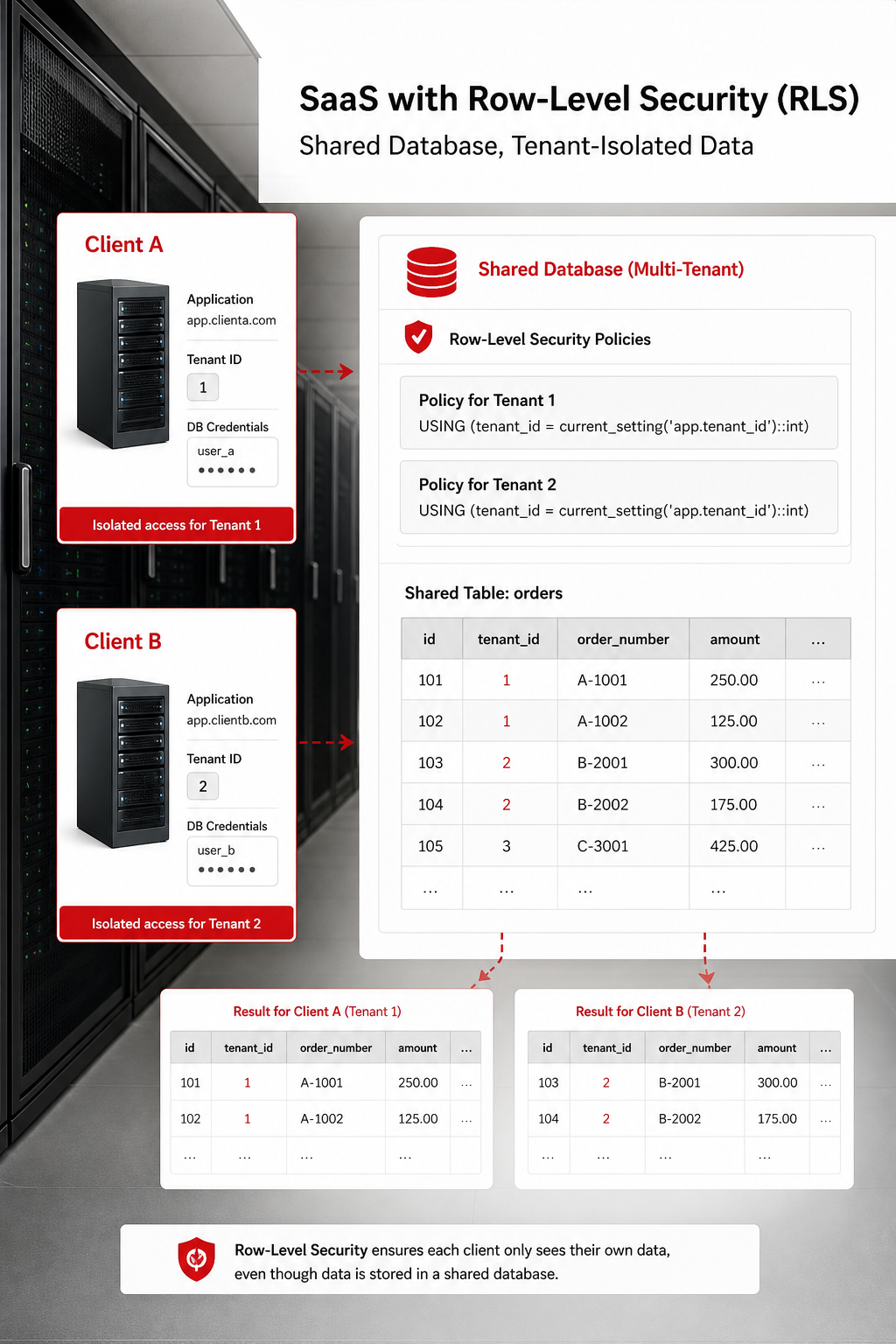
Row‑Level Securitystores all tenants in one shared database but adds a policy layer that automatically filters rows by tenant ID. This approach saves on storage and simplifies schema migrations, but you rely on every query to respect the policy. A missed WHERE clause can expose data.
To illustrate, imagine a SaaS that tracks sales pipelines. With a single database and RLS, the SQL engine appends “WHERE tenant_id = ?” behind the scenes. If a developer forgets that clause, the next query could return all rows, leaking confidential deals.
Here’s a quick checklist to help you decide:
- Do you need per‑tenant performance guarantees? → Database‑per‑Client.
- Is your team comfortable enforcing policy in every query? → RLS.
- Will you serve regulated industries that demand physical data separation? → Database‑per‑Client.
- Do you expect rapid onboarding of hundreds of tenants? → RLS may be cheaper.
Many platforms use a hybrid approach: critical, high‑value customers get dedicated databases, while low‑tier users share a database with RLS. This tiered model lets you balance cost and security.
According to Wikipedia’s row‑level security entry, several modern databases (including open-source and commercial options) support built‑in RLS, making it easier to implement without custom middleware.
Below is a visual cue that can help you explain the difference to stakeholders.
When you pick a model, record the decision in your matrix. That record will guide later steps like credential scoping and audit‑log design.
Step 3: Implement Per‑Client Credential Management
Now that you know where the data lives, you need to lock down the keys that let services talk to that data. Storing API keys in plain text or sharing one secret across many tenants is a recipe for breach.
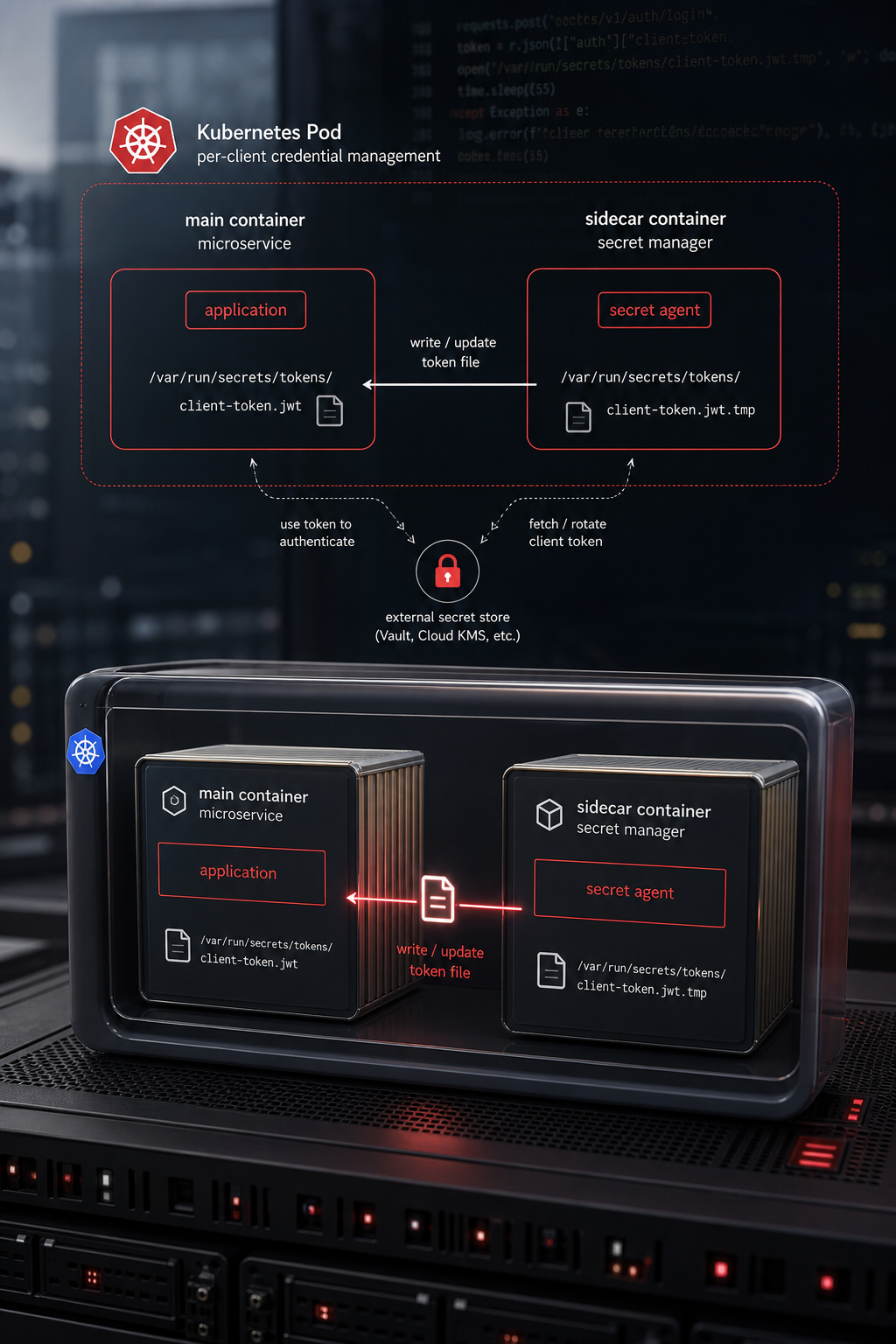
One proven pattern is a token‑vending machine (TVM) that hands out short‑lived, tenant‑scoped credentials at runtime. A popular open‑source secret management tool is built for this job. It can pull temporary IAM tokens from a cloud provider’s security token service, inject them into a sidecar container, and enforce a strict policy that each tenant only gets the permissions it needs.
Here’s how the flow works:
- The microservice asks the secret management sidecar for a token, passing its tenant ID.
- The sidecar looks up a policy that maps the tenant to a limited IAM role.
- The sidecar calls the cloud provider’s STS, receives a short‑lived credential, and returns it to the service.
- The service uses the credential for the duration of the request, then discards it.
This approach gives you three big benefits: credentials are never stored long‑term, you can rotate them automatically, and you have a single audit point for all credential requests.
A cloud provider’s own blog walks through this exact setup on a managed Kubernetes platform, showing how a secret management sidecar can fetch and renew credentials without adding code to the main service.
Donely already isolates each AI employee’s API keys in its own container, which aligns with the TVM idea. You can extend that pattern by adding a secret management sidecar to each instance.
When you choose a secret‑management tool, consider these factors:
- Supports dynamic secrets (e.g., cloud provider STS, database passwords).
- Integrates with your Kubernetes platform via sidecar injection.
- Offers audit logs that map credential issuance to tenant IDs.
- Can be scaled horizontally for many tenants.
For a broader market view, see the Best Secrets Management Tools for 2026 roundup. It compares a popular secret management tool, a cloud provider’s secrets manager, and other options, highlighting compliance certifications that matter for regulated SaaS.
Once you have the sidecar in place, set up a policy per tenant that only allows the specific services they need, for example, read‑only access to a NoSQL database table that holds their sales data.
Remember to rotate the root token on a regular schedule and store it in a hardware security module (HSM) if you need extra assurance.
Step 4: Enforce Data Access Controls and Encryption
Even with isolated databases and short‑lived keys, you still need to lock down who can read or write data inside each tenant’s space. This is where role‑based access control (RBAC) and encryption meet.
Start by defining roles at the tenant level: Owner, Admin, Analyst, and Viewer. Map each role to a set of permissions , for example, Owners can manage credentials, Analysts can run reports, Viewers can only see dashboards.
Implement RBAC in two layers:
- Application layer , your SaaS code checks the user’s role before allowing an API call.
- Database layer , use built‑in row‑level security (if you chose RLS) or separate schemas (if you chose per‑client DB) to enforce the same rules.
Encryption should be applied at rest and in transit. Use TLS 1.2+ for all network traffic, and enable envelope encryption for data stored in databases or object storage. Most cloud providers let you bring your own key (BYOK) so each tenant can supply a unique KMS key if required.
Donely’s platform already encrypts data at rest and uses air‑gapped containers for each AI employee, which matches the zero‑trust model.
Here’s a quick step‑by‑step to lock down a new tenant:
- Create a dedicated schema or database based on the model you chose.
- Generate a KMS key for that tenant (or reuse a shared key if compliance permits).
- Assign RBAC roles in the SaaS UI, tying each role to the appropriate IAM policies.
- Enable row‑level security policies that reference the tenant ID and role.
- Test with a low‑privilege user to confirm they cannot see another tenant’s data.
Embedding a short video can help teams visualize the process.
After you’ve locked down access, run a penetration test focused on cross‑tenant data leaks. Look for any API endpoint that returns data without checking the tenant ID.
“The most common breach in multi‑tenant SaaS is a missing tenant filter in a query.” , a blog on data isolation
Once the test passes, you can move on to automation.
Step 5: Automate Credential Rotation and Audit Logging
Manual rotation of secrets is error‑prone. Set up a scheduler that tells your secrets management tool to revoke and re‑issue tokens every 12 hours. For database passwords, enable the cloud provider’s automatic rotation feature or use a cron job that runs a stored procedure.
Audit logging ties everything together. Every time a credential is issued, every time a user reads or writes data, log the tenant ID, user ID, action, and timestamp. Store logs in an immutable store, write‑once‑read‑many (WORM) buckets or append‑only tables. Donely’s audit‑log service already shards logs per tenant, so each client sees only their own events. When you add your secrets management tool, configure its audit device to forward logs to the same store.
To make logs useful, add a lightweight processor that flags unusual patterns, for example, a user requesting credentials for dozens of tenants in a short window.
Here’s a checklist you can run every month:
- Verify that all active credentials are less than 24 hours old.
- Confirm audit logs contain tenant‑level RBAC fields.
- Test log immutability by attempting a delete operation.
- Review any alerts from the anomaly detector.
Automation can be wired through CI/CD pipelines. When a new tenant is onboarded, an infrastructure‑as‑code script creates the database, key management key, secrets policy, and RBAC roles in one go.
If you need a concrete example of a CI/CD‑driven provisioning flow, check Donely’s Hosting for AI agents guide. It walks through creating a new isolated instance with its own credentials and audit settings.
Finally, make sure you have a retention policy that matches compliance, 90 days for GDPR, longer for financial regulations. Retention settings live in the same logging service, so you only need one place to update.
Conclusion
Building per‑client isolated data and credentials for SaaS isn’t a single‑step task. It starts with a clear requirements matrix, moves through a thoughtful choice of isolation model, adds a dynamic secret‑vending layer, locks down access with RBAC and encryption, and ends with automated rotation and strong audit logging. Each piece reinforces the others, creating a defense‑in‑depth posture that meets modern compliance demands.
When you follow this roadmap, you’ll avoid the common pitfalls that cause data leaks and compliance fines. You’ll also give your customers confidence that their data stays in a silo they control, which can be a strong selling point for agencies and enterprises alike.
Ready to see a real‑world implementation? Look at Donely’s Enterprise audit‑log compliance guide for a deeper look at logging, retention, and alerting.
FAQ
What is the difference between database‑per‑client and row‑level security?
Database‑per‑client gives each tenant a separate database or schema, which isolates performance and security at the storage level. Row‑level security keeps all tenants in one database but adds a policy that filters rows based on tenant ID. The former is stronger but costs more; the latter is cheaper but relies on every query respecting the policy.
How often should I rotate tenant credentials?
Best practice is to use short‑lived tokens that expire in 12‑24 hours. Automated rotation can be handled by a vault service that issues new tokens on demand. For static database passwords, aim for a rotation window of 30 days or less, depending on compliance requirements.
Can I use the same secret‑management tool for all tenants?
Yes, a single Vault cluster can manage secrets for many tenants. You create a policy per tenant that scopes what each can access. The vault then issues tenant‑scoped tokens, keeping the underlying secret store centralized while preserving isolation.
Do I need separate encryption keys for each client?
Separate keys (BYOK) are required for high‑risk or regulated customers. For lower‑risk tenants, a shared KMS key with strict access controls can be sufficient. The key decision should be recorded in your compliance matrix.
How do I ensure audit logs stay tenant‑isolated?
Configure your logging service to tag each event with a tenant ID and store logs in a partitioned table or bucket. Then apply row‑level security or bucket policies so a tenant can only query its own logs. Immutable storage adds protection against tampering.
What tools help detect cross‑tenant data leaks?
Use automated testing that runs queries without tenant filters and checks for unexpected rows. Monitoring tools that flag missing tenant IDs in logs can also catch accidental leaks. Regular penetration testing focused on multi‑tenant boundaries is essential.
Is it safe to share a single instance across multiple clients?
Sharing an instance can work if you enforce strict RBAC, use row‑level security, and have thorough automated testing. However, many regulated industries require physical separation, making a dedicated instance the safer route.
How does Donely support per‑client isolation?
Donely spins up a separate container for each AI employee, stores credentials per instance, and applies RBAC at the instance level. All audit logs are sharded per tenant, so each client sees only their own activity. This design matches the steps outlined in this guide.