
Finding the right pricing calculator feels like hunting for a needle in a haystack. When you have dozens of AI agents or SaaS instances, the needle becomes a whole stack of needles. In this article we break down nine tools that let you price, bill, and forecast across multiple tenants without drowning in spreadsheets.
You’ll see how each calculator handles multi‑instance scenarios, what integrations they offer, and where they shine or fall short. By the end you’ll know which platform matches your workflow and budget.
1. Flexible Billing Platform Pricing Calculator , Our Pick for Smooth Multi‑Instance Billing
Flexible billing platform sits at the sweet spot between flexibility and ease of use. Its calculator lets you plug in per‑instance usage, seat counts, and custom add‑ons, then instantly spits out a quote for every tenant.
The UI feels like a spreadsheet that talks back. You enter a base price, add tiered discounts, and watch the total adjust in real time. That helps sales teams create proposals on the fly, and finance teams verify margins before a contract is signed.
Key benefits
- Multi‑instance support out of the box , you can define separate price rules per tenant.
- Built‑in tax engine that respects global VAT and sales tax.
- Automation hooks , the calculator can push data to your CRM via webhook.
When you need to model a scenario where a client adds a new AI employee, you simply duplicate the instance row and the calculator recalculates the total cost. That saves time and reduces human error.
The platform also offers a sandbox environment where you can test pricing experiments without affecting live customers. The sandbox mirrors production data, so you get realistic results.
For agencies that run dozens of client bots, the per‑instance RBAC feature is a lifesaver. You can grant each client view‑only access to their own pricing sheet while keeping the master view private.
Donely’s own platform mirrors many of these ideas, but the flexible billing platform remains a solid, mature option for pure billing needs.
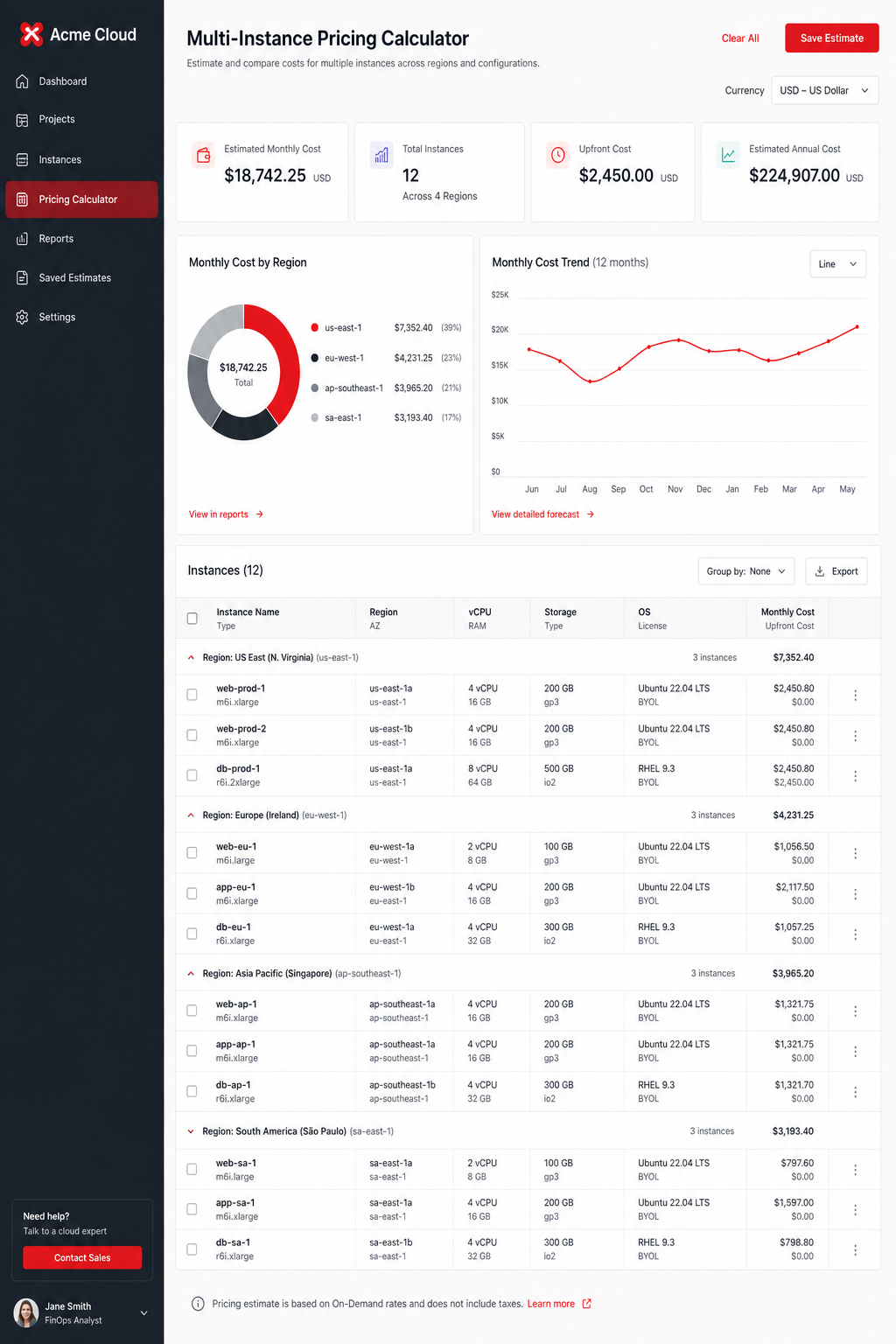
Pro Tip: Export the calculator results to CSV and feed them into your forecasting model for a full‑year revenue view.
2. Payment Platform Billing Calculator , Flexible Usage‑Based Pricing
The payment platform’s billing calculator packs a punch for usage‑based models. You define a unit price, set thresholds, and the calculator computes the bill each month based on actual consumption.
The calculator integrates directly with the platform’s API, so you can pull real‑time usage data from your app and let the system do the math. That means no manual data entry and no lag between usage and invoicing.
According to the pricing experiment guide, companies that run pricing tests see a measurable impact on profit. The calculator lets you experiment with different unit prices or tier thresholds without touching the code.
Because the platform treats pricing as a first‑class resource, you can version price plans. If a client upgrades from a basic to a premium tier, the calculator automatically applies the new rates from the next billing cycle.
One downside is that the usage‑based model charges a percentage of revenue, which can add up as you scale. For high‑volume SaaS firms, the fee may become noticeable.
Still, the smooth integration with payment processing and the ability to run A/B pricing experiments make this solution a strong contender.
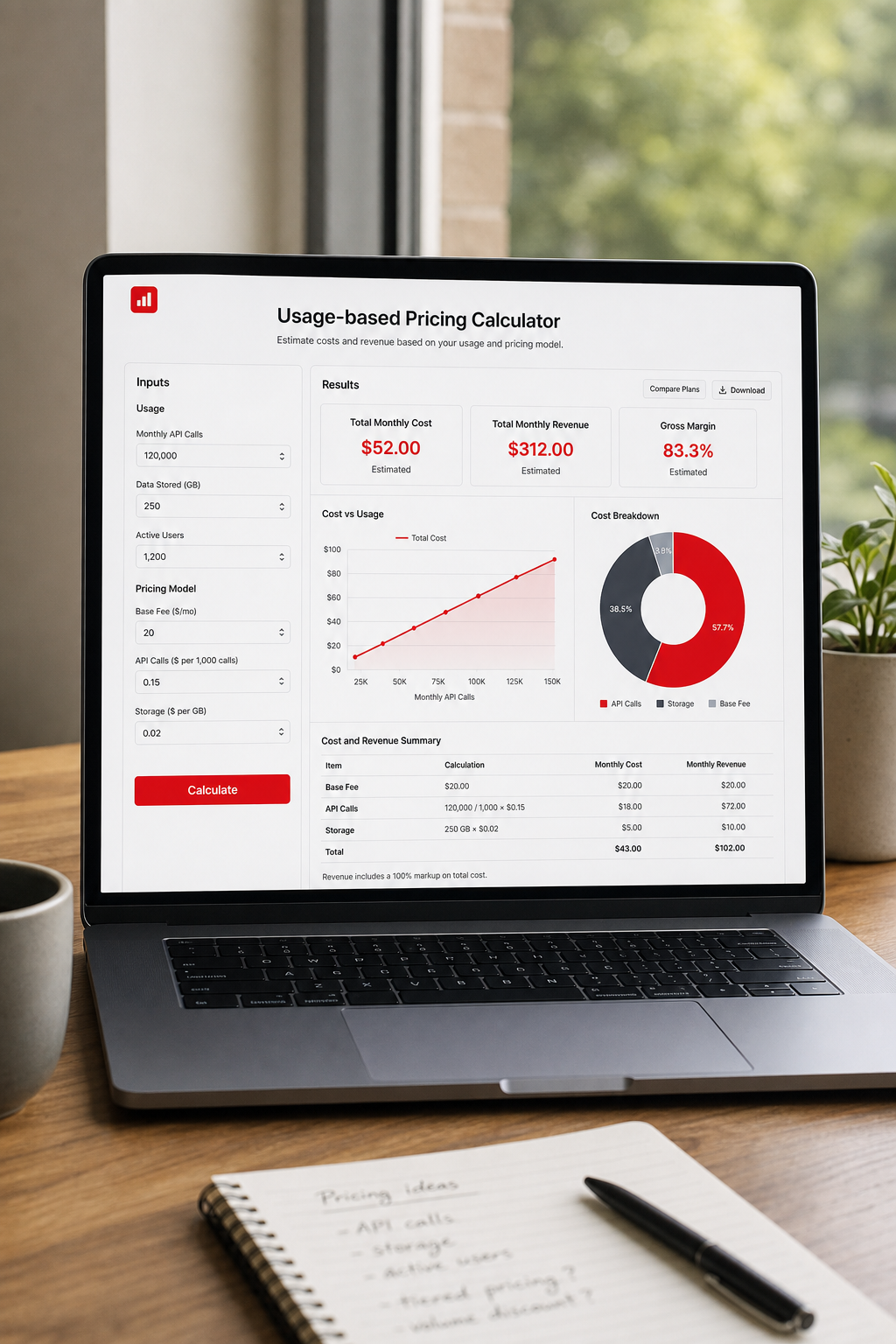
When you pair the calculator with Donely’s multi‑instance dashboard, you get a unified view of usage, pricing, and payments.
3. Enterprise‑Ready Multi‑Tenant Pricing Estimator
The platform targets larger SaaS companies that need deep revenue analytics. Its estimator can model dozens of pricing tiers, discounts, and per‑tenant customizations.
What sets this solution apart is the revenue recognition module. It aligns billing dates with accounting periods, which helps CFOs keep the books clean.
The solution also offers a strong API for pulling pricing data into BI tools. You can export a CSV of all tenant quotes and feed it to Looker or Tableau for a visual revenue forecast.
However, the UI can feel heavy for small teams. The learning curve is steeper than other similar solutions.
Documentation notes that complex usage‑based billing may require a custom integration. If your product has many variable components, you might need a developer to set up the logic.
For enterprises that already use this estimator for subscription management, it adds value by centralizing pricing and finance.
Here’s a quick checklist when evaluating the estimator:
- Does the API return per‑tenant breakdowns?
- Can you map custom fields to price rules?
- Is the revenue recognition alignment compatible with ASC 606?
Pricing is quote‑based, so you’ll need to request a custom quote to see the exact cost.
For a deeper look at multi‑tenant SaaS platforms, check out our comparison of top multi‑tenant SaaS platforms. It shows how the solution stacks up against other players.
Pros
- Advanced revenue recognition.
- Strong API for analytics.
- Enterprise‑grade security.
Cons
- Higher price point.
- Steeper learning curve.
- Custom usage‑based setup may need dev work.
Overall, the solution works best when you already have a subscription backbone and need tighter finance integration.
4. Pricing Tool, Global Payments with Tiered Billing
The platform acts as a Merchant of Record, handling payment processing, tax compliance, and fraud protection for you. Its pricing tool lets you create tiered plans that automatically adjust for each market.
The UI shows a map of supported countries, so you can see at a glance where the service will collect tax on your behalf. That saves legal teams a lot of headaches.
The calculator also supports proration, so if a client upgrades mid‑cycle the bill reflects the exact days used at each tier.
One strength is the built‑in checkout that can be embedded with a single line of JavaScript. The checkout respects the pricing you set in the calculator, so you have a single source of truth.
On the flip side, pricing is quote‑based. You need to request a quote, which can make budgeting a bit opaque for early‑stage startups.
For companies that sell globally, the tax compliance alone can justify the cost. The solution also offers dunning automation that reduces churn caused by failed payments.
When you pair the platform with Donely’s multi‑instance dashboard, you get a unified view of global revenue, tax, and instance counts.
Here’s a quick way to test the calculator:
Pros
- All‑in‑one tax and payment handling.
- Global currency support.
- Automatic dunning.
Cons
- Pricing is quote‑based.
- Setup can take a few weeks.
- Less granular control over custom usage rules.
For SaaS firms that need to sell in dozens of markets without building a tax engine, this solution is a strong choice.
5. Multi‑Tenant Cost Planner, Simple Multi‑Tenant Calculator
The platform’s subscription suite includes a cost planner that lets you model up to 100 k invoices per year. It’s a solid option for SMBs that want a straightforward calculator without a lot of bells and whistles.
The planner works like a wizard: you pick a plan, set the number of instances, and the tool shows you the monthly and annual cost. It also highlights volume discount thresholds.
One nice feature is the multi‑user access control. You can add up to three users on the Standard plan and ten on Premium, each with role‑based permissions.
The pricing page notes that the Enterprise edition adds deep customization, but the cost model stays simple, you pay per invoice generated.
Because the suite bundles CRM, books, and subscriptions, you can pull instance usage from the CRM module and feed it directly into the cost planner.
However, reporting around usage‑based billing is limited. If you need complex per‑instance metrics, you may have to export data manually.
For teams that already use other suite apps, the cost planner adds value by keeping everything in one ecosystem.
Learn more about how the platform handles multi‑tenant billing in the official pricing page.
Pros
- Easy wizard‑style setup.
- Integrated with the broader suite.
- Transparent volume discounts.
Cons
- Limited usage‑based reporting.
- Cap on invoice count for lower tiers.
- Not a dedicated multi‑instance platform.
The platform works well for startups that need a quick estimate and already rely on other tools.
Donely’s approach differs by offering unlimited instances and built‑in audit logs, which can be a better fit for regulated industries.
6. Financial‑Focused Pricing Engine, Financial Modeling Focus
The financial‑focused pricing engine builds its calculator around financial modeling. It lets you plug in cost‑based, value‑based, and competitor‑based pricing strategies side by side.
The engine produces a visual comparison of revenue forecasts for each strategy, helping executives see the trade‑offs before committing.
Because the financial‑focused pricing engine is geared toward finance teams, it includes metrics like CAC, LTV, and churn in the same view. You can see how a change in price affects LTV:CAC ratio instantly.
The UI is a bit data‑heavy, but for CFOs that love numbers it’s a dream. You can export the entire model to Excel for deeper analysis.
One limitation is that the financial‑focused pricing engine does not natively support per‑instance RBAC or audit logs. If you need granular governance, you’ll have to combine it with another tool.
For companies that prioritize financial rigor over quick setup, the pricing engine offers unmatched insight.
Pros
- Side‑by‑side strategy comparison.
- Deep financial metrics.
- Exportable models.
Cons
- No built‑in multi‑instance governance.
- Complex UI for non‑finance users.
- Higher price tier for full feature set.
Combine the financial‑focused pricing engine with a platform that provides per‑instance billing, like Donely, for a full‑stack solution.
7. Data‑Driven Pricing Insights
A data‑driven pricing platform focuses on analytics‑based pricing decisions. It pulls historical subscription data, runs cohort analysis, and suggests price points that maximize profit.
The platform’s “price elasticity” engine shows how a 5 % price bump might affect churn, giving you a clear risk‑reward picture.
The solution also integrates with major billing systems to pull real‑time data, so you can run experiments without manual data entry.
One standout feature is the “benchmark” library, which compares your pricing against industry averages. That helps you avoid underpricing.
However, the tool does not generate invoices or handle tax compliance. It’s purely an analytics layer that you pair with your billing platform.
For teams that love data and want to continuously optimize pricing, this platform is a powerful ally.
Pros
- Advanced elasticity modeling.
- Industry benchmarks.
- Smooth integration with billing APIs.
Cons
- No invoicing or tax handling.
- Requires a solid data pipeline.
- Additional cost on top of your billing stack.
When paired with Donely’s multi‑instance billing, you get both the data insights and the operational billing backbone.
8. API‑first Billing Platform Pricing Suite, API‑Driven Multi‑Instance Calculator
The platform markets itself as an API‑first billing solution. Its pricing suite lets you build custom calculators that factor in per‑instance usage, seat counts, and feature toggles.
Because everything lives behind an API, you can embed the calculator directly into your product’s admin panel. Your sales team can generate a quote with a single click, and the same API call creates the subscription record.
The suite supports webhook notifications, so when a new tenant signs up you can trigger provisioning scripts automatically.
The platform also offers a sandbox that mimics production data, letting you test pricing changes safely.
On the downside, the UI for the calculator is minimal, most of the work happens in code. If you lack a developer, you may need to hire one.
For tech‑savvy teams that want full control over the pricing logic, the platform delivers unmatched flexibility.
Pros
- Full API control.
- Webhook‑driven automation.
- Sandbox for safe testing.
Cons
- Requires developer resources.
- Limited out‑of‑the‑box UI.
- Pricing not publicly disclosed.
Here’s a quick snippet of how the API call looks:
{ "base_price": 25, "instances": 4, "discount": 0.1, "total": 90
}
Below is a short video that walks through setting up a calculator.
When you need a fully programmable pricing engine, the platform is worth a look.
9. Advanced Multi‑Instance Calculator, Strong Tiered Pricing
The platform offers a tiered pricing calculator that lets you set different rates for each instance tier. You can define flat fees, per‑seat charges, and usage‑based add‑ons.
It includes built‑in dunning management, so missed payments trigger automated retries and email reminders.
Its dashboard shows a per‑tenant revenue breakdown, which helps finance teams spot high‑value customers.
One advantage is the component model, allowing you to create reusable pricing components (like “AI agent seat”) and apply them across many plans.
The solution does not natively provide audit logs for each tenant, so you’ll need to add a separate logging layer if governance is a must.
For SaaS businesses that need strong tiered pricing and dunning, Donely provides a reliable solution.
Pros
- Component‑based pricing.
- Strong dunning automation.
- Clear tenant revenue view.
Cons
- No built‑in audit logs per tenant.
- Complex setup for custom usage rules.
- Higher cost for enterprise plans.
Combine the platform with a logging service if you need detailed audit trails.
Comparison at a Glance
FAQ
What is a SaaS pricing calculator for multi‑instance billing?
A SaaS pricing calculator for multi‑instance billing is a tool that lets you input variables such as the number of instances, user seats, usage metrics, and custom add‑ons, then outputs a total price spreadsheet and ensures each client sees an accurate quote that reflects their specific configuration.
How do I choose the right calculator for my business?
Start by mapping your pricing model: do you need flat‑fee tiers, usage‑based meters, or a mix? Then check if the tool supports per‑instance RBAC and audit logs, which are important for security. Finally, compare integration depth with your existing stack. If you already use a payment processor for payments, its calculator may be the easiest fit.
Can these calculators handle global tax compliance?
Some billing platforms embed tax engines that automatically calculate VAT, GST, and sales tax based on the buyer’s location. Others, such as a CRM suite or another billing service, rely on you to integrate a tax service or handle compliance manually. Choose a tool that matches your market reach.
Do I need a developer to use these calculators?
Not necessarily. Several billing platforms provide UI‑driven wizards that let non‑technical users build quotes. Some payment and analytics providers expect you to work with APIs or webhook integrations, which may require developer time.
How accurate are the revenue forecasts from these tools?
Accuracy depends on the quality of input data. If you feed real usage numbers and keep discount rules up to date, the calculators will reflect true revenue. Financial analytics tools add metrics that let you model churn and CAC, improving forecast reliability.
Is there a free option for trying out a multi‑instance calculator?
Many vendors offer a free tier or sandbox. Various providers have free plans that let you create a limited number of instances. Donely also provides a free tier with one instance, which can be a good sandbox for testing pricing ideas before committing to a paid solution.
What role does audit logging play in pricing calculators?
Audit logs record every change made to a quote, who edited a price, when a discount was applied, and what the final amount was. This is vital for compliance, especially in regulated industries. Some billing platforms and Donely include built‑in audit logs, while others may require a separate logging service.
Conclusion
Picking the right SaaS pricing calculator hinges on three things: how you bill (flat, tiered, usage), how you need to govern each tenant, and how far you want to go with financial modeling. One solution provides a fast, visual quote builder with audit logs, a solid all‑rounder. Another platform shines for usage‑based models and lets you experiment with pricing changes in real time. A third option is best for enterprises that need deep revenue recognition. A fourth service handles global tax compliance out of the box, while a simple wizard for small teams is offered by another tool.
Donely stands out by coupling multi‑instance billing, per‑instance RBAC, and unified audit logs with 800+ integrations, all in a self‑serve dashboard. For founders, agencies, or SMBs that want to scale AI agents across many clients, Donely is the only platform that checks every box in our research.
Ready to stop guessing and start pricing with confidence? Start your free trial on Donely today and see how a unified multi‑instance calculator can simplify your revenue engine.
- Log in to the billing platform dashboard.
- Handle to “Pricing” → “Create Plan”.
- Define base price, tier thresholds, and currency.
- Use the preview pane to see per‑instance totals.