
You're probably dealing with this already. An AI agent handled a task well yesterday, remembered a customer preference, made a sensible decision, and left you thinking, “Okay, this could work in production.” Then you start a fresh session and it acts like none of that happened.
That gap is where most agent projects stall. The model can sound capable in the moment, but without durable memory, it behaves more like a smart intern with no notebook than a dependable operator. The OpenClaw memory system matters because it turns memory into something explicit, inspectable, and operational, instead of leaving it trapped inside a transient chat context.
For teams moving from experiments to client work, that difference gets bigger. You don't just need an agent that remembers. You need one whose memory you can inspect, separate by tenant, govern, and recover when something goes wrong.
Table of Contents
- Why AI Agents Need a Better Memory
- The Core Architecture of OpenClaw Memory
- Understanding the Three Types of AI Memory
- How OpenClaw Persists and Retrieves Information
- Security and Isolation for Multi-Instance Deployments
- Configuration Deployment and Advanced Scaling
- Real-World Examples and Troubleshooting Tips
Why AI Agents Need a Better Memory
Most AI agents fail in an ordinary way. Not with a crash. With forgetfulness.
A support agent answers a billing question on Monday, learns the customer uses a specific workflow, and agrees on a follow-up action. On Tuesday, the same customer returns, and the agent asks the same discovery questions again. A sales assistant drafts a good outreach sequence, but by the next session it no longer remembers the lead's objections or the tone that worked.
That's not a personality flaw in the model. It's an architecture problem. Standard LLM context is temporary. If information isn't carried forward deliberately, it disappears when the session ends or when the active context gets compacted.
OpenClaw's approach is useful because it treats memory like a working record, not a mystical property of the model. Instead of asking the model to “just remember,” it writes durable memory to disk in a form humans can inspect and edit. That changes how you build agents. You stop relying on luck and start relying on artifacts.
A reliable agent needs memory you can open, read, and correct.
This matters even more when multiple people touch the same system. A founder may want the agent to remember strategic decisions. An operations lead may need it to retain process notes. A client-facing team may need the agent to keep track of prior interactions without leaking those details into another account's workflow.
Three practical shifts happen when memory becomes explicit:
- Continuity improves: The agent can carry decisions and facts across sessions instead of starting from zero.
- Debugging gets easier: When the agent recalls something incorrect, you can inspect the stored memory rather than guessing.
- Governance becomes possible: Teams can version, review, and isolate memory like any other operational asset.
That's the primary job of the OpenClaw memory system. It doesn't make an agent magical. It makes an agent stateful.
The Core Architecture of OpenClaw Memory
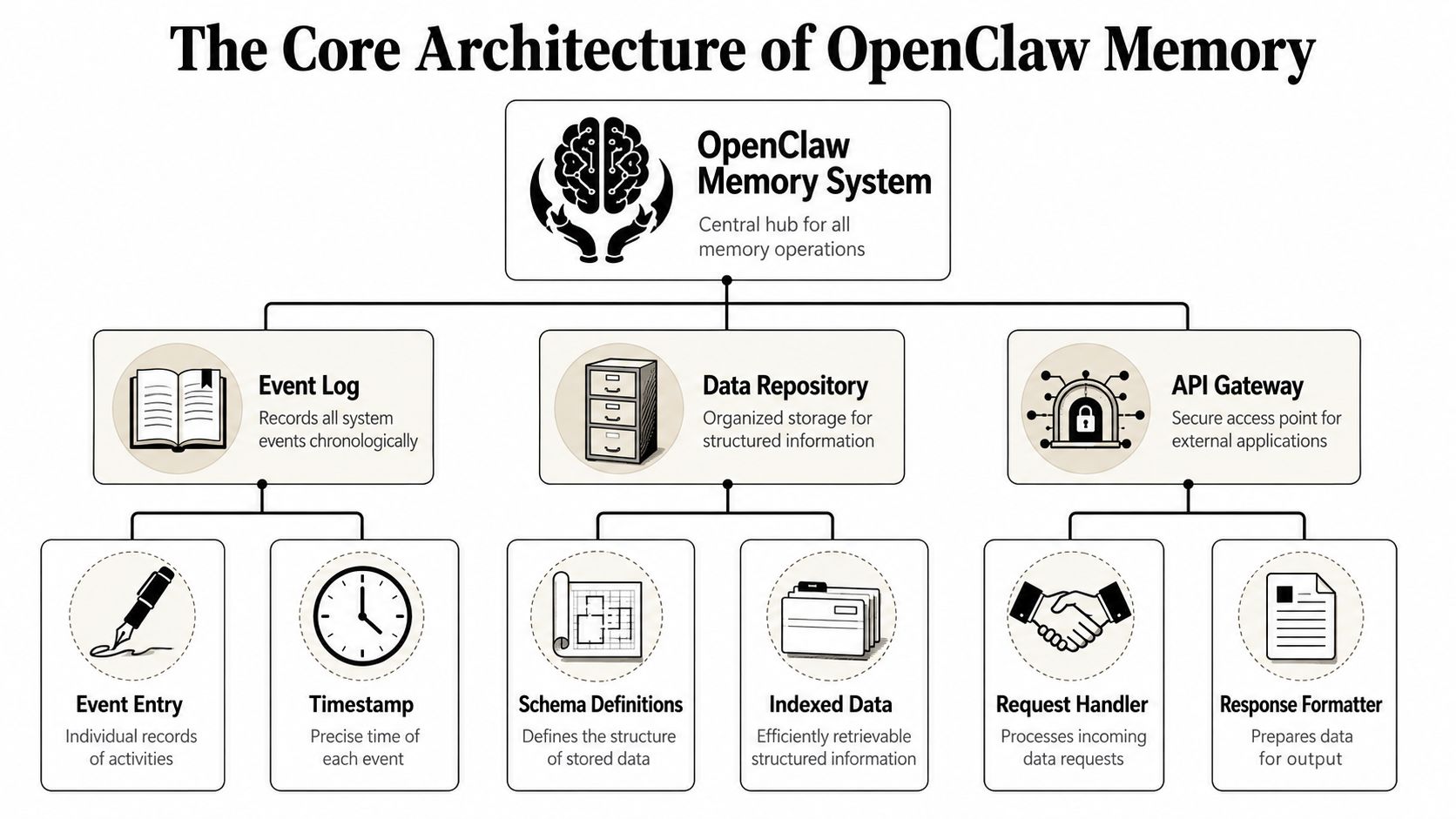
A good mental model is a journal plus filing cabinet.
The journal captures what happened recently. The filing cabinet stores the facts and decisions that should stay useful over time. OpenClaw implements that idea in a very literal way, because its memory is file-first and stored as plain Markdown rather than hidden model state, as described in the OpenClaw memory documentation.
File first means memory is visible
In OpenClaw, memory lives in the agent workspace. By default, that workspace is ~/.openclaw/workspace, and the key design choice is simple: there's no hidden state beyond what's written to disk in the documented memory model at OpenClaw memory concepts.
That sounds small, but it changes the engineering posture in a big way. If the agent “knows” something, that knowledge should be represented in a file. If it isn't written down, you shouldn't assume it survives.
For a team, this gives you a source of truth you can reason about:
- Developers can inspect it without reverse-engineering an opaque memory store.
- Operators can back it up with normal file-level practices.
- Reviewers can audit changes by reading diffs instead of reconstructing a conversation.
The two layers that matter day to day
OpenClaw splits memory into two practical layers.
The first is MEMORY.md. Think of this as the durable reference page. It holds long-term facts, decisions, and stable context that should remain useful across sessions.
The second is memory/YYYY-MM-DD.md. Think of this as a dated work log. It captures ongoing observations, temporary context, and the rough notes that accumulate during actual use.
This split is easy to understand if you compare it to how engineers already work:
MEMORY.mdis like the “decisions and facts” section in an internal runbook.- Daily memory files are like team notes from today's standup, debugging session, or customer triage.
OpenClaw also exposes two built-in tools for working with that memory:
memory_searchfor semantic retrieval when the agent needs to find relevant material.memory_getfor reading exact files or specific ranges when the target is already known.
The architecture is intentionally plain. That plainness is a strength. When people get confused by agent memory systems, it's often because they expect a hidden knowledge graph, a secret state layer, or a cloud-only service. OpenClaw starts from a simpler contract: files first, retrieval second.
Understanding the Three Types of AI Memory
People often mix up file structure and memory function. They're related, but they're not the same thing.
The file layout tells you where information lives. Memory types tell you what role that information plays during agent work. When teams separate those roles clearly, prompts get cleaner, retrieval gets more relevant, and memory stops turning into a junk drawer.
A useful way to separate responsibilities
The first type is short-term memory. This is the active working context for the current interaction. It includes what the agent is handling right now, what the user just asked, and the immediate chain of reasoning needed to finish the task.
The second type is long-term memory. This is the durable layer of facts, preferences, and decisions that should persist. In OpenClaw terms, this most naturally maps to the curated information you'd keep in MEMORY.md.
The third type is episodic memory. This is the record of what happened in specific moments. It's less about timeless truth and more about experience: what happened yesterday, what the user reported this morning, what issue came up in a recent exchange. That's the role daily logs naturally serve.
Practical rule: If a fact should still matter next week, promote it to long-term memory. If it only explains today's work, keep it episodic.
A common mistake is stuffing all three types together. Then retrieval gets noisy. The agent may pull an outdated observation as if it were a stable rule, or miss a durable preference because it's buried in a stream of session notes.
Comparison of OpenClaw Memory Types
| Memory Type | Primary Function | Persistence | Example Use Case |
|---|---|---|---|
| Short-term | Handle the current task and immediate exchange | Temporary | The agent tracks the latest user request while drafting a reply |
| Long-term | Preserve stable facts and decisions | Persistent | The agent remembers a company's approval policy or tone preferences |
| Episodic | Record dated experiences and observations | Persistent, but time-scoped | The agent recalls what happened in a support interaction from yesterday |
A simple way to test whether you've classified memory well is to ask three questions:
- Would this still be true later? If yes, it likely belongs in long-term memory.
- Did this happen at a specific time? If yes, it's episodic.
- Is this only needed to finish the current task? Then it's short-term.
Teams usually get better results when they treat memory like layered storage, not one undifferentiated pile of text. That's how an agent stays coherent without becoming cluttered.
How OpenClaw Persists and Retrieves Information
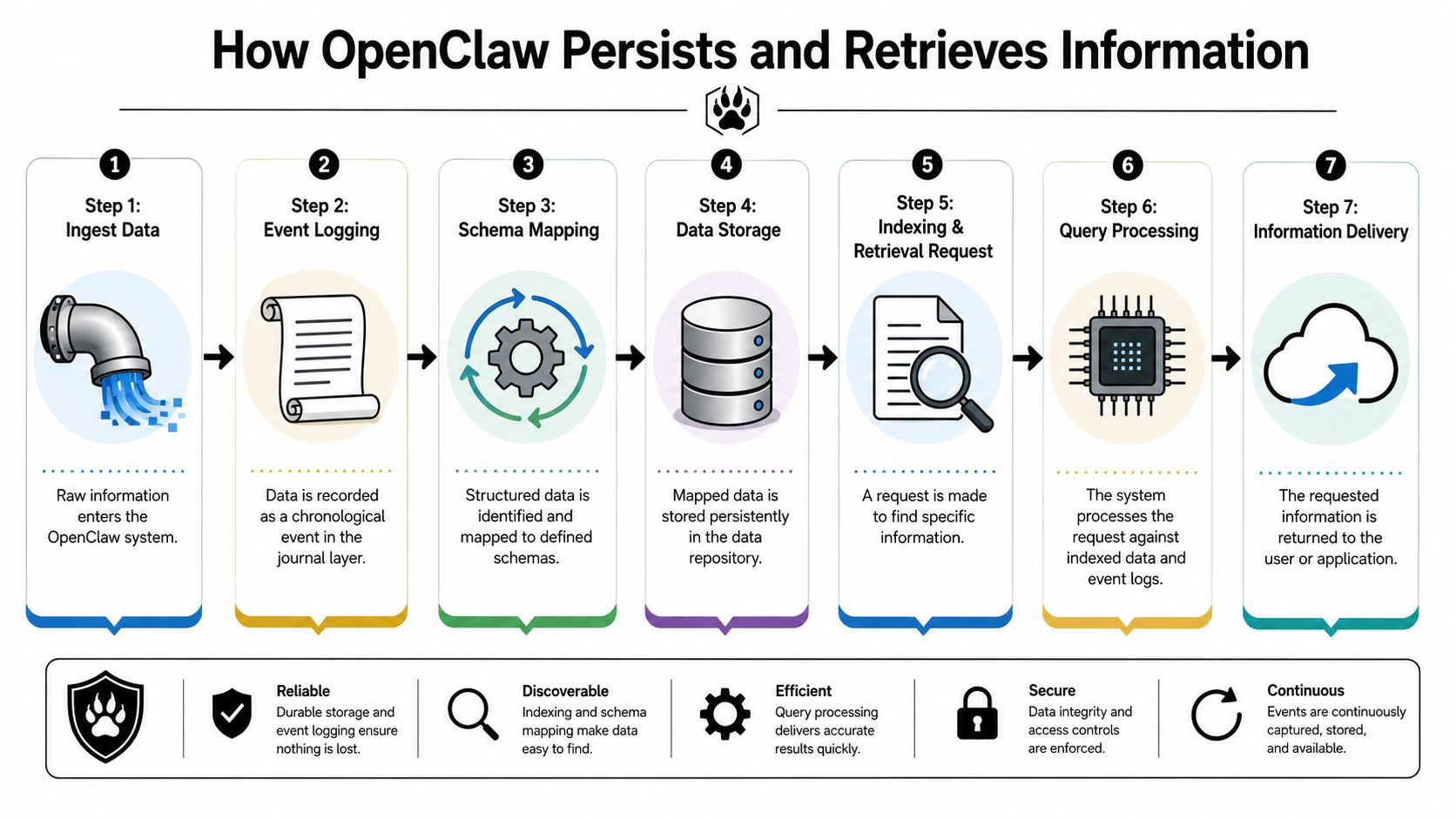
OpenClaw's memory system works because storage and retrieval are both deliberate. Saving notes to Markdown is only half the story. The other half is finding the right memory later without dragging the entire workspace into context.
According to the technical write-up in the OpenClaw memory deep dive, the system uses a SQLite-based index that combines BM25 keyword search with vector search, re-indexes automatically when Markdown files change, applies SHA-256 deduplication, and performs an automatic memory flush before compaction.
What happens when the agent saves memory
The write path is easier to understand if you think of it as a capture pipeline.
First, the agent decides something is worth keeping. That might be a customer preference, a project decision, or a summary of what happened during a task. Instead of leaving that in chat history alone, the system writes it into the Markdown memory files.
From there, the indexing layer keeps the retrieval system fresh:
- File changes trigger re-indexing: When Markdown files change, the index updates so retrieval can see new content.
- Duplicate chunks are avoided: SHA-256 deduplication prevents reprocessing the same content unnecessarily.
- Important context gets flushed before compaction: If the working context is about to be reduced, memory is written out first so it isn't inadvertently lost.
That last point is especially important in practice. Many teams think memory loss happens only when a session ends. In reality, it can happen during long-running sessions when the context needs to be compressed. Automatic flush behavior reduces that risk.
What happens when the agent needs to recall something
Retrieval uses a hybrid method because one search style isn't enough.
BM25 keyword search helps when the wording matters. If the memory contains a product code, a workflow name, or a specific phrase, exact or near-exact matching is valuable.
Vector search helps when the wording varies. A user may ask one question using different language than what was originally written to memory, but the semantic meaning can still match.
Put together, the system behaves like a careful teammate who can both grep for exact terms and recognize the same idea expressed differently.
Retrieval quality usually improves when teams write cleaner memories, not just when they tune prompts.
That's why memory hygiene matters. If MEMORY.md contains distilled facts and daily files contain dated observations, hybrid retrieval has a better chance of surfacing the right thing. If every file is stuffed with loose, repetitive notes, even good indexing will bring back noise.
For engineers, the practical takeaway is straightforward:
- Write memory intentionally.
- Keep durable facts separate from temporary observations.
- Use retrieval to pull what's relevant, not to load everything.
That pattern keeps context lean and memory useful.
Security and Isolation for Multi-Instance Deployments
Open-source memory designs often make sense on a single developer machine. The harder question is what happens when one team runs many agents for many customers.
That's where production requirements show up fast. If two client-facing agents share a memory boundary, even accidentally, you don't just have a bug. You have a data isolation problem.
Why shared memory is a production risk
A file-first memory system is transparent, but transparency alone doesn't create separation. In a multi-tenant environment, each agent instance needs its own workspace, its own retrieval scope, and its own access controls.
Without that separation, several failure modes appear:
- Cross-client recall: An agent may retrieve facts from the wrong tenant's memory.
- Overbroad permissions: Team members may access memory they shouldn't see.
- Weak auditability: You can't confidently answer who accessed or modified memory for a given instance.
At this stage, teams usually outgrow a simple local setup. The memory model is still useful, but operations need guardrails around it.
How isolated workspaces change the operational model
In a managed multi-instance setup, the core idea is simple: each agent runs with a separate memory boundary. That means separate workspace scope, separate data access, and permissions tied to that instance rather than to a broad shared environment.
For agencies and enterprise teams, that model is what turns a file-based memory system into something workable for real accounts. It supports practices like per-instance RBAC, scoped retrieval, and centralized audit review without changing the mental model developers already use.
A deletion workflow matters too. If a customer asks for data removal, teams need a path to remove the relevant instance data in a controlled way. A documented process like Donely's data deletion policy is the kind of operational control enterprises look for when evaluating hosted deployments.
In production, memory quality matters. Memory boundaries matter just as much.
The important point isn't that file-first memory stops being useful in multi-tenant systems. It's that the deployment model has to enforce isolation around it. Once you do that, the OpenClaw memory system becomes easier to trust, because you can reason about both what an agent remembers and where that memory is allowed to live.
Configuration Deployment and Advanced Scaling
It is advisable to start with the default memory model and only add complexity when the workload demands it.
That default gives you a readable, local-first contract: memory is stored as files, retrieval is available through built-in tools, and the system remains understandable without a specialized memory backend.

Start simple and keep the contract stable
The cleanest deployment path is usually:
- Begin with the native memory core for continuity across sessions.
- Shape the memory-writing behavior so durable facts are promoted cleanly and daily logs stay readable.
- Observe retrieval quality before swapping components.
That's especially useful for teams learning the system. If you want a practical setup reference in a narrow vertical use case, this quickstart for Amazon sellers using Openclaw shows how people think about deployment and task wiring in a real workflow.
There's also a hosting question. Some teams want to run OpenClaw without managing the infrastructure themselves. One factual option is OpenClaw hosting on Donely, which offers managed deployment around OpenClaw instances. That's relevant if your main goal is operating agents rather than assembling the runtime.
When to swap in a memory plugin
OpenClaw's memory architecture is designed to be replaceable via plugins. That matters because the native file-and-index model is strong for lightweight continuity, but some workloads need more structured recall.
A concrete example appears in the benchmark described by Mem0's OpenClaw memory article, where a MemMachine plugin raised OpenClaw's accuracy from 36.8% to 81.1% on 2WikiMultiHopQA. The point isn't that every team needs that plugin. The point is that complex multi-hop reasoning can benefit when retrieval is more structured than flat Markdown recall.
A good rule of thumb:
- Stay with the native system when you need transparency, human-editable files, and moderate continuity.
- Consider a plugin layer when the agent must connect facts across multiple steps with higher precision.
- Treat the memory slot as an upgrade path, not as something you need to optimize on day one.
For teams evaluating the scaling path, this walkthrough is useful context:
The architecture choice here is healthy. You don't have to throw away the OpenClaw model when needs evolve. You can preserve the interface and upgrade the memory backend when the workload stops being simple.
Real-World Examples and Troubleshooting Tips
Theory gets clearer when you watch memory do real work.
The OpenClaw memory system is easiest to evaluate by asking one question: does the agent behave more like a teammate with notes, or like a chatbot with a short attention span?
A support agent that remembers the right things
A customer support agent might use all three memory types during a product issue.
Short-term memory holds the active conversation: the customer's latest message, the troubleshooting path, and the answer being drafted. Long-term memory holds stable facts such as the customer's preferred communication style, approved account policies, or recurring environment details that should stay true across tickets. Episodic memory records the timeline: what the customer reported yesterday, what fix was tried, and what happened after that.
If the user returns the next day and says, “The same issue came back,” the agent doesn't need to restart discovery from zero. It can retrieve the recent episode, combine it with durable account context, and continue from there.
A sales agent that keeps continuity across follow ups
A sales agent works differently, but the pattern is similar.
Long-term memory stores durable lead intelligence, such as who the buyer is, what category they care about, and what constraints keep coming up. Episodic memory captures each outreach step: which objection surfaced, what tone got a response, and what follow-up promise the agent made in the last interaction. Short-term memory keeps the current drafting task coherent while the agent prepares the next message.
That combination helps the agent avoid two common failures: repeating the same pitch and forgetting the latest objection.
Troubleshooting checklist
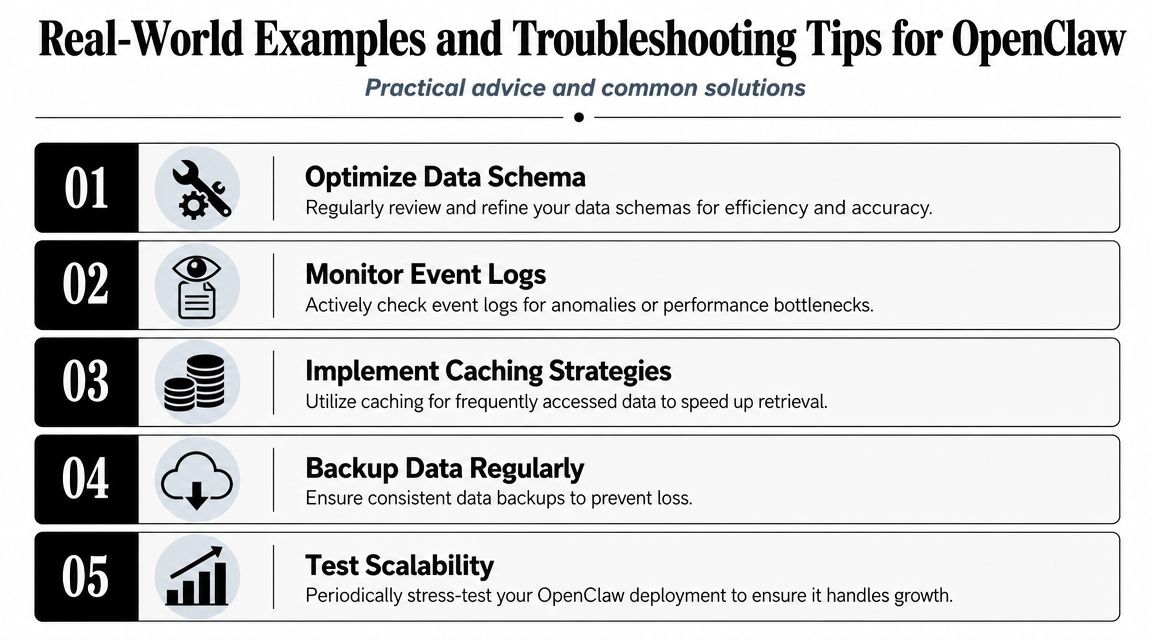
When teams say “memory isn't working,” the failure is usually one of a few patterns.
- Memory isn't being saved: Check whether the agent is writing durable facts to the appropriate memory files. If nothing is written to disk, there's nothing to recover later.
- Search results feel irrelevant: Review the quality of stored notes. Noisy or repetitive Markdown tends to produce noisy retrieval.
- The agent recalls outdated facts: Promote corrected information into the durable layer and remove or rewrite stale entries instead of letting contradictions accumulate.
- Cross-instance behavior feels unsafe: Verify that each deployment has an isolated workspace and scoped permissions, especially in client or multi-team environments.
- Too much context gets loaded: Use retrieval selectively. Don't treat the full memory store like a prompt appendix.
- Debugging is slow: Start by reading the memory files. In a file-first system, that's usually the fastest path to understanding what the agent thinks it knows.
A mature memory setup doesn't try to remember everything. It remembers the right things, stores them in the right place, and makes them easy to inspect when behavior drifts.
If you want to run OpenClaw with persistent memory in a managed environment, Donely provides hosted OpenClaw instances with isolated deployments, centralized operations, and controls that fit multi-instance production use.