
Juggling audit logs from dozens of client and business tenants can feel like herding cats. One missed event can turn a compliance audit into a nightmare. In the next few minutes we’ll walk through seventeen concrete options you can use right now to bring all that data into a single, searchable view. You’ll see how native Microsoft tools stack up against third‑party SIEMs, how to script custom pulls, and where to find the best dashboards for reporting. By the end you’ll have a clear shortlist you can act on today.
1. Native Microsoft 365 Unified Audit Log (Purview)
Microsoft calls its audit engine Purview. It pulls events from Exchange, SharePoint, Teams, Azure AD, and more into a single lake. From the Compliance Center you can turn on logging, set a retention window, and run queries that span all your tenants. The UI lets you filter by date, user, or activity type, then export results as CSV.
Because it lives inside the Microsoft cloud, you don’t need extra connectors. The service automatically writes to the Microsoft‑managed storage backend, which means the data is tamper‑proof and retained for the period you choose. When you have multiple client tenants under a single Microsoft 365 Business Premium subscription, you can enable the “cross‑tenant” view and see admin actions from each tenant side by side.
To get the most out of Purview, start by defining the audit scope. Decide whether you need to capture only admin changes or also end‑user actions like file sharing. Then use the new search UI that Microsoft released in 2024. The interface supports keyword search, advanced filters, and saving reusable queries. Microsoft’s official guide walks you through each step.
Performance is solid for most midsize workloads. The service can return up to 50,000 records per request, and you can page through larger result sets. If you hit the 90‑day window, consider pushing logs to Azure Log Analytics for longer storage.
Pros: native integration, no extra cost for basic tier, built‑in retention controls.
Cons: limited to 90‑day default, complex UI for beginners, advanced analytics require Azure services.
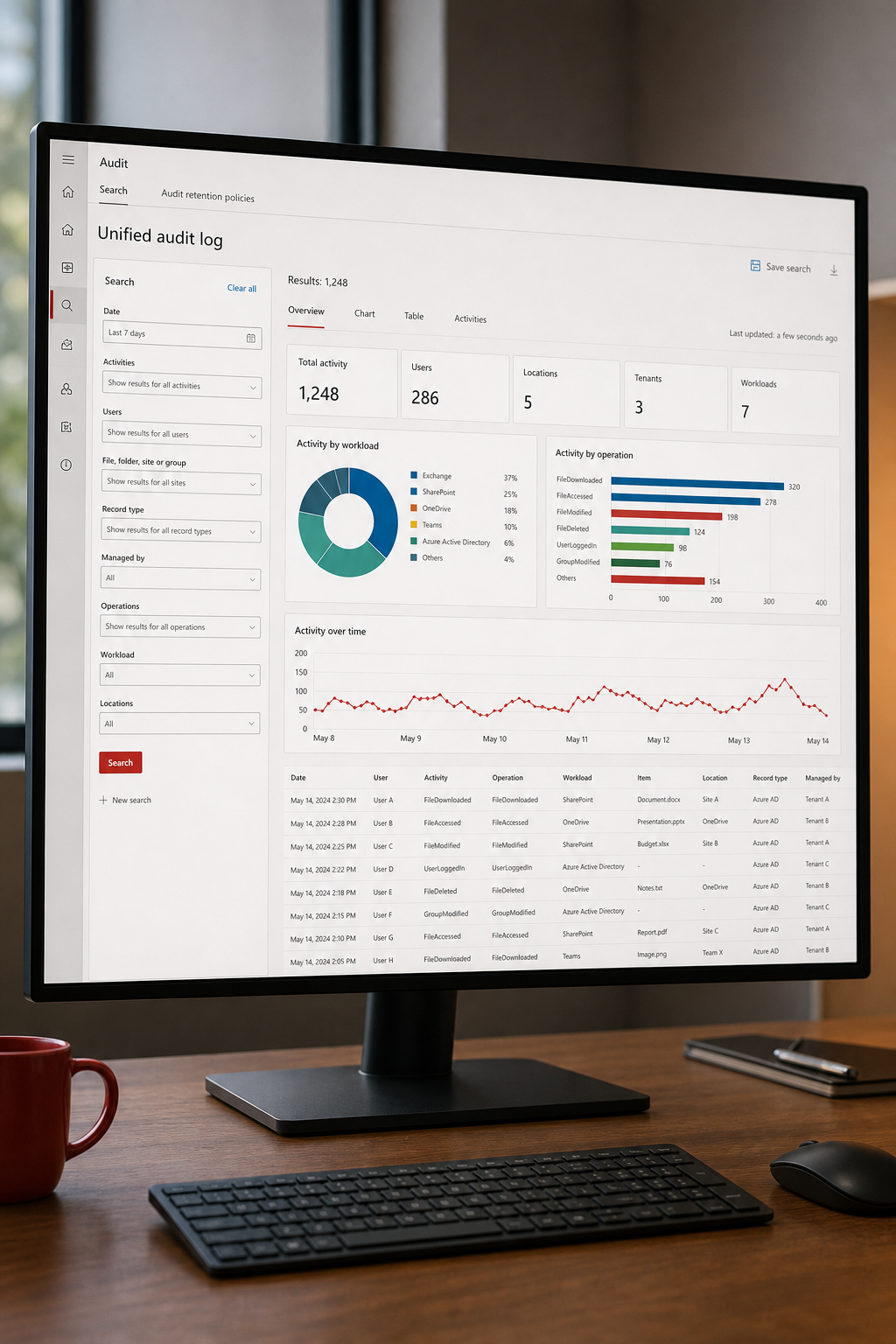
Key Takeaway: Purview gives you a single pane for Microsoft‑originated events, but you’ll likely need a downstream analytics layer for deep reporting.
2. Third‑Party SIEM Integration (e.g., Splunk, Azure Sentinel)
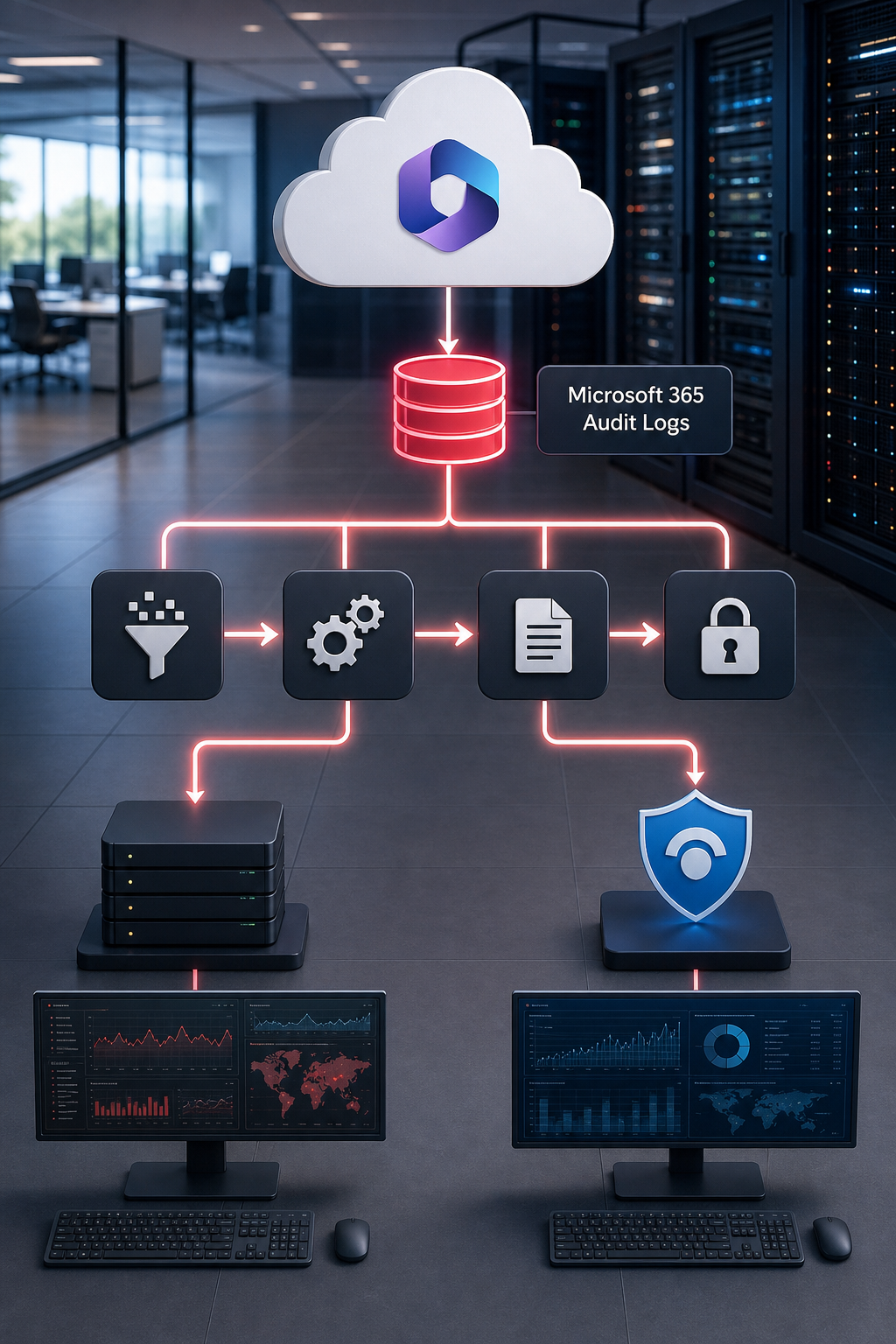
When you need real‑time correlation across many sources, a SIEM is the go‑to choice. Both Splunk and Azure Sentinel can ingest the audit stream from Microsoft Purview via the built‑in connectors. Once inside a SIEM, you can write custom detection rules, set up alerts, and build dashboards that span client and business instances.
Setting up the pipeline starts with enabling the “Export to Event Hub” option in Purview. The Event Hub acts as a buffer, feeding events into Splunk’s HTTP Event Collector or Azure Sentinel’s data connector. From there you can enrich logs with user attributes from Azure AD, add threat intel, and store everything in the SIEM’s indexed storage.
One of the biggest advantages is the ability to query across tenants using a single SPL (Splunk Processing Language) or Kusto query. For example, you can ask “show all admin role changes across tenant A and tenant B in the last 30 days” and get a unified table.
Cost can rise quickly if you ingest raw logs at high volume. Most SIEMs charge per GB stored, so you’ll want to filter out low‑value events before they hit the pipeline. Use Purview’s built‑in event types to exclude routine sign‑ins if they’re not needed for compliance.
Pros: powerful correlation, flexible alerting, long‑term storage.
Cons: higher licensing cost, added management overhead, need for log normalization.
3. Cross‑Tenant Aggregation Using AdminDroid
AdminDroid offers a SaaS dashboard that sits on top of Microsoft 365 and aggregates audit data from multiple tenants. It pulls the same unified logs Purview provides, but adds a layer of normalization and a visual UI that’s easier for non‑technical managers.
The tool works by connecting to each tenant via a service account that has read‑only audit permissions. Once linked, AdminDroid pulls the logs into its own data lake, where it builds pre‑made reports for admin changes, file sharing activity, and external collaboration.
What makes AdminDroid stand out is the cross‑tenant view. You can slice data by tenant, by user, or by activity type, and then export a single CSV for audit committees. The platform also offers a “risk score” that flags unusual spikes, such as a sudden increase in privileged role assignments.
Implementation is straightforward. Create a dedicated Azure AD app, grant it the AuditLog.Read.All permission, then add the client ID and secret to AdminDroid’s tenant configuration page. The service will start pulling data within minutes.
Pros: easy UI, built‑in risk analytics, multi‑tenant support out of the box.
Cons: additional subscription cost, data lives in a third‑party cloud, less control over raw log format.
When you need a quick way to present audit data to executives without building custom dashboards, AdminDroid can save weeks of work.
4. ThreatLocker for Granular Audit Control
ThreatLocker focuses on application‑level control and audit. It adds a whitelist layer that blocks any executable not explicitly approved, then logs every allow or block decision. The logs include the user, device, process hash, and the rule that applied.
For organizations that need to meet strict standards like NIST SP 800‑53, ThreatLocker’s audit trail can fill gaps left by generic cloud logs. The service can push its events to any syslog endpoint, allowing you to feed them into a SIEM or a compliance repository.
Integration is done via a lightweight agent installed on each endpoint. The agent talks to ThreatLocker’s cloud service, which holds the policy definitions. When a new file runs, the agent checks the hash against the whitelist and writes an audit record regardless of the outcome.
Because the logs are endpoint‑focused, they complement the cloud‑native audit logs that capture admin actions. Together they give you a full picture: who changed a policy in Azure AD, and which executable actually ran on a workstation. NIST’s privacy engineering guide recommends combining endpoint and cloud logs for strong compliance.
Pros: fine‑grained control, easy policy management, complementary to cloud logs.
Cons: requires endpoint agent, extra cost, may need tuning to avoid false positives.
5. PowerShell Scripting for Custom Log Collection
PowerShell gives you direct access to the Unified Audit Log API. You can script a nightly job that pulls the last 24‑hour window, filters by workload, and drops the results into a secure blob store for long‑term retention.
The core command uses the Search-UnifiedAuditLog cmdlet. You can specify the RecordType (like AzureActiveDirectory or PowerBIAudit), set the StartDate and EndDate, and then pipe the output to Export‑Csv. Microsoft caps each request at 50,000 events and a 90‑day look‑back, so you’ll want to schedule the script to run at least once a day.
Here’s a quick example that pulls Azure AD admin changes for the past day:
$records = Search-UnifiedAuditLog -StartDate (Get-Date).AddDays(-1) -EndDate (Get-Date) -RecordType AzureActiveDirectory
$records | Export-Csv -Path "C:LogsAADChanges_$(Get-Date -Format yyyyMMdd).csv" -NoTypeInformation
Remember to grant the running account the ExchangeOnlineManagement role and the AuditLog.Read.All permission. You can also add -ResultSize 5000 to control pagination.
Pro Tip: Wrap the script in a Azure Automation Runbook so it runs in the cloud, and use Managed Identity to avoid storing credentials.
Pros: fully customizable, no extra licensing, can feed any downstream system.
Cons: requires scripting skill, manual handling of pagination, limited to 90‑day window.
6. Microsoft Graph API for Programmatic Access
For teams that build their own monitoring platform, the Microsoft Graph API is the most flexible entry point. The /auditLogs endpoint returns a JSON feed of every event that Purview captures. You can call it from any language that supports HTTPS.
To start, register an Azure AD app, grant it the AuditLog.Read.All scope, and acquire an access token via client credentials flow. Then issue a GET request to https://graph.microsoft.com/v1.0/auditLogs/directoryAudits. The response includes fields like activityDisplayName, initiatedBy, and targetResources.
Because the data is JSON, you can pipe it straight into Azure Data Factory, store it in a Data Lake, or push it to a third‑party analytics engine. The API also supports OData query parameters, so you can filter on $filter=activityDateTime ge 2026-06-01 and $top=1000 to paginate. Donely’s AI agent management software uses the Graph API to pull audit events and correlate them with agent actions, giving a unified view of both human and AI activity.
Pros: language‑agnostic, real‑time access, deep filtering.
Cons: requires development effort, rate limits apply, you must handle pagination.
7. Power BI Dashboards for Audit Reporting
Power BI can turn raw audit CSVs or the Graph API feed into visual reports that business leaders love. Import the exported CSVs into Power BI Desktop, then build tables that show admin changes by date, user, and tenant. Use slicers to let executives flip between client and business instances.
Power BI also supports direct query mode against Azure Data Lake, meaning you can keep the data fresh without re‑importing files. Add a line chart that tracks the count of privileged role assignments over time, and set up a conditional formatting rule that highlights spikes above a threshold.
Sharing is simple: publish the report to the Power BI service and grant view‑only access to compliance officers. They can drill down to a single event, see the full JSON payload, and export the row if they need evidence for an audit.
Pros: rich visualizations, easy sharing, integrates with Microsoft ecosystem.
Cons: requires Power BI Pro license, performance can lag on huge datasets, limited to data you feed it.
8. Retention Policy Configuration for Cost Optimization
Retention is where many organizations bleed money. By default Microsoft keeps audit logs for 90 days. If you need longer, you can push logs to Azure Blob Storage with a lifecycle policy that moves older data to cool or archive tiers.
Start by creating a storage account, then set up a container with a policy that transitions blobs older than 30 days to the cool tier, and beyond 180 days to archive. In the Purview portal, point the export destination to that container. This way you keep hot data accessible for day‑to‑day investigations while paying pennies per GB for older logs.
When you have multiple client tenants, tag each blob with a tenant ID in the filename. That makes it easy to script a purge that complies with GDPR’s “right to be forgotten” rule for a specific client without affecting others.
Pros: predictable costs, compliance‑ready, uses Azure’s built‑in tiering.
Cons: requires extra Azure resources, need to manage lifecycle policies, potential delay retrieving archived data.
9. Automated Alerting for Remote Workforces
Remote teams generate a lot of audit noise, VPN logins, device enrollments, and file shares. Setting up alerts that surface only the high‑risk events helps security teams stay focused.
Use Azure Monitor alerts on the Log Analytics workspace where you’ve shipped Purview logs. Create a query that looks for admin role changes from unfamiliar IP ranges, then set the alert action to send a Teams message to the security channel.
Alternatively, Splunk’s alert manager can trigger a webhook that fires a PagerDuty incident. The key is to filter on fields like clientIP, userAgent, and outcome to avoid false positives.
Test your alerts by simulating a role change on a test tenant. Verify that the alert arrives within a minute, and that the payload includes a direct link back to the audit record for quick triage.
Pros: real‑time visibility, reduces investigation time, can be scoped per tenant.
Cons: alert fatigue if thresholds are too low, requires tuning for each client.
10. SOC Workflow with Log Parsing and Analysis
A Security Operations Center (SOC) needs a repeatable process for turning raw audit events into actionable tickets. The typical flow is: ingest → parse → enrich → detect → ticket.
Ingest is handled by the SIEM (Splunk or Sentinel). Parsing involves extracting fields like user, action, and target resource. Enrichment adds context, lookup the user’s department in Azure AD, map the target resource to a cost center, and tag the event with a risk score.
Detection uses either rule‑based queries or machine‑learning models. A common rule flags any admin role assignment that happens outside business hours. Once a match is found, the SOC creates a ticket in ServiceNow with the full audit payload attached.
Training analysts on the specific schema of Microsoft’s audit logs speeds up triage. Provide them with a cheat‑sheet that maps RecordType values to human‑readable descriptions.
Pros: systematic response, audit trail of investigations, integrates with existing ticketing.
Cons: needs skilled analysts, initial rule tuning effort, may generate noise.
11. Azure Activity Log Governance
Azure Activity Log records every management‑plane operation on your subscriptions, resource creation, role assignments, policy changes. While it’s separate from Microsoft 365 audit logs, the two together give a full picture of who did what across the cloud stack.
Enable the Activity Log diagnostic setting to stream events to an Event Hub. From there you can forward them to Azure Sentinel, Log Analytics, or a third‑party SIEM. The Activity Log retains data for 90 days by default, but you can archive it to Blob Storage for longer periods.
When you have multiple client subscriptions under a single Azure Lighthouse management tenant, you can add a tag to each event that identifies the client. Then build a dashboard that aggregates role changes per client, helping you spot over‑privileged accounts across the ecosystem.
Pros: covers Azure resources, easy integration with Azure services, built‑in retention.
Cons: does not capture user‑level actions inside SaaS apps, needs separate storage for long‑term.
12. Hybrid Environment Monitoring with On‑Premises Logs
Many enterprises still run on‑prem Active Directory, Exchange, or file servers. To get a unified view, you must pull those logs into the same pipeline as your cloud audit data.
Use the Microsoft Monitoring Agent (MMA) to collect Windows Event Logs, then forward them to Azure Log Analytics. From there you can write Kusto queries that join on userPrincipalName, matching on‑prem events with Azure AD sign‑ins.
For file‑server activity, enable the “Object Access” audit policy, then ship the Security event logs to the same Log Analytics workspace. The result is a timeline that shows a user’s on‑prem file access followed by a cloud SharePoint upload, all in one view. Donely’s multi‑tenant SaaS platform offers a built‑in connector that pulls on‑prem logs via MMA and merges them with its cloud audit store, giving agencies a single dashboard for all clients.
Pros: true end‑to‑end visibility, supports compliance across environments, uses existing Microsoft tools.
Cons: requires MMA deployment, network bandwidth for log shipping, careful mapping of identities.
13. Compliance Reporting for GDPR, HIPAA, etc.
Regulations demand proof that you can trace any data‑processing action. Unified audit logs are the backbone of that proof. For GDPR, you need to show who accessed personal data, when, and why. For HIPAA, you must demonstrate that only authorized users performed ePHI‑related actions.
Start by mapping each required control to a log source. For example, GDPR’s “right to access” can be satisfied by a query that lists all read events on records containing personal identifiers. Export the result as a PDF and attach it to the data‑subject request response.
Many compliance platforms offer pre‑built report templates. Load your unified logs into those platforms, then schedule monthly compliance snapshots. Keep the snapshots in an immutable storage bucket to satisfy audit‑trail integrity requirements.
Pros: satisfies legal obligations, builds trust with clients, reusable templates.
Cons: can be labor‑intensive to set up, needs ongoing maintenance, may require legal review.
14. Quarterly Business Review Automation
Quarterly Business Reviews (QBRs) often require a deep look at usage, cost, and security metrics per client. Automating the data pull saves weeks of manual work.
Build a Power BI dataflow that runs a stored procedure against your audit‑log warehouse. The procedure aggregates total API calls, number of admin changes, and alerts triggered per client for the last quarter. Then schedule the Power BI report to email stakeholders automatically.
Combine this with a PowerShell script that pulls the latest cost data from Azure Cost Management and merges it with the audit metrics. The final PDF includes a security health score, usage trends, and cost efficiency recommendations.
Pros: saves analyst time, provides consistent metrics, enhances client communication.
Cons: requires initial data modeling, needs access to cost APIs, may need client‑specific customization.
15. User Activity Monitoring (File Sharing, Device Access)
Beyond admin actions, you often need to see what regular users are doing, especially when they handle sensitive files. Microsoft 365’s audit logs capture file‑view, download, and share events for SharePoint and OneDrive.
Set up a scheduled Power BI data refresh that flags any file download from a protected folder by a user who does not belong to the file’s owner group. Pair this with Azure AD Conditional Access logs to see if the device used was compliant.
Donely’s platform surfaces these events in its unified dashboard, letting agency managers see at a glance which client’s agents accessed which files. This visibility helps you spot rogue behavior before it becomes a breach. Check out the top AI agents for examples of how audit logs feed into automated compliance checks.
Pros: detects insider risk, supports data‑loss‑prevention, integrates with DLP policies.
Cons: can generate high volume of events, requires careful filter design, may need storage for long‑term retention.
16. Role‑Based Access Control and Admin Activity Logging
RBAC is the gatekeeper that decides who can see or edit audit logs. If you grant blanket access, you defeat the purpose of logging. Instead, assign read‑only audit permissions to compliance officers and full admin rights only to security leads.
In Azure AD, create custom roles that include the “AuditLog.Read.All” permission. Assign those roles at the tenant level for each client. This way a manager for client A cannot view client B’s logs, preserving isolation.
When an admin changes a role, that change itself is logged in the Unified Audit Log. Build a Power BI report that lists all role‑assignment changes, the actor, and the timestamp. Review this report weekly to catch privilege creep.
Pros: enforces least‑privilege, creates audit‑ready role change trail, aligns with zero‑trust principles.
Cons: adds admin overhead, requires careful role design, may need periodic review.
17. Encrypted Log Storage and Immutable Backups
Even the best logging pipeline is useless if the logs can be altered or deleted. Encrypt logs at rest using Azure Storage Service Encryption, and enable immutability via a Write‑Once‑Read‑Many (WORM) policy.When you push logs to a Blob container, set the immutability policy to retain for 365 days. During that period, no one, not even a subscription owner, can overwrite or delete the blobs. This satisfies many regulatory requirements for tamper‑evident logs.
Combine encryption with customer‑managed keys (CMK) stored in Azure Key Vault. That gives you full control over who can decrypt the logs, adding an extra layer of protection.
Pros: meets legal integrity standards, protects against insider tampering, integrates with Azure security controls.
Cons: higher storage cost, requires key‑management discipline, immutable period cannot be shortened.
Buyer’s Checklist (Quick Reference)
- Do you need cross‑tenant visibility? Look for native Purview or a third‑party aggregator.
- Is real‑time alerting a must? Choose a SIEM with built‑in alert rules.
- Do you have on‑prem systems? Plan for MMA or Syslog forwarding.
- What retention period does your regulator demand? Set up Azure Blob lifecycle policies.
- Do you need endpoint‑level audit? Consider ThreatLocker or similar agents.
- Will you build custom dashboards? Power BI or Graph API are the best routes.
FAQ
What is a unified audit log and why does it matter?
A unified audit log collects events from many services, email, file storage, identity, and cloud resources, into one searchable store. It matters because it gives you a single source of truth for investigations, compliance reporting, and automated alerts. Without it, you would have to chase logs in separate portals, increasing the chance of missing a critical event.
Can I pull audit data from multiple Microsoft tenants at once?
Yes. Microsoft Purview supports cross‑tenant queries if you have the appropriate admin permissions on each tenant. You can also use a third‑party tool like AdminDroid that connects to each tenant via service accounts and aggregates the data in its own UI.
How far back can I keep audit logs in Microsoft 365?
By default the service stores logs for 90 days. You can extend that by exporting logs to Azure Blob Storage or a SIEM, where you control the retention period. Some organizations keep a full year of logs for compliance reasons.
What’s the difference between Azure Activity Log and Microsoft 365 audit log?
Azure Activity Log records management‑plane actions on Azure resources, like VM creation or role assignment. Microsoft 365 audit log records user and admin activity inside SaaS services such as Exchange, SharePoint, and Teams. Together they give a complete view of both infrastructure and productivity actions.
Do I need a SIEM to get value from audit logs?
You don’t have to, but a SIEM makes it easier to correlate events, set up real‑time alerts, and store data long term. If you only need basic reporting, Power BI or simple CSV exports may be enough. For large enterprises with many tenants, a SIEM scales better.
How can I ensure logs are tamper‑proof?
Store logs in an immutable storage tier like Azure Blob with a WORM policy. Encrypt the data at rest with customer‑managed keys, and restrict delete permissions. This creates a cryptographic audit trail that regulators accept as evidence.
Conclusion
Unified audit logs are the backbone of any secure, multi‑tenant operation. Whether you lean on Microsoft’s native Purview, enrich the data with a SIEM, or script custom pulls with PowerShell, the goal is the same: one searchable view that spans client and business instances.
We covered seventeen options, from native tools to third‑party platforms, and showed how each fits into a larger governance strategy. Remember to match the solution to your needs, cross‑tenant visibility, real‑time alerts, endpoint control, or long‑term retention.
If you want to dive deeper into building a compliant audit pipeline, check out our enterprise audit‑log compliance guide. It walks you through architecture decisions, policy design, and usable implementation steps.
With the right mix of tools, you can turn a mountain of log data into clear, actionable insight, and keep your clients and business units both secure and accountable.
“A well‑tuned SOC turns raw audit logs into a single, auditable ticket that tells you who, what, when, and why.”