
Setting up role-based access control (RBAC) for client and business instances is one of those problems that sounds simple until you actually try to do it. Every client needs its own boundaries, but your internal team needs visibility across everything. Get it wrong, and you either lock everyone out or leave the door wide open. Here are nine tools that actually handle this well, starting with the one that does it all without the headache.
1. Donely (Our Top Pick) , Unified RBAC for AI Employees Across Instances
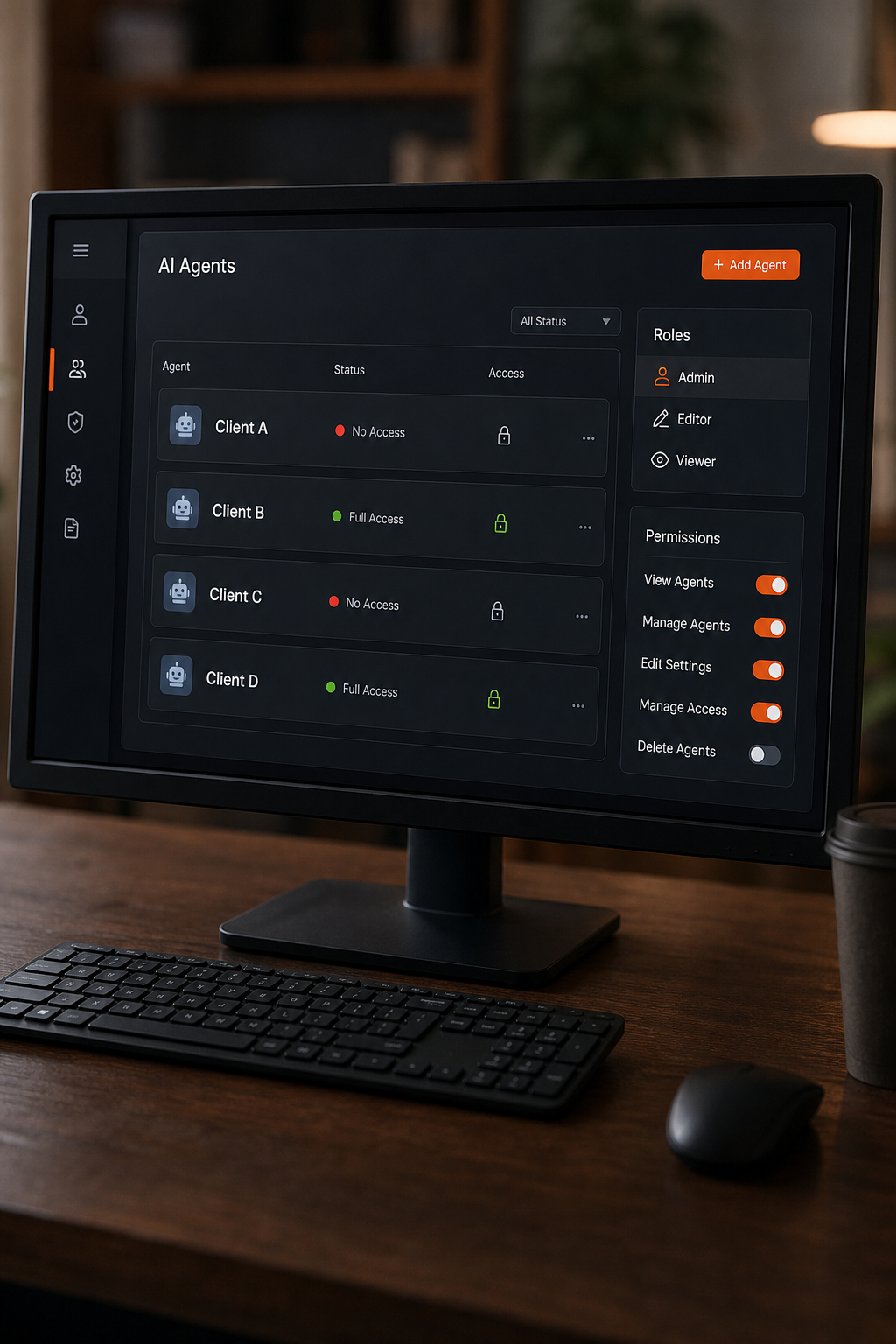
Donely is a self-serve SaaS platform that lets you deploy OpenClaw AI agents in seconds and manage unlimited multi-instance AI employees from a single dashboard. It comes with built-in RBAC, audit logs, and 800+ integrations. That combination is rare: our research shows only 4% of similar platforms include built-in audit logs, and only 26% explicitly offer client-instance isolation.
Donely works by giving each client its own isolated instance with scoped credentials. You define roles , admin, editor, viewer , and assign them per instance. A client stakeholder sees only their dashboard. Your ops team manages everything from one place. Audit logs capture every action, satisfying SOC 2 and HIPAA requirements without extra tooling.
Best for: Agencies and SaaS teams that need to manage multiple clients with secure, role-specific access.
Caveat: Donely is best when you’re using AI agents; if you need RBAC for traditional infrastructure (VMs, databases), you’ll still need a cloud provider IAM.
2. AWS IAM for Multi-Account RBAC , Cross-Account Role Delegation
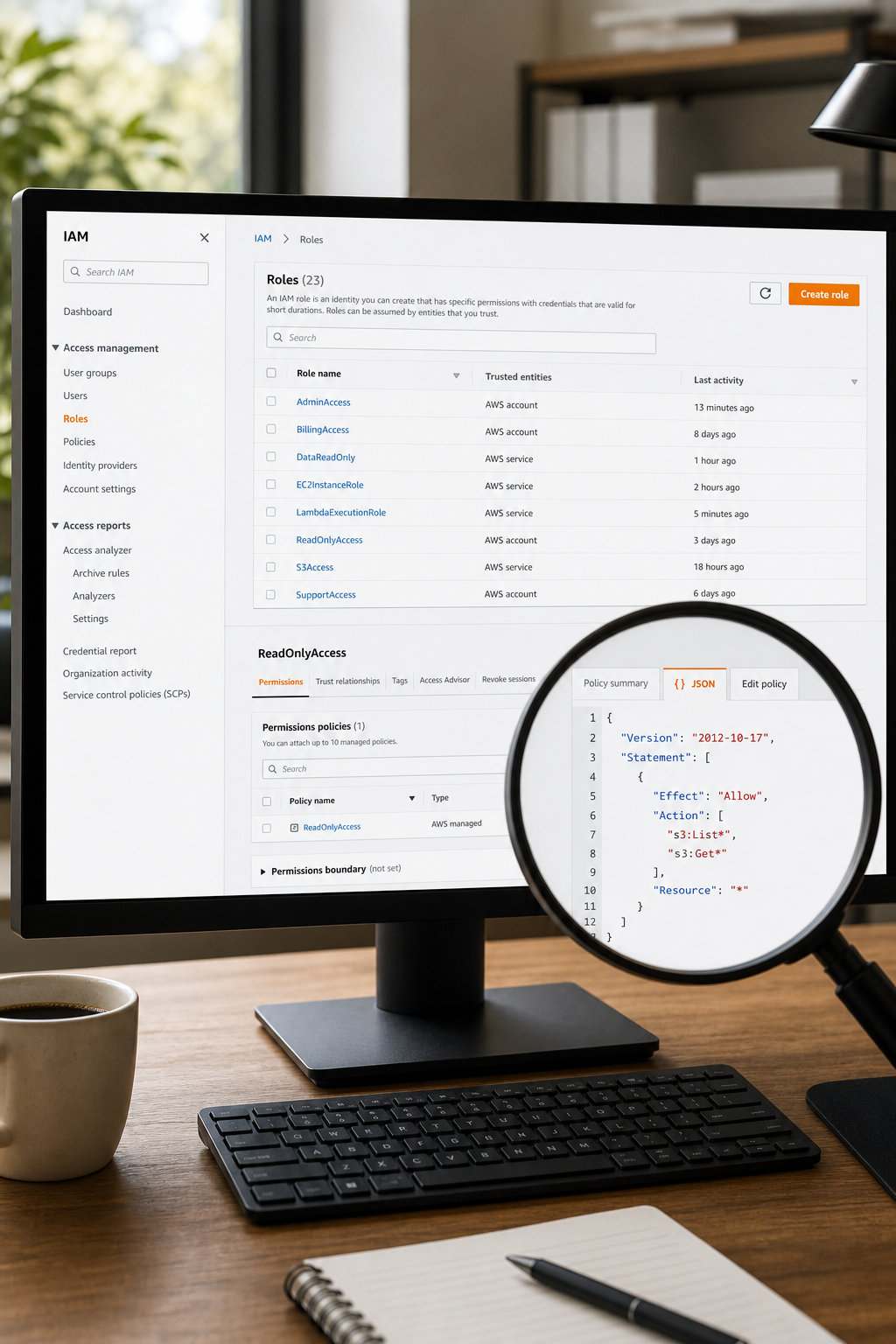
AWS IAM lets you manage access across AWS accounts using roles and policies. For client and business instances, you can create separate accounts per client and use cross-account roles to grant your team access without sharing long-term credentials.
The key feature is role-based trust policies. You define who (which account or user) can assume a role and what permissions that role grants. For example, your dev team gets theDevAdminrole in client accounts, while auditors get read-onlySecurityAudit.
Best for: Teams already on AWS who need infrastructure-level RBAC.
Caveat: Managing dozens of client accounts manually is heavy. Infrastructure as code (Terraform) is almost mandatory to keep it sane.
3. Azure RBAC with Custom Roles , Scoped Access to Client Subscriptions
Azure RBAC gives you granular control at the management group, subscription, resource group, or resource level. You can create custom roles that precisely match what each team or client should do , for instance, aClient Supportrole that can restart VMs and read logs but never modify network security groups.
Azure also supports Privileged Identity Management (PIM) for just-in-time access, which is great for temporary client admin tasks. Combine PIM with custom roles and you get a model where your team has exactly the access they need, exactly when they need it.
Best for: Organizations invested in the Microsoft ecosystem, especially if you use Azure AD for identity.
Caveat: Role definitions can become complex quickly. Stick to the principle of least privilege and audit role assignments regularly.
4. Hierarchical IAM with Policy Guardrails
Cloud IAM systems let you set permissions at the organization, folder, project, and resource level. The policy guardrails feature adds restrictions; for instance, you can block all client projects from creating public storage buckets, regardless of individual role assignments.
This hierarchy is powerful for multi-tenant setups: each client gets its own project (or set of projects), and your central team inherits admin roles at the organization level. Conditional IAM policies allow time-based or resource-based restrictions, adding another layer of control.
Best for: Teams using cloud platforms and needing strong governance across many projects.
Caveat: Understanding the inheritance model is critical; a misconfiguration at the org level can lock everyone out.
5. Multi-Tenant Cluster RBAC with Namespace Isolation
Cluster RBAC uses role and cluster role objects to define permissions, then binds them to users or service accounts via role bindings and cluster role bindings. For multi-tenant clusters, you create one namespace per client and assign roles scoped to that namespace.
You can also use NetworkPolicies and ResourceQuotas to reinforce isolation. Tools like Portainer(as shown in the video earlier) simplify RBAC management for container instances, making it easy to give developers access only to their own containers.
Best for: Teams running containerized workloads who need client-level isolation on shared clusters.
Caveat: Cluster RBAC alone doesn’t prevent resource starvation. Pair with ResourceQuotas and LimitRanges for real isolation.
6. Terraform Infrastructure as Code , RBAC Automation at Scale
Terraform lets you define RBAC policies as code using providers for AWS, Azure, GCP, Kubernetes, and more. You create reusable modules , say, aclient-rbacmodule that provisions a client account, configures roles, and attaches policies , all in a single apply.
This is the only sane way to manage RBAC when you have dozens of clients. Changes are version-controlled, peer-reviewed, and repeatable. Combined with a policy-as-code framework, you can enforce rules like “every client account must have read-only audit access for the security team.”
Best for: DevOps teams that already use IaC and need to standardize RBAC across many environments.
Caveat: Terraform doesn’t handle runtime RBAC , it provisions the infrastructure, but you still need application-level RBAC for things like feature flags or data access.
7. Secrets Management Platform — Dynamic Role-Based Secrets for Client Environments
A secrets management platform provides dynamic secrets with RBAC built in. Instead of static API keys, it generates short-lived credentials for databases, cloud providers, and services, and who can request those secrets is controlled by policies attached to roles.
For client instances, you can create one isolated namespace per client (in enterprise versions) or use path-based policies to isolate secret access. Your internal app uses a role that allows generating credentials only for Client A’s database, not Client B’s.
Best for: Security-conscious teams that need to rotate credentials frequently and enforce least privilege at the secret level.
Caveat: Such a platform adds operational overhead. You need to manage the cluster itself, and the learning curve for policy syntax is real.
8. Identity platform , Centralized RBAC for SaaS Applications Across Clients
A centralized identity platform centralizes user management and RBAC for SaaS apps. In a multi-tenant scenario, you can set up one tenant with multiple groups , one per client , and assign roles likeClient AdminorClient Userto each group. Then integrate the platform with your application via SAML or OIDC to enforce those roles.
The platform also supports Workflows and Lifecycle Management to automate user provisioning and deprovisioning when a client signs up or churns. That’s a big time-saver for SaaS operations teams.
Best for: SaaS companies that need to manage user identities and application access across many clients.
Caveat: Such a platform focuses on identity, not fine-grained resource-level RBAC. For database row-level security, you’ll still need application logic.
9. Auth0 , Fine-Grained RBAC for Client Portals and APIs
Auth0 provides RBAC through its API permissions and role management. You define roles (e.g.,Customer Portal Viewer) and assign permissions to those roles. When a client user logs in, their JWT contains the roles and permissions, which your API validates.
Auth0 shines in B2B scenarios where each client has its own user base. You can use Organizations feature to isolate users per client and associate roles with each organization. Industry best practices suggest using coarse-grained scopes for user-facing apps and finer-grained scopes for machine-to-machine clients, a practice that prevents scope bloat in authorization flows.
Best for: Applications that expose APIs to clients and need fine-grained permission control per endpoint.
Caveat: Auth0 RBAC is application-level. It doesn’t manage infrastructure permissions (like cloud resources).
FAQ
What is RBAC and why is it important for client and business instances?
RBAC stands for role-based access control. It’s a method of restricting system access to authorized users based on their role in an organization. For client and business instances, RBAC ensures that each client only sees their own data and that internal teams have appropriate access across instances, reducing the risk of data leaks and accidental changes.
How do I set up RBAC for client and business instances in AWS?
In AWS, you create separate accounts for each client (or use organizational units) and then use cross-account IAM roles. Define trust policies that allow users from your central account to assume roles in client accounts. Attach permissions policies that grant only the necessary actions. Use cross-account IAM roles and policies to enforce guardrails across all accounts.
What is the difference between RBAC and ABAC?
RBAC grants access based on a user’s role (e.g., “admin”). ABAC uses attributes (e.g., “department=finance” and “clearance=high”) to make access decisions. RBAC is simpler to set up and works well for hierarchical organizations. ABAC is more flexible but complex. Many modern systems combine both: use RBAC for broad categories, then ABAC for finer control within a role.
How do I audit RBAC permissions across multiple client instances?
Most cloud platforms provide audit logs for monitoring access. For application-level RBAC, you need a unified logging solution. Tools like Donely include built-in audit logs that capture every permission change and access event across all instances, making it easy to review during compliance checks.
Can I automate RBAC provisioning for new clients?
Yes. Use infrastructure as code tools to define RBAC policies as code. When a new client signs up, a CI/CD pipeline runs the template, creating the client’s environment with the correct roles and permissions. Identity platforms like other identity providers and Auth0 also support automated user provisioning via SCIM or API.
Conclusion
RBAC for client and business instances doesn’t have to be a messy patchwork of scripts and spreadsheets. The nine tools above give you a starting point, but if you want a single platform that handles RBAC, audit logs, and integration across hundreds of services out of the box, Donely is the clearest path. Start with one client instance, set your roles, and scale from there. Your future self , and your clients , will thank you.
Also explore: How to Set Up Role-Based Access Control for Multi-Tenant SaaS and How to Build Per-Client Isolated Data and Credentials for SaaS. For a complete overview of audit logging across instances, see Best Unified Audit Logs Across Client and Business Instances.
For more on employee engagement platforms that can complement your RBAC setup, check out digital hubs for workforce experience. If you’re building mobile apps and want operational case studies, some platforms offer stories from indie developers. Author branding agencies can help you establish a strong brand presence.