
If you're running one YouTube channel manually, the friction is annoying. If you're running several, it turns into operations work. Someone has to manage assets, metadata, approvals, scheduling, retries, failed uploads, and the awkward cleanup after an agent publishes the wrong draft to the wrong channel.
That gap is where most OpenClaw YouTube automation tutorials fall short. They show a proof of concept. They don't show how to run a system that survives client separation, role boundaries, flaky APIs, and real publishing volume. Production automation isn't about getting one video online. It's about making sure the right agent publishes the right asset to the right destination, with a paper trail and recovery path when something breaks.
Table of Contents
- Beyond Upload Schedulers to True YouTube Automation
- Foundations and First API Connections
- Designing Your Core YouTube Automation Workflow
- Integrating Approvals and Notifications with Your Ecosystem
- Scaling Securely with Multi-Instance Architecture
- Monitoring Auditing and Optimizing Your Agents
Beyond Upload Schedulers to True YouTube Automation
A YouTube automation project usually looks fine on day one. One workflow uploads one finished file to one channel. By week three, the requirements change. One client wants approvals in Slack, another wants scheduled drafts, a third wants strict separation between editors, operators, and billing owners. That is where simple upload tooling stops being useful.
OpenClaw YouTube automation is more than timed publishing. Its core value is coordinated execution across research, asset generation, assembly, review, publishing, and post-run logging. Once an agent can act across that full chain, the design problem shifts from "how do we upload videos?" to "how do we control, isolate, and observe a publishing system that may run for multiple channels and multiple clients at once?"
That distinction matters in production.
The failure mode is rarely the upload itself. It is permission sprawl, shared credentials, missing approval checkpoints, weak audit trails, and no clean boundary between one client workspace and another. A demo can ignore those problems. An agency setup cannot. Teams evaluating OpenClaw deployment patterns for multi-agent automation should judge the system on those operational controls, not on whether it can publish a single test video.
What basic upload tools miss
Basic upload tools handle one narrow job well enough:
- File submission: Send a prepared asset to YouTube.
- Scheduled release: Publish at a selected date and time.
- Metadata entry: Set title, description, tags, and category.
- Limited workflow awareness: No upstream research, generation, or editorial checks.
- Limited operational control: No approval routing, audit history, retry logic, or client isolation.
That is acceptable for a solo creator with one repeatable process.
It breaks down once content originates from several systems, one operator can edit metadata but should not publish, or a team needs to prove who approved what and when. In those cases, "upload automation" is too small a frame. The underlying system is a controlled content pipeline with policy, state, and ownership rules.
Practical rule: If your automation begins at
upload_video, the architecture is already underspecified for production use.
What durable OpenClaw YouTube automation looks like
A durable setup separates responsibilities, even if one platform can technically do everything in one flow. That adds a little orchestration overhead, but it reduces blast radius and makes failures easier to diagnose.
A production design usually includes:
| Layer | Responsibility |
|---|---|
| Research agent | Topic intake, transcript analysis, source collection |
| Metadata agent | Title, description, tags, captions draft |
| Compliance gate | Policy checks, asset validation, approval requirement |
| Publishing agent | Upload, scheduling, playlist placement |
| Ops layer | Logs, retries, rollback, notifications |
This structure supports different operating models without cloning the whole stack. A clips channel can publish automatically after validation. A brand channel can require human approval on every run. A client with stricter controls can get isolated credentials, separate logs, and a different approval path while still using the same core architecture.
That is the difference between a tutorial workflow and a system you can run for paying clients without creating support debt.
Foundations and First API Connections
A production YouTube agent usually fails before the first upload. The failure starts earlier, when one OAuth client gets shared across environments, a contractor keeps long-lived access, or nobody can say which channel a token can publish to. For OpenClaw, the first API connection is an identity and control problem before it is an automation problem.
That matters even more in multi-agent setups. One agent may prepare metadata, another may validate assets, and a publishing agent may call YouTube only after approval. If those roles all inherit the same credentials, one mistake can affect every channel tied to that tenant.
Start with the permission model
Create a dedicated Google Cloud project for the YouTube publishing workload. Keep staging and production separate. If you manage multiple clients, give each client its own project or, at minimum, its own credential boundary. That adds setup time, but it makes audits, quota debugging, and incident response much easier.
Enable only the APIs the workflow uses. For early validation, that is often just the YouTube Data API. Give the OAuth consent screen a name that an auditor or client admin can recognize six months later. "youtube-prod-publisher-client-a" is better than "test app 3."
Use a simple setup order:
Create the cloud project
Isolate YouTube automation from unrelated internal services.Enable the required API
Start with the YouTube Data API and add nothing else without a reason.Configure the OAuth consent screen
Use clear ownership and app naming so reviews do not stall later.Create credentials per environment and role
Separate staging from production. Separate publisher from reviewer if the workflow supports approvals.Connect a non-critical channel first
Test token scopes, callback handling, and upload behavior somewhere you can afford to break.
Store credentials like production secrets
OAuth tokens, refresh tokens, and client secrets should never live in prompts, markdown runbooks, shared notes, or agent memory. Store them in a secrets manager with access controls and rotation procedures. Log secret usage events where possible. Do not log secret values.
For teams running isolated agent stacks, Donely for OpenClaw deployments is one way to bind credentials to a specific instance instead of reusing them across unrelated workloads. The design goal is clear isolation, not convenience.
A practical baseline looks like this:
- Name secrets by client, environment, and role. Ambiguous labels cause production mistakes.
- Keep test and live credentials separate. A bad test run should never touch a revenue channel.
- Restrict secret visibility. Operators often need permission to run jobs, not to view raw values.
- Rotate after personnel changes or suspected exposure. Refresh token sprawl gets expensive during an incident.
- Record an owner for each credential set. If nobody owns rotation, rotation does not happen.
One more dependency gets missed in YouTube tutorials. Media quality and render consistency affect publishing success long before the API call. Teams standardizing that part of the pipeline should use a comprehensive guide for video creators to pick tools that fit their output format, review process, and volume.
The first successful API request is not the milestone that matters. The real milestone is a connection model that can survive staff changes, client growth, and a bad day in production without turning every channel into shared blast radius.
Designing Your Core YouTube Automation Workflow
The cleanest OpenClaw YouTube automation systems don't behave like one giant prompt. They behave like a pipeline with controlled handoffs.
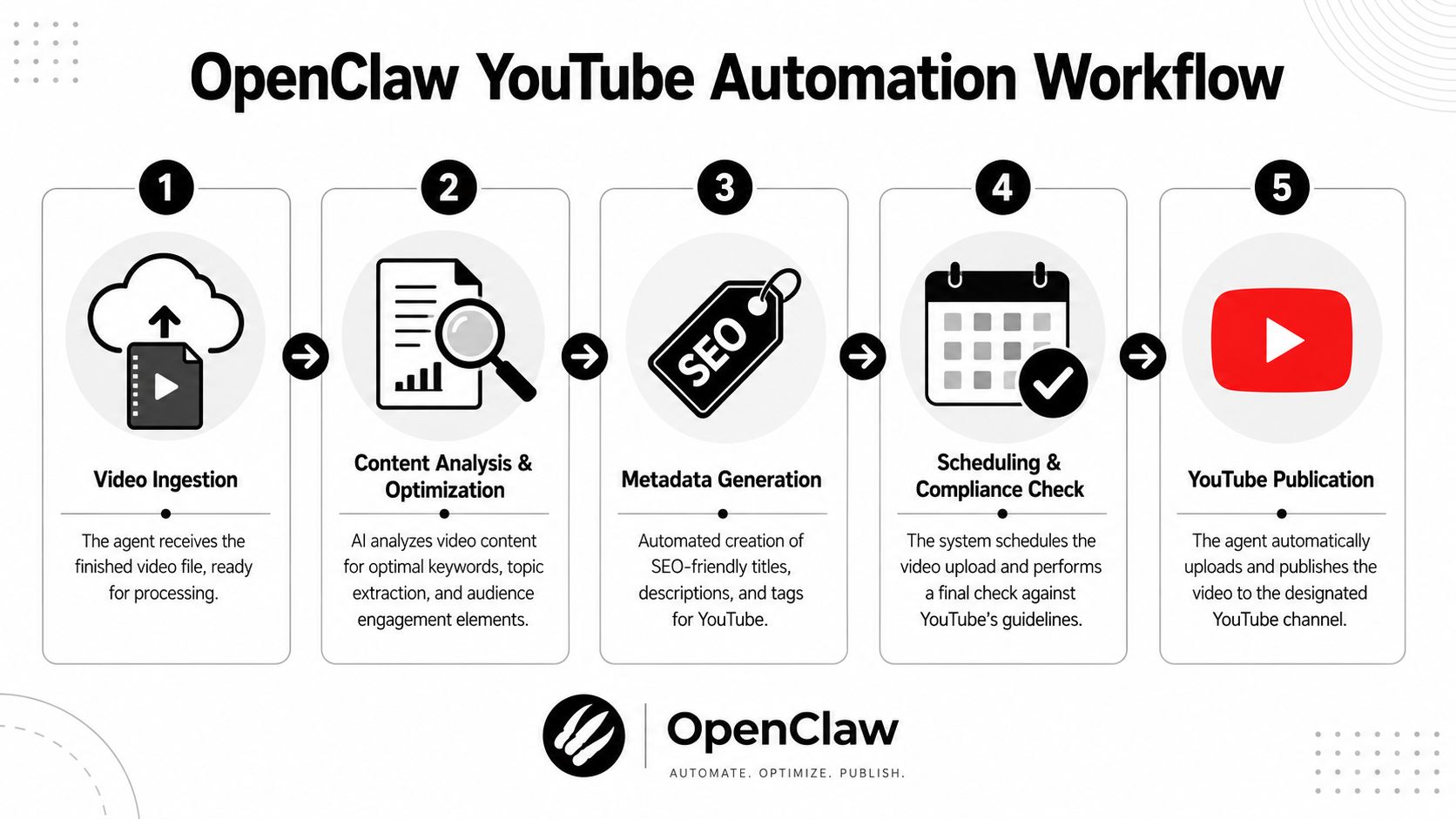
Start with a practical workflow. A finished video lands in storage. The agent reads the asset manifest, generates metadata, creates or attaches a transcript, performs a release check, and publishes or schedules the video. Each step should be runnable on its own, with a visible output and a failure state that doesn't corrupt the rest of the job.
Early in the design, I like to force one question: if step three fails, can step four still be blocked cleanly without rerunning steps one and two? If the answer is no, the workflow is too tightly coupled.
A simple visual model helps keep the handoffs explicit.
Build the pipeline as separate jobs
The strongest technical pattern in the available OpenClaw YouTube material is modular workflow design. The published guidance describes one workflow that can decide the topic, generate prompts, create media, stitch the final video, and upload it, while a separate toolkit workflow can ingest a URL and return summaries, transcripts, channel analysis, and playlist breakdowns through the OpenClaw YouTube toolkit guide. That's the right way to think about content ops. Publishing and research are related, but they shouldn't be the same job.
A production-ready chain often looks like this:
- Ingestion job: Validates file presence, format, channel target, and asset naming.
- Analysis job: Extracts transcript or source text, then derives topic and intent.
- Metadata job: Drafts title, description, tags, and playlist suggestions.
- Review job: Applies policy checks and routes for optional approval.
- Publish job: Uploads, schedules, attaches metadata, and records the result.
If your team is still refining thumbnails, scripts, or edit standards, that upstream work matters just as much as upload automation. A useful reference outside the agent layer is this comprehensive guide for video creators, because the quality of the source asset still determines whether automation helps or just accelerates weak inputs.
For teams that split responsibilities across agents, AI employees for operational workflows is the broader model. Research, metadata, compliance, and publishing are separate functions even when they cooperate inside one system.
Prefer Cron over heartbeat polling
A lot of first deployments waste tokens and create noise because they use heartbeat-style checks for work that should be scheduled. The OpenClaw YouTube toolkit guidance explicitly notes that heartbeat polling burns significantly more AI tokens since each check is a fresh AI call, and says most automations should use Cron instead.
Use heartbeat checks only when an external event has to be watched in near real time. YouTube publishing usually doesn't fall into that category. Most tasks are predictable:
- release every weekday at a fixed hour
- scan a watch folder every morning
- collect approvals at editorial cutoff
- publish long-form videos on one cadence and shorts on another
That schedule is exactly what Cron is good at.
Here is the embedded demo for context on how these flows are often presented at a high level:
Define what the agent may publish automatically
Not every output deserves full autonomy. The trick is to classify content by risk.
A low-risk lane may include standardized clips from a trusted template, where title formats and CTA language are preapproved. A higher-risk lane includes original commentary, news-sensitive videos, or uploads tied to sponsors. Those should stop at a review checkpoint.
Use a simple publication policy matrix:
| Content type | Auto-publish | Human approval |
|---|---|---|
| Template-based shorts | Usually acceptable | Optional |
| Evergreen tutorials | Sometimes | Recommended |
| Sponsored videos | No | Required |
| News or policy-sensitive content | No | Required |
"Autonomous" doesn't mean "unsupervised." It means the system knows when to proceed and when to stop.
That's the difference between a demo that uploads videos and an operations-grade workflow that your team can trust.
Integrating Approvals and Notifications with Your Ecosystem
The fastest way to lose trust in OpenClaw YouTube automation is to remove humans from the wrong decisions.
A practical setup keeps human review narrow and deliberate. The agent shouldn't ask for approval on every tiny field. It should ask when a decision has brand, legal, sponsor, or reputational weight. Most of the repetitive work can still run without interruption.
A practical approval pattern with Slack
A common pattern is simple. The metadata agent prepares a draft title, description, tags, schedule time, and target playlist. It then posts a summary into a Slack channel used by content ops. The message includes an approval action and a reject or revise path.
A solid approval message usually contains:
- Asset identity: Video title slug, internal job ID, and target channel
- Proposed metadata: Draft title, short description preview, and tag set
- Risk flags: Sponsor mention, policy-sensitive topic, or missing transcript
- Action controls: Approve, reject, request rewrite, or escalate
- Traceability: Link back to the workflow run and stored draft
This keeps Slack as the decision surface, not the source of truth. The source of truth should remain your workflow state store or content database.
Approvals work best when the reviewer can answer one question quickly: "Is this safe and good enough to publish?"
If the reviewer has to ask where the file came from, which channel it's targeting, or whether captions were generated, the notification is incomplete.
Using Notion as the editorial control plane
Notion works well when the publishing queue needs more context than a chat message can hold. Agencies often use it as a channel calendar, draft tracker, and exception queue.
A useful pattern is to let the agent create a database record with fields for status, owner, target channel, thumbnail state, transcript state, and approval state. The agent can update the record as it moves through the pipeline. Editors can change one field, such as "approved for publish," and the workflow can continue from that checkpoint.
For broader app connectivity, workflow integrations for agent systems are useful when Slack, Notion, Gmail, and storage all need to participate in one approval flow. The key is not the specific platform. The key is keeping the approval event structured so the agent can act on it deterministically.
A typical human-in-the-loop flow looks like this:
- The publishing agent prepares a draft package.
- Slack receives the quick approval card.
- Notion stores the full editorial record.
- If approved, the publish job continues.
- If rejected, the metadata or script agent receives a constrained rewrite request.
That last point matters. Rejection shouldn't dump the workflow back to the start. It should return to the step that needs correction.
Scaling Securely with Multi-Instance Architecture
The single biggest architectural mistake in OpenClaw YouTube automation is treating all channels as one environment.
That might hold for a solo operator with one brand. It doesn't hold for an agency, a portfolio company setup, or a media team with separate regional channels. Once multiple stakeholders, billing owners, and permission boundaries enter the picture, a shared instance becomes a liability.
Most public tutorials don't deal with that reality. They focus on getting an agent to perform the task. They skip the harder operating model of running many agents across many client environments while keeping secrets, logs, and permissions cleanly separated.
Why single-instance setups break down
In a shared instance, several problems show up quickly:
- Credential spillover: One operator can accidentally wire the wrong YouTube token to the wrong workflow.
- Log confusion: Troubleshooting gets harder when multiple clients share the same event stream.
- Weak access boundaries: Editors see workflows they shouldn't touch.
- Billing ambiguity: Usage attribution turns into manual reconciliation.
- Unsafe experimentation: A staging test can collide with a live client setup.
This is why secure deployment is such an underserved part of the conversation. Agencies especially feel the pain. The operational issue isn't just automation logic. It's tenancy.
How to partition clients and teams cleanly
A better model is one isolated instance per client, brand, or environment.
That separation should cover more than dashboards. It should include secrets, workflow definitions, storage bindings, agent memory, and logs. If a client asks for export, archival, or revocation, you want a boundary that already exists operationally.
A clean multi-instance pattern usually includes these controls:
| Control area | Recommended boundary |
|---|---|
| Credentials | Separate per instance |
| Workflows | Versioned and deployed per client |
| Storage | Scoped folders or buckets per tenant |
| Access | Per-instance RBAC |
| Logs | Unified view for ops, isolated visibility for clients |
Role-Based Access Control matters as much as instance separation. A client stakeholder may need read-only visibility into their publishing status. An internal operator may need workflow execution rights. A finance user may need billing visibility without secret access. If your platform can't express those roles precisely, people will compensate by sharing accounts or over-permissioning users.
The cleanest systems also keep a unified audit trail at the platform layer while preserving tenant isolation. That gives central ops a way to investigate issues across the fleet without exposing one client's details to another.
Operational shortcut to avoid: Never solve multi-client management by cloning one "master" agent and changing only the channel ID while leaving shared secrets and shared logs underneath.
That shortcut works until the day it doesn't. Then you spend your time proving which action happened under which tenant context, and the evidence is messy.
For YouTube operations, secure scale isn't a luxury feature. It's the condition that lets automation expand beyond a single enthusiastic builder.
Monitoring Auditing and Optimizing Your Agents
At 2:00 a.m., a scheduled upload misses its publish window, the retry queue keeps growing, and an account manager wants to know whether the problem came from YouTube API latency, bad metadata, or the wrong approval state. That is the moment when a demo pipeline stops being useful and your operating model gets tested.
Reliable YouTube automation depends less on the upload itself and more on what happens around it. Track every run, every retry, every override, and every state transition. General agent reliability guidance from Tencent Cloud's write-up on agent reliability aligns with that approach: start with narrow workflows, then add controls such as timeouts, retries with backoff, circuit breakers, deduplication keys, and checkpointing as failure modes become clear in production.
Track the signals that reveal fragility
A useful dashboard answers operational questions fast:
- Is each workflow starting and finishing inside the expected publish window
- Which step fails most often: asset fetch, metadata generation, approval, upload, or post-publish validation
- How often does a human step in to fix a run that technically completed
- Are retries recovering transient failures or repeatedly delaying the same broken job
Those questions map to a small set of metrics that operators can use:
- Run time: Spots queue buildup, slow dependencies, and jobs that drift past their schedule.
- Error rate by step: Separates API instability from workflow bugs or bad input data.
- Delivery latency: Measures the gap between trigger time and confirmed publication.
- Manual overrides: Exposes weak spots that logs alone miss, especially around metadata quality and approval routing.
Manual overrides deserve more attention than many teams give them. If operators keep fixing titles, thumbnails, playlist assignments, or audience settings by hand, the agent is producing work that looks successful in the logs but still costs staff time. In multi-client environments, that also creates inconsistency across channels because each operator applies fixes a little differently.
Use audit logs to reconstruct what actually happened
Audit logs are part of day-to-day operations, not a compliance afterthought.
When a video is published late, published twice, or sent to the wrong channel, the team needs a clean event trail. Which agent instance picked the asset. Which metadata version was attached. Which approval record cleared the run. Which credential set was active. Which retry finally succeeded. Without that sequence, root cause analysis turns into guesswork.
The controls that hold up under load are predictable:
- Retries with backoff: Recover short-lived API failures without hammering the dependency.
- Timeouts: Stop stuck jobs from tying up workers and blocking later publishes.
- Circuit breakers: Prevent one failing service from flooding the queue with doomed retries.
- Deduplication keys: Block duplicate uploads after reruns, worker restarts, or webhook replays.
- Checkpointing: Resume from the last safe state instead of replaying the entire workflow.
I treat deduplication and checkpointing as first-class design choices, not cleanup tasks. They matter most after the first incident, when a worker restarts halfway through an upload or a webhook fires twice. If the system cannot prove whether a publish already happened, operators either risk duplicates or delay the channel while they verify it manually.
Optimize with controlled changes
Optimization works best when it is boring. Change one variable per release and watch the results for at least a few run cycles.
If metadata quality is inconsistent, adjust prompt logic or validation rules first. If jobs miss publish windows, tune queue concurrency, timeout thresholds, or retry policy first. If approval delays are the problem, fix notification routing and escalation paths first. Bundling all of those edits into one deployment makes troubleshooting harder and hides which change improved reliability.
Teams that run OpenClaw YouTube automation well treat observability, auditability, and failure recovery as part of the product. Donely is one option for hosting and managing OpenClaw-based agents with isolated instances, RBAC, integrations, and centralized monitoring. The practical test stays the same: can you identify what happened, who approved it, which tenant it belonged to, and how the system recovered, without digging through scattered logs or shared credentials.