
Manual invoice processing can cost about $9.40 per invoice on average and as much as $19.83 for laggard teams, while best-in-class automated teams process invoices for about $2.78. The same benchmark reports an average end-to-end cycle time of 9.2 days, compared with 3.1 days for best-in-class teams, and touchless processing of 32.6% on average versus 49.2% at best-in-class organizations (invoice processing automation benchmarks).
That gap changes the discussion. Invoice processing automation isn't a way to remove keystrokes from accounts payable. It affects working capital visibility, supplier communication, approval capacity, audit readiness, and the amount of invoice volume a finance team can handle without adding equivalent administrative work.
Table of Contents
- Why Invoice Processing Automation Is Now a Strategic Priority
- Reference Architecture for an AI-Driven Invoice Workflow
- Choosing the Right Capture and Extraction Approach
- Validation, Three-Way Match, and Approval Rules That Hold Up in Production
- Deploying the Workflow on an AI-Agent Platform
- Integrations, Monitoring, and the KPIs That Actually Matter
- Security, Compliance, and Your First 90 Days
Why Invoice Processing Automation Is Now a Strategic Priority
A finance team can tolerate manual invoice work while volume remains predictable. The process breaks under mixed intake: shared inboxes, supplier portals, scanned documents, and ERP uploads arriving together. AP staff download attachments, rekey fields, chase approvals, investigate mismatches, and respond to suppliers asking whether an invoice was received.
The benchmark figures show why the operating model matters. Manual handling averages $9.40 per invoice, compared with $2.78 per invoice for best-in-class automated workflows. Laggard teams can reach $19.83 per invoice, while average cycle time is 9.2 days, compared with 3.1 days for best-in-class organizations (benchmark data from Parseur).
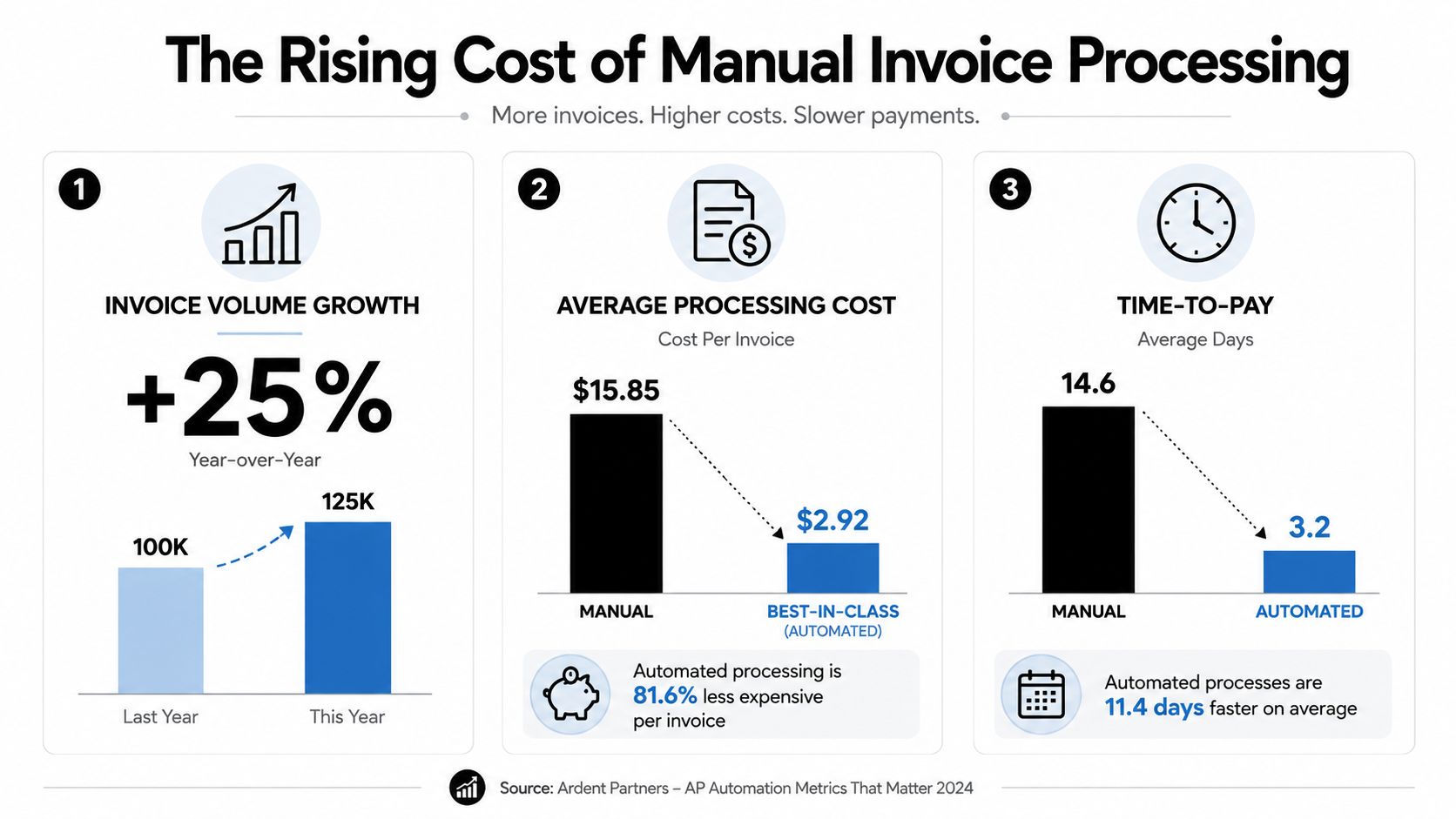
The strategic value sits beyond data entry
OCR only addresses capture. The operating gain comes when clean invoices pass through validation, matching, approval, and ERP posting without repeated AP intervention. People can then focus on exceptions, policy decisions, supplier master data, and fraud-sensitive changes. That distinction matters because production workflows rarely fail on the easy invoices. They fail when documents are incomplete, coding is unclear, or approvals stall.
Adoption is now widespread. Industry reporting indicates that about 73% of AP departments use some form of invoice-processing automation, up from 56% in 2022 and 64% in 2023 (AP automation adoption reporting). Yet the average touchless rate remains 32.6%. Buying software, therefore, does not create straight-through processing by itself.
Practical rule: Treat automation as an operating model, not a capture feature. If the workflow cannot resolve or route exceptions, it creates a faster way to build a manual queue.
Start with intake ownership, vendor master quality, PO discipline, approval policy, and ERP integration. These choices determine whether automation reduces work or merely shifts it into an exception queue. Teams connecting purchasing controls with downstream AP execution can also consult this DataLunix procurement process insight.
Reference Architecture for an AI-Driven Invoice Workflow
A reliable invoice workflow can be drawn as seven connected stages. Each stage has a different failure pattern, owner, and control requirement. Vendor demonstrations often blur these boundaries, so finance and IT teams should ask exactly where each capability operates.
Seven stages from receipt to reporting
Intake brings invoices into a controlled queue from email, portals, supplier uploads, or EDI. The immediate risk is fragmentation. If suppliers continue sending documents to personal inboxes or local folders, the platform can't provide a complete inventory.
Ingestion and classification identifies the document type and separates invoices from statements, credit notes, purchase orders, and unrelated attachments. Classification errors are usually workflow errors, not extraction errors, because the wrong document can be sent down the wrong path.
Capture and field extraction reads supplier name, invoice number, dates, totals, tax data, PO references, and line items. The system should retain confidence signals and the original image so a reviewer can verify the source rather than trust an opaque value.
Validation and enrichment checks supplier records, required fields, tax treatment, duplicate indicators, currency, payment terms, and coding suggestions. Master-data quality starts to determine the practical ceiling of automation.
Matching compares the invoice with a purchase order and, where required, a goods receipt or service confirmation. Two-way matching checks the invoice against the PO. Three-way matching adds evidence that the goods or services were received.
Approval routing sends valid invoices to the correct cost-center owner, budget holder, or controller. Rules should support sequential and parallel approval paths, delegation, reminders, and escalation without allowing an approval to bypass segregation of duties.
ERP posting and analytics creates or updates the accounting record, returns status to the workflow, and exposes cycle time, exceptions, touchless processing, and posting failures. The final stage matters because an invoice that is approved but not posted still requires manual intervention.
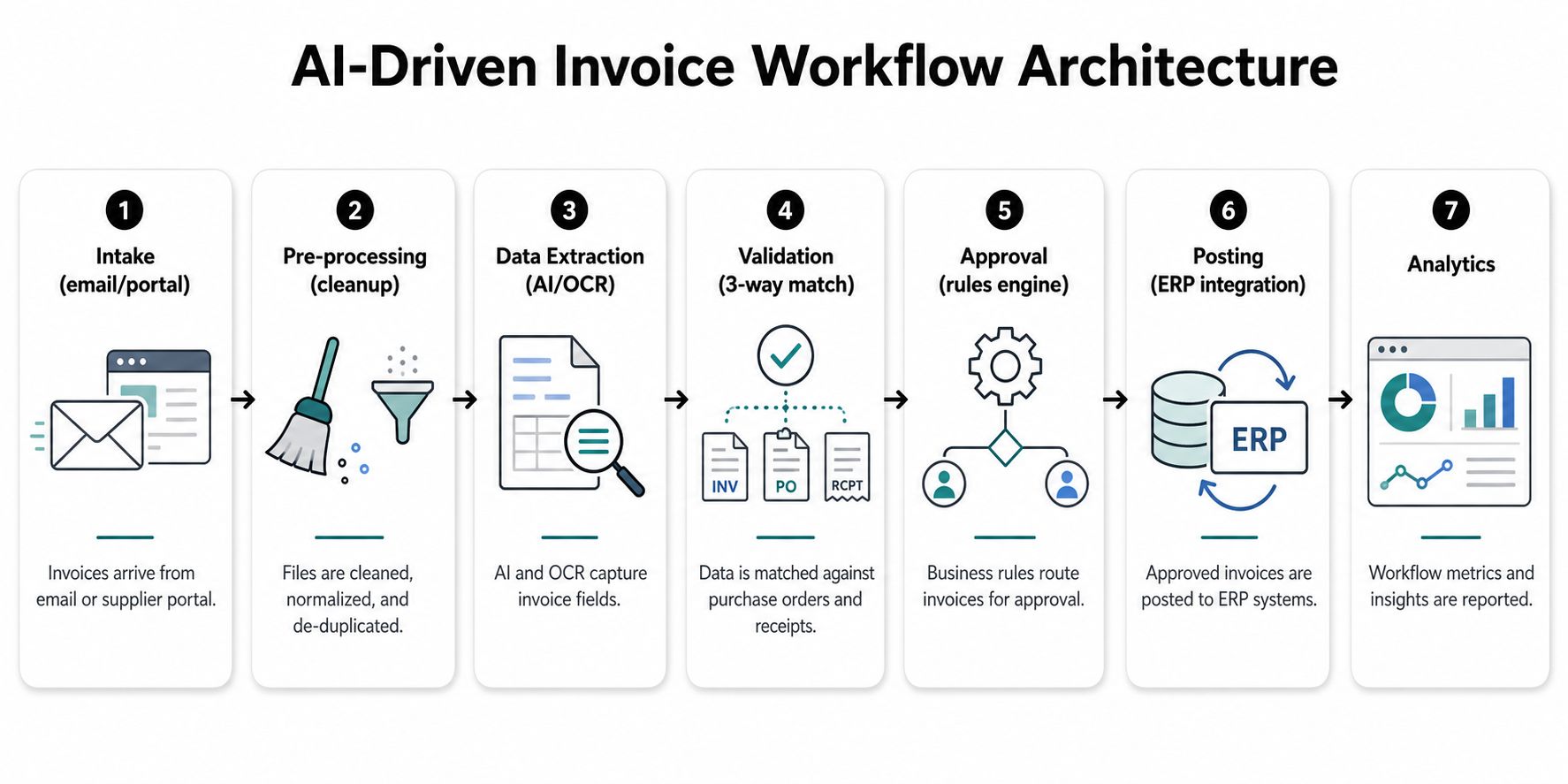
The architecture should preserve context between stages. A reviewer resolving a missing receipt needs access to the invoice, PO, receipt record, supplier history, and prior comments in one workspace. A centralized knowledge layer, such as a company brain for shared operational context, can help agents work from approved business information, but it shouldn't replace explicit accounting controls.
The video below provides a visual complement to the workflow architecture.
Choosing the Right Capture and Extraction Approach
Capture technology determines how much data enters the workflow cleanly, but it doesn't determine whether the invoice can be posted safely. An advanced extraction engine still fails when the supplier is duplicated, the PO is missing, or the ERP rejects the proposed GL code.
Three approaches dominate practical evaluations.
| Approach | Strengths | Weak Spots | Best Fit |
|---|---|---|---|
| Template-based OCR | Predictable, inexpensive for stable layouts, easy to test | Breaks when suppliers change layouts, tables shift, scans are skewed, or fields move | Teams with a narrow supplier base and highly consistent forms |
| Traditional AI and ML extraction | Handles varied layouts, classification, line items, and document patterns better than fixed templates | Needs training data, monitoring, and periodic adjustment for unusual formats or languages | Mid-market AP teams with recurring invoice diversity and established workflows |
| LLM-based agents | Interprets context, handles unfamiliar layouts, explains extracted values, and can coordinate follow-up actions | Higher governance burden, variable confidence, greater need for permission controls and human review | Complex environments where invoices contain ambiguous structure or require contextual reasoning |
Where each approach breaks
Template OCR works well when a supplier sends the same structured document repeatedly. It becomes brittle when a redesign moves the invoice number, when a multi-line table wraps unexpectedly, or when an image contains noise. It also needs careful handling for foreign-language invoices, handwritten annotations, and irregular tax layouts.
Traditional AI and ML extraction is more adaptable. Computer vision can locate fields without fixed coordinates, while classification models can distinguish invoice types and identify relevant regions. The trade-off is operational maintenance. Teams need labeled examples, a feedback process, and a way to investigate why a model made a poor extraction.
LLM-based agents are useful when the invoice requires interpretation rather than simple location. An agent can reason about labels, reconcile alternate descriptions, and explain why a value appears inconsistent. That flexibility doesn't make the output automatically safe for posting. Financial controls should require confidence thresholds, validation against authoritative records, and human approval for sensitive exceptions.
A practical selection rule
Choose the simplest approach that handles your actual supplier mix. Template OCR may be enough for stable, standardized documents. Traditional AI and ML is a sensible middle ground for varied layouts and established ERP processes. LLM-based agents become more attractive when the business has multiple document styles, ambiguous fields, or a need to coordinate extraction with validation and follow-up work.
The recommendation for most mid-market teams is hybrid. Use deterministic rules for required fields, duplicate checks, tax logic, and posting controls. Use adaptive extraction for document understanding, then send uncertain or high-risk decisions to a human.
Validation, Three-Way Match, and Approval Rules That Hold Up in Production
Clean extraction is only the beginning. The workflow earns trust when it can distinguish an invoice that is safe to post from one that needs investigation, without turning every minor variance into a manual stop.
Start with header-level controls. Confirm that the supplier exists, the invoice number isn't already recorded, the remit-to details are expected, and any tax identifiers or banking changes follow a separate verification process. A name that looks similar to an approved supplier shouldn't be accepted automatically if it creates a duplicate master record.
Build controls in layers
Line-level validation should compare quantity, unit price, tax treatment, and totals. Tolerances need to reflect the organization's purchasing policy. A small quantity or price variance might route to a buyer for confirmation, while a material discrepancy should block posting until the PO or receipt is corrected.
Three-way matching adds receiving evidence to the invoice and purchase order. It works especially well for goods with clear quantities, but services often require a service entry, milestone confirmation, or named business owner. Teams dealing with international suppliers should also account for currency, tax, shipping, and cross-border documentation. This guide to cross-border three-way matching from Zaro is useful when standard domestic assumptions don't fit the transaction.
A workable rule set might look like this:
- Supplier validation: Accept only active supplier records, and route remit-to changes for independent verification.
- PO and receipt matching: Permit automatic progression when the invoice, PO, and receipt satisfy configured tolerances.
- GL and tax verification: Suggest coding from supplier and cost-center history, but require review when the account, tax code, or entity is unfamiliar.
- Duplicate detection: Compare supplier, invoice number, amount, date, and document similarity before posting.
- Approval routing: Send invoices to the responsible cost-center owner, then escalate according to policy when value, risk, or exception type requires it.
Non-PO invoices need their own path
Non-PO invoices are where many programs lose their return. Utilities, legal services, subscriptions, rent, and other recurring charges may not have a conventional PO, so the workflow needs an approved alternative: contract reference, budget owner, recurring-invoice rule, or service confirmation.
Don't force non-PO invoices through a PO-only path. Create a separate queue with required coding fields, named approvers, recurring supplier controls, and a clear escalation route. The objective isn't to make every invoice touchless. It's to make every manual review intentional, documented, and faster to resolve.
Deploying the Workflow on an AI-Agent Platform
A practical deployment starts with boundaries, not prompts. Create a personal sandbox for experimentation, a production finance instance for controlled processing, and separate client instances if an agency operates workflows for multiple organizations. Isolation prevents test data, permissions, and operating assumptions from crossing environments.
Configure agents around responsibilities
A useful design assigns narrow responsibilities to agents rather than asking one general agent to run AP end to end. For example, one agent can monitor a Gmail or Outlook intake channel, another can classify and extract invoice data, and another can prepare an exception summary for AP review. A posting agent should have tightly scoped ERP permissions and shouldn't be allowed to alter supplier banking details.
Connect document sources such as Google Drive or SharePoint when invoices and receiving records live outside email. Use Slack or Microsoft Teams for notifications, not as the system of record. Accounting and ERP connectors, including QuickBooks, Xero, NetSuite, or SAP, should return posting status and errors to the workflow.
Use RBAC to make the safe path the easy path
An AP clerk might review invoices within an approved threshold, while a controller handles higher-value or policy-exception items. The exact threshold belongs in the organization's approval matrix, and the platform should enforce it rather than relying on an agent's interpretation.
Keep audit logs across instances. Record who changed a rule, who approved an invoice, which data the agent used, what it proposed, and what the human reviewer changed. Donely's AI employees model is relevant here because it frames agents as managed operational workers with defined access and tasks, rather than unmanaged scripts scattered across finance systems.
Deployment discipline: Start with one intake channel, one entity, and a limited supplier group. Expand only after the exception reasons are understood.
Initial setup should focus on process mapping, connector permissions, approval rules, sample invoices, and exception routing. A quick launch is possible when the ERP data is clean and the approval matrix is documented. If those inputs are unclear, configuration speed won't solve the underlying operating problem.
Integrations, Monitoring, and the KPIs That Actually Matter
An invoice workflow is not finished when extraction and approval work. It is finished when the accounting system receives the right transaction, returns a clear result, and keeps payment status aligned with the invoice record. Posting, reconciliation, payment readiness, and failure handling need defined interfaces, ownership, and recovery steps.
Choose the integration pattern deliberately
Use an API when the ERP supports near-real-time reads and writes, validation responses, and status callbacks. The workflow can check supplier records, retrieve purchase order and receipt data, submit approved invoices, and receive posting errors without waiting for a batch.
Flat files remain practical in legacy environments, controlled migrations, or ERP deployments with limited API coverage. They introduce latency and more reconciliation work. Each file needs an owner, delivery confirmation, schema version, duplicate protection, and a defined process for rejected rows.
Before enabling live posting, test the complete loop:
- Pull authoritative supplier, PO, receipt, entity, cost-center, and GL data.
- Validate an invoice without changing the ledger.
- Submit a controlled posting.
- Capture successful, rejected, and partially failed responses.
- Reconcile the workflow record with the ERP record.
- Confirm that payment status returns to the invoice workspace.
Teams documenting ownership, authentication, error handling, and rollout dependencies can use these seamless integration tips. For connector coverage across business systems, review the Donely integrations available for the deployment.

Build monitoring around exceptions, not activity
A dashboard showing invoice volume can make a weak workflow appear productive. The useful view shows why an invoice stopped, where it stopped, how long it remained there, and whether the underlying cause is declining.
Track these measures by entity, supplier, invoice type, and exception reason:
- Touchless rate: The share of invoices completing the defined workflow without human intervention. The benchmark cited earlier places average performance at 32.6% and best-in-class performance at 49.2%. Treat this as a maturity signal, not a vanity score (AP automation benchmark data).
- Exception rate by reason: Separate missing PO, price variance, receipt gap, GL uncertainty, duplicate concern, supplier mismatch, approval delay, and integration failure. A blended rate hides the action required to reduce each queue.
- Cycle time by supplier: An overall average can conceal a supplier whose invoices repeatedly wait for a receipt or approval. Supplier-level results identify recurring bottlenecks and the process owner who can address them.
- Cost per invoice: Include labor, platform, review, rework, and integration effort. The benchmark range, from $9.40 on average to $2.78 for best-in-class teams, gives finance leaders a reference for the economic gap.
- Posting failure rate: Monitor invoices approved by the workflow but rejected by the ERP. A rising rate usually indicates drift between the automation layer, accounting rules, and master data.
- Approval aging: Separate time waiting for a person from time spent in validation or integration. Each queue requires a different remedy.
Five production failure modes
Missing or mismatched POs appear as invoices waiting for buyer confirmation. The cause is usually purchasing behavior or supplier instruction, not weak extraction. Require PO references, improve PO creation practices, and give buyers a visible exception queue.
Incorrect GL coding sends non-PO invoices to reviewers who repeatedly correct the same supplier or cost-center pattern. Establish approved coding rules, maintain a feedback log, and route unfamiliar combinations to a designated reviewer. Model retraining will not resolve an accounting policy gap.
Duplicate suppliers produce failed matches, duplicate-payment risk, and inconsistent historical coding. Consolidate supplier records, assign a master-data owner, and hold new near-duplicate records for review.
Disconnected systems leave invoices approved in one application but unposted in the ERP. Add transaction identifiers, retry handling, reconciliation reports, and alerts for rejected or stale messages. Financial transactions should not be retried without idempotency protection.
Change-management resistance shows up as email approvals outside the workflow, spreadsheet queues, and users bypassing required fields. Train approvers on the new path, simplify notifications, and make the controlled route faster than the workaround. Managers must reinforce the process when users return to old habits.
Decide whether to fix, retrain, or involve a human
Use a practical decision tree:
- If the same field or match fails across many suppliers, fix upstream data or policy.
- If source documents vary but the business meaning is clear, improve extraction examples or model instructions.
- If the decision depends on judgment, fraud sensitivity, or incomplete evidence, add a human-in-the-loop step.
- If the ERP rejects valid-looking transactions, repair the integration or master data before changing the agent.
- If users bypass the workflow, address ownership, training, and approval design before tuning the technology.
AP research identifies invoice exceptions as the biggest challenge for 53% of AP professionals, while only 32.6% of invoices are processed without human intervention. Even best-in-class teams reach 49.2% touchless processing, reinforcing the operational point that production performance depends on exception reduction and data hygiene, not capture quality alone (AP exception and touchless processing findings).
Security, Compliance, and Your First 90 Days
Security controls belong in the workflow design from the first pilot. Invoice images and approval records should be encrypted in transit and at rest, access should follow role-based permissions, and supplier banking changes should require independent verification rather than an agent-only decision.
Segregation of duties must survive automation. The person who creates or edits a supplier shouldn't automatically approve and release a payment. Retain invoice images, supporting documents, approval actions, comments, exception decisions, and posting responses according to the organization's retention policy.
Regulated buyers should ask vendors about their current security posture, audit evidence, incident response, access reviews, and roadmap. A HIPAA-ready architecture may matter for organizations handling protected information, while SOC 2 status should be verified rather than assumed. Donely describes SOC 2 as in progress and a HIPAA-ready architecture as part of its enterprise offering, so buyers should validate the controls and scope that apply to their own deployment.
A disciplined 90-day rollout
Days 1 to 30: Map intake, validation, matching, approval, posting, and payment status. Establish baseline cost, cycle time, touchless rate, and exception reasons. Clean supplier master records and document the approval matrix before configuring agents.
Days 31 to 60: Pilot one entity, supplier group, or invoice type. Keep posting controls conservative, review every exception category, test ERP failures, and collect feedback from AP clerks, approvers, procurement, IT, and internal audit.
Days 61 to 90: Expand volume only after the pilot queue is understood. Add suppliers in cohorts, publish weekly KPI reviews, retire duplicate intake channels, and assign owners for each recurring exception.
The leading indicators are straightforward: exception volume is falling, the same root causes aren't returning, approvers use the workflow, ERP reconciliation is clean, and touchless processing improves without weakening controls. If those signals don't move, buying a smarter extraction engine won't repair the deployment.
Donely provides a managed way to deploy AI employees with isolated instances, granular permissions, integrations, and centralized audit visibility for workflows such as invoice intake, validation, approval routing, and reconciliation. Visit Donely to evaluate whether its agent platform fits your AP automation pilot and governance requirements.