
You've probably landed here because regular chatbots stopped feeling like enough.
You can ask ChatGPT or Claude to draft an email, summarize notes, or brainstorm ideas. That's useful. But the moment you want an AI to sit inside your workflow, watch for triggers, connect to your tools, and keep working when you close your laptop, you start looking for something more like an operator than a chatbot.
That's where an openclaw beginner guide matters. OpenClaw is the kind of project people pick up when they want a real assistant, not just a better prompt box. It can live in Telegram or WhatsApp, connect to tools you already use, and carry out recurring work like a junior teammate with a very fast typing speed and no need for sleep.
For a first-time user, the hardest part isn't usually motivation. It's building the right mental model. If you treat OpenClaw like “ChatGPT, but installed locally,” you'll get confused fast. If you treat it like your first AI employee, the pieces start to make sense.
Table of Contents
- What Is OpenClaw and Why Does It Matter
- Understanding OpenClaw Core Architecture
- Practical Use Cases for Your First AI Agent
- Your Concise Getting-Started Checklist
- Beyond a Single Agent Scaling and Governance with Donely
- Planning Your OpenClaw Journey
What Is OpenClaw and Why Does It Matter
A familiar workday looks like this. Your inbox needs replies. Your calendar has holes and collisions. A customer message arrives in one app, a teammate asks for context in another, and your task list keeps growing because every small decision creates three more tiny tasks.
That's the job OpenClaw is trying to absorb.
Instead of acting like a chatbot you visit, OpenClaw behaves more like a digital chief of staff. You message it through channels you already use, give it access to selected tools, and assign it ongoing responsibilities. Think less “search engine with personality” and more “assistant with an inbox, a browser, and a checklist.”
Why people move from chatbots to agents
A normal chatbot waits for your next prompt. An agent can keep context, use tools, and take action inside a defined lane.
That difference matters most when work repeats:
- Inbox triage: sorting messages, summarizing threads, drafting replies
- Calendar support: checking availability, pulling context before meetings
- Document lookup: finding prior notes, gathering references, surfacing next actions
- Channel monitoring: watching Telegram, WhatsApp, or other feeds for updates you care about
One early sign of how people use OpenClaw is the popularity of its Google-focused skill set. By May 2026, bundled skills like gog for Gmail, Calendar, and Docs were installed in 75% of new OpenClaw setups, and those read-only workflows boosted productivity by an average of 40% in early user trials, according to this beginner tutorial data point.
A simple way to think about it
If ChatGPT is like a very smart consultant you call into a meeting, OpenClaw is closer to a staff member with standing responsibilities.
You don't ask it just one question. You give it a role.
Give your first agent one job that already repeats in your life. That's where OpenClaw feels useful fastest.
That's also why comparisons between general AI apps and agent systems matter. If you want more context on how this model differs from all-in-one AI products, this breakdown of OpenAI superapp vs OpenClaw is a good companion read.
Understanding OpenClaw Core Architecture
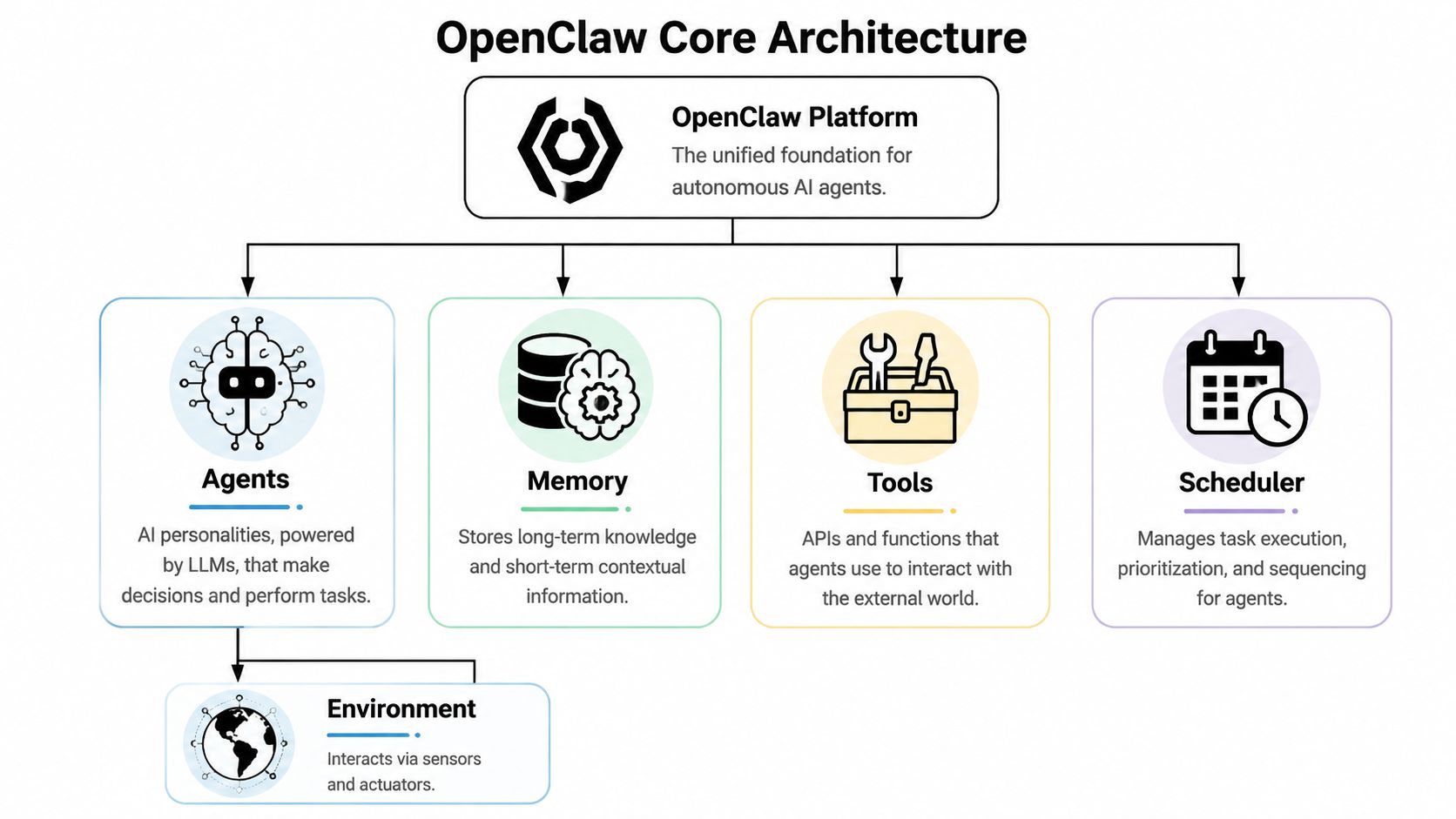
OpenClaw's architecture has four parts you need to grasp early: the agent, the instance, the skills, and the gateway. If you understand how those pieces relate, setup stops feeling mysterious. You can also make better decisions later when one personal agent turns into several agents that need oversight.
Agents define the role
An agent is the part that holds instructions, behavior, memory patterns, and the model connection. You might connect it to Anthropic, OpenAI, Google, or a local Ollama model, but the model alone is only the reasoning engine. The agent adds the operating rules around that engine.
For a beginner, the clearest way to set this up is to name a role and a narrow responsibility. “Inbox Assistant” works. “Meeting Prep Bot” works. “General life helper that does everything” usually creates confusion because the agent has no clear priority for what good performance looks like.
A helpful mental model is this: the model supplies intelligence, while the agent supplies identity and boundaries.
Instances define the workspace
An instance is where that agent lives and runs. It holds the local environment, settings, files, running state, and the practical context that makes one setup different from another.
Beginners often assume one install should become one universal assistant. Separate workspaces are easier to manage, considering a personal admin instance has different files, channels, permissions, and risk tolerance than one used for client work or team operations.
If the agent answers the question "who is doing the job?", the instance answers "where is that job happening?"
Skills connect the agent to real systems
Skills are what let OpenClaw do useful work outside the chat window. Without them, the agent can reason and draft. With them, it can read, check, send, search, and organize.
A skill might let the agent read Gmail and Calendar, search the web, work with files, or respond through channels such as Telegram and WhatsApp. If your workflow includes social publishing, some builders also connect OpenClaw to external tooling like Mallary.ai's social media API so an agent can turn findings into scheduled drafts or queued posts.
This is usually the moment when OpenClaw clicks for beginners. The agent stops being a smart text box and starts acting more like a system that can gather context before it responds.
The gateway moves messages and actions
The gateway handles the traffic between channels, agents, and skills. A message comes in, the agent processes it, the right skill gets called if needed, and the result goes back out to the user or the connected system.
That flow sounds simple, but it explains a lot of beginner confusion. If a reply looks fine but no external action happened, the issue is often not the model. It is usually the path between the message, the tool call, and the return route.
OpenClaw documents often describe the gateway as a bidirectional proxy. That wording is useful because it highlights the gateway's real job: passing requests in both directions, keeping the conversation layer connected to the action layer.
Permissions shape trust
Permissions are not a final polish step. They are part of the architecture from day one.
Start with read-only access where you can. Give each agent one job, a small toolset, and a clear list of allowed systems. That makes testing easier, reduces surprises, and gives you a clean base for later growth.
This is also where the long-term picture starts to matter. A single local agent is manageable by hand. Several agents across different channels, data sources, and teammates create a different kind of problem. You need naming rules, access controls, auditability, and a way to see what each agent is allowed to do. Learning the core architecture now prepares you for that shift, which is exactly why local OpenClaw setup should be treated as step one, not the finish line.
Practical Use Cases for Your First AI Agent
The best first project isn't the most ambitious one. It's the one you'll keep using after the novelty wears off.
OpenClaw works best when you point it at work that repeats, has clear inputs, and doesn't require constant reinvention. Here are three beginner-friendly patterns that make the platform feel real fast.
The inbox zero assistant
Your inbox usually contains three kinds of work. Messages that need a fast reply, messages that need context from other tools, and messages that should never have interrupted you in the first place.
An OpenClaw inbox assistant can read incoming mail, summarize important threads, and draft responses for review. If you connect Google tools, it can also cross-check your calendar or documents before replying. That turns “What should I say here?” into “Approve or adjust this draft.”
The value isn't just speed. It's reduced switching. You stay in one conversation thread with your agent instead of bouncing between tabs.
The social media scout
A second strong starter project is a scout that watches channels for patterns you care about. That could mean product mentions in Telegram communities, competitor chatter in Discord, or topic tracking across creator spaces.
A simple version sends you a digest. A more advanced version turns findings into draft posts or content ideas. If social publishing is part of your workflow, it's worth reviewing how Mallary.ai's social media API fits into OpenClaw-based scheduling and monitoring setups.
This type of agent is useful because it filters noise before you see it. You don't need every message. You need the messages that change what you do next.
The meeting prep automator
Meeting prep is one of those jobs that looks small until you count how often you do it.
An OpenClaw agent can watch your calendar, notice an upcoming meeting, gather attendee context, pull prior notes or threads, and send you a concise briefing before the call. For a founder, that might mean investor history and recent emails. For sales, it could mean account notes and open questions. For recruiting, it might mean resume highlights plus prior interviewer feedback.
The best first agent usually doesn't replace a whole role. It removes the same annoying setup work from your day, over and over.
That's why these projects are good beginner bets. Each one has a narrow scope, visible payoff, and enough structure that you can tell whether the agent is improving.
Your Concise Getting-Started Checklist
Your first OpenClaw session should feel like setting up a workbench, not building a factory. The goal is small and concrete. Get one agent running, connect one model provider, add one channel, and send one real message.
That first loop matters because it teaches you where the parts are. You learn what OpenClaw asks for, what your model provider controls, and where channel setup tends to trip people up. Later, if you decide to run several agents for a team, those basics become the foundation for cleaner scaling and better governance.
Pre-flight check
Before you install OpenClaw, make sure you have the minimum pieces ready.
- A supported machine: beginner setups usually use macOS, Linux, or Windows through WSL.
- A current Node version: the OpenClaw 101 guide notes that recent documentation recommends Node.js 24, with support for Node 22.16+ in updated setups, and that the standard install is short enough to get through quickly during a first run (OpenClaw 101 guide).
- At least one model provider: Anthropic, OpenAI, Google, or Ollama if you want to test a local model.
- A realistic starting point: hosted providers are usually easier for a first run. Local models add hardware and performance variables before you have learned the basic flow.
If you want a more detailed walkthrough after this checklist, this OpenClaw agent tutorial for 2026 gives you a fuller build path.
Install OpenClaw
The default install is intentionally short:
curl -fsSL https://openclaw.ai/install.sh | bash
The command is only the ignition key. The actual setup starts when the onboarding wizard begins asking you to choose a model, a channel, and the tools your agent can use.
Run the onboarding wizard carefully
The onboarding flow is where OpenClaw shifts from a general framework into a working assistant you can test.
Focus on four choices:
Model provider
Start with the provider you can access fastest. Hosted APIs are usually easier because they remove local model tuning from the setup process.
First channel
Pick the channel you can verify quickly. Telegram is often the simplest starting point because creating a bot token through @BotFather is usually straightforward.
Skills
Add only the skills your first task needs. If your first job is meeting prep, calendar access and summarization are enough. Extra tools create extra failure points.
Daemon behavior
If you want the agent available throughout the day, install it in daemon mode so it keeps running in the background.
Start with one clear job. One agent that does one useful thing teaches you more than five half-configured tools.
A walkthrough can help when the terminal interface feels unfamiliar:
Make first contact
Once onboarding finishes, send a message that tests a real workflow.
Ask for something observable:
- For email help: “Summarize my newest important messages and draft replies I should review.”
- For planning: “What's on my calendar today, and what needs prep?”
- For research: “Watch for mentions of this topic and send me a digest later.”
This step matters more than it looks. A live message confirms that your model, channel, and permissions are working together. It also shows whether your agent has a job definition that is specific enough to be useful.
If you are choosing between channels, WhatsApp setup can involve more friction during QR-based linking. Telegram is often the cleaner first test.
Common beginner mistakes
Early problems usually come from setup decisions, not from OpenClaw itself.
- Missing local dependencies: developer tooling on macOS or Windows can still cause installation hiccups.
- Too many tools at once: broad access makes behavior harder to trace and debug.
- Starting with a local model too early: local inference adds hardware limits and performance tuning before you know whether the workflow is sound.
- No defined role: an agent without a narrow job tends to produce generic, inconsistent output.
A good day-one result is simple. You installed OpenClaw, sent a message, got a useful response, and learned which parts deserve more structure before this grows from a personal experiment into something your team may eventually need to manage.
Beyond a Single Agent Scaling and Governance with Donely
A local OpenClaw setup is great for learning. It teaches you how the moving pieces work, what kinds of tasks are good fits, and where agentic workflows save you real time.
Then success creates a new problem.
The moment one agent starts helping, you'll want a second. Then one for another function. Then a separate environment for a client. Then a safer boundary between personal and business work. Then logs, billing, permissions, uptime, and a way to know whether everything is healthy without checking five different places.
That's the point where a personal project starts turning into infrastructure.
The hidden cost of doing it all locally
Self-hosting looks simple at the start because the first install is short. The longer-term burden is everything wrapped around the install.
Someone has to keep the machine available. Someone has to manage ports, restarts, credentials, updates, and monitoring. Someone has to think carefully about which agent can see which tool and which dataset.
For a solo builder, that can be educational. For an agency or operations team, it turns into a governance problem.
Here's the deeper issue. Agents don't just produce text. They touch systems. If two workloads live too close together, “helpful automation” can become “why did client A's context leak into client B's workflow?”
That's why the scaling conversation isn't just about convenience. It's about isolation and control.
Why multi-client setups get risky fast
As agency adoption of OpenClaw grew over 40% in 2026, the lack of native RBAC and scoped data controls in local setups created serious data bleed risks, according to this OpenClaw setup analysis focused on agencies. That problem matters most when one team is managing multiple client workloads under the same operational umbrella.
A beginner usually doesn't feel this on day one. They feel it on agent four or five, when they realize:
- Personal and business data shouldn't share the same loose boundaries
- Client agents need isolated access, not just different prompt instructions
- Auditing actions matters once work affects real accounts and revenue
- Separate billing and monitoring get messy fast
A single agent can live like a project. Multiple agents need to live like a system.
What changes when you need governance
At small scale, you can remember how everything is wired together.
At larger scale, memory stops being a reliable control plane. You need the platform to enforce separation for you.
That's where managed infrastructure becomes the logical next step. Not because local OpenClaw is wrong, but because local OpenClaw was never meant to be the final operating model for every serious deployment.
Teams typically start wanting a few things all at once:
| Need | Why it matters |
|---|---|
| Per-instance isolation | Keeps one workload's tools, files, and context separate from another |
| Granular RBAC | Lets the right people access the right agents without oversharing |
| Unified logs | Makes debugging and compliance reviews far easier |
| Centralized monitoring | Shows which agents are healthy without manual spot-checking |
| Consolidated billing | Reduces operational sprawl as usage grows |
Where Donely fits
This is the point where AI employee platforms become strategically useful.
Donely is built around the exact shift many OpenClaw users hit after the beginner phase. You start with one agent. Then you need many. Then you need those agents to be isolated, governed, observable, and easy to operate without becoming your own DevOps team.
Based on the publisher information provided, Donely offers:
- Multi-instance architecture so personal, team, and client workloads can run separately
- Per-instance RBAC for more precise access control
- Isolated containers and scoped data access to support stronger boundaries
- Unified audit logs, monitoring, and billing so operations don't fragment
- Built-in integrations to 850+ tools across systems like Gmail, Slack, Notion, HubSpot, Salesforce, Jira, Zendesk, and Stripe
- Support for channels like WhatsApp, Telegram, Discord, and Slack
The practical difference is simple. With local OpenClaw, you assemble and maintain the environment yourself. With a managed layer, the environment is the product.
OpenClaw deployment models compared
| Feature | Self-Hosted OpenClaw | Donely Platform |
|---|---|---|
| Initial learning value | Strong. You see how the pieces work firsthand | Strong, but more abstracted |
| Setup style | Manual install and local configuration | Managed deployment from a dashboard |
| Operational burden | You handle maintenance, availability, and troubleshooting | Platform handles the operational layer |
| Instance isolation | Possible, but you must design and maintain it carefully | Built in as a core operating model |
| Access control | Limited in local beginner setups, especially at scale | Granular per-instance RBAC |
| Auditability | Depends on how you configure logs and processes | Unified audit-oriented management |
| Multi-client management | Can get messy quickly | Better suited for agencies and client portfolios |
| Billing and usage visibility | Often fragmented across tools and environments | Centralized |
| Best fit | Tinkerers, developers, first-time learners | Teams moving from experiments to production |
A useful way to choose
If your goal is to understand OpenClaw thoroughly, local setup is still worth doing at least once. You'll learn the mechanics of channels, skills, models, and runtime behavior.
If your goal is to run a dependable fleet of AI workers for business use, the question changes. You're no longer asking, “Can I get this running?” You're asking, “Can I trust this setup to stay organized, isolated, and manageable as usage grows?”
Those are different questions. They deserve different tools.
Planning Your OpenClaw Journey
There are really two sensible paths.
The first is the tinkerer's path. You install OpenClaw locally, connect a model, add a channel, and learn by building. This is the best route if you want hands-on understanding and don't mind troubleshooting your way through it.
The second is the builder's path. You still need the same mental model, but your priority is reliable deployment, clean separation between workloads, and a smoother route from one agent to many.
The tinkerer's path
Local setup teaches you the fundamentals better than almost anything else. You'll learn what an agent should be allowed to do, which skills are useful, and how much structure good automation needs.
But local setup also comes with a very real DevOps tax. Many YouTube tutorials show users struggling with hidden dependencies like Xcode or Homebrew during installation, and some comments report that setup “took hours,” as highlighted in this installation troubleshooting discussion.
That doesn't mean self-hosting is a bad idea. It means self-hosting is part learning exercise, part systems project.
The builder's path
If you already know you want separate business workloads, client isolation, auditability, or centralized control, it makes sense to optimize for that outcome from the start.
You're not giving up the OpenClaw model. You're choosing a more operationally mature way to run it.
Choose the path that matches your real goal. Learn the internals if you want mastery. Reduce the operational drag if you want dependable deployment.
For many people, the best sequence is hybrid. Start local so the concepts click. Move to a managed setup when the work stops being experimental.
OpenClaw is exciting because it makes AI feel less like software you visit and more like labor you can direct. That shift is real. The setup you choose should match how serious that labor becomes in your world.
If you're ready to move from a single experimental agent to a secure, managed AI workforce, Donely gives you a practical path. You can launch OpenClaw-powered AI employees from one dashboard, keep personal, business, and client workloads isolated, and avoid the ongoing DevOps burden that comes with stitching everything together yourself.