
Your first OpenClaw agent probably went live faster than expected. It answered messages, called a few tools, maybe even handled a real workflow. Then the second requirement showed up. A separate agent for support. Another for internal ops. A client-specific assistant that can't touch the rest of your data. A staging copy for testing. That's where a normal single-agent tutorial stops being useful.
The hard part of an OpenClaw multiple agents setup isn't creating more agents. It's running them without turning your infrastructure, credentials, logs, and channel bindings into a mess. In production, the primary problems are isolation, routing, access control, observability, and lifecycle management. If those aren't designed early, the agent fleet gets fragile fast.
This is the point where teams usually discover they aren't just building an agent. They're operating a small distributed system with conversational interfaces attached.
Table of Contents
- Architecting Your OpenClaw Multi-Agent System
- Creating and Isolating Multiple Agent Instances
- Securing Agents with RBAC and Scoped Data
- Connecting Integrations and Channels to Specific Agents
- Managing the AI Workforce Lifecycle and Observability
- Security and Scaling Best Practices for Your AI Fleet
Architecting Your OpenClaw Multi-Agent System
A production-grade OpenClaw multiple agents setup starts with one decision: are you splitting work for coordination, or are you splitting work for isolation?
Those sound similar, but they lead to very different systems. If you only need a primary agent to delegate a narrow task, you don't need a fully separate persona with its own workspace and credentials. If you need a client-facing bot that must never mix state, tools, or account access with another workload, delegation alone won't solve it.
Choose coordination or isolation first
OpenClaw has three collaboration patterns: SubAgent, Agent Teams, and AgentToAgent. The OpenClaw guidance also says there's no hard technical limit on agent count, but practical experience suggests 3–7 members is the most efficient range because coordination overhead rises beyond that and the orchestrator's context can get overloaded, as documented in this OpenClaw multi-agent architecture overview.
That single detail is more useful than most platform demos. It tells you not to start by spawning a crowd.
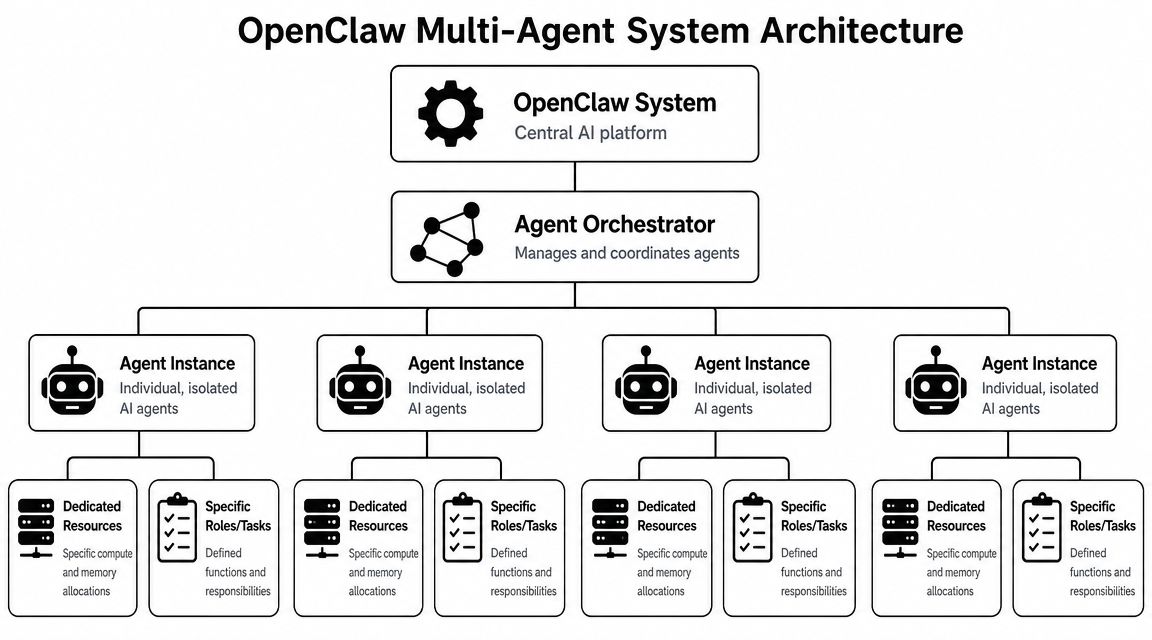
Practical rule: if one orchestrator can coordinate a few specialists with clean handoffs, keep it that way. More agents increase governance work long before they increase useful output.
A lot of teams overbuild here. They create separate agents for writing, formatting, research, scheduling, QA, approvals, and notifications, then spend most of their time debugging handoffs. In early deployments, a smaller specialist group with explicit boundaries is easier to monitor, cheaper to reason about, and less likely to duplicate work.
Map OpenClaw patterns to real workloads
Use the patterns for what they are.
| Pattern | Best fit | Wrong fit |
|---|---|---|
| SubAgent | Short-lived delegated tasks inside one parent workflow | Client isolation, separate identities, separate credentials |
| Agent Teams | Agents that need shared state and real-time coordination | Strict tenant separation |
| AgentToAgent | Cross-server or cross-organization collaboration | Simple internal delegation where one runtime is enough |
The operational takeaway is simple. Shared context and isolated context are different design goals. If you confuse them, you end up with agents that either know too much or can't do enough.
That's why platforms built around multi-instance operation matter in practice. On Donely for OpenClaw deployments, the useful abstraction isn't “create lots of bots.” It's “run separate agent instances without rebuilding hosting, access boundaries, and deployment plumbing each time.”
Architecturally, that means:
- Use one orchestrator when work is related. A single router can assign tasks to specialists more predictably than a swarm of peers.
- Create isolated instances for tenant boundaries. Client A and Client B shouldn't share sessions, tools, or workspaces just because the prompt looks similar.
- Keep inter-agent contracts explicit. JSON handoffs and schema discipline prevent vague message passing from becoming a debugging trap.
- Prefer the simplest collaboration model that solves the problem. OpenClaw's own pattern guidance points in that direction, and it holds up in production.
A mature agent system usually looks less like a hive mind and more like a controlled service topology. You want clear ownership, narrow permissions, and predictable routing. That's not glamorous, but it's what survives contact with real users.
Creating and Isolating Multiple Agent Instances
Once the architecture is settled, the next challenge is mechanical. You need separate agents that can live on the same underlying platform without leaking files, credentials, sessions, or channel identities into each other.
That isolation isn't a nice-to-have. It's the baseline requirement for agencies, internal departments, and any team running personal and business workloads side by side.
What isolation means in practice
OpenClaw's routing model gives each agent its own workspace, state directory (agentDir), and session history. Inbound messages are routed through bindings to the correct agent, and each agent acts as a full per-persona scope with its own sandbox and tool restrictions for security and resource control, according to the OpenClaw multi-agent concepts documentation.
That means isolation exists below the prompt layer. It isn't “the model promises to stay in character.” It's infrastructure-level separation.

In practical terms, each isolated instance should have:
- A separate workspace for files, memory artifacts, and installed operational context.
- Independent session history so one workload doesn't inherit another's conversation state.
- Scoped tools and sandbox rules so a finance-oriented agent doesn't inadvertently get the same permissions as a marketing agent.
- Dedicated channel bindings so inbound messages land on the intended persona every time.
If you're managing real tenant boundaries, this is the difference between multi-agent and multi-tenant. Many teams think they're doing both when they're only doing the first.
A clean way to create separate instances
The cleanest operating model is to treat each agent instance like a self-contained service. Different owner, different role, different credentials, different blast radius.
A workable rollout pattern looks like this:
- Define the boundary first. Decide whether the new agent represents a department, a customer, a workflow, or an environment such as staging.
- Assign only the integrations that boundary needs. Don't clone the full access set from an older agent just because it's convenient.
- Bind channels to the new instance deliberately. Messaging mistakes happen when teams assume persona selection will be inferred.
- Test with representative traffic. A support agent handling customer replies behaves differently from an internal ops assistant triggered by staff.
- Review the instance as its own operating unit. Logs, audit trail, role permissions, and tool access should all be reviewed independently.
Separate instances are easier to retire, replace, or hand off than one overloaded agent with a maze of conditionals.
This matters outside pure software teams too. If you're building AI operations for a property management group, for example, you'll likely want one isolated agent per portfolio, function, or client account. A service team evaluating AI solutions for property managers often runs into the same issue. The useful question isn't whether AI can answer messages. It's whether each assistant can stay inside the correct operational boundary.
The fastest way to break trust in a multi-agent system is to let one persona touch another persona's data. Once that happens, the cleanup isn't technical only. It's organizational.
Securing Agents with RBAC and Scoped Data
Permissions are often added after the first scare. A contractor saw the wrong logs. A client-facing agent inherited internal tools. A staging assistant got access to production channels because someone copied an instance template too loosely.
That sequence is avoidable. RBAC and scoped data should exist before the second or third agent goes live, not after.
Why permissions fail in early deployments
The common mistake is thinking of access control as “who can log in.” In a multi-agent environment, there are at least three permission layers:
- Human operator permissions
- Agent permissions
- Data and integration scope
If any one of those is broad, the system is broad.
A junior engineer might need access to a staging agent's logs but not its production credentials. An agency partner might need to review one client instance while being completely blind to every other tenant. A finance bot might need invoice data but no access to sales notes or customer support transcripts.
Those aren't edge cases. They're the default shape of real deployments.
A practical RBAC model for agent fleets
A permission model that works in practice usually separates control by environment, tenant, and function.
| Scope | Example role | What they should access |
|---|---|---|
| Environment | Developer | Staging instance, test logs, non-production channels |
| Tenant | Agency account manager | One client's instance and related audit history |
| Function | Finance lead | Finance agent outputs, approved integrations, restricted reports |
The principle is straightforward. People should only see the instances they operate, and agents should only see the data they need to complete their assigned role.
That also changes how you design shared resources. Instead of one big knowledge base exposed to every assistant, split data by operational need. Sales context stays with sales. Support history stays with support. Client A artifacts stay with Client A.
The biggest RBAC mistake isn't malicious access. It's accidental convenience that never gets cleaned up.
Scoped data access matters because conversational systems make overreach easy to miss. A human operator can ask a broad question and the agent may answer from whatever it can reach. If the boundaries aren't enforced at the instance and data layer, the prompt becomes your only control surface. That's not strong enough for anything client-facing or compliance-sensitive.
Good governance also changes team behavior. When operators know each agent has a defined scope, they stop treating the fleet like one giant shared assistant. That reduces both operational confusion and audit pain later.
For compliance-focused organizations, the useful standard isn't “can we lock this down later.” It's “can we prove today who had access to which instance, which logs, and which connected systems.” If the answer is fuzzy, the deployment isn't ready.
Connecting Integrations and Channels to Specific Agents
Most routing failures in an OpenClaw multiple agents setup don't come from model behavior. They come from bindings, credentials, and assumptions about where inbound messages will land.
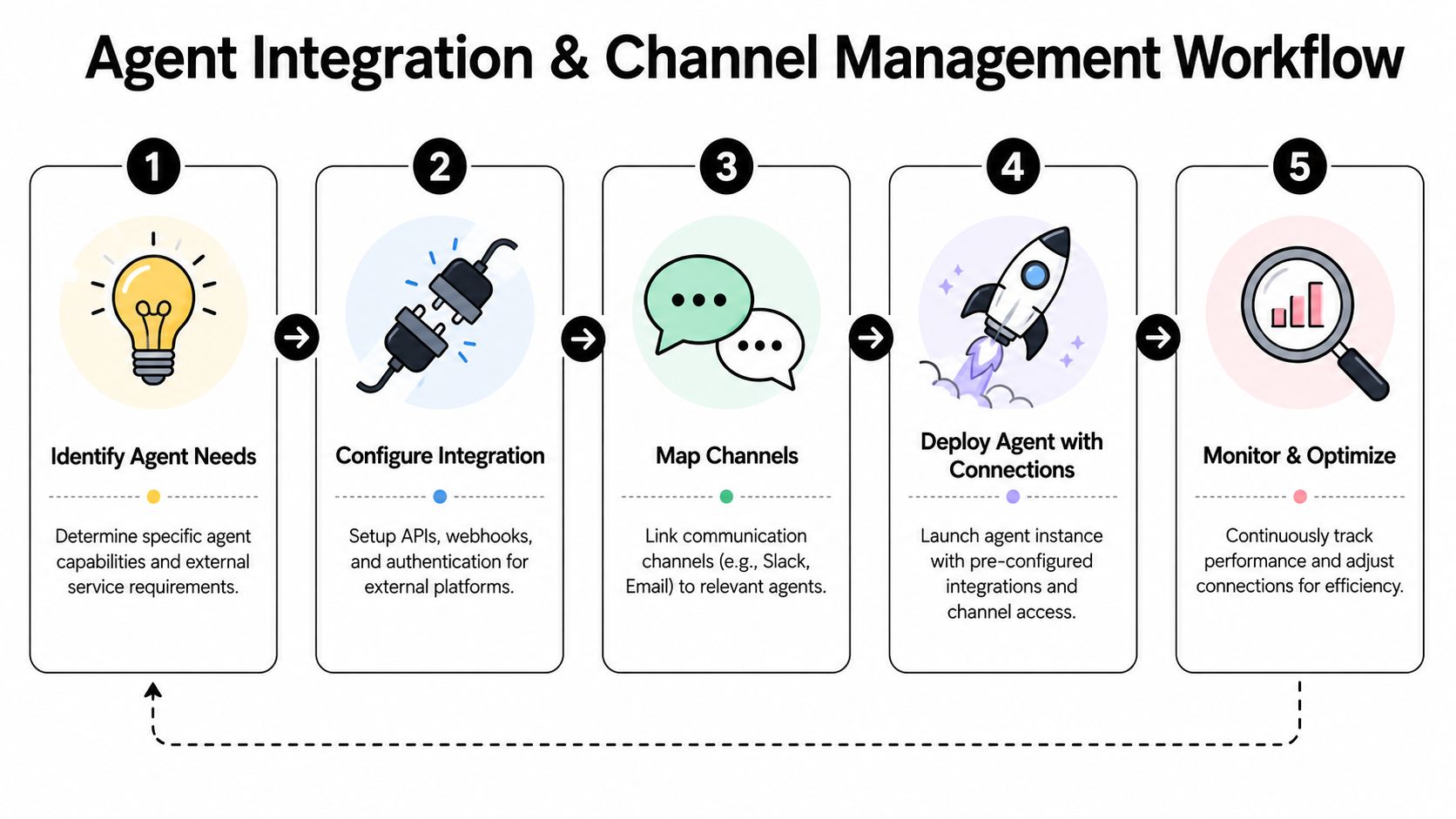
One agent connected to one Slack workspace is simple. Running several agents across separate Slack workspaces, Gmail inboxes, CRM accounts, support systems, and messaging channels is where architecture matters.
Sub-agents and routed agents are different tools
A frequently confused distinction in OpenClaw is the difference between sub-agents and multi-agent routing. Sub-agents are spawned work units inside one agent. Multi-agent routing directs messages to fully isolated agents. Donely handles that routing through bindings so a message from a specific channel account reaches the correct isolated agent with its own workspace, sessions, and tools, as described in this OpenClaw routing discussion.
That distinction should drive how you wire channels.
If an email arrives in Client A's inbox, you don't want a parent agent spawning a helper and hoping the right context follows. You want the message bound directly to Client A's isolated agent. Same with separate support inboxes, Slack bots, or WhatsApp numbers.
Here's a simple comparison:
- Use sub-agents when one agent is breaking a task into parts inside the same operating boundary.
- Use routed isolated agents when identity, credentials, sessions, or workspaces must remain separate.
A lot of fragile systems exist because teams tried to get tenant isolation out of internal delegation. It doesn't hold.
After the routing model is clear, the next piece is the integration map. If you need a managed directory of connectors, Donely integrations is one example of a control plane that lets you attach tools and channels per instance instead of reworking infrastructure per agent.
How to bind channels and integrations safely
Treat integrations like scoped dependencies, not shared platform defaults.
A strong setup usually follows this order:
- Start with the agent identity. Define which persona owns the inbox, chat account, or CRM record set.
- Attach only the required credentials. If the agent doesn't need Stripe or Zendesk, don't connect them.
- Bind the channel explicitly. Every inbound source should map to one target agent with no ambiguity.
- Verify outbound behavior. Test where replies are posted, which account sends them, and what context the agent can access.
- Document the ownership. Someone on the team should be able to answer who owns each integration without opening the runtime.
This walkthrough is useful if you're mapping the process visually:
The failure mode to avoid is shared credentials plus prompt instructions. Telling an agent “only use the right account” isn't an access policy. It's wishful thinking. The actual safety comes from per-instance credentials, per-instance bindings, and isolated execution context.
When that's in place, multi-channel operation becomes manageable. Without it, one wrong binding can create a client-visible error immediately.
Managing the AI Workforce Lifecycle and Observability
Launching agents is the easy day. The actual operational load starts after users depend on them.
By then, your concerns look familiar to any DevOps team: how updates get rolled out, how failures are diagnosed, what changed, who changed it, what each instance is consuming, and how to make a fix without disturbing unrelated workloads.
Treat each agent like an application boundary
The most reliable pattern is to stop thinking of agents as prompts with APIs attached and start treating them like small applications.
That changes how you deploy:
- Version changes per instance. A new prompt package, workflow definition, or integration policy should move through staging before touching a production tenant.
- Roll forward selectively. If one support agent needs a fix, that doesn't mean every other agent should be redeployed.
- Keep rollback simple. The smaller the instance boundary, the easier it is to revert one broken workflow without collateral damage.
- Audit configuration drift. Agent fleets degrade when “temporary” adjustments to prompts, tools, or channel settings never get reconciled.
This is also where central management starts paying off. A fleet view matters more than any single runtime dashboard. Teams need one place to review status, logs, ownership, and deployment state across all instances, especially when the estate expands from a handful of assistants to a wider group of AI employees managed in one system.
What to monitor after launch
Agent observability has to answer operational questions, not just model questions.
A useful dashboard should help you see:
| Operational signal | Why it matters |
|---|---|
| Instance health | Shows which agent is failing, stalled, or disconnected |
| Audit history | Helps trace configuration changes, access events, and operator actions |
| Logs by instance | Keeps debugging local instead of mixing every agent into one noisy stream |
| Usage patterns | Reveals which agents are active, idle, or unexpectedly expensive |
| Channel status | Catches broken bindings or expired integrations before users report them |
If all agent logs flow into one undifferentiated stream, you don't have observability. You have noise.
A mature Day 2 operating model also defines ownership. Every production agent should have a named owner, a deployment path, a rollback path, and a review cadence. Otherwise the fleet becomes a collection of abandoned automations that nobody wants to modify.
Billing matters too, even if engineering doesn't own it directly. Once teams run multiple agents across departments or clients, they need usage and cost visibility that matches those boundaries. Consolidated reporting helps, but only if the underlying operational model is already clean.
Security and Scaling Best Practices for Your AI Fleet
Scaling a fleet safely isn't about adding more agents faster. It's about knowing when a new agent deserves its own boundary, when an existing one should absorb the work, and which controls must become standard before the next wave of rollout.
The easiest way to keep the system governable is to turn those choices into an explicit checklist.
When to create a new instance
Create a new isolated instance when one of these conditions is true:
- The workload has a different owner. Separate teams should not share a single operational persona by default.
- The agent needs different credentials. A new CRM account, inbox, or Slack workspace usually means a new instance.
- The risk profile changes. Client-facing and internal-only workflows shouldn't live under the same access envelope.
- The audit boundary matters. If you need separate logs, approvals, or billing visibility, split the instance.
- The sandbox policy differs. Tool restrictions are cleaner when they belong to the instance, not a maze of runtime exceptions.
Keep work inside an existing instance when the task is just another capability inside the same identity and data boundary. Too many instances create operational drag. Too few create security and debugging problems.
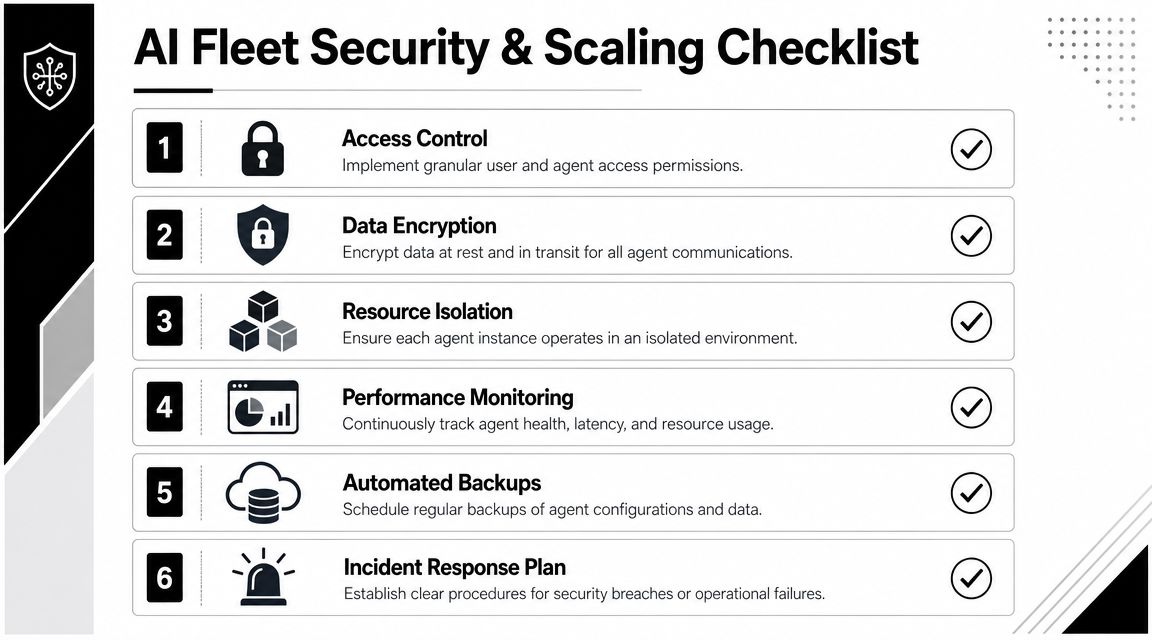
An operating checklist that prevents drift
Use a repeatable review before every new agent launch.
Access control
Confirm who can administer the instance, who can view logs, and who can edit integrations.Credential scope
Limit every external connection to the smallest possible permission set. Never inherit a broad integration package just because it's available.Resource isolation
Keep workspaces, sessions, and execution environments separated by role, tenant, or environment.Monitoring
Make sure health, logs, and audit history are visible at the instance level. If you can't isolate a failure quickly, the fleet is already too coupled.Backups and recovery
Preserve agent configuration and operational state in a way that supports restoration without rebuilding the whole estate manually.Incident response
Decide in advance what happens if an integration is compromised, a channel is misrouted, or an agent starts acting outside policy.
The broader lesson is that scale amplifies weak boundaries. An agent setup that feels manageable with two instances becomes chaotic with ten if routing, ownership, and permissions were informal from the start.
For teams that want OpenClaw without owning the full infrastructure burden, Donely is one managed option. It provides hosted multi-instance operation, per-instance RBAC, scoped data access, unified audit logs, and centralized monitoring and billing. Those are the controls that usually take the longest to build internally, especially when you're trying to move from a prototype to an operational fleet.
If you're past the single-agent stage and need a cleaner way to run isolated OpenClaw workloads, Donely is worth evaluating for the operational layer alone. It gives teams one place to deploy, govern, and monitor multiple agent instances without rebuilding the same hosting, access, and observability stack for every new workload.